Unidentified Network Wired TRIED EVERYTHING

Larzypoo

New member
Local time
8:52 AM
Messages
7
Hi,
I have this unidentified network problem when i'm using a wired connection. Wireless is fine and all but wired no.
Here is a bunch of things i tried:
-Reinstall Driver
-Bonjour service uninstalled, and reinstalled
-enable and disable driver
-Reset router
-Static IP
-Updating driver
-Switching to different routers (Same problem on all routers i tried) Current router: Linksys WRT160N V.1
-Disabled IPv6
-WOL and Shutdown link to 100 Mpbs first
-Also tried different cables
-Giving network address to present with random Letters a-f and numbers 0-9
-Putting only manual DNS
-Tried on different computer still doesnt work
-Wont even work on PS3

So is there anything else i can do? i've tried almost everything. I dont think its my router as i tried different routers. What could it be?
 
Last edited:

My Computer

OS
Windows 7 Ultimate 32 bit
When did this problem start? Were your wired devices previously able to access the network?
 

My Computer

Computer Manufacturer/Model Number
Dell XPS 15 L502x
OS
Windows 7 Ultimate x64 SP1
CPU
Core i7-2670QM
Memory
8GB DDR3 PC3-10600
Graphics Card(s)
Intel HD Graphics 3000 + GeForce GT 540M
Screen Resolution
1920x1080
Hard Drives
1TB 5400RPM Seagate
Started about a week ago. It was working all fine then it happened suddenly
 

My Computer

OS
Windows 7 Ultimate 32 bit
Larzypoo:

Sometimes the TCP/IP stack can become corrupted.
Try this:
open a DOS Box and type in
netsh i i r r <enter>
netsh i i de ar <enter>
netsh w r <enter>

Pay attention to your spacing when you type this in.
Close the Box and re-boot (don't know if a re-boot is actually required, but it can't hurt).
---
Also, if you have set up a Static IP address, be sure that the radio button labeled 'Enable NetBIOS over TCP/IP' is checked
I also have the LMHOSTS lookup unchecked.

You will find this window at: Control Panel/Network and Sharing Center/Local Area Connection Status/Properties/TCP/IPv4 Properties/Advanced/WINS


Welcome to SF!
 

My Computer

Computer Manufacturer/Model Number
OEM - Me
OS
Windows 7 Home Premium x64
CPU
AMD Phenom II X6 1600T
Motherboard
GigaByte GZ-990FXA-UD3
Memory
16GB PC3-10700 (1342MHz)
Graphics Card(s)
ATI Radeon 5770 HD (x2) CrossFire
Sound Card
On-board RealTek chipset
Monitor(s) Displays
3x Hanns-G 1920x1080 Monitors
Screen Resolution
3x Hanns-G 1920x1080 Monitors
Hard Drives
Intel 25-V SSD 40GB: 218 MB/s AT: 0.1ms
Intel X-25M SSD 80GB: 230MB/s AT: 0.1ms
Seagate 750GB: 133 MB/s AT: 13ms (perpendicular storage)
Buffalo HD-PCTU3 1TB External drive
PSU
OCZ Stealth X Stream 750W
Case
Cheap (unknown)
Cooling
Stock
Keyboard
HP USB
Mouse
LogiTech USB
Internet Speed
1.5 Mbps - Slow - At the tail-end of a rural network
Other Info
Printer: Epson Stylus C-84
Scanner: HP 3500C Flatbed
DVD-RW: Plextor
DVD-ROM: Unknown
WEI: 7.4
This seems obvious, but it isn't in your list of what you have tried... Did you try using a different cable?
 

My Computer

Computer Manufacturer/Model Number
Gateway GM5472
OS
Windows 7 Home Premium (64 bit)
CPU
AMD Athlon 56 X2 5000+
Motherboard
ECS MCP61P-AM
Memory
4.0 GB
Graphics Card(s)
Sapphire HD 4350 fanless w/512MB
Monitor(s) Displays
VeiwSonic VX2035WM
Screen Resolution
1680x1050
Other Info
Stock system except for the addition of 2GB memory, a Swann PCDVR 4 Card and a Hauppage dual HD tuner and a Sapphire HD 4550 video card
Ahh yes I forget I Also tried that and rap i tried what you suggested same result: unidentified network no network access
 

My Computer

OS
Windows 7 Ultimate 32 bit
Ahh yes I forget I Also tried that and rap i tried what you suggested same result: unidentified network no network access

Do you have anything from Apple installed on this system like iTunes or Adobe photo suite?

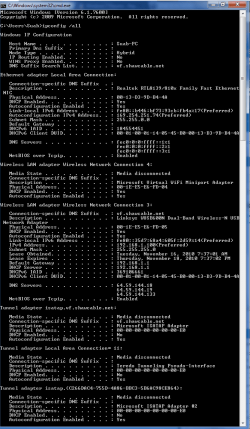
If you can post a screen shot of your ipconfig /all it would be helpful. :)
 

My Computer

Computer type
PC/Desktop
Computer Manufacturer/Model Number
Home built
OS
Windows 7 Ult, Windows 8.1 Pro,
CPU
Q9650-4.275GHz, E8600 4.5GHz, E6750-3.8GHz
Motherboard
Evga 780i FTW
Memory
G.Skill PC2 9600 1200Mhz 5 5 5 15 2T
Graphics Card(s)
GTX480
Sound Card
Asus Xonar D2
Monitor(s) Displays
HannsG
Screen Resolution
1680X1050
Hard Drives
GSkill Phoenix Pro 120GB SSD
PSU
ThermalTake Toughpower 1000Watt modular
Case
ThermalTake XaserV
Cooling
Xigmatek S1283
Keyboard
Logitech G15
Mouse
Logitech G9
Internet Speed
T1
Sounds like a failed Ethernet port! They can detect the fact its been connected but may not be able to apply ip settings. A reinstallation would be the only way to check for certain!
 

My Computer

Computer Manufacturer/Model Number
Packard Bell MH36-U300
OS
Windows 7 Ultimate 64-Bit
CPU
Intel(R) Pentium(R) Dual CPU T3400 @ 2.16GHz
Memory
2GB DDR2
Graphics Card(s)
Mobile Intel(R) 4 Series Express Chipset
Sound Card
Realtek High Definition Audio
Monitor(s) Displays
15" LCD
Screen Resolution
1280 x 800
Hard Drives
320GB Western Digital
Case
Notebook
Internet Speed
10Mbps
I did reinstall too. That was in the list. But yes i also tried the uninstalling and reinstalling the bonjour service aswell.
 

Attachments

  • sadasd.png
    sadasd.png
    29.1 KB · Views: 63

My Computer

OS
Windows 7 Ultimate 32 bit
I did reinstall too. That was in the list. But yes i also tried the uninstalling and reinstalling the bonjour service aswell.

Bonjour isn't required on Windows systems and will only cause problems for you.
To fix ...
Run MsConfig

Under the Services tab uncheck the service called "##Id_String1.6844[... and then a bunch of numbers]" by Apple

Reboot

After that you will want to remove bonjour from your system.

1. Navigate to C:\Program Files\Bonjour
2. Rename the mdnsNSP.dll file in that folder to mdnsNSP.old
3. Restart your computer
4. Delete the Program Files\Bonjour folder

Reboot then run the batch file below. :)
Download Renew IP + Reset Winsock Batch File

From the looks of it your wired connection isn't getting anything at all from the router, no IP, default gateway, subnet or DNS so you may want to reset your router also.

It also looks like you manually put in your DNS servers into the IPv4 properties. It sometimes works better to remove those from the IPv4 properties and add them to your routers DNS servers.
 

My Computer

Computer type
PC/Desktop
Computer Manufacturer/Model Number
Home built
OS
Windows 7 Ult, Windows 8.1 Pro,
CPU
Q9650-4.275GHz, E8600 4.5GHz, E6750-3.8GHz
Motherboard
Evga 780i FTW
Memory
G.Skill PC2 9600 1200Mhz 5 5 5 15 2T
Graphics Card(s)
GTX480
Sound Card
Asus Xonar D2
Monitor(s) Displays
HannsG
Screen Resolution
1680X1050
Hard Drives
GSkill Phoenix Pro 120GB SSD
PSU
ThermalTake Toughpower 1000Watt modular
Case
ThermalTake XaserV
Cooling
Xigmatek S1283
Keyboard
Logitech G15
Mouse
Logitech G9
Internet Speed
T1
Bonjour isn't required on Windows systems and will only cause problems for you.

Quick question about Bonjour - can it be uninstalled/disabled without affecting itunes?

Don't want to hijack the thread so you can pm if you prefer.

Thanks

BTW I don't have any issues with it.
 

My Computer

Computer type
PC/Desktop
Computer Manufacturer/Model Number
Custom built by me.
OS
Windows 10 Pro
CPU
Intel Core i7-4770K (3.5Ghz)
Motherboard
Gigabyte G1 Sniper 5 (F10 Bios)
Memory
32 gig Corsair Dominator Platinum (4x8Gig)
Graphics Card(s)
Sapphire Tri-X R9 Fury
Sound Card
Soundblaster ZXR
Monitor(s) Displays
NEC PA242W 24" LCD Monitor
Screen Resolution
1920 x 1200
Hard Drives
Primary - Samsung 850 Pro (512gig), Samsung 840 Pro (256gig), 2TB WD Caviar Black.
PSU
EVGA Supernova 1000 G2
Case
Cooler Master HAF X
Cooling
Corsair H100i with Corsair Air Series SP120 Quiet Fans
Keyboard
Logitech Wireless Wave
Mouse
Logitech Performance MX
Internet Speed
High Speed Cable
Antivirus
Norton Security
Browser
IE11
Other Info
Memory Timings - 1866MHz @ 9-9-9-27-1T @ 1.5 volts
Alright, successfully uninstalled bonjour. Ran the batch file. still nothing. Same result.
 

My Computer

OS
Windows 7 Ultimate 32 bit
Alright, successfully uninstalled bonjour. Ran the batch file. still nothing. Same result.

Can you post another ipconfig /all here. It's the only way to tell whats going on. :)
 

My Computer

Computer type
PC/Desktop
Computer Manufacturer/Model Number
Home built
OS
Windows 7 Ult, Windows 8.1 Pro,
CPU
Q9650-4.275GHz, E8600 4.5GHz, E6750-3.8GHz
Motherboard
Evga 780i FTW
Memory
G.Skill PC2 9600 1200Mhz 5 5 5 15 2T
Graphics Card(s)
GTX480
Sound Card
Asus Xonar D2
Monitor(s) Displays
HannsG
Screen Resolution
1680X1050
Hard Drives
GSkill Phoenix Pro 120GB SSD
PSU
ThermalTake Toughpower 1000Watt modular
Case
ThermalTake XaserV
Cooling
Xigmatek S1283
Keyboard
Logitech G15
Mouse
Logitech G9
Internet Speed
T1
Bonjour isn't required on Windows systems and will only cause problems for you.

Quick question about Bonjour - can it be uninstalled/disabled without affecting itunes?

Don't want to hijack the thread so you can pm if you prefer.

Thanks

BTW I don't have any issues with it.

Bonjour is only Apples version of universal plug and play, it's not required on windows systems at all. Removing it won't change iTunes.
 

My Computer

Computer type
PC/Desktop
Computer Manufacturer/Model Number
Home built
OS
Windows 7 Ult, Windows 8.1 Pro,
CPU
Q9650-4.275GHz, E8600 4.5GHz, E6750-3.8GHz
Motherboard
Evga 780i FTW
Memory
G.Skill PC2 9600 1200Mhz 5 5 5 15 2T
Graphics Card(s)
GTX480
Sound Card
Asus Xonar D2
Monitor(s) Displays
HannsG
Screen Resolution
1680X1050
Hard Drives
GSkill Phoenix Pro 120GB SSD
PSU
ThermalTake Toughpower 1000Watt modular
Case
ThermalTake XaserV
Cooling
Xigmatek S1283
Keyboard
Logitech G15
Mouse
Logitech G9
Internet Speed
T1
I did reinstall too. That was in the list. But yes i also tried the uninstalling and reinstalling the bonjour service aswell.

You're wired to the router and still getting a 169.254.* IP address? That is a public blackhole IP (goes nowhere and is never registered to anything that is routable on the internet), not an internal one that you'd get from your router, so that is quite weird. You are also connected at the same time to your wireless network. If you are connected by a wired connection, disable your wireless connection for the time being. They could both somehow be competing.

Is your router configured to administer DHCP to wired clients? And is your machine configured for DHCP?
 

My Computer

OS
XP / Win7 x64 Pro
CPU
Intel Quad-Core Q9450 @ 3.2GHz
Motherboard
Asus P5-E
Memory
2x2GB GSkill DDR2
Graphics Card(s)
NVIDIA GeForce 8600 GTS (EVGA)
Monitor(s) Displays
Dell 2408WFP
Screen Resolution
1920x1200
If the wired connection was working "which it's not" it would automatically over ride the wireless connection "if it was working that is". So the wireless connection shouldn't be keeping the wired connection from working. I have tested this out. I think the OP needs the wireless just to get to this site so he can post here.

I suspect the router needs to be reset and the manual DNS entries in the IPv4 properties need to be removed as I mentioned earlier. The OP needs to Use the routers DNS settings instead as I've seen that cause problems in the past between wired and wireless connections.
 

My Computer

Computer type
PC/Desktop
Computer Manufacturer/Model Number
Home built
OS
Windows 7 Ult, Windows 8.1 Pro,
CPU
Q9650-4.275GHz, E8600 4.5GHz, E6750-3.8GHz
Motherboard
Evga 780i FTW
Memory
G.Skill PC2 9600 1200Mhz 5 5 5 15 2T
Graphics Card(s)
GTX480
Sound Card
Asus Xonar D2
Monitor(s) Displays
HannsG
Screen Resolution
1680X1050
Hard Drives
GSkill Phoenix Pro 120GB SSD
PSU
ThermalTake Toughpower 1000Watt modular
Case
ThermalTake XaserV
Cooling
Xigmatek S1283
Keyboard
Logitech G15
Mouse
Logitech G9
Internet Speed
T1
I did reinstall too. That was in the list. But yes i also tried the uninstalling and reinstalling the bonjour service aswell.

You're wired to the router and still getting a 169.254.* IP address? That is a public blackhole IP (goes nowhere and is never registered to anything that is routable on the internet), not an internal one that you'd get from your router, so that is quite weird. You are also connected at the same time to your wireless network. If you are connected by a wired connection, disable your wireless connection for the time being. They could both somehow be competing.

If the wired connection was working "which it's not" it would automatically over ride the wireless connection "if it was working that is". So the wireless connection shouldn't be keeping the wired one from working. I have tested this out. I think the OP needs the wireless just to get to this site.

I suspect either the router needs to be reset and the manual DNS entries in the IPv4 properties need to be removed as I mentioned earlier. The OP needs to Use the routers DNS settings instead.

I agree that wired should override the wireless, which it always has for me, but in a separate thread a while back someone was arguing how theirs never did. So, I suggest it be temporarily disabled when troubleshooting a wired connection anymore because of this (however it may have happened with that person).
 

My Computer

OS
XP / Win7 x64 Pro
CPU
Intel Quad-Core Q9450 @ 3.2GHz
Motherboard
Asus P5-E
Memory
2x2GB GSkill DDR2
Graphics Card(s)
NVIDIA GeForce 8600 GTS (EVGA)
Monitor(s) Displays
Dell 2408WFP
Screen Resolution
1920x1200
The wireless should be disabled "I agree" and the router reset and dialed back in, plus the manual DNS entries need to be removed from the IPv4 properties. Although connecting the wired always overrides the wireless connection for me, it's just to eliminate loose ends.

The sad thing is that I'm pretty darn certain that the famous Bonjour service caused all the problems in the first place. Steve Jobs little curse to the microsoft world. :rolleyes:

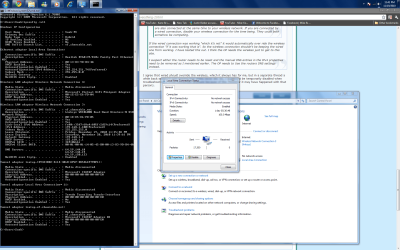
Remove the DNS entries from where it says "Use the following DNS server addresses" and set to automatically obtain, because looking at the ipconfig /all they were set statically. I've seen this cause problems in the past so best to just use the router's DNS settings for now.
 

Attachments

  • DHCP turn to static IP's.PNG
    DHCP turn to static IP's.PNG
    24.7 KB · Views: 18

My Computer

Computer type
PC/Desktop
Computer Manufacturer/Model Number
Home built
OS
Windows 7 Ult, Windows 8.1 Pro,
CPU
Q9650-4.275GHz, E8600 4.5GHz, E6750-3.8GHz
Motherboard
Evga 780i FTW
Memory
G.Skill PC2 9600 1200Mhz 5 5 5 15 2T
Graphics Card(s)
GTX480
Sound Card
Asus Xonar D2
Monitor(s) Displays
HannsG
Screen Resolution
1680X1050
Hard Drives
GSkill Phoenix Pro 120GB SSD
PSU
ThermalTake Toughpower 1000Watt modular
Case
ThermalTake XaserV
Cooling
Xigmatek S1283
Keyboard
Logitech G15
Mouse
Logitech G9
Internet Speed
T1
Chev, the DNS is set to Automatically obtain. And yes i've tried disabling my wireless adapter (Linksys Wireless N adapter) still doesnt work. Heres another Screeny
 

Attachments

  • fasfafsa.png
    fasfafsa.png
    111.6 KB · Views: 24

My Computer

OS
Windows 7 Ultimate 32 bit
As I said in my last post, this will be a faulty Ethernet card! Sounds like all other avenues have been explored! Best thing to try is a different network such as a friends.
 

My Computer

Computer Manufacturer/Model Number
Packard Bell MH36-U300
OS
Windows 7 Ultimate 64-Bit
CPU
Intel(R) Pentium(R) Dual CPU T3400 @ 2.16GHz
Memory
2GB DDR2
Graphics Card(s)
Mobile Intel(R) 4 Series Express Chipset
Sound Card
Realtek High Definition Audio
Monitor(s) Displays
15" LCD
Screen Resolution
1280 x 800
Hard Drives
320GB Western Digital
Case
Notebook
Internet Speed
10Mbps
Back
Top