Unidentified Network?

mortrca

New member
Local time
3:42 PM
Messages
7
I am having a problem connecting to my home network with one of my computers. I have several computers in my house with various operating systems, some of which are connected to my router via Wi-Fi, others via ethernet. The one computer that I'm having the problem with is a Windows 7 Professional 64bit desktop that I have connected via ethernet. I have tested the cord I am using and the port on the router with another computer and experienced no problems, so I think the problem lies within the desktop. Here are the technical details:
Motherboard: MSI H67MA-E45 (I am using the built in ethernet port)
Graphics Card: NVIDIA GeForce GTX 460 with driver version 295.73 (Included because I've read that some NVIDIA products are causing networking problems in Windows 7)

The part that has me most confused is that I can sometimes connect to the network without problem, but the majority of the time I cannot. All I get is "Unidentified Network" and "No Internet Access". Additionally, I have discovered that I can always connect to the internet without problem when I plug the computer directly into my modem (but I then cannot access other networked devices).

Please let me know if I missed any necessary information. Any help is greatly appreciated.
 

My Computer

OS
Windows 7 Professional x64
CPU
Intel i7-2600K
Motherboard
MSI H67MA-E45
Memory
16GB DDR3
Graphics Card(s)
NVIDIA GeForce GTX 460
Monitor(s) Displays
Acer S231HL
Screen Resolution
1920x1080
If you can post a screen shot of the ipconfig/all from this machine it would be most helpful. :)
 

My Computer

Computer type
PC/Desktop
Computer Manufacturer/Model Number
Home built
OS
Windows 7 Ult, Windows 8.1 Pro,
CPU
Q9650-4.275GHz, E8600 4.5GHz, E6750-3.8GHz
Motherboard
Evga 780i FTW
Memory
G.Skill PC2 9600 1200Mhz 5 5 5 15 2T
Graphics Card(s)
GTX480
Sound Card
Asus Xonar D2
Monitor(s) Displays
HannsG
Screen Resolution
1680X1050
Hard Drives
GSkill Phoenix Pro 120GB SSD
PSU
ThermalTake Toughpower 1000Watt modular
Case
ThermalTake XaserV
Cooling
Xigmatek S1283
Keyboard
Logitech G15
Mouse
Logitech G9
Internet Speed
T1
If you can post a screen shot of the ipconfig/all from this machine it would be most helpful. :)

A screen shot of the ipconfig/all from this machine when connected to the modem or the router? Here is one taken when connected to the router.
 

Attachments

  • Capture.PNG
    Capture.PNG
    106.6 KB · Views: 18

My Computer

OS
Windows 7 Professional x64
CPU
Intel i7-2600K
Motherboard
MSI H67MA-E45
Memory
16GB DDR3
Graphics Card(s)
NVIDIA GeForce GTX 460
Monitor(s) Displays
Acer S231HL
Screen Resolution
1920x1080
The only problem I see in the ipconfig is that it appears as if you have a mix of DNS servers typed into your IPv4 properties. It shows Google as 8.8.8.8, then it shows the default gateway of your router which is 192.168.1.1, then it shows another incorrect gateway of 192.168.0.1 which doesn't relate to anything in your network.

This could be confusing DNS access for the network adaptor.

You might try removing the DNS server entries from the IPv4 properties then use the routers settings for DNS which is my preferred method. This assumes that you typed in two DNS servers into your routers set up page for DNS servers.

Google's DNS server addresses are 8.8.8.8 and 8.8.4.4 so you might try typing those into your routers set up page after removing the IPv4 DNS entries.
 

My Computer

Computer type
PC/Desktop
Computer Manufacturer/Model Number
Home built
OS
Windows 7 Ult, Windows 8.1 Pro,
CPU
Q9650-4.275GHz, E8600 4.5GHz, E6750-3.8GHz
Motherboard
Evga 780i FTW
Memory
G.Skill PC2 9600 1200Mhz 5 5 5 15 2T
Graphics Card(s)
GTX480
Sound Card
Asus Xonar D2
Monitor(s) Displays
HannsG
Screen Resolution
1680X1050
Hard Drives
GSkill Phoenix Pro 120GB SSD
PSU
ThermalTake Toughpower 1000Watt modular
Case
ThermalTake XaserV
Cooling
Xigmatek S1283
Keyboard
Logitech G15
Mouse
Logitech G9
Internet Speed
T1
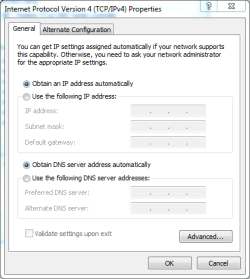
Actually, I don't have any DNS servers typed into my IPv4 properties. (see attached)
 

Attachments

  • Capture.PNG
    Capture.PNG
    33.6 KB · Views: 5

My Computer

OS
Windows 7 Professional x64
CPU
Intel i7-2600K
Motherboard
MSI H67MA-E45
Memory
16GB DDR3
Graphics Card(s)
NVIDIA GeForce GTX 460
Monitor(s) Displays
Acer S231HL
Screen Resolution
1920x1080
Actually, I don't have any DNS servers typed into my IPv4 properties. (see attached)

Then you might want to check the ones that are typed into the routers settings because only your default gateway should be showing up in the ipconfig for DNS servers. Do you have two routers in this network?

Do you have iTunes installed on this system?
 

My Computer

Computer type
PC/Desktop
Computer Manufacturer/Model Number
Home built
OS
Windows 7 Ult, Windows 8.1 Pro,
CPU
Q9650-4.275GHz, E8600 4.5GHz, E6750-3.8GHz
Motherboard
Evga 780i FTW
Memory
G.Skill PC2 9600 1200Mhz 5 5 5 15 2T
Graphics Card(s)
GTX480
Sound Card
Asus Xonar D2
Monitor(s) Displays
HannsG
Screen Resolution
1680X1050
Hard Drives
GSkill Phoenix Pro 120GB SSD
PSU
ThermalTake Toughpower 1000Watt modular
Case
ThermalTake XaserV
Cooling
Xigmatek S1283
Keyboard
Logitech G15
Mouse
Logitech G9
Internet Speed
T1
Alright, I just checked and I have no DNS servers typed into my router's settings either. Also, 192.168.0.1 is my modem, so it does relate to the router in my network, but nothing else. Finally, no, I don't have iTunes installed.
 

My Computer

OS
Windows 7 Professional x64
CPU
Intel i7-2600K
Motherboard
MSI H67MA-E45
Memory
16GB DDR3
Graphics Card(s)
NVIDIA GeForce GTX 460
Monitor(s) Displays
Acer S231HL
Screen Resolution
1920x1080
Alright, I just checked and I have no DNS servers typed into my router's settings either. Also, 192.168.0.1 is my modem, so it does relate to the router in my network, but nothing else. Finally, no, I don't have iTunes installed.

That is a strange Ip for a modem to have and it wouldn't normally show up as the DNS server. This could be why Windows thinks there is an Unidentified Network. Are you sure this isn't one of those modem/router combo units?

Ok so the DNS is somehow coming from the modem but it shows one DNS server as Google's 8.8.8.8 but we don't know where that one is coming from "maybe the modem", which is a strange way of obtaining the DNS.

Usually the DNS server would only come from the router and in the ipconfig the DNS server would show up as the default gateway of the router, which means it's getting the DNS from the router.

If you can go into the routers set up page, find the DNS settings and type in Google's DNS servers 8.8.8.8 and 8.8.4.4, then if you have access to the modem's settings page at 192.168.0.1 then remove the DNS server IP's from there.

Both changes will require you to hit the save button which reboots the hardware.
 

My Computer

Computer type
PC/Desktop
Computer Manufacturer/Model Number
Home built
OS
Windows 7 Ult, Windows 8.1 Pro,
CPU
Q9650-4.275GHz, E8600 4.5GHz, E6750-3.8GHz
Motherboard
Evga 780i FTW
Memory
G.Skill PC2 9600 1200Mhz 5 5 5 15 2T
Graphics Card(s)
GTX480
Sound Card
Asus Xonar D2
Monitor(s) Displays
HannsG
Screen Resolution
1680X1050
Hard Drives
GSkill Phoenix Pro 120GB SSD
PSU
ThermalTake Toughpower 1000Watt modular
Case
ThermalTake XaserV
Cooling
Xigmatek S1283
Keyboard
Logitech G15
Mouse
Logitech G9
Internet Speed
T1
Alright, I found a place in my modem where there are two options, Dynamic DNS and Static DNS. Static DNS was selected and Google's DNS addresses were in the two boxes provided. I selected the Dynamic DNS option and Google's addresses disappeared. I then went to my router's settings and tried to add Google's servers for DNS, but I'm not very experienced with static IPs. Here are the settings as I defined them in my router:
Internet Setup:
Internet IP Address: 192.168.0.2 (The IP assigned to the router by the modem)
Subnet Mask: 255.255.255.0 (Default setting)
Default Gateway: 192.168.0.1 (IP address of modem)
DNS 1: 8.8.8.8
DNS 2: 8.8.4.4

Network Setup:
Router Address: 192.168.1.1
DHCP Server: Enabled
Start IP Address: 192.168.1.100

Since applying these settings, I have checked my other computers and can still access the internet with them, but still can't access the internet with the "problem computer" when connected to the router. ipconfig/all information attached.
 

Attachments

  • Capture.PNG
    Capture.PNG
    76.4 KB · Views: 5
Last edited:

My Computer

OS
Windows 7 Professional x64
CPU
Intel i7-2600K
Motherboard
MSI H67MA-E45
Memory
16GB DDR3
Graphics Card(s)
NVIDIA GeForce GTX 460
Monitor(s) Displays
Acer S231HL
Screen Resolution
1920x1080
Alright, I found a place in my modem where there are two options, Dynamic DNS and Static DNS. Static DNS was selected and Google's DNS addresses were in the two boxes provided. I selected the Dynamic DNS option and Google's addresses disappeared. I then went to my router's settings and tried to add Google's servers for DNS, but I'm not very experienced with static IPs. Here are the settings as I defined them in my router:
Internet Setup:
Internet IP Address: 192.168.0.2 (The IP assigned to the router by the modem)
Subnet Mask: 255.255.255.0 (Default setting)
Default Gateway: 192.168.0.1 (IP address of modem)
DNS 1: 8.8.8.8
DNS 2: 8.8.4.4

Network Setup:
Router Address: 192.168.1.1
DHCP Server: Enabled
Start IP Address: 192.168.1.100

Since applying these settings, I have checked my other computers and can still access the internet with them, but still can't access the internet with the "problem computer" when connected to the router. ipconfig/all information attached.

You see Modems do not have this type of adjustment but those combo unit modem/routers do.

The problem in your case is that you are using a modem/router combo plus another router in the same network. This is why Windows see's a secondary network. This is not the proper way to set up a reliable network. ;)

This also causes you to have two default gateways among other things, it's simply not the correct way to set up a network and will give you problems such as you are describing with some machines working and others not working and giving error messages.

In order to fix all problems you need to get a standard modem "not a combo unit" and plug it into the WAN port on your router.

All problems with the Unidentified Network will go away after you do that.
 

My Computer

Computer type
PC/Desktop
Computer Manufacturer/Model Number
Home built
OS
Windows 7 Ult, Windows 8.1 Pro,
CPU
Q9650-4.275GHz, E8600 4.5GHz, E6750-3.8GHz
Motherboard
Evga 780i FTW
Memory
G.Skill PC2 9600 1200Mhz 5 5 5 15 2T
Graphics Card(s)
GTX480
Sound Card
Asus Xonar D2
Monitor(s) Displays
HannsG
Screen Resolution
1680X1050
Hard Drives
GSkill Phoenix Pro 120GB SSD
PSU
ThermalTake Toughpower 1000Watt modular
Case
ThermalTake XaserV
Cooling
Xigmatek S1283
Keyboard
Logitech G15
Mouse
Logitech G9
Internet Speed
T1
If that is the case, why don't any of my other computers have this issue? Is it possible to configure the modem/router to behave like a "standard modem"?
 

My Computer

OS
Windows 7 Professional x64
CPU
Intel i7-2600K
Motherboard
MSI H67MA-E45
Memory
16GB DDR3
Graphics Card(s)
NVIDIA GeForce GTX 460
Monitor(s) Displays
Acer S231HL
Screen Resolution
1920x1080
If that is the case, why don't any of my other computers have this issue? Is it possible to configure the modem/router to behave like a "standard modem"?

I gave you all the info you need to make your network reliable.

You might try asking your ISP for a standard modem instead of a combo unit. :)
 

My Computer

Computer type
PC/Desktop
Computer Manufacturer/Model Number
Home built
OS
Windows 7 Ult, Windows 8.1 Pro,
CPU
Q9650-4.275GHz, E8600 4.5GHz, E6750-3.8GHz
Motherboard
Evga 780i FTW
Memory
G.Skill PC2 9600 1200Mhz 5 5 5 15 2T
Graphics Card(s)
GTX480
Sound Card
Asus Xonar D2
Monitor(s) Displays
HannsG
Screen Resolution
1680X1050
Hard Drives
GSkill Phoenix Pro 120GB SSD
PSU
ThermalTake Toughpower 1000Watt modular
Case
ThermalTake XaserV
Cooling
Xigmatek S1283
Keyboard
Logitech G15
Mouse
Logitech G9
Internet Speed
T1
I contacted my ISP and they stepped me through turning my modem/router into just a basic modem. Having done that, I'm in the same position as I was before, where just the 1 computer does not connect.
 

My Computer

OS
Windows 7 Professional x64
CPU
Intel i7-2600K
Motherboard
MSI H67MA-E45
Memory
16GB DDR3
Graphics Card(s)
NVIDIA GeForce GTX 460
Monitor(s) Displays
Acer S231HL
Screen Resolution
1920x1080
I contacted my ISP and they stepped me through turning my modem/router into just a basic modem. Having done that, I'm in the same position as I was before, where just the 1 computer does not connect.

Disabling DHCP on the modem/router may or may not fix this problem depending on many factors.

The problem I noticed in the last ipconfig was that you have nothing coming from your regular router so it probably needs to be reset or the correct settings haven't been typed in.

You will need to type in two DNS servers into the settings on your regular router and also enable DHCP on your router.

After doing that try posting the ipconfig/all again so I can see if the secondary default gateway is gone and that you are obtaining an IP from your regular router.
 

My Computer

Computer type
PC/Desktop
Computer Manufacturer/Model Number
Home built
OS
Windows 7 Ult, Windows 8.1 Pro,
CPU
Q9650-4.275GHz, E8600 4.5GHz, E6750-3.8GHz
Motherboard
Evga 780i FTW
Memory
G.Skill PC2 9600 1200Mhz 5 5 5 15 2T
Graphics Card(s)
GTX480
Sound Card
Asus Xonar D2
Monitor(s) Displays
HannsG
Screen Resolution
1680X1050
Hard Drives
GSkill Phoenix Pro 120GB SSD
PSU
ThermalTake Toughpower 1000Watt modular
Case
ThermalTake XaserV
Cooling
Xigmatek S1283
Keyboard
Logitech G15
Mouse
Logitech G9
Internet Speed
T1
Back
Top