
You are using an out of date browser. It may not display this or other websites correctly.
You should upgrade or use an alternative browser.
You should upgrade or use an alternative browser.
Unidentify network and not internet access
- Thread starter trandtun
- Start date

zigzag3143
New member
- Local time
- 3:57 AM
- Messages
- 27,140
Hi all,
Now i upgrade Vista Home Basic to Window7 Ultimate during setup, i selected Home network and connect the wireless network but I can't access internet .What should I do ? Should I change to public network?
Hi and welcome
Probably not a "public" issue if you are on a "home" network. More likely the drivers involved. type device manager in search. go to the network tab. Is your wifi card listed? does it have a yellow triangle on it? are there any other unknown devices with yellow on them?
le us know
Kenn J+
My Computer
- Computer Manufacturer/Model Number
- HP Pavillion dv-7 1005 Tx
- OS
- Win 8 Release candidate 8400
- Memory
- 4 gigs
- Graphics Card(s)
- Nvidia 9600M
- Sound Card
- HD built-in
- Monitor(s) Displays
- 17" Wxga
- Screen Resolution
- 1440x900
- Cooling
- none
- Internet Speed
- 45Mb down 5Mb up

torrentg
New member
- Local time
- 3:57 AM
- Messages
- 5,747
Look for mdnsresponder.exe in the task manager. If you have that, you have Bonjour service. Completely uninstall that by searching Google for how.
Assign a static ip address to the adapter for IPv4 in Windows, using a public dns server. This will clear your issue.
Assign a static ip address to the adapter for IPv4 in Windows, using a public dns server. This will clear your issue.
My Computer
- Computer Manufacturer/Model Number
- self built
- OS
- 7600.20510 x86
- CPU
- P4 550 3.4 GHz HT running at 3.5 GHz
- Motherboard
- MSI PM8M3-V (MS-7211 v1.x) Micro-ATX mainboard
- Memory
- OCZ 2 GB(2x1GB) DDR400mHz running @ 414 mHz
- Graphics Card(s)
- HIS Radeon HD 3850 IceQ 3 Turbo HDMI Dual DL-DVI AGP
- Sound Card
- MOTU Traveler firewire studio interface 192 kHz 24 bit
- Monitor(s) Displays
- 22" widescreen Acer X223W LCD, 17" Compaq P75 CRT
- Screen Resolution
- 1680x1050 and 1280x1024
- Hard Drives
- SATA I x2 WD, 400 GB and 120 GB, SATA 2 WD Caviar Black 1 TB
- PSU
- 350W generic
- Case
- Cybertronpc, it glows blue
- Cooling
- stock cpu fan, Ice-Q 3 gpu and system, many case fans
- Keyboard
- Logitch Classical Keyboard 200
- Mouse
- Logitech Mediaplay cordless
- Internet Speed
- 1792/448 kbits/sec
- Other Info
- SATA II PCI fake RAID adapter, 1 GB Readyboost, original ATI Remote Wonder (even works with WMC perfectly), Logitech Rumblepad 2 game controller x2
Hi Zig & GuaranT,
I used ADSL wireless network at home.
Now I checked alr at device mgr, nothing any yellow device and this is properly working
and
I hv used Bonjour before upgrade to window7 so now Do I need to uninstall this first ??
Thanks to all
I used ADSL wireless network at home.
Now I checked alr at device mgr, nothing any yellow device and this is properly working
and
I hv used Bonjour before upgrade to window7 so now Do I need to uninstall this first ??
Thanks to all
My Computer
- OS
- window7
torrentg
New member
- Local time
- 3:57 AM
- Messages
- 5,747
Yes. Open an elevated command prompt. Copy and paste each line one at a time and hit enter after each:
“%PROGRAMFILES%\Bonjour\mDNSResponder.exe” -remove
regsvr32 /u “%PROGRAMFILES%\Bonjour\mdnsNSP.dll”
Reboot and then delete the Bonjour folder inside Program Files folder.
“%PROGRAMFILES%\Bonjour\mDNSResponder.exe” -remove
regsvr32 /u “%PROGRAMFILES%\Bonjour\mdnsNSP.dll”
Reboot and then delete the Bonjour folder inside Program Files folder.
My Computer
- Computer Manufacturer/Model Number
- self built
- OS
- 7600.20510 x86
- CPU
- P4 550 3.4 GHz HT running at 3.5 GHz
- Motherboard
- MSI PM8M3-V (MS-7211 v1.x) Micro-ATX mainboard
- Memory
- OCZ 2 GB(2x1GB) DDR400mHz running @ 414 mHz
- Graphics Card(s)
- HIS Radeon HD 3850 IceQ 3 Turbo HDMI Dual DL-DVI AGP
- Sound Card
- MOTU Traveler firewire studio interface 192 kHz 24 bit
- Monitor(s) Displays
- 22" widescreen Acer X223W LCD, 17" Compaq P75 CRT
- Screen Resolution
- 1680x1050 and 1280x1024
- Hard Drives
- SATA I x2 WD, 400 GB and 120 GB, SATA 2 WD Caviar Black 1 TB
- PSU
- 350W generic
- Case
- Cybertronpc, it glows blue
- Cooling
- stock cpu fan, Ice-Q 3 gpu and system, many case fans
- Keyboard
- Logitch Classical Keyboard 200
- Mouse
- Logitech Mediaplay cordless
- Internet Speed
- 1792/448 kbits/sec
- Other Info
- SATA II PCI fake RAID adapter, 1 GB Readyboost, original ATI Remote Wonder (even works with WMC perfectly), Logitech Rumblepad 2 game controller x2
Hi GuaranT,
Thanks for your help.
Now removed and make clear all Bonjour but still can't connect to internet.
I use Fujitsu L1010 laptop with Atheros AR928X Wireless Network Adapter.
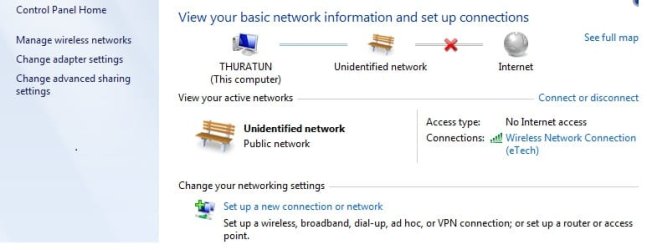
Now wireless network is connected but Unidentified Network.
Pls see attachment my screen :
Pls Any your help.
Thanks
Thanks for your help.
Now removed and make clear all Bonjour but still can't connect to internet.
I use Fujitsu L1010 laptop with Atheros AR928X Wireless Network Adapter.
Now wireless network is connected but Unidentified Network.
Pls see attachment my screen :
Pls Any your help.
Thanks
Attachments
My Computer
- OS
- window7
Hi GuaranT
After I use static IP at IPv4 and DNS also, it is changed the status as Internet access
but still can't browse internet.
Then I try with LAN cable , status also got Internet access right but can't browse inetnet.
How any idea??
Thanks to all.
After I use static IP at IPv4 and DNS also, it is changed the status as Internet access
but still can't browse internet.
Then I try with LAN cable , status also got Internet access right but can't browse inetnet.
How any idea??
Thanks to all.
My Computer
- OS
- window7
torrentg
New member
- Local time
- 3:57 AM
- Messages
- 5,747
Use 208.67.222.222 as your preferred dns server in the static ip address settings and it will be fine. Reboot after you set it if it doesn't work right away.
Enjoy.
Enjoy.
My Computer
- Computer Manufacturer/Model Number
- self built
- OS
- 7600.20510 x86
- CPU
- P4 550 3.4 GHz HT running at 3.5 GHz
- Motherboard
- MSI PM8M3-V (MS-7211 v1.x) Micro-ATX mainboard
- Memory
- OCZ 2 GB(2x1GB) DDR400mHz running @ 414 mHz
- Graphics Card(s)
- HIS Radeon HD 3850 IceQ 3 Turbo HDMI Dual DL-DVI AGP
- Sound Card
- MOTU Traveler firewire studio interface 192 kHz 24 bit
- Monitor(s) Displays
- 22" widescreen Acer X223W LCD, 17" Compaq P75 CRT
- Screen Resolution
- 1680x1050 and 1280x1024
- Hard Drives
- SATA I x2 WD, 400 GB and 120 GB, SATA 2 WD Caviar Black 1 TB
- PSU
- 350W generic
- Case
- Cybertronpc, it glows blue
- Cooling
- stock cpu fan, Ice-Q 3 gpu and system, many case fans
- Keyboard
- Logitch Classical Keyboard 200
- Mouse
- Logitech Mediaplay cordless
- Internet Speed
- 1792/448 kbits/sec
- Other Info
- SATA II PCI fake RAID adapter, 1 GB Readyboost, original ATI Remote Wonder (even works with WMC perfectly), Logitech Rumblepad 2 game controller x2
- Local time
- 1:27 PM
- Messages
- 21
Turn off Windows 7 firewall. I had the same problem. Turning off the firewall was the only solution that worked for me. 
My Computer
- OS
- windows XP
- CPU
- intel q8400
- Motherboard
- giga-byte S3G
- Memory
- kingston 2gigs 800MHz
- Graphics Card(s)
- Palit hd4850 512mb
- Sound Card
- on-board realtek
- Monitor(s) Displays
- lg 19"
- Hard Drives
- WD 500gb
- PSU
- cm Xtreme 500 w
- Case
- cm 690
- Cooling
- cm 690
torrentg
New member
- Local time
- 3:57 AM
- Messages
- 5,747
Turn off Windows 7 firewall. I had the same problem. Turning off the firewall was the only solution that worked for me.
Hi. That's not really a solution as you should always have a firewall active. That's a misconfigured firewall. You can reset it back to default settings which are fulll connectivity "out-of-the-box" or "vanilla."
My Computer
- Computer Manufacturer/Model Number
- self built
- OS
- 7600.20510 x86
- CPU
- P4 550 3.4 GHz HT running at 3.5 GHz
- Motherboard
- MSI PM8M3-V (MS-7211 v1.x) Micro-ATX mainboard
- Memory
- OCZ 2 GB(2x1GB) DDR400mHz running @ 414 mHz
- Graphics Card(s)
- HIS Radeon HD 3850 IceQ 3 Turbo HDMI Dual DL-DVI AGP
- Sound Card
- MOTU Traveler firewire studio interface 192 kHz 24 bit
- Monitor(s) Displays
- 22" widescreen Acer X223W LCD, 17" Compaq P75 CRT
- Screen Resolution
- 1680x1050 and 1280x1024
- Hard Drives
- SATA I x2 WD, 400 GB and 120 GB, SATA 2 WD Caviar Black 1 TB
- PSU
- 350W generic
- Case
- Cybertronpc, it glows blue
- Cooling
- stock cpu fan, Ice-Q 3 gpu and system, many case fans
- Keyboard
- Logitch Classical Keyboard 200
- Mouse
- Logitech Mediaplay cordless
- Internet Speed
- 1792/448 kbits/sec
- Other Info
- SATA II PCI fake RAID adapter, 1 GB Readyboost, original ATI Remote Wonder (even works with WMC perfectly), Logitech Rumblepad 2 game controller x2
torrentg
New member
- Local time
- 3:57 AM
- Messages
- 5,747
Hi optimus290,
Yes . Yesterday , I hv tried after turn off firewall but still can't .
Thanks to all.
Did you set a static ip address with the dns server I told you about?
My Computer
- Computer Manufacturer/Model Number
- self built
- OS
- 7600.20510 x86
- CPU
- P4 550 3.4 GHz HT running at 3.5 GHz
- Motherboard
- MSI PM8M3-V (MS-7211 v1.x) Micro-ATX mainboard
- Memory
- OCZ 2 GB(2x1GB) DDR400mHz running @ 414 mHz
- Graphics Card(s)
- HIS Radeon HD 3850 IceQ 3 Turbo HDMI Dual DL-DVI AGP
- Sound Card
- MOTU Traveler firewire studio interface 192 kHz 24 bit
- Monitor(s) Displays
- 22" widescreen Acer X223W LCD, 17" Compaq P75 CRT
- Screen Resolution
- 1680x1050 and 1280x1024
- Hard Drives
- SATA I x2 WD, 400 GB and 120 GB, SATA 2 WD Caviar Black 1 TB
- PSU
- 350W generic
- Case
- Cybertronpc, it glows blue
- Cooling
- stock cpu fan, Ice-Q 3 gpu and system, many case fans
- Keyboard
- Logitch Classical Keyboard 200
- Mouse
- Logitech Mediaplay cordless
- Internet Speed
- 1792/448 kbits/sec
- Other Info
- SATA II PCI fake RAID adapter, 1 GB Readyboost, original ATI Remote Wonder (even works with WMC perfectly), Logitech Rumblepad 2 game controller x2
torrentg
New member
- Local time
- 3:57 AM
- Messages
- 5,747
Glad to hear it. Enjoy. 
My Computer
- Computer Manufacturer/Model Number
- self built
- OS
- 7600.20510 x86
- CPU
- P4 550 3.4 GHz HT running at 3.5 GHz
- Motherboard
- MSI PM8M3-V (MS-7211 v1.x) Micro-ATX mainboard
- Memory
- OCZ 2 GB(2x1GB) DDR400mHz running @ 414 mHz
- Graphics Card(s)
- HIS Radeon HD 3850 IceQ 3 Turbo HDMI Dual DL-DVI AGP
- Sound Card
- MOTU Traveler firewire studio interface 192 kHz 24 bit
- Monitor(s) Displays
- 22" widescreen Acer X223W LCD, 17" Compaq P75 CRT
- Screen Resolution
- 1680x1050 and 1280x1024
- Hard Drives
- SATA I x2 WD, 400 GB and 120 GB, SATA 2 WD Caviar Black 1 TB
- PSU
- 350W generic
- Case
- Cybertronpc, it glows blue
- Cooling
- stock cpu fan, Ice-Q 3 gpu and system, many case fans
- Keyboard
- Logitch Classical Keyboard 200
- Mouse
- Logitech Mediaplay cordless
- Internet Speed
- 1792/448 kbits/sec
- Other Info
- SATA II PCI fake RAID adapter, 1 GB Readyboost, original ATI Remote Wonder (even works with WMC perfectly), Logitech Rumblepad 2 game controller x2