Unidentifying Network

DevendraDD

New member
Local time
11:27 AM
Messages
8
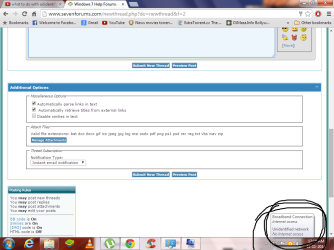
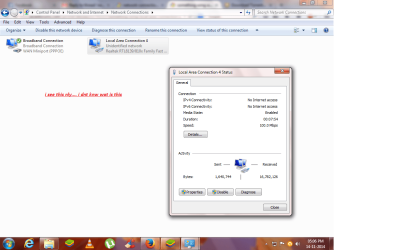
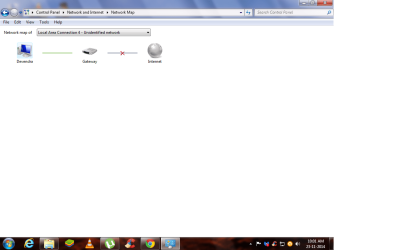
hie guyz .... i have wired connection which is working fine at 1mbps.... bt i have problem with local area connection which is showing me "Unidentifying network".which slows down my net speed ... i have tried all possible help from google which is available on that....
i hav tried ipv4 connectivity .... DNS/IP validation.... then network address .... trouble shooting on network adaptr n all ... bt it ddnt work out for me....
plz tell me what should i do for this prob ?
i hav highlighetd my prob
plzz help :cry:
 

Attachments

  • Untitleddsdsdsdsdsd.png
    Untitleddsdsdsdsdsd.png
    160.9 KB · Views: 2

My Computer

Computer type
PC/Desktop
Computer Manufacturer/Model Number
Custom build
OS
Windows 7 ultimate 32 bit
CPU
Intel(R) Pentium(R) Dual CPU E2140 @ 1.60GHz
Motherboard
Gigabyte Technology Co., Ltd.
Memory
2.50 GB
Graphics Card(s)
AMD Radeon HD 5450
Sound Card
AMD High Definition Audio Device
Monitor(s) Displays
AMD Radeon HD 5450
Screen Resolution
1024 x 768 x 85 hertz
Hard Drives
231.17 GB
Keyboard
Standard PS/2 Keyboard
Mouse
PS/2 Compatible Mouse
Internet Speed
1 Mbps
Antivirus
avast antivirus
Browser
google chrome
What makes you think that it is slowing down your speed? It is probably a neighbors connection. It should have no effect on your speed.
 

My Computer

Computer type
PC/Desktop
Computer Manufacturer/Model Number
Custom Build
OS
Windows 7 Home Premium 32-Bit - Build 7600 SP1
CPU
Intel Core i3-2120 3.30Ghz
Motherboard
Asus P8Z68-V LX Intel Z68 Socket H2 ATX
Memory
Kingston 4 GB DDR3 1333 mhz
Graphics Card(s)
AMD Radeon HD6670
Sound Card
Sound Blaster Audigy SE 24-Bit
Monitor(s) Displays
Asus VE228
Screen Resolution
1440 X 900
Hard Drives
OCZ Vertex 3 120 GB Sata 3 SSD ==
Kingston SH103/S3 120 G Hyper X 120 GB SSD ==
Western Digital 500 GB Caviar Green 7200 RPM ==
PSU
Corsair CX600M == 600 Watt
Case
NZXT Apollo - Silver with Clear Side Panel
Cooling
Three 120 mm Fans
Keyboard
Microsoft Natural 4000
Mouse
Microsoft Custom Optical 3000
Internet Speed
AT&T Fiber Optic Wireless Network
Antivirus
Microsoft Security Essentials
Browser
Chrome
Other Info
120 mm Blue LED Fan -- Three Blue LED Lazer Light Sticks
means this doesnt concern abt my net speed ? coz earlier i used to get speed nearly 1.2 mb/s ... sort of...
bt nw its nly stuck between 140-150 kbps.... thats y...
 

My Computer

Computer type
PC/Desktop
Computer Manufacturer/Model Number
Custom build
OS
Windows 7 ultimate 32 bit
CPU
Intel(R) Pentium(R) Dual CPU E2140 @ 1.60GHz
Motherboard
Gigabyte Technology Co., Ltd.
Memory
2.50 GB
Graphics Card(s)
AMD Radeon HD 5450
Sound Card
AMD High Definition Audio Device
Monitor(s) Displays
AMD Radeon HD 5450
Screen Resolution
1024 x 768 x 85 hertz
Hard Drives
231.17 GB
Keyboard
Standard PS/2 Keyboard
Mouse
PS/2 Compatible Mouse
Internet Speed
1 Mbps
Antivirus
avast antivirus
Browser
google chrome
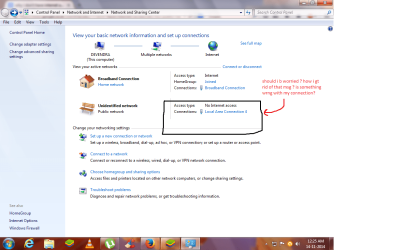
network connection prob

i need to remove this msg of unidentified network ... plz help
 

Attachments

  • Untitled.png
    Untitled.png
    220.4 KB · Views: 4

My Computer

Computer type
PC/Desktop
Computer Manufacturer/Model Number
Custom build
OS
Windows 7 ultimate 32 bit
CPU
Intel(R) Pentium(R) Dual CPU E2140 @ 1.60GHz
Motherboard
Gigabyte Technology Co., Ltd.
Memory
2.50 GB
Graphics Card(s)
AMD Radeon HD 5450
Sound Card
AMD High Definition Audio Device
Monitor(s) Displays
AMD Radeon HD 5450
Screen Resolution
1024 x 768 x 85 hertz
Hard Drives
231.17 GB
Keyboard
Standard PS/2 Keyboard
Mouse
PS/2 Compatible Mouse
Internet Speed
1 Mbps
Antivirus
avast antivirus
Browser
google chrome
Please post a picture of the "Change adapter settings" screen. You can access this screen directly from the screen of the screenshot you posted. The button to it is on the left. This screen should tell you the name of the connection which will give you a better idea if you should be worried or not.

Normally, that extra connection is a network driver that an application installed. For example:
 

Attachments

  • network connections Win7 forum.jpg
    network connections Win7 forum.jpg
    83.8 KB · Views: 3

My Computer

Computer type
Laptop
Computer Manufacturer/Model Number
Alienware
OS
Windows 7 Ultimate x64
CPU
Intel i7-3840QM
Memory
16GB
Graphics Card(s)
Geforce GT 650M
Hard Drives
512GB SSD
Antivirus
Malwarebytes Premium
Browser
Firefox and IE
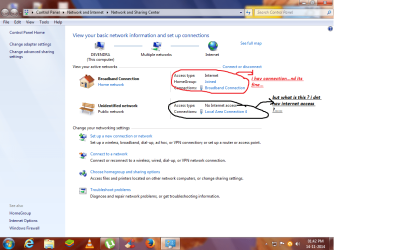
something wrng with local area connection..plz help

i hav broadband connection which works fine ... bt on local area connection it says no internet access... wat to do ?
 

Attachments

  • pic1.png
    pic1.png
    236.4 KB · Views: 5
  • pic2.png
    pic2.png
    230.6 KB · Views: 4

My Computer

Computer type
PC/Desktop
Computer Manufacturer/Model Number
Custom build
OS
Windows 7 ultimate 32 bit
CPU
Intel(R) Pentium(R) Dual CPU E2140 @ 1.60GHz
Motherboard
Gigabyte Technology Co., Ltd.
Memory
2.50 GB
Graphics Card(s)
AMD Radeon HD 5450
Sound Card
AMD High Definition Audio Device
Monitor(s) Displays
AMD Radeon HD 5450
Screen Resolution
1024 x 768 x 85 hertz
Hard Drives
231.17 GB
Keyboard
Standard PS/2 Keyboard
Mouse
PS/2 Compatible Mouse
Internet Speed
1 Mbps
Antivirus
avast antivirus
Browser
google chrome
What do you see if you go to "Control Panel > Network and Internet > Network Connections"?

You can click on "Change adapter settings" (the middle option in the left column of your screenshots) to get there.
 

My Computer

Computer type
PC/Desktop
Computer Manufacturer/Model Number
n/a
OS
W7 Ultimate SP1, LM19.2 MATE, W10 Home 1703, W10 Pro 1703 VM, #All 64 bit
CPU
AMD Phenom II x6 1100T, 3.3 GHz
Motherboard
ASUS M4A88T-M/USB3 (AM3)
Memory
12GB DDR3 1333 G-Skill (4GB x 2), G-Skill (2GB x 2)
Graphics Card(s)
NVIDIA GeForce GTX 660
Sound Card
Realtek?
Monitor(s) Displays
Samsung S23B350
Screen Resolution
1920x1080
Hard Drives
WD Green 2TB (SATA), WD Green 3TB (SATA), WD Blue 4TB (SATA), WD Blue 6TB (SATA)
PSU
Cooler Master
Case
Antec GX300 Tower
Cooling
3x Antec TRICOOL 120mm Fans
Mouse
Wired Optical
Internet Speed
DSL
Antivirus
Avast
Browser
Pale Moon (64 bit)
Other Info
2018-12-27 Upgraded HDDs
2015-12-10 Upgraded case, graphics card, storage
2015-08-15 Upgraded motherboard & RAM
2015-07-15 Upgraded LM17.1 to LM17.2
i see this

...
 

Attachments

  • 12.png
    12.png
    212.5 KB · Views: 3

My Computer

Computer type
PC/Desktop
Computer Manufacturer/Model Number
Custom build
OS
Windows 7 ultimate 32 bit
CPU
Intel(R) Pentium(R) Dual CPU E2140 @ 1.60GHz
Motherboard
Gigabyte Technology Co., Ltd.
Memory
2.50 GB
Graphics Card(s)
AMD Radeon HD 5450
Sound Card
AMD High Definition Audio Device
Monitor(s) Displays
AMD Radeon HD 5450
Screen Resolution
1024 x 768 x 85 hertz
Hard Drives
231.17 GB
Keyboard
Standard PS/2 Keyboard
Mouse
PS/2 Compatible Mouse
Internet Speed
1 Mbps
Antivirus
avast antivirus
Browser
google chrome
Disable it?

Why not disable the Network Adapter that you aren't using?

If that causes any issues, simply re-enable it.
 
Last edited:

My Computer

Computer type
PC/Desktop
Computer Manufacturer/Model Number
n/a
OS
W7 Ultimate SP1, LM19.2 MATE, W10 Home 1703, W10 Pro 1703 VM, #All 64 bit
CPU
AMD Phenom II x6 1100T, 3.3 GHz
Motherboard
ASUS M4A88T-M/USB3 (AM3)
Memory
12GB DDR3 1333 G-Skill (4GB x 2), G-Skill (2GB x 2)
Graphics Card(s)
NVIDIA GeForce GTX 660
Sound Card
Realtek?
Monitor(s) Displays
Samsung S23B350
Screen Resolution
1920x1080
Hard Drives
WD Green 2TB (SATA), WD Green 3TB (SATA), WD Blue 4TB (SATA), WD Blue 6TB (SATA)
PSU
Cooler Master
Case
Antec GX300 Tower
Cooling
3x Antec TRICOOL 120mm Fans
Mouse
Wired Optical
Internet Speed
DSL
Antivirus
Avast
Browser
Pale Moon (64 bit)
Other Info
2018-12-27 Upgraded HDDs
2015-12-10 Upgraded case, graphics card, storage
2015-08-15 Upgraded motherboard & RAM
2015-07-15 Upgraded LM17.1 to LM17.2
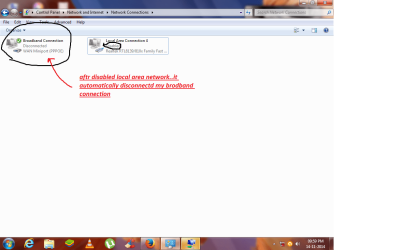
i hav tried that ..it shows this

....
 

Attachments

  • we.png
    we.png
    188.9 KB · Views: 2

My Computer

Computer type
PC/Desktop
Computer Manufacturer/Model Number
Custom build
OS
Windows 7 ultimate 32 bit
CPU
Intel(R) Pentium(R) Dual CPU E2140 @ 1.60GHz
Motherboard
Gigabyte Technology Co., Ltd.
Memory
2.50 GB
Graphics Card(s)
AMD Radeon HD 5450
Sound Card
AMD High Definition Audio Device
Monitor(s) Displays
AMD Radeon HD 5450
Screen Resolution
1024 x 768 x 85 hertz
Hard Drives
231.17 GB
Keyboard
Standard PS/2 Keyboard
Mouse
PS/2 Compatible Mouse
Internet Speed
1 Mbps
Antivirus
avast antivirus
Browser
google chrome
W7 Network Manager is flaky

In that case, if you are not experiencing any network connectivity issues, I would just ignore it (the W7 Network Manager has always been flaky on my PC).

I have VMware Workstation 7 installed.

When I run a VM, the Network Notification Area icon shows an alert symbol.
The Network & Sharing window indicates that my network is completely broken.

However, the network is completely functional (i.e. my real OS and VMs can still access any network or Internet location without issue).
 

My Computer

Computer type
PC/Desktop
Computer Manufacturer/Model Number
n/a
OS
W7 Ultimate SP1, LM19.2 MATE, W10 Home 1703, W10 Pro 1703 VM, #All 64 bit
CPU
AMD Phenom II x6 1100T, 3.3 GHz
Motherboard
ASUS M4A88T-M/USB3 (AM3)
Memory
12GB DDR3 1333 G-Skill (4GB x 2), G-Skill (2GB x 2)
Graphics Card(s)
NVIDIA GeForce GTX 660
Sound Card
Realtek?
Monitor(s) Displays
Samsung S23B350
Screen Resolution
1920x1080
Hard Drives
WD Green 2TB (SATA), WD Green 3TB (SATA), WD Blue 4TB (SATA), WD Blue 6TB (SATA)
PSU
Cooler Master
Case
Antec GX300 Tower
Cooling
3x Antec TRICOOL 120mm Fans
Mouse
Wired Optical
Internet Speed
DSL
Antivirus
Avast
Browser
Pale Moon (64 bit)
Other Info
2018-12-27 Upgraded HDDs
2015-12-10 Upgraded case, graphics card, storage
2015-08-15 Upgraded motherboard & RAM
2015-07-15 Upgraded LM17.1 to LM17.2
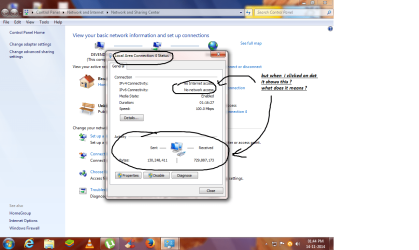
guyz help me

my local area connection shows like this ...i dnt hav any idea wat to do ...
 

Attachments

  • Untitled.png
    Untitled.png
    160.1 KB · Views: 2
Last edited by a moderator:

My Computer

Computer type
PC/Desktop
Computer Manufacturer/Model Number
Custom build
OS
Windows 7 ultimate 32 bit
CPU
Intel(R) Pentium(R) Dual CPU E2140 @ 1.60GHz
Motherboard
Gigabyte Technology Co., Ltd.
Memory
2.50 GB
Graphics Card(s)
AMD Radeon HD 5450
Sound Card
AMD High Definition Audio Device
Monitor(s) Displays
AMD Radeon HD 5450
Screen Resolution
1024 x 768 x 85 hertz
Hard Drives
231.17 GB
Keyboard
Standard PS/2 Keyboard
Mouse
PS/2 Compatible Mouse
Internet Speed
1 Mbps
Antivirus
avast antivirus
Browser
google chrome
Right click the network icon run the troubleshooter.

Reboot your modem.
 

My Computer

Computer type
PC/Desktop
Computer Manufacturer/Model Number
Skylake Special #666
OS
Windows 10 Pro x64
CPU
Intel Core i7 6700K
Motherboard
Asus Sabertooth Z170 Mark 1
Memory
GSkill TridentZ RGB 16GB 3600 16-16-16-36
Graphics Card(s)
EVGA GTX 980 Ti SC x2
Sound Card
Realtek High Definition
Monitor(s) Displays
AOC G2460PG
Screen Resolution
1920 x 1080 144Hz
Hard Drives
Samsung 860 Pro 256GB, Seagate Barracuda 4TB x2
PSU
EVGA 1000 P2, EVGA White Custom Braided Cables
Case
Corsair Vengeance C70 Gunmetal Black
Cooling
Corsair H100i v2, Corsair ML120 x2, Thermal Grizzly Kryonaut
Keyboard
Logitech G910 Orion Spectrum
Mouse
Logitech G700s
Internet Speed
Verizon Fios Quantum Gateway 75/75
Antivirus
Windows Defender, Malwarebytes Free 3.8.3
Browser
Chrome
Other Info
Corsair SP120 x4, LG Blu-ray Drive, Durabrand HT-395 100 Watt Dolby Digital Amp, Corsair H2100 Wireless 7.1 Headset
If your network is working, the Notification icon is irrelevant.

Here's what my so-called Network Manager is showing right now as I type this comment.
Broken Network.png
 

My Computer

Computer type
PC/Desktop
Computer Manufacturer/Model Number
n/a
OS
W7 Ultimate SP1, LM19.2 MATE, W10 Home 1703, W10 Pro 1703 VM, #All 64 bit
CPU
AMD Phenom II x6 1100T, 3.3 GHz
Motherboard
ASUS M4A88T-M/USB3 (AM3)
Memory
12GB DDR3 1333 G-Skill (4GB x 2), G-Skill (2GB x 2)
Graphics Card(s)
NVIDIA GeForce GTX 660
Sound Card
Realtek?
Monitor(s) Displays
Samsung S23B350
Screen Resolution
1920x1080
Hard Drives
WD Green 2TB (SATA), WD Green 3TB (SATA), WD Blue 4TB (SATA), WD Blue 6TB (SATA)
PSU
Cooler Master
Case
Antec GX300 Tower
Cooling
3x Antec TRICOOL 120mm Fans
Mouse
Wired Optical
Internet Speed
DSL
Antivirus
Avast
Browser
Pale Moon (64 bit)
Other Info
2018-12-27 Upgraded HDDs
2015-12-10 Upgraded case, graphics card, storage
2015-08-15 Upgraded motherboard & RAM
2015-07-15 Upgraded LM17.1 to LM17.2
Back
Top