Solved uninstall/deactivate Windows key tutorial question

HAVOC

New member
Guru
VIP
Local time
11:13 PM
Messages
1,355
Location
Connecticut

My Computer

Computer type
PC/Desktop
Computer Manufacturer/Model Number
custom build
OS
Windows 7 Professional 64bit
CPU
Intel i7-5960X
Motherboard
EVGA X99 Classified
Memory
64GB Corsair Dominator 2400MHz
Graphics Card(s)
3 EVGA GTX980's
Sound Card
on board
Monitor(s) Displays
3 Dell E2715H 27"
Screen Resolution
1920x1080 (5760x1080)
Hard Drives
Samsung 950 Pro 1TB M.2 SSD,
Western Digital Black 2TB HDD's x5
Western Digital Black 1TB HDD's x3
PSU
Corsair AX1200i
Case
Corsair 750D
Cooling
Corsair H110i GT
Keyboard
Corsair K70
Mouse
Corsair M45
Internet Speed
250 down/10 up
Antivirus
Microsoft Security Essentials
Browser
IE 11, Google Chrome
Please notice, the below is just how I have understood this and how Microsoft phone support has it explained for me. It must not be factual information, however I have used this method successfully. I have had two times a situation where activation on a new computer has failed first but worked on another try when the key was first uninstalled on old computer.

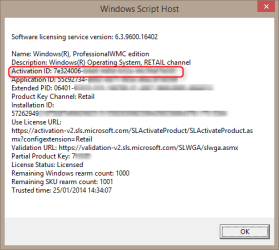
First, be sure you are online. Get your activation ID on "old" PC with slmgr /dlv:

2014-01-25_14h34_33.png

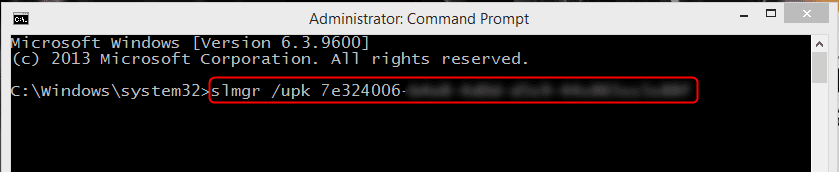
Now run the uninstall command with your activation ID on an elevated command prompt:

2014-01-25_14h42_31.png

As far as I have understood this, running the uninstall command without activation ID only removes the product key from local Windows setup. To "release" the product key completely you need to add the activation ID.

Kari
 

My Computer

Computer type
Laptop
Computer Manufacturer/Model Number
HP ENVY 17-1150eg
OS
Windows 10 Pro x64 EN-GB
CPU
1.6 GHz Intel Core i7-720QM Processor
Memory
6 GB
Graphics Card(s)
ATI Mobility Radeon HD 5850 Graphics
Sound Card
Beats sound system with integrated subwoofer
Monitor(s) Displays
17" laptop display, 22" LED and 32" Full HD TV through HDMI
Screen Resolution
1600*900 (1), 1920*1080 (2&3)
Hard Drives
Internal: 2 x 500 GB SATA Hard Disk Drive 7200 rpm
External: 2TB for backups, 3TB USB3 network drive for media
Cooling
As Envy runs a bit warm, I have it on a Cooler Master pad
Keyboard
Logitech diNovo Media Desktop Laser (bluetooth)
Mouse
Logitech Performance Mouse MX
Internet Speed
50/10 Mbps VDSL
Antivirus
Windows Defender 4.3.9431.0
Browser
Maxthon 3.5.2., IE11
I ran the command without the activation ID. Afterwards I got the "Windows is not genuine" in the corner of the display. Shutdown the netbook and installed Windows 7 on the laptop, activated and didn't even have to call.
 

My Computer

Computer type
PC/Desktop
Computer Manufacturer/Model Number
custom build
OS
Windows 7 Professional 64bit
CPU
Intel i7-5960X
Motherboard
EVGA X99 Classified
Memory
64GB Corsair Dominator 2400MHz
Graphics Card(s)
3 EVGA GTX980's
Sound Card
on board
Monitor(s) Displays
3 Dell E2715H 27"
Screen Resolution
1920x1080 (5760x1080)
Hard Drives
Samsung 950 Pro 1TB M.2 SSD,
Western Digital Black 2TB HDD's x5
Western Digital Black 1TB HDD's x3
PSU
Corsair AX1200i
Case
Corsair 750D
Cooling
Corsair H110i GT
Keyboard
Corsair K70
Mouse
Corsair M45
Internet Speed
250 down/10 up
Antivirus
Microsoft Security Essentials
Browser
IE 11, Google Chrome
Usually a retail key has no issues when reused, even without uninstalling it on old PC first.

A true story: I had for instance a Seven Ultimate retail key reused countless times for various reasons, a lot of reinstalls as it was used on a test rig, then I decided to use it on a totally new self built PC.

Activation failed, automated phone activation likewise. After some 10 minutes or so getting no answer while waiting MS staff to pick up the call, booted the old PC and uninstalled the product key without activation ID. Again, activation on new PC failed, as well as the automated phone activation. Also this time after some 5 to 10 minutes waiting no human response from activation phone number, decided to call TechNet Subscriber support instead. A support technician could not help me with phone activation but suggested I would try to uninstall the product key on old PC with activation ID, wait half an hour or so and then try to activate the key on new PC.

This worked. It might be karma or coincidence or whatever, the main thing for me was that it worked.
 

My Computer

Computer type
Laptop
Computer Manufacturer/Model Number
HP ENVY 17-1150eg
OS
Windows 10 Pro x64 EN-GB
CPU
1.6 GHz Intel Core i7-720QM Processor
Memory
6 GB
Graphics Card(s)
ATI Mobility Radeon HD 5850 Graphics
Sound Card
Beats sound system with integrated subwoofer
Monitor(s) Displays
17" laptop display, 22" LED and 32" Full HD TV through HDMI
Screen Resolution
1600*900 (1), 1920*1080 (2&3)
Hard Drives
Internal: 2 x 500 GB SATA Hard Disk Drive 7200 rpm
External: 2TB for backups, 3TB USB3 network drive for media
Cooling
As Envy runs a bit warm, I have it on a Cooler Master pad
Keyboard
Logitech diNovo Media Desktop Laser (bluetooth)
Mouse
Logitech Performance Mouse MX
Internet Speed
50/10 Mbps VDSL
Antivirus
Windows Defender 4.3.9431.0
Browser
Maxthon 3.5.2., IE11
Nice to know if I or another forum member has an issue.
Thanks Kari.
 

My Computer

Computer type
PC/Desktop
Computer Manufacturer/Model Number
custom build
OS
Windows 7 Professional 64bit
CPU
Intel i7-5960X
Motherboard
EVGA X99 Classified
Memory
64GB Corsair Dominator 2400MHz
Graphics Card(s)
3 EVGA GTX980's
Sound Card
on board
Monitor(s) Displays
3 Dell E2715H 27"
Screen Resolution
1920x1080 (5760x1080)
Hard Drives
Samsung 950 Pro 1TB M.2 SSD,
Western Digital Black 2TB HDD's x5
Western Digital Black 1TB HDD's x3
PSU
Corsair AX1200i
Case
Corsair 750D
Cooling
Corsair H110i GT
Keyboard
Corsair K70
Mouse
Corsair M45
Internet Speed
250 down/10 up
Antivirus
Microsoft Security Essentials
Browser
IE 11, Google Chrome
Kari, were these TechNet subscriber keys? I recently talked with them and they are each five use keys that the agent thought could not be uninstalled. Once five uses are up they will issue subscribers new ones. Maybe you found the way.

As you note retail keys can be reinstalled as often as one pleases.

In the past I have come to believe that MS Activation servers have no way to know a key has been uninstalled or deactivated any more than they know the install's partition is deleted. It's only when the OS connects to clear activation that it has any such contact. So the key remains associated with the same hardware signature until it is overwritten during a reactivation on new hardware. In such cases a key questions is posed: "Is this copy of Win7 installed on more than one PC" to which one can only answer Yes to proceed.

There should be a way to find out for certain how this works.
 
Kari, were these TechNet subscriber keys?
No, that's why TechNet support could not help me.

My example case as told was with a normal Ultimate retail key, the one I got as a present for organizing Windows 7 Launch Party back in 2009. I had a test rig where I tested various Audit Mode and sysprep scenarios, each time I returned to OOBE (as usual when exiting Audit to return to OOBE) it required product key and new activation.

Using the same key on a new PC meant I was trying to enter a product key which A) was still used on another PC, and B) had already been used and activated at least 15 to 20 times in quite a short period of time.
 

My Computer

Computer type
Laptop
Computer Manufacturer/Model Number
HP ENVY 17-1150eg
OS
Windows 10 Pro x64 EN-GB
CPU
1.6 GHz Intel Core i7-720QM Processor
Memory
6 GB
Graphics Card(s)
ATI Mobility Radeon HD 5850 Graphics
Sound Card
Beats sound system with integrated subwoofer
Monitor(s) Displays
17" laptop display, 22" LED and 32" Full HD TV through HDMI
Screen Resolution
1600*900 (1), 1920*1080 (2&3)
Hard Drives
Internal: 2 x 500 GB SATA Hard Disk Drive 7200 rpm
External: 2TB for backups, 3TB USB3 network drive for media
Cooling
As Envy runs a bit warm, I have it on a Cooler Master pad
Keyboard
Logitech diNovo Media Desktop Laser (bluetooth)
Mouse
Logitech Performance Mouse MX
Internet Speed
50/10 Mbps VDSL
Antivirus
Windows Defender 4.3.9431.0
Browser
Maxthon 3.5.2., IE11
I did have to call Microsoft when I installed Windows 7 on my HTPC. I think it's because I never deactivated it from my gaming PC which I parted out.
 

My Computer

Computer type
PC/Desktop
Computer Manufacturer/Model Number
custom build
OS
Windows 7 Professional 64bit
CPU
Intel i7-5960X
Motherboard
EVGA X99 Classified
Memory
64GB Corsair Dominator 2400MHz
Graphics Card(s)
3 EVGA GTX980's
Sound Card
on board
Monitor(s) Displays
3 Dell E2715H 27"
Screen Resolution
1920x1080 (5760x1080)
Hard Drives
Samsung 950 Pro 1TB M.2 SSD,
Western Digital Black 2TB HDD's x5
Western Digital Black 1TB HDD's x3
PSU
Corsair AX1200i
Case
Corsair 750D
Cooling
Corsair H110i GT
Keyboard
Corsair K70
Mouse
Corsair M45
Internet Speed
250 down/10 up
Antivirus
Microsoft Security Essentials
Browser
IE 11, Google Chrome
Back
Top