
tonidavid5
New member
- Local time
- 9:44 PM
- Messages
- 2
Hi,
This is my first post here although I've been reading you for quite some time now.
I had XP 32 bits originally installed and later implemented a dual-boot setup by installing Seven 64bits to another partition of the same physical HDD. Everything is been working fine until one day, probably after either a Seven system update or a XP system update from Microsoft, the dual boot only starts Seven correctly. XP doesn't seem to start-up anymore.
So, either I recover access to XP (desired option) or I completely remove XP from the HDD, remove the dual boot, and use the free disk space to add it to the current Seven partition.
I'm seeking guidance as to how to recover the XP or the steps to follow to remove it.
I have already downloaded easyBCD and Partition Wizard bootable CD.
This is what EasyBCD shows as info:
This a snapshot of my disk management:
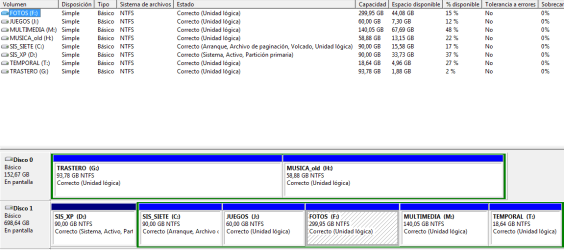
XP is in the active, primary partition and SEVEN is in the logical partition.
Thanks for your help!
David
This is my first post here although I've been reading you for quite some time now.
I had XP 32 bits originally installed and later implemented a dual-boot setup by installing Seven 64bits to another partition of the same physical HDD. Everything is been working fine until one day, probably after either a Seven system update or a XP system update from Microsoft, the dual boot only starts Seven correctly. XP doesn't seem to start-up anymore.
So, either I recover access to XP (desired option) or I completely remove XP from the HDD, remove the dual boot, and use the free disk space to add it to the current Seven partition.
I'm seeking guidance as to how to recover the XP or the steps to follow to remove it.
I have already downloaded easyBCD and Partition Wizard bootable CD.
This is what EasyBCD shows as info:
There are a total of 2 entries listed in the bootloader.
Default: Windows 7
Timeout: 30 seconds
Boot Drive: D:\
Entry #1
Name: Versi¢n anterior Windows XP
BCD ID: {ntldr}
Drive: D:\
Bootloader Path: \ntldr
Entry #2
Name: Windows 7
BCD ID: {current}
Drive: C:\
Bootloader Path: \Windows\system32\winload.exe
Default: Windows 7
Timeout: 30 seconds
Boot Drive: D:\
Entry #1
Name: Versi¢n anterior Windows XP
BCD ID: {ntldr}
Drive: D:\
Bootloader Path: \ntldr
Entry #2
Name: Windows 7
BCD ID: {current}
Drive: C:\
Bootloader Path: \Windows\system32\winload.exe
This a snapshot of my disk management:
XP is in the active, primary partition and SEVEN is in the logical partition.
Thanks for your help!
David
My Computer
- Computer Manufacturer/Model Number
- Custom
- OS
- Windows 7 Ultimate x64
- CPU
- Core Dual E6600
- Motherboard
- Asus P5E3 deluxe
- Memory
- 6GB
- Graphics Card(s)
- Nvidia GeForce GT8800

 about removing the xp dual boot for probably nearly a year. Now I can see why.