

I just noticed something strange, hopefully someone can explain this to me.
I installed the Windows 7 Signature Edition from Launch Party Kit to one of my computers. Was just now doing some maintenance and noticed something strange.
Check the image here:
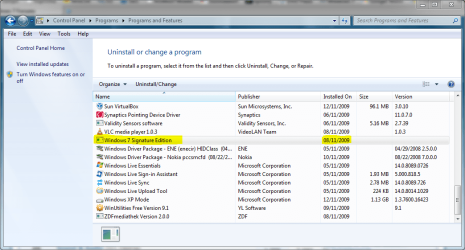
It shows Windows 7 on the programs list. Double clicking it, or choosing Uninstall / Change brings this up:
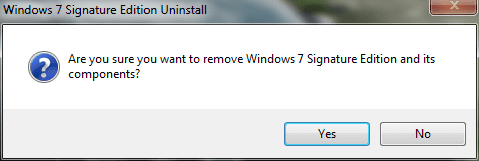
The thing is, this was a clean install so what happens if I choose Yes? I am really tempted to try...
I have never seen the installed Windows OS listed among other installed software on the programs list. No big issue but once again something I would like to undestand.
Any deeper knowledge among geeks and gurus here?
Kari
I installed the Windows 7 Signature Edition from Launch Party Kit to one of my computers. Was just now doing some maintenance and noticed something strange.
Check the image here:
It shows Windows 7 on the programs list. Double clicking it, or choosing Uninstall / Change brings this up:
The thing is, this was a clean install so what happens if I choose Yes? I am really tempted to try...
I have never seen the installed Windows OS listed among other installed software on the programs list. No big issue but once again something I would like to undestand.
Any deeper knowledge among geeks and gurus here?
Kari
My Computer
At a glance
Windows 10 Pro x64 EN-GB1.6 GHz Intel Core i7-720QM Processor6 GBATI Mobility Radeon HD 5850 Graphics
- Computer type
- Laptop
- Computer Manufacturer/Model Number
- HP ENVY 17-1150eg
- OS
- Windows 10 Pro x64 EN-GB
- CPU
- 1.6 GHz Intel Core i7-720QM Processor
- Memory
- 6 GB
- Graphics Card(s)
- ATI Mobility Radeon HD 5850 Graphics
- Sound Card
- Beats sound system with integrated subwoofer
- Monitor(s) Displays
- 17" laptop display, 22" LED and 32" Full HD TV through HDMI
- Screen Resolution
- 1600*900 (1), 1920*1080 (2&3)
- Hard Drives
- Internal: 2 x 500 GB SATA Hard Disk Drive 7200 rpm
External: 2TB for backups, 3TB USB3 network drive for media
- Cooling
- As Envy runs a bit warm, I have it on a Cooler Master pad
- Keyboard
- Logitech diNovo Media Desktop Laser (bluetooth)
- Mouse
- Logitech Performance Mouse MX
- Internet Speed
- 50/10 Mbps VDSL
- Antivirus
- Windows Defender 4.3.9431.0
- Browser
- Maxthon 3.5.2., IE11


