Hi All! I uninstalled Winamp media player but the problem is I'm left with three Windows explorer shell extensions which appear when I right click on mp3 files. They are: "Play in Winamp", "Enqueue in Winamp" and "Add to Winamp's Bookmark list". How do I remove and delete these? Driving me nuts!!! Thanks!
Reinstall winamp. Go into the preferences. There is an option that allows you to select which shell extensions are shown on right clicking files and folders. Uncheck them all. Uninstall winamp again.
There may be a better solution to this problem but this will work just fine I think.
My Computer
At a glance
Win7 64bit UltimateAMD Phenom II X6 1100T Black Edition Thuban 3...CORSAIR DOMINATOR GT 8GB (2 x 4GB) 1866 DDR3XFX HD-697A-CNDC Radeon HD6970 2GB 256-bit
Computer Manufacturer/Model Number
Custom
OS
Win7 64bit Ultimate
CPU
AMD Phenom II X6 1100T Black Edition Thuban 3.3GHz, 3.7GHz
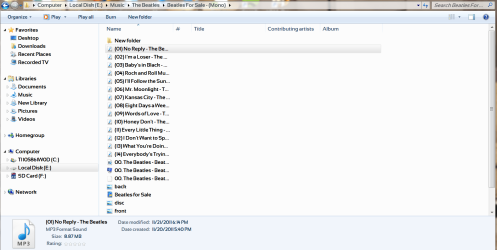
OK, I'll try that. Now I've discovered another problem. For some reason my flac music files say mp3 in Explorer. Each file even has the little mp3 logo next to it. But they're not mp3, they're flac! I had the xiph.org codec installed (it has a tiny little fish head logo) and now that's gone. Even at the bottom it states MP3 format sound. In the column under 'type' it says mp3 format sound. Trouble is, they're not mp3 and they've never been converted. I've installed and reinstalled the xiph codec and its still there. Tried a system restore and nothing. Any suggestions?
What I'd really like to so is a system restore that would take me back to a specific time about two days ago but I know that isn't possible.
Yeah that reminds me of the exact same thing real media player did to me a few years back. I had mp3 files and it changed the file extension to some crap of it's own that was specific to real media. When I removed real it left all my mp3 files crippled. From that point on I have been completely against real media player.
I don't know what would have changed your flac files though. I use winamp and I also have flac files and I can tell you right off this is not something caused by winamp.
I do not use whatever codec it was you mentioned I use the k-lite codec pack because it covers anything and everything in one shot and has never let me down.
I know there is an easy way to correct those file extensions but I have not had to do that so I will let someone else handle it. About all I can do is say what did not cause it since I also use flac and winamp.
My Computer
At a glance
Win7 64bit UltimateAMD Phenom II X6 1100T Black Edition Thuban 3...CORSAIR DOMINATOR GT 8GB (2 x 4GB) 1866 DDR3XFX HD-697A-CNDC Radeon HD6970 2GB 256-bit
Computer Manufacturer/Model Number
Custom
OS
Win7 64bit Ultimate
CPU
AMD Phenom II X6 1100T Black Edition Thuban 3.3GHz, 3.7GHz
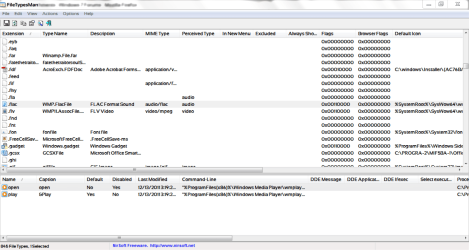
Yeah, they were always flac files the entire time. The file extension (.flac) remained the same and nothing was converted in the process. BTW, I use dBpoweramp to convert any flac files to mp3. I can batch convert an entire folder by right clicking on it and selecting the dBpoweramp convert option in the shell extension. Pretty straightforward. Pretty nice to have if I ever want to put any flac files onto a portable player. Anyway, only the logo had changed so it wasn't too traumatic of a change to begin with. I was advised by dsperber to download a zip file called FileTypesMan from here:
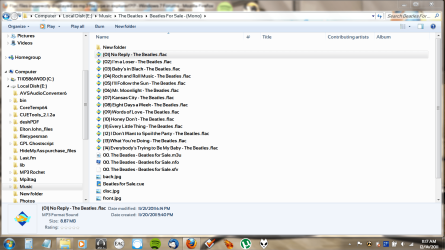
Here's what they look like after using FileTypesMan:
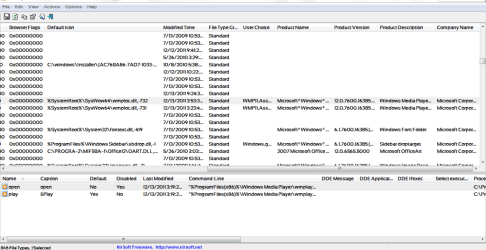
Here's the FileTypesMan application when opened: (It's fairly wide and requires two screenshots.)
Worked great. Had to navigate my way over to the xiph.org codec install in order to find the correct icon but there it was. Now mp3 files have the Windows mp3 icon and flac files have the codec icon.
You know, I learn a lot about Windows 7 and how my PC works every time I visit Sevenforums. It's amazing, really. Just when you think that's about all one needs to know, you learn a little more. More than you thought you'd ever need to digest in the first place! Will the learning curve ever straighten out and come to an end? I doubt it. It's actually great fun in a weird sort of way. Who knows what I'll have to learn tomorrow or even a year from now? Thanks everyone!