
You are using an out of date browser. It may not display this or other websites correctly.
You should upgrade or use an alternative browser.
You should upgrade or use an alternative browser.
uninstaller not working
- Thread starter Nits
- Start date
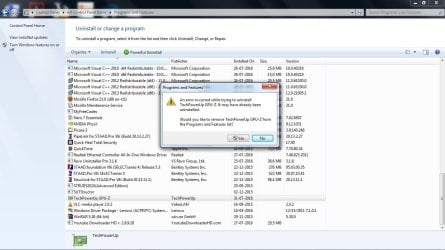
Try to locate the folder for the application.
Sometime it required to uninstall from the application in the C:\Programs Files
If the application folder is empty, then it had uninstalled.
Not all application can be uninstall from Control Panel.
It may require you to reboot the computer to clear any leftover data inside the folder.
One other method is to Install the application, read on how to uninstall during installation, if any.
Reboot
Do the uninstall in the application in program files folder.
Reboot.
Sometimes it need to re-install and then uninstall, for some application.
Reboot is to clear any leftover in the memory.
Sometime it required to uninstall from the application in the C:\Programs Files
If the application folder is empty, then it had uninstalled.
Not all application can be uninstall from Control Panel.
It may require you to reboot the computer to clear any leftover data inside the folder.
One other method is to Install the application, read on how to uninstall during installation, if any.
Reboot
Do the uninstall in the application in program files folder.
Reboot.
Sometimes it need to re-install and then uninstall, for some application.
Reboot is to clear any leftover in the memory.
My Computer
- Computer type
- Laptop
- Computer Manufacturer/Model Number
- Toshiba L630 and L735
- OS
- Windows 7 x64
- Hard Drives
- 240 GB SSD

Actually it does install if you don't select the standalone version.
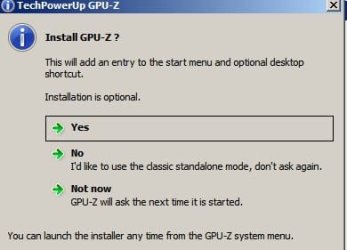
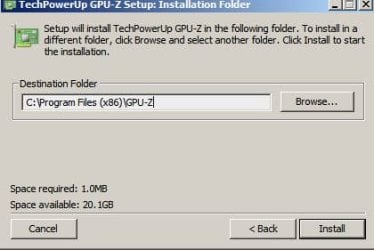
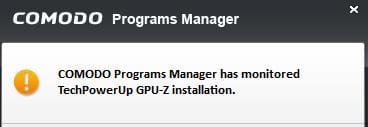
Did you try to delete any files shown here manually? If so - reinstall then uninstall the application.
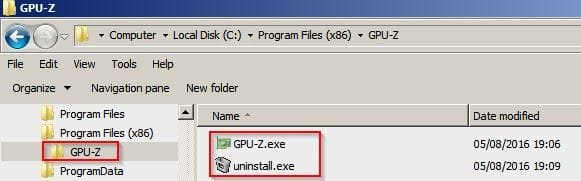
Use GeekUninstaller
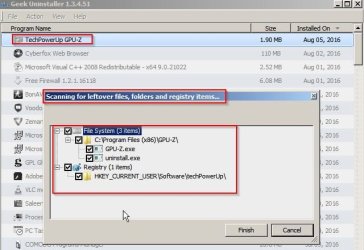
Did you try to delete any files shown here manually? If so - reinstall then uninstall the application.
Use GeekUninstaller
My Computer
- Computer type
- Laptop
- Computer Manufacturer/Model Number
- ASUS
- OS
- Microsoft Windows 7 Home Premium 64-bit 7601 Multiprocessor Free Service Pack 1
- CPU
- AMD C-60 APU with Radeon(tm) HD Graphics
- Motherboard
- ASUSTeK COMPUTER INC. X501U
- Memory
- 4.00 GB
- Graphics Card(s)
- AMD Radeon HD 6290 Graphics
- Sound Card
- (1) AMD High Definition Audio Device (2) Realtek High Defi
- Screen Resolution
- 1366 x 768 x 32 bits (4294967296 colors) @ 60 Hz
- Hard Drives
- Hitachi HTS545050A7E380 SATA Disk Device
- Antivirus
- Comodo CIS & FW, SecureAplus App Whitelisting, Threatfire
- Browser
- Cyberfox 64bit, Opera 64bit, Airfox
- Other Info
- Spy-The-Spy, HitmanPro.Alert, Norton Connect Safe, MJRegWatcher, BitDefender TrafficLight, Voodoo Shield, Zemana AntiMalware

- Local time
- 6:34 AM
- Messages
- 127
Yes, you're right..I just though of that..It's been a while since I got it and I have the stand alone.
Oh well...It's a nice little program He should just leave it.
If you need to be confused more just let me know..LOL
Oh well...It's a nice little program He should just leave it.
If you need to be confused more just let me know..LOL
My Computer
- OS
- Windows 7 64 bit
Yes, you're right..I just though of that..It's been a while since I got it and I have the stand alone.
Oh well...It's a nice little program He should just leave it.
If you need to be confused more just let me know..LOL
Well you are correct in a way. Why install it when you can use the portable version? I was just testing so installed it.
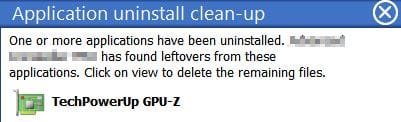
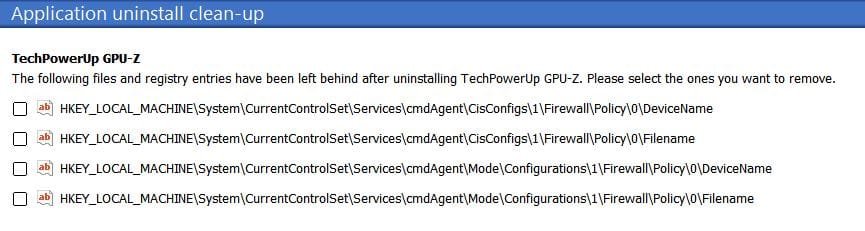
Also after uninstall got this regarding Firewall Rules.
My Computer
- Computer type
- Laptop
- Computer Manufacturer/Model Number
- ASUS
- OS
- Microsoft Windows 7 Home Premium 64-bit 7601 Multiprocessor Free Service Pack 1
- CPU
- AMD C-60 APU with Radeon(tm) HD Graphics
- Motherboard
- ASUSTeK COMPUTER INC. X501U
- Memory
- 4.00 GB
- Graphics Card(s)
- AMD Radeon HD 6290 Graphics
- Sound Card
- (1) AMD High Definition Audio Device (2) Realtek High Defi
- Screen Resolution
- 1366 x 768 x 32 bits (4294967296 colors) @ 60 Hz
- Hard Drives
- Hitachi HTS545050A7E380 SATA Disk Device
- Antivirus
- Comodo CIS & FW, SecureAplus App Whitelisting, Threatfire
- Browser
- Cyberfox 64bit, Opera 64bit, Airfox
- Other Info
- Spy-The-Spy, HitmanPro.Alert, Norton Connect Safe, MJRegWatcher, BitDefender TrafficLight, Voodoo Shield, Zemana AntiMalware
REVO Uninstaller is pretty good but I would need the paid for pro version on a 64bit machine as the free version only works properly on 32bit windows. That's why I don't use it. 
My Computer
- Computer type
- Laptop
- Computer Manufacturer/Model Number
- ASUS
- OS
- Microsoft Windows 7 Home Premium 64-bit 7601 Multiprocessor Free Service Pack 1
- CPU
- AMD C-60 APU with Radeon(tm) HD Graphics
- Motherboard
- ASUSTeK COMPUTER INC. X501U
- Memory
- 4.00 GB
- Graphics Card(s)
- AMD Radeon HD 6290 Graphics
- Sound Card
- (1) AMD High Definition Audio Device (2) Realtek High Defi
- Screen Resolution
- 1366 x 768 x 32 bits (4294967296 colors) @ 60 Hz
- Hard Drives
- Hitachi HTS545050A7E380 SATA Disk Device
- Antivirus
- Comodo CIS & FW, SecureAplus App Whitelisting, Threatfire
- Browser
- Cyberfox 64bit, Opera 64bit, Airfox
- Other Info
- Spy-The-Spy, HitmanPro.Alert, Norton Connect Safe, MJRegWatcher, BitDefender TrafficLight, Voodoo Shield, Zemana AntiMalware
- Local time
- 6:34 AM
- Messages
- 127
I have the paid pro version on my 64bit. It's an older version because I didn't want to pay again for the new upgrade that came out awhile back. It works fine...Cleans up a lot of crap after the un-install.
My Computer
- OS
- Windows 7 64 bit