Uninstalling Windows 7 Dual Boot

QuackPot

New member
Pro User
Local time
7:05 PM
Messages
396
I have XP and WIndows 7 on my old desktop and since windows 7 is so slow and crashes a lot, how do I go about uninstalling it? Should I just load up XP then format my I:\ drive or do I have to deactivate Windows 7 first?
 

My Computer

Computer Manufacturer/Model Number
Desktop
OS
Windows 7 Professional x64
CPU
Intel i5-2500k @ 3.3Ghz
Motherboard
Gigabyte GA-Z77X-UD5H
Memory
4GB DDR3
Graphics Card(s)
Nvidia GTS250 1GB
Monitor(s) Displays
Sony SDM S95A
Screen Resolution
1280x1024
Hard Drives
1x 1TB, 2x 250GB HDDs
PSU
Corsair HX850W
Case
Cooler Master 690 II
Cooling
Thermalright True Spirit 140mm & 3x 120mm & 3x 140mm Fans
Keyboard
Logitech Media Keyboard
Mouse
Microsoft Intellimouse
Internet Speed
8MB
going to xp, and make sure that's your data in the windows 7 drive already backup.
just click format on it, and set inactive.
 

My Computer

Computer Manufacturer/Model Number
built up
OS
windows 7
CPU
Phenom II AMD Dragon 3.5Ghz
Memory
DDR3 4GB
Graphics Card(s)
ATI Radeon 512Mb
Monitor(s) Displays
HP L1506
Screen Resolution
1152 x 864
Hard Drives
WDC 1 TB SATA-II Green Power
Keyboard
HP wireless keyboard
Mouse
HP Optic
Internet Speed
1GB
That simple?
 

My Computer

Computer Manufacturer/Model Number
Desktop
OS
Windows 7 Professional x64
CPU
Intel i5-2500k @ 3.3Ghz
Motherboard
Gigabyte GA-Z77X-UD5H
Memory
4GB DDR3
Graphics Card(s)
Nvidia GTS250 1GB
Monitor(s) Displays
Sony SDM S95A
Screen Resolution
1280x1024
Hard Drives
1x 1TB, 2x 250GB HDDs
PSU
Corsair HX850W
Case
Cooler Master 690 II
Cooling
Thermalright True Spirit 140mm & 3x 120mm & 3x 140mm Fans
Keyboard
Logitech Media Keyboard
Mouse
Microsoft Intellimouse
Internet Speed
8MB
It might be that simple - it depends.

If you had XP installed first - XP partition will show as "system" when you are booted into 7.

If that is the case, boot the 7 dvd to command prompt, type:

bootsect /nt52 all

then press enter.

Should then be OK to delete 7 partition.

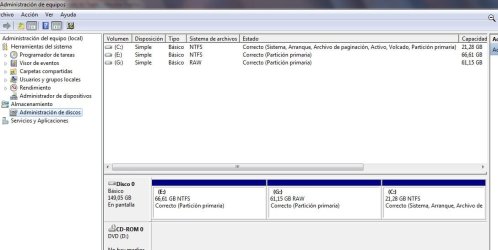
First, better boot into Win7 and post a screenie of Disk Management , to be sure.

http://www.sevenforums.com/tutorials/9733-how-post-screenshot-seven-forums.html
 

My Computers

System One System Two

  • Computer type
    PC/Desktop
    OS
    7 X64
    CPU
    i5 8400
    Motherboard
    gigabyte b365m ds3h
    Memory
    2x8gb 3200mhz
    Hard Drives
    various
    PSU
    pure power 11 400w cm
    Case
    Coolermaster
    Cooling
    cryorig m9i
  • Computer type
    PC/Desktop
    OS
    7x64
    CPU
    g5400
    Motherboard
    ga b365m ds3h
    Memory
    8gb ddr4 2400
    PSU
    xfx pro 450w
It might be that simple - it depends.

If you had XP installed first - XP partition will show as "system" when you are booted into 7.

If that is the case, boot the 7 dvd to command prompt, type:

bootsect /nt52 all

then press enter.

Should then be OK to delete 7 partition.

First, better boot into Win7 and post a screenie of Disk Management , to be sure.

http://www.sevenforums.com/tutorials/9733-how-post-screenshot-seven-forums.html

XP was installed first but Windows 7 displays the I:\ drive as "system" as that is the partition it in install in.
 

My Computer

Computer Manufacturer/Model Number
Desktop
OS
Windows 7 Professional x64
CPU
Intel i5-2500k @ 3.3Ghz
Motherboard
Gigabyte GA-Z77X-UD5H
Memory
4GB DDR3
Graphics Card(s)
Nvidia GTS250 1GB
Monitor(s) Displays
Sony SDM S95A
Screen Resolution
1280x1024
Hard Drives
1x 1TB, 2x 250GB HDDs
PSU
Corsair HX850W
Case
Cooler Master 690 II
Cooling
Thermalright True Spirit 140mm & 3x 120mm & 3x 140mm Fans
Keyboard
Logitech Media Keyboard
Mouse
Microsoft Intellimouse
Internet Speed
8MB
Definitely need a screenshot, then.

Should be easy to do once we see it.

Like this:

DISK-2-2009-11-06_151646.jpg
 

My Computers

System One System Two

  • Computer type
    PC/Desktop
    OS
    7 X64
    CPU
    i5 8400
    Motherboard
    gigabyte b365m ds3h
    Memory
    2x8gb 3200mhz
    Hard Drives
    various
    PSU
    pure power 11 400w cm
    Case
    Coolermaster
    Cooling
    cryorig m9i
  • Computer type
    PC/Desktop
    OS
    7x64
    CPU
    g5400
    Motherboard
    ga b365m ds3h
    Memory
    8gb ddr4 2400
    PSU
    xfx pro 450w
It might be that simple - it depends.

If you had XP installed first - XP partition will show as "system" when you are booted into 7.

If that is the case, boot the 7 dvd to command prompt, type:

bootsect /nt52 all

then press enter.

Should then be OK to delete 7 partition.

First, better boot into Win7 and post a screenie of Disk Management , to be sure.

http://www.sevenforums.com/tutorials/9733-how-post-screenshot-seven-forums.html

XP was installed first but Windows 7 displays the I:\ drive as "system" as that is the partition it in install in.

take screenshot on your disk management,, that's will be more easy to do next step on it.
 

My Computer

Computer Manufacturer/Model Number
built up
OS
windows 7
CPU
Phenom II AMD Dragon 3.5Ghz
Memory
DDR3 4GB
Graphics Card(s)
ATI Radeon 512Mb
Monitor(s) Displays
HP L1506
Screen Resolution
1152 x 864
Hard Drives
WDC 1 TB SATA-II Green Power
Keyboard
HP wireless keyboard
Mouse
HP Optic
Internet Speed
1GB
Use the Snipping Tool in Start Menu. Attach file using paper clip in Reply Box.
 
I've taken windows 7 out now but I still get the dual boot options screen when I start my PC up. Is there an option to get rid of this?
 

My Computer

Computer Manufacturer/Model Number
Desktop
OS
Windows 7 Professional x64
CPU
Intel i5-2500k @ 3.3Ghz
Motherboard
Gigabyte GA-Z77X-UD5H
Memory
4GB DDR3
Graphics Card(s)
Nvidia GTS250 1GB
Monitor(s) Displays
Sony SDM S95A
Screen Resolution
1280x1024
Hard Drives
1x 1TB, 2x 250GB HDDs
PSU
Corsair HX850W
Case
Cooler Master 690 II
Cooling
Thermalright True Spirit 140mm & 3x 120mm & 3x 140mm Fans
Keyboard
Logitech Media Keyboard
Mouse
Microsoft Intellimouse
Internet Speed
8MB
msconfig>Boot Tab> highlight the entry you don't want > Delete.
 

My Computers

System One System Two

  • Computer type
    PC/Desktop
    OS
    7 X64
    CPU
    i5 8400
    Motherboard
    gigabyte b365m ds3h
    Memory
    2x8gb 3200mhz
    Hard Drives
    various
    PSU
    pure power 11 400w cm
    Case
    Coolermaster
    Cooling
    cryorig m9i
  • Computer type
    PC/Desktop
    OS
    7x64
    CPU
    g5400
    Motherboard
    ga b365m ds3h
    Memory
    8gb ddr4 2400
    PSU
    xfx pro 450w

My Computer

Computer Manufacturer/Model Number
Desktop
OS
Windows 7 Professional x64
CPU
Intel i5-2500k @ 3.3Ghz
Motherboard
Gigabyte GA-Z77X-UD5H
Memory
4GB DDR3
Graphics Card(s)
Nvidia GTS250 1GB
Monitor(s) Displays
Sony SDM S95A
Screen Resolution
1280x1024
Hard Drives
1x 1TB, 2x 250GB HDDs
PSU
Corsair HX850W
Case
Cooler Master 690 II
Cooling
Thermalright True Spirit 140mm & 3x 120mm & 3x 140mm Fans
Keyboard
Logitech Media Keyboard
Mouse
Microsoft Intellimouse
Internet Speed
8MB
Back
Top