Uninstalling XP

Edsaid

New member
Power User
Local time
4:41 PM
Messages
63
Location
Gloucestershire, UK
Can anyone give me step-by-step 'how to' instructions to uninstall Windows XP from Windows 7 ?
 

My Computer

Computer Manufacturer/Model Number
Dell - Dimension 9200
OS
Windows 7
CPU
Intel
Memory
4GB
Graphics Card(s)
GForce 8600 GTX

My Computer

Computer type
PC/Desktop
Computer Manufacturer/Model Number
Pauly Special
OS
Win7 Ultimate X64
CPU
Intel i5 3570K
Motherboard
Gigabyte Z77X-DS3H
Memory
8GB DDR3 1600
Graphics Card(s)
Onboard
Sound Card
Onboard
Screen Resolution
1280x1024
Hard Drives
Samsung 840 Evo SSD (OS)
1TB Spinner (Data)
PSU
800W Arctic
Case
Cooler Master
Cooling
3x120mm Fans
Keyboard
MS Wireless
Mouse
MS Wireless
Internet Speed
20M
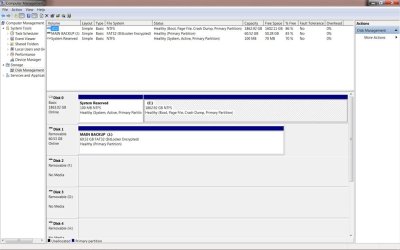
Please post back a screenshot of your maximized Disk Management drive map with listings, using Snipping TOol in Start Menu, so we can advise you best.
 
Thanks, everyone...

DriveMap.jpg attached. I do not use dual boot. I want to be rid of XP only so I don't have to bother maintaining it any more, as I no longer use it.
 

Attachments

  • DriveMap.jpg
    DriveMap.jpg
    69.8 KB · Views: 26

My Computer

Computer Manufacturer/Model Number
Dell - Dimension 9200
OS
Windows 7
CPU
Intel
Memory
4GB
Graphics Card(s)
GForce 8600 GTX
Where is it ? Is it in a Virtual Machine ? Is C: Windows 7 ?
 

My Computer

Computer type
PC/Desktop
Computer Manufacturer/Model Number
Skylake Special #666
OS
Windows 10 Pro x64
CPU
Intel Core i7 6700K
Motherboard
Asus Sabertooth Z170 Mark 1
Memory
GSkill TridentZ RGB 16GB 3600 16-16-16-36
Graphics Card(s)
EVGA GTX 980 Ti SC x2
Sound Card
Realtek High Definition
Monitor(s) Displays
AOC G2460PG
Screen Resolution
1920 x 1080 144Hz
Hard Drives
Samsung 860 Pro 256GB, Seagate Barracuda 4TB x2
PSU
EVGA 1000 P2, EVGA White Custom Braided Cables
Case
Corsair Vengeance C70 Gunmetal Black
Cooling
Corsair H100i v2, Corsair ML120 x2, Thermal Grizzly Kryonaut
Keyboard
Logitech G910 Orion Spectrum
Mouse
Logitech G700s
Internet Speed
Verizon Fios Quantum Gateway 75/75
Antivirus
Windows Defender, Malwarebytes Free 3.8.3
Browser
Chrome
Other Info
Corsair SP120 x4, LG Blu-ray Drive, Durabrand HT-395 100 Watt Dolby Digital Amp, Corsair H2100 Wireless 7.1 Headset
Looks like 7 is present or you replaced a 7 install to go back to XP when looking at the 100mb System Reserved partition created only by the Windows 7 installer. To simply wipe a drive clean you can boot up with the 7 dvd to the Install Now screen and click on the Repair tools link.

The Command prompt option will be found at the bottom of the list of repair options once you reach the second screen following the OS detection phase. Once you open that up and type in Disk Part and press enter you next type the following commands:
List Disk (will display both drives!)
select Disk 0 (once you verify that as the C OS drive)
List Volume (displays all partitions on drive)
Select volume # (one at time)
delete (nukes each separately) or
Clean (total wipe of drive)
create partition primary (create replacement primary partition)
format fs=ntfs 60 (formats drive to NTFS)
exit (exit Disk Part tool)

The format option when going through the initial 7 install is the second option while booting live to consider if planning a clean install of 7. Or you could opt for a 3rd party partitioning program.
 

My Computers

System One System Two

  • Computer type
    PC/Desktop
    Computer Manufacturer/Model Number
    Custom builds = 2
    OS
    W7 Ultimate x64/W10 Pro x64/W11 Pro Triple Boot - Main PC W7 Remote PC Micro ATX W7 Pro x64/W11 Pro
    CPU
    AMD Phenom II X4 975 Deneb 3.6ghz - 965 2nd remote pc
    Motherboard
    Gigabyte GA-790XTA-UD4-Gigabyte GA-880GM-D2H remote pc
    Memory
    Kingston Hyper X DDR3 1600 1.5v 16gb - Hyper X Fury 8gb 2nd
    Graphics Card(s)
    MSI HD Radeon 5750 1gb - MSI HD Radeon 6450 on mini tower
    Sound Card
    Creative Labs X-Fi Xtreme Audio P - Realtek onooard 2nd case
    Monitor(s) Displays
    ASUS VW199T-P 19" HP 2082a Main-HP 2082a 20" remote pc
    Screen Resolution
    Asus 1440x900 - HP 1600x900
    Hard Drives
    WD Black 1TB HD per OS W7, W10, and pending W11 presently on 500gb OS Drive - Pending Triple 1TB HDs for Spanned Storage/backup volume
    Single 2TB external USB enclosure, single 1TB System 7 Host/Boot drive, Pending 8TB external HD for system image b
    PSU
    Corsair 750TX - primary / Corsair CX600 - second
    Case
    Antec 900-2 - SSD compatible / NZXT Vulcan mini tower
    Cooling
    Zalman CNPS9900A
    Keyboard
    AZIO L70 Backlit Letters Gaming - ONN Cordless/USB
    Mouse
    MSI DS200 Programmable, Logitech Cordless
    Internet Speed
    30mbps upgrade - primary hard wired - mini tower usb WiFi
    Antivirus
    GFI VIPRE Internet Security 2014 on W7 2016 beta on W10,
    Browser
    Cyberfox, WaterFox 64bit FF variants, FireFox x64, Pale Moon
    Other Info
    Accomdata fan cooled usb 2.0 PIDE/Sata II, III external enclosure.
    Sambient usb/eSata PATA/Sata II, III external enclosure.
  • Computer type
    PC/Desktop
    System Manufacturer/Model Number
    CUSTOM ASSEMBLY
    OS
    W7 Pro x64/W11 Pro
    CPU
    AMD Deneb 3.6ghz - 965
    Motherboard
    Gigabyte GA-880GM-D2H remote pc
    Memory
    Kingston Hyper X Fury 8gb
    Graphics Card(s)
    MSI HD Radeon 6450 DVI Output
    Sound Card
    Realtek onooard Creative or Other separate PENDING
    Monitor(s) Displays
    VIZIO 32" LCD TV Separate LCD Pending
    Screen Resolution
    1600x1080
    Hard Drives
    WD 500GB OS Host/Boot WD Green 1TB Storage/Backup
    PSU
    Corsair 600W - THERMALTAKE 600W spare case
    Case
    NZXT Vulcan mini tower
    Cooling
    Twin 120mm Top Fans - 240mm Side Cover
    Keyboard
    ONN Cordless/USB Logitech Cordless
    Mouse
    ONN USB/Cordless - Logitech Cordless
    Internet Speed
    DSL 5G
    Browser
    MS Edge, FireFox, WaterFox x64, FireFox Nightly
    Other Info
    OS Testing-Remote Access to Main TeamViewer
Addram: yes it is the virtual machine (Windows Virtual PC option).

Night Hawk: I think this might affect your suggestion.
 

My Computer

Computer Manufacturer/Model Number
Dell - Dimension 9200
OS
Windows 7
CPU
Intel
Memory
4GB
Graphics Card(s)
GForce 8600 GTX
Can you not just uninstall XP in the virtual app or uninstall the virtual app itself? There is nothing about XP which is affecting the bootability of your system .
 
Gregrocker: I am not sure. Windows XP Mode shows in "Control Panel/Uninstall a Program" but there is nothing indicating Windows Virtual PC which is the main shortcut on the Start menu. The Start Menu tree shows - Windows Virtual PC/Windows Virtual PC/Windows XP Mode/Windows XP Mode Applications... The last on the tree shows all the applications installed on XP, such as Avast Security, Scansoft among others.

Window 7 is the OEM installation on my PC and I downloaded XP from Microsoft free of charge so that I could run a few incompatible apps.

I can leave it where it is as it is not vital. It's just the discomfort of knowing it is there and unmaintained Updates wise.
 

My Computer

Computer Manufacturer/Model Number
Dell - Dimension 9200
OS
Windows 7
CPU
Intel
Memory
4GB
Graphics Card(s)
GForce 8600 GTX
I respect your advice and will do as you suggest. Just a little apprehensively...!! Thanks again.

I'll let you know if it goes belly-up.
 

My Computer

Computer Manufacturer/Model Number
Dell - Dimension 9200
OS
Windows 7
CPU
Intel
Memory
4GB
Graphics Card(s)
GForce 8600 GTX
What could go belly up from uninstalling a program? XP? isn't that what you want?
 
I still haven't gotten around to reinstalling it since 7 went on clean again recently. The VPC itself goes on like any other Windows update. "KB958559-64.msu"

The XP Mode has a separate program installer you see in the Programs & Features. That will automatically download and install the VPC as one package since the initial beta release saw both as separate items until MS incorporated the two together for the updated version as an addition option to see both conbined. You likely downloaded the combo version rather then downloading each separately when going to see it installed.

The VPC is still available as a separate download however from Download Windows XP Mode

The options on the first page bring to that or you can choose to download the XP Mode separately in case the VPC was installed separately, Download Windows XP Mode

Here I had the two of those on plus the VMLite Workstation for XP Mode on the 7 install just cleaned a few weeks ago.
 

My Computers

System One System Two

  • Computer type
    PC/Desktop
    Computer Manufacturer/Model Number
    Custom builds = 2
    OS
    W7 Ultimate x64/W10 Pro x64/W11 Pro Triple Boot - Main PC W7 Remote PC Micro ATX W7 Pro x64/W11 Pro
    CPU
    AMD Phenom II X4 975 Deneb 3.6ghz - 965 2nd remote pc
    Motherboard
    Gigabyte GA-790XTA-UD4-Gigabyte GA-880GM-D2H remote pc
    Memory
    Kingston Hyper X DDR3 1600 1.5v 16gb - Hyper X Fury 8gb 2nd
    Graphics Card(s)
    MSI HD Radeon 5750 1gb - MSI HD Radeon 6450 on mini tower
    Sound Card
    Creative Labs X-Fi Xtreme Audio P - Realtek onooard 2nd case
    Monitor(s) Displays
    ASUS VW199T-P 19" HP 2082a Main-HP 2082a 20" remote pc
    Screen Resolution
    Asus 1440x900 - HP 1600x900
    Hard Drives
    WD Black 1TB HD per OS W7, W10, and pending W11 presently on 500gb OS Drive - Pending Triple 1TB HDs for Spanned Storage/backup volume
    Single 2TB external USB enclosure, single 1TB System 7 Host/Boot drive, Pending 8TB external HD for system image b
    PSU
    Corsair 750TX - primary / Corsair CX600 - second
    Case
    Antec 900-2 - SSD compatible / NZXT Vulcan mini tower
    Cooling
    Zalman CNPS9900A
    Keyboard
    AZIO L70 Backlit Letters Gaming - ONN Cordless/USB
    Mouse
    MSI DS200 Programmable, Logitech Cordless
    Internet Speed
    30mbps upgrade - primary hard wired - mini tower usb WiFi
    Antivirus
    GFI VIPRE Internet Security 2014 on W7 2016 beta on W10,
    Browser
    Cyberfox, WaterFox 64bit FF variants, FireFox x64, Pale Moon
    Other Info
    Accomdata fan cooled usb 2.0 PIDE/Sata II, III external enclosure.
    Sambient usb/eSata PATA/Sata II, III external enclosure.
  • Computer type
    PC/Desktop
    System Manufacturer/Model Number
    CUSTOM ASSEMBLY
    OS
    W7 Pro x64/W11 Pro
    CPU
    AMD Deneb 3.6ghz - 965
    Motherboard
    Gigabyte GA-880GM-D2H remote pc
    Memory
    Kingston Hyper X Fury 8gb
    Graphics Card(s)
    MSI HD Radeon 6450 DVI Output
    Sound Card
    Realtek onooard Creative or Other separate PENDING
    Monitor(s) Displays
    VIZIO 32" LCD TV Separate LCD Pending
    Screen Resolution
    1600x1080
    Hard Drives
    WD 500GB OS Host/Boot WD Green 1TB Storage/Backup
    PSU
    Corsair 600W - THERMALTAKE 600W spare case
    Case
    NZXT Vulcan mini tower
    Cooling
    Twin 120mm Top Fans - 240mm Side Cover
    Keyboard
    ONN Cordless/USB Logitech Cordless
    Mouse
    ONN USB/Cordless - Logitech Cordless
    Internet Speed
    DSL 5G
    Browser
    MS Edge, FireFox, WaterFox x64, FireFox Nightly
    Other Info
    OS Testing-Remote Access to Main TeamViewer
GregLocker: All went ok... I cannot remember the sequence when installing - if Virtual Machine was separate - so I was just slightly worried in case I had any nuisance shrapnel left over. I did not doubt your advice or I would not have taken it. I hope I did not offend you...!

Night Hawk: Thanks for your input. I am now sure both were installed as a single package. GregLocker's advice worked fine.

Of course, I could have done it without contacting the forum, but you can bet, the day one does is when it all goes wrong...!"

 

My Computer

Computer Manufacturer/Model Number
Dell - Dimension 9200
OS
Windows 7
CPU
Intel
Memory
4GB
Graphics Card(s)
GForce 8600 GTX
Not at all, Ed. Glad to help.

I was actually thinking aloud after mulling over whether XP could reach outside of the virtual program, since I am not much of a virtualoso.
 
greglocker: great pun...! :D
 

My Computer

Computer Manufacturer/Model Number
Dell - Dimension 9200
OS
Windows 7
CPU
Intel
Memory
4GB
Graphics Card(s)
GForce 8600 GTX
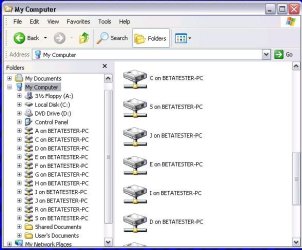
It does reach outside the VM with the integrated components! :roflmao: "reach out and touch that drive!"

Originally the beta and first final version of the XP Mode required the separate install and reboot for the Virtual PC. The second updated release incorporated the VPC and XP Mode into one download. That's how that went.

I think MS must of got tired answering installation problems since they never specified the need to restart the system first once the VPC was on before trying to install the XP Mode last. The installation was more involved there then the removal which goes much easier.
 

Attachments

  • XP Mode Drive List.jpg
    XP Mode Drive List.jpg
    52.2 KB · Views: 5

My Computers

System One System Two

  • Computer type
    PC/Desktop
    Computer Manufacturer/Model Number
    Custom builds = 2
    OS
    W7 Ultimate x64/W10 Pro x64/W11 Pro Triple Boot - Main PC W7 Remote PC Micro ATX W7 Pro x64/W11 Pro
    CPU
    AMD Phenom II X4 975 Deneb 3.6ghz - 965 2nd remote pc
    Motherboard
    Gigabyte GA-790XTA-UD4-Gigabyte GA-880GM-D2H remote pc
    Memory
    Kingston Hyper X DDR3 1600 1.5v 16gb - Hyper X Fury 8gb 2nd
    Graphics Card(s)
    MSI HD Radeon 5750 1gb - MSI HD Radeon 6450 on mini tower
    Sound Card
    Creative Labs X-Fi Xtreme Audio P - Realtek onooard 2nd case
    Monitor(s) Displays
    ASUS VW199T-P 19" HP 2082a Main-HP 2082a 20" remote pc
    Screen Resolution
    Asus 1440x900 - HP 1600x900
    Hard Drives
    WD Black 1TB HD per OS W7, W10, and pending W11 presently on 500gb OS Drive - Pending Triple 1TB HDs for Spanned Storage/backup volume
    Single 2TB external USB enclosure, single 1TB System 7 Host/Boot drive, Pending 8TB external HD for system image b
    PSU
    Corsair 750TX - primary / Corsair CX600 - second
    Case
    Antec 900-2 - SSD compatible / NZXT Vulcan mini tower
    Cooling
    Zalman CNPS9900A
    Keyboard
    AZIO L70 Backlit Letters Gaming - ONN Cordless/USB
    Mouse
    MSI DS200 Programmable, Logitech Cordless
    Internet Speed
    30mbps upgrade - primary hard wired - mini tower usb WiFi
    Antivirus
    GFI VIPRE Internet Security 2014 on W7 2016 beta on W10,
    Browser
    Cyberfox, WaterFox 64bit FF variants, FireFox x64, Pale Moon
    Other Info
    Accomdata fan cooled usb 2.0 PIDE/Sata II, III external enclosure.
    Sambient usb/eSata PATA/Sata II, III external enclosure.
  • Computer type
    PC/Desktop
    System Manufacturer/Model Number
    CUSTOM ASSEMBLY
    OS
    W7 Pro x64/W11 Pro
    CPU
    AMD Deneb 3.6ghz - 965
    Motherboard
    Gigabyte GA-880GM-D2H remote pc
    Memory
    Kingston Hyper X Fury 8gb
    Graphics Card(s)
    MSI HD Radeon 6450 DVI Output
    Sound Card
    Realtek onooard Creative or Other separate PENDING
    Monitor(s) Displays
    VIZIO 32" LCD TV Separate LCD Pending
    Screen Resolution
    1600x1080
    Hard Drives
    WD 500GB OS Host/Boot WD Green 1TB Storage/Backup
    PSU
    Corsair 600W - THERMALTAKE 600W spare case
    Case
    NZXT Vulcan mini tower
    Cooling
    Twin 120mm Top Fans - 240mm Side Cover
    Keyboard
    ONN Cordless/USB Logitech Cordless
    Mouse
    ONN USB/Cordless - Logitech Cordless
    Internet Speed
    DSL 5G
    Browser
    MS Edge, FireFox, WaterFox x64, FireFox Nightly
    Other Info
    OS Testing-Remote Access to Main TeamViewer
Back
Top