Universal Thumb Drive + Recovery Environments

Ageeb

New member
Pro User
VIP
Local time
4:09 AM
Messages
196
Location
Minnesota
Here is my goal:
To create a universal install thumb drive of sp1 installs with both recovery environments on it. If possible, I would love to get a utility or two on it as well like Parted Magic (with possible boot menu?).

I've been snooping around this afternoon looking at threads like following to get me started.
creating a 2 OS thumb drive
Windows 7 Universal Installation Disc - Create

What I have so far is both the x86/x64 sp1 iso's downloaded. Now i'm trying to figure out what steps i need to take to get both environments into the same setup before i move on.

If anyone could point me to some more definitive literature on how to set up this task, I would greatly appreciate it.
 

My Computer My Computer

Computer Manufacturer/Model Number
Custom
OS
Windows 7 Ultimate x64
CPU
Intel i5-2500k
Motherboard
ASUS P8Z68-V Pro/GEN3
Memory
16GB
Graphics Card(s)
2x Radeon HD7970 Crossfire
Sound Card
On-Board / Logitech G930
Monitor(s) Displays
3x Dell u2412m
Screen Resolution
5760x1200
Hard Drives
Toshiba thns064gg2bbaa SSD
Seagate Barracuda 7200.12 ST31000528AS 1TB
Intel RST SSD caching enabled
PSU
Corsair AX850
Case
Corsair Obsidian 650D
Cooling
Corsair H100
Keyboard
Logitech Illuminated
Mouse
Logitech M510 Wireless
Internet Speed
1Mb/s

My Computer My Computer

Computer Manufacturer/Model Number
* BFK Customs *
OS
W 7 64-bit Ultimate
CPU
Intel Q9550 Yorkfield
Motherboard
ASUS P5Q Pro
Memory
8GB Dominator 8500C5D
Graphics Card(s)
ATI : XFX 5870
Sound Card
Realtek HD Audio 7-1
Monitor(s) Displays
1x 47" LCD HDMI & 3x 26" LCD HDMI
Screen Resolution
1920x1080P & 1920x1200
Hard Drives
1x 80GB Intel X25-M G2 SSD : 1x 500GB & 1x 640GB WD Caviar Black(s)
PSU
Corsair 620HX
Case
Cooler Master RC-690
Cooling
Tuniq Tower 120, 2x 140mm and 3x 120mm case fans
Keyboard
Microsoft 500
Mouse
Razer Diamondback 3G
Internet Speed
14 Mb/s
Other Info
1x Koutech 3Gb/s SATA HDD Hot Swap Rack
Will i need each ISO with that method?
 

My Computer My Computer

Computer Manufacturer/Model Number
Custom
OS
Windows 7 Ultimate x64
CPU
Intel i5-2500k
Motherboard
ASUS P8Z68-V Pro/GEN3
Memory
16GB
Graphics Card(s)
2x Radeon HD7970 Crossfire
Sound Card
On-Board / Logitech G930
Monitor(s) Displays
3x Dell u2412m
Screen Resolution
5760x1200
Hard Drives
Toshiba thns064gg2bbaa SSD
Seagate Barracuda 7200.12 ST31000528AS 1TB
Intel RST SSD caching enabled
PSU
Corsair AX850
Case
Corsair Obsidian 650D
Cooling
Corsair H100
Keyboard
Logitech Illuminated
Mouse
Logitech M510 Wireless
Internet Speed
1Mb/s
I carry a 16gb Kingston Data Traveler flash stick in my pocket with Win7 & Vista bootable all version 32- and 64-bit installers, XP 9-in-1 ISO, plus everything I need to set up my installs including Works, 3 flavors of Office, Adobe Flash & Reader, Java, 120 Win7 national-edition backgrounds, Firefox, Chrome, IE8&9, EasyBCD, iTunes, Partition Wizard home and boot, ImgBurn, TeamViewer, CCleaner, Defraggers, PowerISO, UltraISO, WinRAR, 7zip, and another 2 dozen tools and apps.

I set this up by installing UltraISO trial version, on File tab open Win7 ISO, on Bootable Tab write DIsk Image, click Format button, click Write button. This nt60-bootsects the stick and loads Win7 files into it. I then place the Win7 files into a folder, copy all of my apps and tools into it, Vista files in their own folder.

When I want to install Win7, I spill its files out of it's folder into the root and the stick will boot Win7 installer - likewise Vista. At other times I keep them in their folder so they dont' get in the way of my other tools and apps which are constantlly being swapped in and out depending on the installs I'm doing that week.

This allows me to show up to install with only a stick in a baggie in my pocket. I sometimes forget and take it surfing with me. The same stick has lasted me 5 years. I'd like to get a new one but I can't seem to lose or kill it.
 
It is for choosing one of several iso files from the grub boot menu - so yes, you could put a separate 64 bit recovery iso on there.
 

My Computers My Computers

System One System Two

  • Computer type
    PC/Desktop
    OS
    7 X64
    CPU
    i5 8400
    Motherboard
    gigabyte b365m ds3h
    Memory
    2x8gb 3200mhz
    Hard Drives
    various
    PSU
    pure power 11 400w cm
    Case
    Coolermaster
    Cooling
    cryorig m9i
  • Computer type
    PC/Desktop
    OS
    7x64
    CPU
    g5400
    Motherboard
    ga b365m ds3h
    Memory
    8gb ddr4 2400
    PSU
    xfx pro 450w
So here's where i'm at:

Derailed pretty quick, but it ends with a good note. The "Requirements" section of the guide Bare Foot Kid linked to got me stumped at step 1.
Requirements:

1. MultibootISO > Install Grub4Dos easily into USB Flash Drive/External Hard Disk
Get it here: Boot Multiple ISO from USB (MultiBoot USB) | USB Pen Drive Linux
or here: http://www.pendrivelinux.com/downloa...SOs-v1.4.8.exe

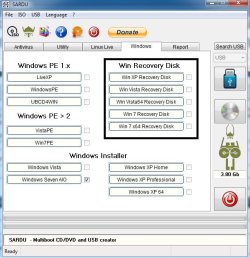
I couldn't seem to find anything called MultibootISO from those links, and even anything closely related was nowhere near v1.4.8, but it did lead me to a utility called YUMI which is pretty cool in itself, and one other very similar one called SARDU. I think this will do exactly what i was looking for.

So my question is, what is the easiest way for me to aquire the iso's for the section i have blocked off in the pic? Will it be to create the disc from each edition and then create an ISO of that? Man i hope there's an easier way :D

sardu.jpg
 

My Computer My Computer

Computer Manufacturer/Model Number
Custom
OS
Windows 7 Ultimate x64
CPU
Intel i5-2500k
Motherboard
ASUS P8Z68-V Pro/GEN3
Memory
16GB
Graphics Card(s)
2x Radeon HD7970 Crossfire
Sound Card
On-Board / Logitech G930
Monitor(s) Displays
3x Dell u2412m
Screen Resolution
5760x1200
Hard Drives
Toshiba thns064gg2bbaa SSD
Seagate Barracuda 7200.12 ST31000528AS 1TB
Intel RST SSD caching enabled
PSU
Corsair AX850
Case
Corsair Obsidian 650D
Cooling
Corsair H100
Keyboard
Logitech Illuminated
Mouse
Logitech M510 Wireless
Internet Speed
1Mb/s
  • Like
Reactions: JMH
Yep you could use Sardu.

Those are just labels, you can assign any iao to any of the windows ones.

E.g. You can Use The Windows 7 recovery disc entry for your AIO iso

Thern win7x64 entry for your 64 bit repair iso

Then use
 

My Computers My Computers

System One System Two

  • Computer type
    PC/Desktop
    OS
    7 X64
    CPU
    i5 8400
    Motherboard
    gigabyte b365m ds3h
    Memory
    2x8gb 3200mhz
    Hard Drives
    various
    PSU
    pure power 11 400w cm
    Case
    Coolermaster
    Cooling
    cryorig m9i
  • Computer type
    PC/Desktop
    OS
    7x64
    CPU
    g5400
    Motherboard
    ga b365m ds3h
    Memory
    8gb ddr4 2400
    PSU
    xfx pro 450w
Yea i gathered that SIW2, thank you!

I'm more curious how i can obtain the recovery disks in ISO form other than actually creating the disc and then making an ISO from that. Can they be extracted from the editions somehow? Hosted on technet somewhere?
 

My Computer My Computer

Computer Manufacturer/Model Number
Custom
OS
Windows 7 Ultimate x64
CPU
Intel i5-2500k
Motherboard
ASUS P8Z68-V Pro/GEN3
Memory
16GB
Graphics Card(s)
2x Radeon HD7970 Crossfire
Sound Card
On-Board / Logitech G930
Monitor(s) Displays
3x Dell u2412m
Screen Resolution
5760x1200
Hard Drives
Toshiba thns064gg2bbaa SSD
Seagate Barracuda 7200.12 ST31000528AS 1TB
Intel RST SSD caching enabled
PSU
Corsair AX850
Case
Corsair Obsidian 650D
Cooling
Corsair H100
Keyboard
Logitech Illuminated
Mouse
Logitech M510 Wireless
Internet Speed
1Mb/s

My Computer My Computer

Computer Manufacturer/Model Number
* BFK Customs *
OS
W 7 64-bit Ultimate
CPU
Intel Q9550 Yorkfield
Motherboard
ASUS P5Q Pro
Memory
8GB Dominator 8500C5D
Graphics Card(s)
ATI : XFX 5870
Sound Card
Realtek HD Audio 7-1
Monitor(s) Displays
1x 47" LCD HDMI & 3x 26" LCD HDMI
Screen Resolution
1920x1080P & 1920x1200
Hard Drives
1x 80GB Intel X25-M G2 SSD : 1x 500GB & 1x 640GB WD Caviar Black(s)
PSU
Corsair 620HX
Case
Cooler Master RC-690
Cooling
Tuniq Tower 120, 2x 140mm and 3x 120mm case fans
Keyboard
Microsoft 500
Mouse
Razer Diamondback 3G
Internet Speed
14 Mb/s
Other Info
1x Koutech 3Gb/s SATA HDD Hot Swap Rack
Special thanks to Bare Foot Kid for the link to the Grub4Dos guide!

Reading that led me to the final tool of choice for myself, SARDU, and I now have a selectable multiboot thumbdrive with:

AntiVirus Rescue's
- Gdata
- Kaspersky
- F-Secure
- Panda

Utilities
- Macrium Rescue
- Parted Magic
- Clonezilla

Windows
- Windows 7 SP1 x86/x64 AIO installer
- Vista 32b recovery
- Vista 64b recovery
- 7 32b recovery
- 7 64b recovery

Thanks again all! rep's on me tonight!
 

My Computer My Computer

Computer Manufacturer/Model Number
Custom
OS
Windows 7 Ultimate x64
CPU
Intel i5-2500k
Motherboard
ASUS P8Z68-V Pro/GEN3
Memory
16GB
Graphics Card(s)
2x Radeon HD7970 Crossfire
Sound Card
On-Board / Logitech G930
Monitor(s) Displays
3x Dell u2412m
Screen Resolution
5760x1200
Hard Drives
Toshiba thns064gg2bbaa SSD
Seagate Barracuda 7200.12 ST31000528AS 1TB
Intel RST SSD caching enabled
PSU
Corsair AX850
Case
Corsair Obsidian 650D
Cooling
Corsair H100
Keyboard
Logitech Illuminated
Mouse
Logitech M510 Wireless
Internet Speed
1Mb/s
Well done mate, glad I could assist you and thanks for the update
 

My Computer My Computer

Computer Manufacturer/Model Number
* BFK Customs *
OS
W 7 64-bit Ultimate
CPU
Intel Q9550 Yorkfield
Motherboard
ASUS P5Q Pro
Memory
8GB Dominator 8500C5D
Graphics Card(s)
ATI : XFX 5870
Sound Card
Realtek HD Audio 7-1
Monitor(s) Displays
1x 47" LCD HDMI & 3x 26" LCD HDMI
Screen Resolution
1920x1080P & 1920x1200
Hard Drives
1x 80GB Intel X25-M G2 SSD : 1x 500GB & 1x 640GB WD Caviar Black(s)
PSU
Corsair 620HX
Case
Cooler Master RC-690
Cooling
Tuniq Tower 120, 2x 140mm and 3x 120mm case fans
Keyboard
Microsoft 500
Mouse
Razer Diamondback 3G
Internet Speed
14 Mb/s
Other Info
1x Koutech 3Gb/s SATA HDD Hot Swap Rack
I use the Grub4Dos for a multi boot USB and find it very useful
Just swap the isos for new editions.

In addition windows system repair, Macrium etc you can consider
- Partition Wizard 4.2 (in addition to 5.2) is good to have for dynamic disk conversion.
- Hiren's Boot CD v13 (other tools + mini XP environment)
The mini XP environment lets you run most windows standalone *.exes.
- Puppy linux
 

My Computer My Computer

Computer type
PC/Desktop
Computer Manufacturer/Model Number
Own build
OS
Windows 7x64 Home Premium SP1
CPU
Intel i7 2600k
Motherboard
ASUS P8Z68 Deluxe
Memory
G.Skill Ripjaws (DDR3-1600) 2x4GB
Graphics Card(s)
Nvidia GeForce GTS 450; Intel HD Graphics 3000(GT2+)
Monitor(s) Displays
Dell Ultrasharp IPS panel U2311H, Samsung SyncMaster P2350
Screen Resolution
1920x1080
Hard Drives
Samsung 850 Pro SSD 256GB, Samsung SSD 840 120GB, Seagates 1TB Barracuda ST31000528AS x2
PSU
Seasonic M12II 520W
Case
Lian Li Lancool PC-K60
Cooling
Case: 1x120mm, 3x140mm CPU: Hyper 212+
Keyboard
Logitech MK520 (wireless)
Mouse
Logitech MK520
Internet Speed
6-7 Mbps
Antivirus
Norton Security Premium, Malwarebytes on 2 (MSE on 3rd PC)
Browser
FireFox
Other Info
Audio: Logitech Z523 2.1
Back
Top