Universal Windows 7 Installation Disc

Paul Black

I WANT TO BELIEVE!
Guru
VIP
Local time
11:06 PM
Messages
3,823
Location
Planet Earth VGhlIFgtRmlsZXM=
Good afternoon,

Am I right in saying that once I delete/rename the \Sources\ei.cfg file that the following versions/editions will be available?

Windows 7 Starter x86
Windows 7 Home Basic x86
Windows 7 Home Premium x86
Windows 7 Professional x86
Windows 7 Ultimate x86

Windows 7 Starter x64 (NOT AVAILABLE AS 64-bit)
Windows 7 Home Basic x64
Windows 7 Home Premium x64
Windows 7 Professional x64
Windows 7 Ultimate x64

Thanks in advance.
 

My Computer

Computer type
Laptop
Computer Manufacturer/Model Number
Fujitsu LIFEBOOK
OS
Win 7 HP SP1 64-bit Vista HB SP2 32-bit Linux Mint 18.3
CPU
Intel(R) Pentium(R) CPU P6200 @ 2.13GHz
Motherboard
FUJITSU FJNBB06
Memory
4.00 GB
Graphics Card(s)
Intel(R) Graphics Media Accelerator HD
Sound Card
[1] Realtek High Definition Audio [2] Intel(R) Display Audio
Screen Resolution
1366 x 768 x 32 bits (4294967296 colors) @ 59 Hz
Hard Drives
TOSHIBA MK5076GSX
Antivirus
AVG FREE
Not sure, but I AM sure that you won't have both 32-bit and 64-bit Windows on the same install disk.

If this is true, and you were a computer technician, it would be very handy to only have to carry around one Windows disk for all of your customers, and then install the version that matches their license key.
 

My Computer

Computer type
PC/Desktop
Computer Manufacturer/Model Number
Dell
OS
Linux Mint 18.2 xfce 64-bit (VMWare host) / Windows 8.1 Pro 32-bit (VMWare guest)
CPU
Haswell
Memory
4 GB
Monitor(s) Displays
Acer 23"
Screen Resolution
1920 x 1080
Hard Drives
Two hard drives, 1TB each: One for Linux, one for my data.
Keyboard
IBM Model M
Antivirus
Sophos (Linux), Trend Micro (Windows)
Browser
Firefox, Opera
Other Info
I use Samba to share my data drive with the other computers at my house and with my guest session in VMWare Workstation Player.
Yes, the 32 bit media will show
Windows 7 Starter x86
Windows 7 Home Basic x86
Windows 7 Home Premium x86
Windows 7 Professional x86
Windows 7 Ultimate x86

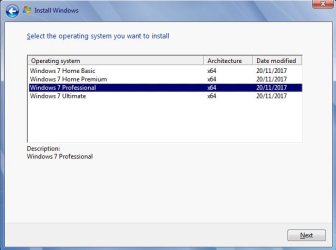
The 64 bit media will show
Windows 7 Home Basic x64
Windows 7 Home Premium x64
Windows 7 Professional x64
Windows 7 Ultimate x64

You could also integrate drivers and updates into the images ( integrating all the updates takes a while ).


Good afternoon,

Am I right in saying that once I delete/rename the \Sources\ei.cfg file that the following versions/editions will be available?

Windows 7 Starter x86
Windows 7 Home Basic x86
Windows 7 Home Premium x86
Windows 7 Professional x86
Windows 7 Ultimate x86

Windows 7 Starter x64 (NOT AVAILABLE AS 64-bit)
Windows 7 Home Basic x64
Windows 7 Home Premium x64
Windows 7 Professional x64
Windows 7 Ultimate x64

Thanks in advance.
 

My Computers

System One System Two

  • Computer type
    PC/Desktop
    OS
    7 X64
    CPU
    i5 8400
    Motherboard
    gigabyte b365m ds3h
    Memory
    2x8gb 3200mhz
    Hard Drives
    various
    PSU
    pure power 11 400w cm
    Case
    Coolermaster
    Cooling
    cryorig m9i
  • Computer type
    PC/Desktop
    OS
    7x64
    CPU
    g5400
    Motherboard
    ga b365m ds3h
    Memory
    8gb ddr4 2400
    PSU
    xfx pro 450w
Thank you both for the replies, it is appreciated.

Yes it would be handy if the 32-bit and 64-bit could fit onto one disc.
I was just trying to clarify what was available on the 32-bit and 64-bit installation discs.

Thanks again and have a great weekend :) .
 

My Computer

Computer type
Laptop
Computer Manufacturer/Model Number
Fujitsu LIFEBOOK
OS
Win 7 HP SP1 64-bit Vista HB SP2 32-bit Linux Mint 18.3
CPU
Intel(R) Pentium(R) CPU P6200 @ 2.13GHz
Motherboard
FUJITSU FJNBB06
Memory
4.00 GB
Graphics Card(s)
Intel(R) Graphics Media Accelerator HD
Sound Card
[1] Realtek High Definition Audio [2] Intel(R) Display Audio
Screen Resolution
1366 x 768 x 32 bits (4294967296 colors) @ 59 Hz
Hard Drives
TOSHIBA MK5076GSX
Antivirus
AVG FREE
You could also integrate drivers and updates into the images ( integrating all the updates takes a while ).
Thanks for the information above SIW2 but that does sound complicated, especially not knowing which are the main updates to include and how to do it. I think I read somewhere about slipstreaming to achieve this though.
 

My Computer

Computer type
Laptop
Computer Manufacturer/Model Number
Fujitsu LIFEBOOK
OS
Win 7 HP SP1 64-bit Vista HB SP2 32-bit Linux Mint 18.3
CPU
Intel(R) Pentium(R) CPU P6200 @ 2.13GHz
Motherboard
FUJITSU FJNBB06
Memory
4.00 GB
Graphics Card(s)
Intel(R) Graphics Media Accelerator HD
Sound Card
[1] Realtek High Definition Audio [2] Intel(R) Display Audio
Screen Resolution
1366 x 768 x 32 bits (4294967296 colors) @ 59 Hz
Hard Drives
TOSHIBA MK5076GSX
Antivirus
AVG FREE
Probably easier just to integrate drivers. Nvme and mass storage drivers to add support for Skylake, etc is easy enough.
Using something like Dism++ makes it simple.


Install media updated in November
win7-updatedmedia.jpg
 

My Computers

System One System Two

  • Computer type
    PC/Desktop
    OS
    7 X64
    CPU
    i5 8400
    Motherboard
    gigabyte b365m ds3h
    Memory
    2x8gb 3200mhz
    Hard Drives
    various
    PSU
    pure power 11 400w cm
    Case
    Coolermaster
    Cooling
    cryorig m9i
  • Computer type
    PC/Desktop
    OS
    7x64
    CPU
    g5400
    Motherboard
    ga b365m ds3h
    Memory
    8gb ddr4 2400
    PSU
    xfx pro 450w
Yes, the 32 bit media will show
Windows 7 Starter x86
Windows 7 Home Basic x86
Windows 7 Home Premium x86
Windows 7 Professional x86
Windows 7 Ultimate x86

The 64 bit media will show
Windows 7 Home Basic x64
Windows 7 Home Premium x64
Windows 7 Professional x64
Windows 7 Ultimate x64

You could also integrate drivers and updates into the images ( integrating all the updates takes a while ).

Hello:)
Sorry if I kidnapped this thread.
I wonder if you have a guide or want to write an how to do the miracle install USB drive with X86 and X64 and all the updates?
Now I have one x86starter-->Ultimate and one X64basic-->ultimate on separate usb drives.. But I really love the idea with all versions on only one drive with all the security updates.. (up to the monthly updates) It would really make reinstallations easier in the future. :p:D:party::dinesh:
(we have 6 or 7 windows 7 computers in the family)
//Marie
 

My Computer

Computer type
PC/Desktop
Computer Manufacturer/Model Number
AsusX53, Aspire E1-572. AsusUX32A, HP Pro3130mt+3010mt, HP Proliant ML150G3, 3xCustom, i3, i5, i7
OS
Linux:Debian, Kali.. 2xWin8.1,2x,1x7Pro, Retro:1x2003server.1xXPpro, 1xW2k,1x98SE,1x95,1x3.11
CPU
cpu's intel 8088 up to intel i7 gen9.. dual xenon on server
Motherboard
a lot of them :-)
Memory
oldest 1024KB newest 64GB
Graphics Card(s)
mostly internals i don't game
Sound Card
old retro=soundblaster.. newer ones internal
Monitor(s) Displays
smalest 12" largest 26"
Internet Speed
100/100
Antivirus
NortonInternetSecurity, MS, Avast, (not on the same computer
Browser
IE8, IE9. IE11, Firefox
Other Info
I can't fit all info on all my computers in these fields :-D
1. If all your machines are the same edition, then you need only update that edition in the install.wim file.

This is one way:
simplix

2. If you need to update all the editions:

It takes a long time to update all the images individually.

Quicker to update image 1, then save it 4 times into a newInstall.wim.

Then mount newInstall.wim image 2 and change it to the next highest edition ( HomePremium). Commit the changes and unmount.

Then mount newInstall.wim image 3 and change it to the next highest edition ( Professional). Commit the changes and unmount.
 

My Computers

System One System Two

  • Computer type
    PC/Desktop
    OS
    7 X64
    CPU
    i5 8400
    Motherboard
    gigabyte b365m ds3h
    Memory
    2x8gb 3200mhz
    Hard Drives
    various
    PSU
    pure power 11 400w cm
    Case
    Coolermaster
    Cooling
    cryorig m9i
  • Computer type
    PC/Desktop
    OS
    7x64
    CPU
    g5400
    Motherboard
    ga b365m ds3h
    Memory
    8gb ddr4 2400
    PSU
    xfx pro 450w
Back
Top