Unknown Device Frustration

brandoncolorado

New member
Local time
12:34 AM
Messages
3
Hi,

I have Windows 7 RC. I am having an annoying problem, and I cannot figure out how to solve it. Basically, any external media I attach to my netbook shows up as an "unknown device" in device manager and does not show up in my computer as a drive.

Relevant troubleshooting info:

1) This happens with USB drives that work in other computers
2) This happens with either USB port.
3) This happens with the internal Secure Digital Card reader.

I can't reinstall Windows 7 or install another operating system without some way to boot to the USB or SD.

Any ideas?

Thanks
 

My Computer

Computer Manufacturer/Model Number
HP Mini 1030NR
OS
Windows 7
CPU
1.6 Atom
Motherboard
Unknown
Memory
1Gb
Graphics Card(s)
Intel
Hard Drives
16GB SSD
welcome brandoncolorado to Sevenforums.....

open device manager(while the device is in the usb port ) expand the universal serial bus controller and check if there is any exclamatory sign on the icon of Usb mass storage device.

post a screen shot if possible...
 

My Computer

Computer Manufacturer/Model Number
Custom made
OS
Window 7 build 7600, Xp pro(VM)
CPU
Amd Athlon 2000 xp+
Motherboard
Asus x series
Memory
kingstone(1gb+256MB)
Graphics Card(s)
Nvdia 6200(256 mb+255mb(shared))
Sound Card
soundmax
Monitor(s) Displays
Lg Flatron w1943
Screen Resolution
1360x768
Hard Drives
segate 80GB
Case
i-ball
Keyboard
i-ball
Mouse
i-ball
Internet Speed
256kbps up and 256 kbps down
Thanks for the quick reply.

To clarify, this doesn't only happen with USB drives, it also happens with SD cards.

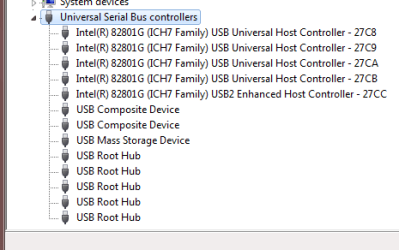
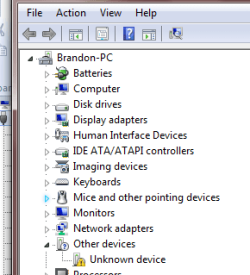
I have attached two screenshots of the device manager. You can see the exclamation point under "other devices." This is the device that is added/removed each time I insert or remove some media.

Thanks for any advice.
 

Attachments

  • ss1.png
    ss1.png
    4.6 KB · Views: 81
  • ss2.png
    ss2.png
    9.2 KB · Views: 104

My Computer

Computer Manufacturer/Model Number
HP Mini 1030NR
OS
Windows 7
CPU
1.6 Atom
Motherboard
Unknown
Memory
1Gb
Graphics Card(s)
Intel
Hard Drives
16GB SSD
Try reinstalling the Usb mass storage device under universal serial bus controller.

And are you sure that it is not a loose connection..............
 

My Computer

Computer Manufacturer/Model Number
Custom made
OS
Window 7 build 7600, Xp pro(VM)
CPU
Amd Athlon 2000 xp+
Motherboard
Asus x series
Memory
kingstone(1gb+256MB)
Graphics Card(s)
Nvdia 6200(256 mb+255mb(shared))
Sound Card
soundmax
Monitor(s) Displays
Lg Flatron w1943
Screen Resolution
1360x768
Hard Drives
segate 80GB
Case
i-ball
Keyboard
i-ball
Mouse
i-ball
Internet Speed
256kbps up and 256 kbps down
Hey,


Thanks again. I actually just solved the problem by finding a solution on your forum. As it turns out, there is some bug. Here is what I did:

1) Copy the entire C:\Windows\INF folder to C:\NewFolder
2) Tell windows to search for the driver there instead of /INF
3) Blammo! It just works right away for both types of media.

This is a really annoying problem, but hopefully somebody finds this useful.

Thanks again
 

My Computer

Computer Manufacturer/Model Number
HP Mini 1030NR
OS
Windows 7
CPU
1.6 Atom
Motherboard
Unknown
Memory
1Gb
Graphics Card(s)
Intel
Hard Drives
16GB SSD
I am glad it is fixed..........
 

My Computer

Computer Manufacturer/Model Number
Custom made
OS
Window 7 build 7600, Xp pro(VM)
CPU
Amd Athlon 2000 xp+
Motherboard
Asus x series
Memory
kingstone(1gb+256MB)
Graphics Card(s)
Nvdia 6200(256 mb+255mb(shared))
Sound Card
soundmax
Monitor(s) Displays
Lg Flatron w1943
Screen Resolution
1360x768
Hard Drives
segate 80GB
Case
i-ball
Keyboard
i-ball
Mouse
i-ball
Internet Speed
256kbps up and 256 kbps down
Back
Top