Unknown device in USB controllers

Monsta

New member
Local time
12:56 AM
Messages
15
Hi all. Hope some windows guru out there can help solve my problem.

I have installed Windows 7 home premium retail and have just added a Peak 221544AGPK DVB-T digital tv pci card. Unfortunately the card wont work and the driver wont install.

When I plug the card in to my PCI slot windows finds new hardware on reboot but this is the result.
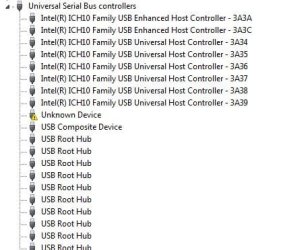
unknown device.JPG

My motherboard is the gigabyte GA-EX58 UD5 with an i7 920 cpu.

If i remove the card the unknown device dissapears so i know it is the tv card. Is there a way to fix this problem and get the tv card to work.

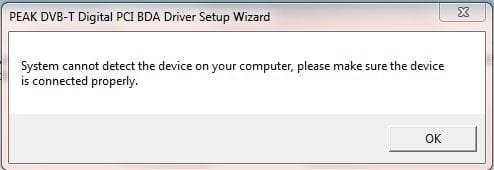
Tried to install the driver but the driver reports that the hardware cannot be found.

Tried the tv card in another pc and it works just fine.

Any help would be greatly appreciated.

Monsta.
 

My Computer

Computer Manufacturer/Model Number
Home Build
OS
windows 7 home premium
CPU
Intel i7 920 D0
Motherboard
Gigabyte GA-EX58 UD5
Memory
6GB PATRIOT VIPER DDR3
Graphics Card(s)
GFORCE GTS 250
Monitor(s) Displays
22" WIDESCREEN
Hard Drives
CORSAIR 128GB SSD
PSU
COOLERMASTER 700 WATT
Case
ANTEC 1200
Cooling
TITAN FENRIR AIR COOLER
Hi all. Hope some windows guru out there can help solve my problem.

I have installed Windows 7 home premium retail and have just added a Peak 221544AGPK DVB-T digital tv pci card. Unfortunately the card wont work and the driver wont install.

When I plug the card in to my PCI slot windows finds new hardware on reboot but this is the result.

View attachment 36278

My motherboard is the gigabyte GA-EX58 UD5 with an i7 920 cpu.

If i remove the card the unknown device dissapears so i know it is the tv card. Is there a way to fix this problem and get the tv card to work.

Tried to install the driver but the driver reports that the hardware cannot be found.

Tried the tv card in another pc and it works just fine.

Any help would be greatly appreciated.

Monsta.


Hi and welcome

what driver are you using?
 

My Computer

Computer Manufacturer/Model Number
HP Pavillion dv-7 1005 Tx
OS
Win 8 Release candidate 8400
CPU
[email protected]
Memory
4 gigs
Graphics Card(s)
Nvidia 9600M
Sound Card
HD built-in
Monitor(s) Displays
17" Wxga
Screen Resolution
1440x900
Cooling
none
Internet Speed
45Mb down 5Mb up
I have the correct driver disc for the hardware but when I try to install the driver I get a message telling me that the hardware cannot be found.
 

My Computer

Computer Manufacturer/Model Number
Home Build
OS
windows 7 home premium
CPU
Intel i7 920 D0
Motherboard
Gigabyte GA-EX58 UD5
Memory
6GB PATRIOT VIPER DDR3
Graphics Card(s)
GFORCE GTS 250
Monitor(s) Displays
22" WIDESCREEN
Hard Drives
CORSAIR 128GB SSD
PSU
COOLERMASTER 700 WATT
Case
ANTEC 1200
Cooling
TITAN FENRIR AIR COOLER
Ah, an easy one. I thought we were going to have to type all wild directions to get this one to work.

No need. Just install this and enjoy.
 

My Computer

Computer Manufacturer/Model Number
self built
OS
7600.20510 x86
CPU
P4 550 3.4 GHz HT running at 3.5 GHz
Motherboard
MSI PM8M3-V (MS-7211 v1.x) Micro-ATX mainboard
Memory
OCZ 2 GB(2x1GB) DDR400mHz running @ 414 mHz
Graphics Card(s)
HIS Radeon HD 3850 IceQ 3 Turbo HDMI Dual DL-DVI AGP
Sound Card
MOTU Traveler firewire studio interface 192 kHz 24 bit
Monitor(s) Displays
22" widescreen Acer X223W LCD, 17" Compaq P75 CRT
Screen Resolution
1680x1050 and 1280x1024
Hard Drives
SATA I x2 WD, 400 GB and 120 GB, SATA 2 WD Caviar Black 1 TB
PSU
350W generic
Case
Cybertronpc, it glows blue
Cooling
stock cpu fan, Ice-Q 3 gpu and system, many case fans
Keyboard
Logitch Classical Keyboard 200
Mouse
Logitech Mediaplay cordless
Internet Speed
1792/448 kbits/sec
Other Info
SATA II PCI fake RAID adapter, 1 GB Readyboost, original ATI Remote Wonder (even works with WMC perfectly), Logitech Rumblepad 2 game controller x2
Unfortunately I have already tried that driver. This is the result.
no luck.JPG
 

My Computer

Computer Manufacturer/Model Number
Home Build
OS
windows 7 home premium
CPU
Intel i7 920 D0
Motherboard
Gigabyte GA-EX58 UD5
Memory
6GB PATRIOT VIPER DDR3
Graphics Card(s)
GFORCE GTS 250
Monitor(s) Displays
22" WIDESCREEN
Hard Drives
CORSAIR 128GB SSD
PSU
COOLERMASTER 700 WATT
Case
ANTEC 1200
Cooling
TITAN FENRIR AIR COOLER
Install it using the device manager. Right click on it, update driver software. Browse. Let me pick. Have disk. Browse.

Find the .inf now and double click on it. Hit ok.
 

My Computer

Computer Manufacturer/Model Number
self built
OS
7600.20510 x86
CPU
P4 550 3.4 GHz HT running at 3.5 GHz
Motherboard
MSI PM8M3-V (MS-7211 v1.x) Micro-ATX mainboard
Memory
OCZ 2 GB(2x1GB) DDR400mHz running @ 414 mHz
Graphics Card(s)
HIS Radeon HD 3850 IceQ 3 Turbo HDMI Dual DL-DVI AGP
Sound Card
MOTU Traveler firewire studio interface 192 kHz 24 bit
Monitor(s) Displays
22" widescreen Acer X223W LCD, 17" Compaq P75 CRT
Screen Resolution
1680x1050 and 1280x1024
Hard Drives
SATA I x2 WD, 400 GB and 120 GB, SATA 2 WD Caviar Black 1 TB
PSU
350W generic
Case
Cybertronpc, it glows blue
Cooling
stock cpu fan, Ice-Q 3 gpu and system, many case fans
Keyboard
Logitch Classical Keyboard 200
Mouse
Logitech Mediaplay cordless
Internet Speed
1792/448 kbits/sec
Other Info
SATA II PCI fake RAID adapter, 1 GB Readyboost, original ATI Remote Wonder (even works with WMC perfectly), Logitech Rumblepad 2 game controller x2
I had a simalar unknown USB driver issue, turns out I accidently plugged in one of my USB motherboard connectors incorrectly. You might try checking your motherboards USB header connections and make sure they are all where they are supposed to be.
 

My Computer

Computer Manufacturer/Model Number
Homebuilt
OS
Windows 7 Ultimate x86
CPU
AMD Phenom 9850 BLACK EDITION 2.5GHz
Motherboard
JetWay HA04-Extreme
Memory
Kingston HyperX 4GB (4 x 1GB) 240-Pin DDR2 SDRAM DDR2 1066
Graphics Card(s)
SAPPHIRE Toxic 100225TXSR Radeon HD 3870 512MB
Sound Card
Realtek onboard sound
Monitor(s) Displays
BenQ FP222WH Black 22" 5ms HDMI Widescreen LCD
Screen Resolution
1680 X 1050
Hard Drives
Seagate Barracuda 7200.10 ST3250410AS 250GB 7200 RPM
2 x Western Digital WD-800 80 Gig
PSU
Antec TPQ-850
Case
Lian Li PC-61
Cooling
Arctic Cooling Freezer 64 Pro PWN
Keyboard
Logitech G-11
Mouse
Logitch Wheel Mouse
Internet Speed
Cable
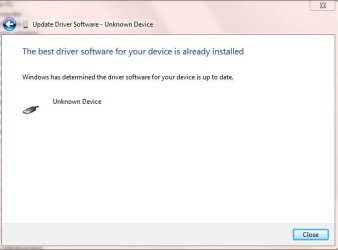
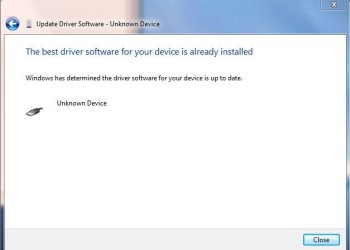
I have tried to install it the way you said and i get the same message. cant find the hardware. doing my head in.

I have checked all the usb headers and they are fine. Tried a diffferent pci slot and same result.

It's only a tv card. How hard can it be? I'm beat!

This is the message i get trying the way you suggested.

correct.JPG
 

My Computer

Computer Manufacturer/Model Number
Home Build
OS
windows 7 home premium
CPU
Intel i7 920 D0
Motherboard
Gigabyte GA-EX58 UD5
Memory
6GB PATRIOT VIPER DDR3
Graphics Card(s)
GFORCE GTS 250
Monitor(s) Displays
22" WIDESCREEN
Hard Drives
CORSAIR 128GB SSD
PSU
COOLERMASTER 700 WATT
Case
ANTEC 1200
Cooling
TITAN FENRIR AIR COOLER
You may have already tried this, but you might try restetting the ESCD in your BIOS. You also might try turning off any Legacy USB support while your in the BIOS, sometimes that can cause problems. You might also try setting PCI resources(IRQ,DMA) manualy, instead of letting your BIOS do it. Try setting them to PCI/ISA PnP.
 
Last edited:

My Computer

Computer Manufacturer/Model Number
Homebuilt
OS
Windows 7 Ultimate x86
CPU
AMD Phenom 9850 BLACK EDITION 2.5GHz
Motherboard
JetWay HA04-Extreme
Memory
Kingston HyperX 4GB (4 x 1GB) 240-Pin DDR2 SDRAM DDR2 1066
Graphics Card(s)
SAPPHIRE Toxic 100225TXSR Radeon HD 3870 512MB
Sound Card
Realtek onboard sound
Monitor(s) Displays
BenQ FP222WH Black 22" 5ms HDMI Widescreen LCD
Screen Resolution
1680 X 1050
Hard Drives
Seagate Barracuda 7200.10 ST3250410AS 250GB 7200 RPM
2 x Western Digital WD-800 80 Gig
PSU
Antec TPQ-850
Case
Lian Li PC-61
Cooling
Arctic Cooling Freezer 64 Pro PWN
Keyboard
Logitech G-11
Mouse
Logitch Wheel Mouse
Internet Speed
Cable
You you get us the Device ID info on that unknown device? It's in the drop down menu in Properties under Details tab.
 

My Computer

Computer Manufacturer/Model Number
Lenovo ThinkPad T60
OS
Windows 7 Ultimate 64Bit
CPU
GenuineIntel Intel(R) Core(TM) DuoCore T2400 @ 1.83GHz
Motherboard
Intel(R) 82801G (ICH7 Family)
Memory
2.00 GB
Graphics Card(s)
Mobile Intel(R) 945 Express Chipset
Sound Card
SoundMAX Integrated Digital HD Audio
Monitor(s) Displays
ThinkPad Display
Screen Resolution
1400x1050
Hard Drives
100Gb SATA
Keyboard
Standard Keyboard
Mouse
HID-compliant Mouse
Internet Speed
Cable Broadband - 54Mbps
Other Info
Intel(R) PRO/1000 PL Network Connection
11a/b/g Wireless LAN Mini PCI Express Adapter
I have tried to install it the way you said and i get the same message. cant find the hardware. doing my head in.

I have checked all the usb headers and they are fine. Tried a diffferent pci slot and same result.

It's only a tv card. How hard can it be? I'm beat!

This is the message i get trying the way you suggested.

View attachment 37037

You didn't follow my advice.

It's as easy as reading and following instructions. You tried to install by pointing to the folder instead of clicking or double clicking on the .inf itself.
 

My Computer

Computer Manufacturer/Model Number
self built
OS
7600.20510 x86
CPU
P4 550 3.4 GHz HT running at 3.5 GHz
Motherboard
MSI PM8M3-V (MS-7211 v1.x) Micro-ATX mainboard
Memory
OCZ 2 GB(2x1GB) DDR400mHz running @ 414 mHz
Graphics Card(s)
HIS Radeon HD 3850 IceQ 3 Turbo HDMI Dual DL-DVI AGP
Sound Card
MOTU Traveler firewire studio interface 192 kHz 24 bit
Monitor(s) Displays
22" widescreen Acer X223W LCD, 17" Compaq P75 CRT
Screen Resolution
1680x1050 and 1280x1024
Hard Drives
SATA I x2 WD, 400 GB and 120 GB, SATA 2 WD Caviar Black 1 TB
PSU
350W generic
Case
Cybertronpc, it glows blue
Cooling
stock cpu fan, Ice-Q 3 gpu and system, many case fans
Keyboard
Logitch Classical Keyboard 200
Mouse
Logitech Mediaplay cordless
Internet Speed
1792/448 kbits/sec
Other Info
SATA II PCI fake RAID adapter, 1 GB Readyboost, original ATI Remote Wonder (even works with WMC perfectly), Logitech Rumblepad 2 game controller x2
Maybe you can clarify for me? I have tried to point to the inf file however when I browse to where the inf file is I can only see the folder that it is in. When I point to the folder that it is in I get the following.....Capture.JPG


The doesn't seem to be a device ID. However this is what is listed under the heading DRIVER KEY.

{36fc9e60-c465-11cf-8056-444553540000}\0025}

and this under the heading DEVICE CLASS GUID:

{36fc9e60-c465-11cf-8056-444553540000}

Don't know if this helps at all. Going to try any suggestions. I'd like to thank everyone who has attempted to assist including torrentg, Thagarr, and aem.
 

My Computer

Computer Manufacturer/Model Number
Home Build
OS
windows 7 home premium
CPU
Intel i7 920 D0
Motherboard
Gigabyte GA-EX58 UD5
Memory
6GB PATRIOT VIPER DDR3
Graphics Card(s)
GFORCE GTS 250
Monitor(s) Displays
22" WIDESCREEN
Hard Drives
CORSAIR 128GB SSD
PSU
COOLERMASTER 700 WATT
Case
ANTEC 1200
Cooling
TITAN FENRIR AIR COOLER
The doesn't seem to be a device ID. However this is what is listed under the heading DRIVER KEY.

{36fc9e60-c465-11cf-8056-444553540000}\0025}

and this under the heading DEVICE CLASS GUID:

{36fc9e60-c465-11cf-8056-444553540000}

Don't know if this helps at all. Going to try any suggestions. I'd like to thank everyone who has attempted to assist including torrentg, Thagarr, and aem.

Monsta Hi and welcoome

I was just passing thru and saw the guid so i figured what the heck google it. I did and here is MS about USB devices not working. A USB device may no longer work correctly after Windows Vista resumes from sleep or from hibernation

Hope This helps like I said Im just passing thru

Ken J
 

My Computer

Computer Manufacturer/Model Number
HP Pavillion dv-7 1005 Tx
OS
Win 8 Release candidate 8400
CPU
[email protected]
Memory
4 gigs
Graphics Card(s)
Nvidia 9600M
Sound Card
HD built-in
Monitor(s) Displays
17" Wxga
Screen Resolution
1440x900
Cooling
none
Internet Speed
45Mb down 5Mb up
Hi zigzag3143, thanks for taking the time as you were passing. I have also googled it and got the same result, however i have tried to go through the registry and cant find the things that this microsoft solution refers to. Also it says that it was fixed with service pack 1 in vista. Surely they would not have made the same mistake in windows 7. I'm on the verge of giving up and going to the lounge to watch tv.

If I don't get this thing sorted soon it will be a phsychiatrist I am in need of, not a windows expert.

Thanks for the help offered. It is appreciated.
 

My Computer

Computer Manufacturer/Model Number
Home Build
OS
windows 7 home premium
CPU
Intel i7 920 D0
Motherboard
Gigabyte GA-EX58 UD5
Memory
6GB PATRIOT VIPER DDR3
Graphics Card(s)
GFORCE GTS 250
Monitor(s) Displays
22" WIDESCREEN
Hard Drives
CORSAIR 128GB SSD
PSU
COOLERMASTER 700 WATT
Case
ANTEC 1200
Cooling
TITAN FENRIR AIR COOLER
Monsta, can you right-click the device in Device Manager, Properties, Details tab and from drop down menu, select Hardware ID. Give us the "PCI\VEN_....." details.

As for what torrentg implies when you need to point your browsing to the .inf is sometimes the system will automatically locate the .inf file (and there could be more than one .inf in the folder) to use (don't worry about the theory at this stage). The system does not necessary know which is the correct .inf file to use. It is critical that when you are having issues with drivers that you know which drive to use and in particular if problems arises the need to look at .inf file (for the appropriate OS and even if it's 32Bit or 64Bit etc). The details are inside that .inf file.

For now show us the PCI/VEN..details.
 

My Computer

Computer Manufacturer/Model Number
Lenovo ThinkPad T60
OS
Windows 7 Ultimate 64Bit
CPU
GenuineIntel Intel(R) Core(TM) DuoCore T2400 @ 1.83GHz
Motherboard
Intel(R) 82801G (ICH7 Family)
Memory
2.00 GB
Graphics Card(s)
Mobile Intel(R) 945 Express Chipset
Sound Card
SoundMAX Integrated Digital HD Audio
Monitor(s) Displays
ThinkPad Display
Screen Resolution
1400x1050
Hard Drives
100Gb SATA
Keyboard
Standard Keyboard
Mouse
HID-compliant Mouse
Internet Speed
Cable Broadband - 54Mbps
Other Info
Intel(R) PRO/1000 PL Network Connection
11a/b/g Wireless LAN Mini PCI Express Adapter
Monsta, I was just looking over the specs for your motheboard, I noticed that Gigbyte has a new Intel chipset driver listed in there driver page for your motherboard. You might give that a try, the date on the new driver is 11-16-2009. Also, have you tried resetting your BIOS to factory defaults or shorting the reset jumper on your motherboard?
 

My Computer

Computer Manufacturer/Model Number
Homebuilt
OS
Windows 7 Ultimate x86
CPU
AMD Phenom 9850 BLACK EDITION 2.5GHz
Motherboard
JetWay HA04-Extreme
Memory
Kingston HyperX 4GB (4 x 1GB) 240-Pin DDR2 SDRAM DDR2 1066
Graphics Card(s)
SAPPHIRE Toxic 100225TXSR Radeon HD 3870 512MB
Sound Card
Realtek onboard sound
Monitor(s) Displays
BenQ FP222WH Black 22" 5ms HDMI Widescreen LCD
Screen Resolution
1680 X 1050
Hard Drives
Seagate Barracuda 7200.10 ST3250410AS 250GB 7200 RPM
2 x Western Digital WD-800 80 Gig
PSU
Antec TPQ-850
Case
Lian Li PC-61
Cooling
Arctic Cooling Freezer 64 Pro PWN
Keyboard
Logitech G-11
Mouse
Logitch Wheel Mouse
Internet Speed
Cable
Is this what you are looking for??
hardware id.JPG

It doesn't help me, but maybe it will help you. Tried the chipset driver. No good. Tried resetting the bios. No good. I give up. I guess you're not meant to watch tv on a computer eh?
 

My Computer

Computer Manufacturer/Model Number
Home Build
OS
windows 7 home premium
CPU
Intel i7 920 D0
Motherboard
Gigabyte GA-EX58 UD5
Memory
6GB PATRIOT VIPER DDR3
Graphics Card(s)
GFORCE GTS 250
Monitor(s) Displays
22" WIDESCREEN
Hard Drives
CORSAIR 128GB SSD
PSU
COOLERMASTER 700 WATT
Case
ANTEC 1200
Cooling
TITAN FENRIR AIR COOLER
Is this what you are looking for??
View attachment 37401

It doesn't help me, but maybe it will help you. Tried the chipset driver. No good. Tried resetting the bios. No good. I give up. I guess you're not meant to watch tv on a computer eh?

No. Almost. Do the same thing for the card itself in sound, video and game contoller section. If it doesn't have a driver installed, it will be yellow with exclamation point.

And you are going to have to get the usb ports working. If you're on x86, use this and install using device manager.

Right click the usb you just posted about. Update driver software. Browse my computer. Let me pick. Have disk. Browse. Now find and double click the appropriate .inf. Click next and allow it to install.
 

My Computer

Computer Manufacturer/Model Number
self built
OS
7600.20510 x86
CPU
P4 550 3.4 GHz HT running at 3.5 GHz
Motherboard
MSI PM8M3-V (MS-7211 v1.x) Micro-ATX mainboard
Memory
OCZ 2 GB(2x1GB) DDR400mHz running @ 414 mHz
Graphics Card(s)
HIS Radeon HD 3850 IceQ 3 Turbo HDMI Dual DL-DVI AGP
Sound Card
MOTU Traveler firewire studio interface 192 kHz 24 bit
Monitor(s) Displays
22" widescreen Acer X223W LCD, 17" Compaq P75 CRT
Screen Resolution
1680x1050 and 1280x1024
Hard Drives
SATA I x2 WD, 400 GB and 120 GB, SATA 2 WD Caviar Black 1 TB
PSU
350W generic
Case
Cybertronpc, it glows blue
Cooling
stock cpu fan, Ice-Q 3 gpu and system, many case fans
Keyboard
Logitch Classical Keyboard 200
Mouse
Logitech Mediaplay cordless
Internet Speed
1792/448 kbits/sec
Other Info
SATA II PCI fake RAID adapter, 1 GB Readyboost, original ATI Remote Wonder (even works with WMC perfectly), Logitech Rumblepad 2 game controller x2
Get the device ID like aem suggests. I had an unknown device. Searched the web with the device ID and found the solution. I had to install my motherboard's ME = Management Engine.

Fixed the problem.
 

My Computer

Computer Manufacturer/Model Number
Intel
OS
Windows 7 64bit
CPU
Itel Dual 6600
Motherboard
DG33BU
Memory
8 GB
Graphics Card(s)
nVidia 9600
Sound Card
Logitech Z-10
Monitor(s) Displays
Dell
Hard Drives
Dual 500GB WD not Raid
PSU
Thermaltake 420W
Case
Thermaltake
Cooling
Fans
The card itself is not listed in the sound, video and game contoller section. There is only my sound card which is working perfectly. When I plug the PCI TV card into a PCI slot the UNKNOWN USB device appears as follows:

Capture.JPG

When I unplug the PCI TV card the UNKOWN USB DEVICE is gone. I have tried software such as Uniblue driver scanner and it says that all my drivers are up to date. I have tried installing the inf file indicated by torrentg with no effect. Tried installing in a different PCI slot with same result. I have only have 2 PCI slots so there is nowhere left to go with it. Just doesn't seem to pick it up as a tv card, just as a USB DEVICE that wont work.
 

My Computer

Computer Manufacturer/Model Number
Home Build
OS
windows 7 home premium
CPU
Intel i7 920 D0
Motherboard
Gigabyte GA-EX58 UD5
Memory
6GB PATRIOT VIPER DDR3
Graphics Card(s)
GFORCE GTS 250
Monitor(s) Displays
22" WIDESCREEN
Hard Drives
CORSAIR 128GB SSD
PSU
COOLERMASTER 700 WATT
Case
ANTEC 1200
Cooling
TITAN FENRIR AIR COOLER
Back
Top