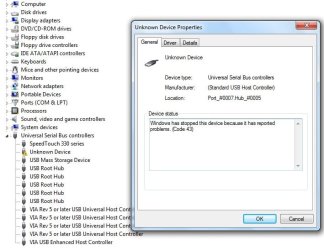
Unknown Device

pooksahib

New member
Member
VIP
Local time
1:13 PM
Messages
149
Location
Scotland
Hi all. Since installing Windows7 64bit, I have an 'unknown device' (see pic). I've not installed any new hardware except 4GB RAM but that's been recognised by Windows already. Any way I can find out about this device so's to get rid of the warning triangle?

Many thanks.
 

Attachments

  • Unknown device.jpg
    Unknown device.jpg
    54.2 KB · Views: 263

My Computer

Computer type
PC/Desktop
Computer Manufacturer/Model Number
self build
OS
Microsoft Windows 7 Ultimate 64-bit 7601 Multiprocessor Free Service Pack 1
CPU
Intel(R) Core(TM) i3-4150 CPU @ 3.50GHz
Motherboard
ASUSTeK COMPUTER INC. H97M-PLUS
Memory
8.00 GB
Graphics Card(s)
Intel(R) HD Graphics 4400
Sound Card
(1) High Definition Audio Device (2) USB Audio Device
Screen Resolution
1024 x 768 x 32 bits (4294967296 colors) @ 75 Hz
Hard Drives
(1) SAMSUNG HD103SI ATA Device (2) Samsung SSD 840 EVO 120GB ATA Device (3) ST31000528AS ATA Device (4) GENERIC USB Storage-CFC USB Device (5) GENERIC USB Storage-MSC USB Device (6) GENERIC USB Storage-SDC USB Device (7) GENERIC USB Stora
PSU
Corsair CXM 430W Modular 80 PLUS Bronze
Antivirus
Panda Free
Browser
Firefox+NoScript, AdBlockPlus, Disconnect
USB driver

Maybe win 7 doesnt have a driver for whatever that is. You could try unplugging usb devices (safely) and checking to see if that usb port is referenced to a specific piece of hardware. I had an external usb HD that was no problem in vista but there wasnt a driver for it in win 7 beta. After driver install no problem. Just guessing though

Good Luck
Ken
 

My Computer

Computer Manufacturer/Model Number
HP Pavillion dv-7 1005 Tx
OS
Win 8 Release candidate 8400
CPU
[email protected]
Memory
4 gigs
Graphics Card(s)
Nvidia 9600M
Sound Card
HD built-in
Monitor(s) Displays
17" Wxga
Screen Resolution
1440x900
Cooling
none
Internet Speed
45Mb down 5Mb up
Thanks for that. However, my PC is very basic - no USB devices bar modem and that works fine...
 

My Computer

Computer type
PC/Desktop
Computer Manufacturer/Model Number
self build
OS
Microsoft Windows 7 Ultimate 64-bit 7601 Multiprocessor Free Service Pack 1
CPU
Intel(R) Core(TM) i3-4150 CPU @ 3.50GHz
Motherboard
ASUSTeK COMPUTER INC. H97M-PLUS
Memory
8.00 GB
Graphics Card(s)
Intel(R) HD Graphics 4400
Sound Card
(1) High Definition Audio Device (2) USB Audio Device
Screen Resolution
1024 x 768 x 32 bits (4294967296 colors) @ 75 Hz
Hard Drives
(1) SAMSUNG HD103SI ATA Device (2) Samsung SSD 840 EVO 120GB ATA Device (3) ST31000528AS ATA Device (4) GENERIC USB Storage-CFC USB Device (5) GENERIC USB Storage-MSC USB Device (6) GENERIC USB Storage-SDC USB Device (7) GENERIC USB Stora
PSU
Corsair CXM 430W Modular 80 PLUS Bronze
Antivirus
Panda Free
Browser
Firefox+NoScript, AdBlockPlus, Disconnect
By going to the Details tab and using the drop-down list, you will get the ID codes of the offending device. You may get lucky with a Google or Bing search of those codes to someone else who figured it out.

Bye. :cool:
 

My Computer

Computer Manufacturer/Model Number
Home Brew
OS
Windows 7 Ultimate x64
CPU
i7 970
Motherboard
ASUS Rampage III GENE
Memory
9 GB
Graphics Card(s)
9600GT
Monitor(s) Displays
dual 24" Samsung
Screen Resolution
1920x1200
Hard Drives
VelociRaptor and 4TB of Hitachi RAID 0
PSU
Thermaltake toughpower W0104RU 650W
Case
Thermaltake LANBOX Lite
Internet Speed
30 Mbps Download 1 Mbps Upload (Speedtest.com)
You could try uninstalling the device in device manager then Windows will attempt to connect to Windows Update to find drivers. Since it acts as a newly installed device Windows will do a more thorough search for drivers.

Hope this helps :)


Jeff
 

My Computer

Computer Manufacturer/Model Number
Compaq Desktop
OS
Windows 7 Ultimate x64
CPU
AMD Sempron Dual Core
Memory
3GB
Graphics Card(s)
NVIDIA GeForce 6150SE nForce 430
Screen Resolution
1024x768
Hard Drives
150GB Sata
may be just dust or dirt in your port, try a can of compressed air and clean out ports and then reboot, good luck to you
 

My Computer

Computer Manufacturer/Model Number
Gateway GT5692
OS
Windows 7 Ulti. x64
CPU
AMD Phenom 8450 triple-core 2.10 ghz
Memory
4GB
Graphics Card(s)
ATI Radion HD 3200
Monitor(s) Displays
Gateway FPD1775W
Screen Resolution
1280x720
Hard Drives
465.6613 Gibibytes
I really am grateful to you all for the suggestions. But guess what? It's gone. I've just been using a memory stick with my bank passwords etc on it so maybe that had something to do with 'clearing' the system. Anyways, thanks again. Darn good forum this...
 

My Computer

Computer type
PC/Desktop
Computer Manufacturer/Model Number
self build
OS
Microsoft Windows 7 Ultimate 64-bit 7601 Multiprocessor Free Service Pack 1
CPU
Intel(R) Core(TM) i3-4150 CPU @ 3.50GHz
Motherboard
ASUSTeK COMPUTER INC. H97M-PLUS
Memory
8.00 GB
Graphics Card(s)
Intel(R) HD Graphics 4400
Sound Card
(1) High Definition Audio Device (2) USB Audio Device
Screen Resolution
1024 x 768 x 32 bits (4294967296 colors) @ 75 Hz
Hard Drives
(1) SAMSUNG HD103SI ATA Device (2) Samsung SSD 840 EVO 120GB ATA Device (3) ST31000528AS ATA Device (4) GENERIC USB Storage-CFC USB Device (5) GENERIC USB Storage-MSC USB Device (6) GENERIC USB Storage-SDC USB Device (7) GENERIC USB Stora
PSU
Corsair CXM 430W Modular 80 PLUS Bronze
Antivirus
Panda Free
Browser
Firefox+NoScript, AdBlockPlus, Disconnect
Glad it's sorted mate :party:

What is the exact device? Some other people may benefit from information in this thread if they have the same hardware.
 

My Computer

Computer Manufacturer/Model Number
Compaq Desktop
OS
Windows 7 Ultimate x64
CPU
AMD Sempron Dual Core
Memory
3GB
Graphics Card(s)
NVIDIA GeForce 6150SE nForce 430
Screen Resolution
1024x768
Hard Drives
150GB Sata
Ah, that's the point - there was no device. The yellow warning triangle just appeared out of nowhere, either when I switched to x64 or soon thereafter. Musta been a blip of some kind.
 

My Computer

Computer type
PC/Desktop
Computer Manufacturer/Model Number
self build
OS
Microsoft Windows 7 Ultimate 64-bit 7601 Multiprocessor Free Service Pack 1
CPU
Intel(R) Core(TM) i3-4150 CPU @ 3.50GHz
Motherboard
ASUSTeK COMPUTER INC. H97M-PLUS
Memory
8.00 GB
Graphics Card(s)
Intel(R) HD Graphics 4400
Sound Card
(1) High Definition Audio Device (2) USB Audio Device
Screen Resolution
1024 x 768 x 32 bits (4294967296 colors) @ 75 Hz
Hard Drives
(1) SAMSUNG HD103SI ATA Device (2) Samsung SSD 840 EVO 120GB ATA Device (3) ST31000528AS ATA Device (4) GENERIC USB Storage-CFC USB Device (5) GENERIC USB Storage-MSC USB Device (6) GENERIC USB Storage-SDC USB Device (7) GENERIC USB Stora
PSU
Corsair CXM 430W Modular 80 PLUS Bronze
Antivirus
Panda Free
Browser
Firefox+NoScript, AdBlockPlus, Disconnect
Ah, my bad :o

I thought you had a memory stick in
I've just been using a memory stick....

Still, glad it's gone away.


Jeff
 

My Computer

Computer Manufacturer/Model Number
Compaq Desktop
OS
Windows 7 Ultimate x64
CPU
AMD Sempron Dual Core
Memory
3GB
Graphics Card(s)
NVIDIA GeForce 6150SE nForce 430
Screen Resolution
1024x768
Hard Drives
150GB Sata
No, no, you're right... What I was trying to say was that there'd never been any new devices attached. I've got a stick that I plug in and out on a regular basis so maybe that 'cleared' something.

"My bad"?? I've only ever heard that said in 'Scrubs'. Is it in regular use in Milton Keynes?
 

My Computer

Computer type
PC/Desktop
Computer Manufacturer/Model Number
self build
OS
Microsoft Windows 7 Ultimate 64-bit 7601 Multiprocessor Free Service Pack 1
CPU
Intel(R) Core(TM) i3-4150 CPU @ 3.50GHz
Motherboard
ASUSTeK COMPUTER INC. H97M-PLUS
Memory
8.00 GB
Graphics Card(s)
Intel(R) HD Graphics 4400
Sound Card
(1) High Definition Audio Device (2) USB Audio Device
Screen Resolution
1024 x 768 x 32 bits (4294967296 colors) @ 75 Hz
Hard Drives
(1) SAMSUNG HD103SI ATA Device (2) Samsung SSD 840 EVO 120GB ATA Device (3) ST31000528AS ATA Device (4) GENERIC USB Storage-CFC USB Device (5) GENERIC USB Storage-MSC USB Device (6) GENERIC USB Storage-SDC USB Device (7) GENERIC USB Stora
PSU
Corsair CXM 430W Modular 80 PLUS Bronze
Antivirus
Panda Free
Browser
Firefox+NoScript, AdBlockPlus, Disconnect
Not just Milton Keynes, we say it here in Lancashire too...

Scrubs might be to blame for us though, I love the show and so do most of my mates. :D
 

My Computer

Computer Manufacturer/Model Number
Self Built
OS
XP Pro SP3 x86/Vista SP2 x64/Win7 x64 Triple-boot
CPU
AMD64 X2 AM2 5000+
Motherboard
Asus MSN-X Plus
Memory
Corsair TWX 2Gb (2x1Gb) DDR2 800Mhz
Graphics Card(s)
PCI-X 2.0 Inno3D (NVidia) 9500GT 1Gb DDR2
Sound Card
Onboard Realtec ALC662-GR
Monitor(s) Displays
Relisys 17' CRT (model unknown)
Screen Resolution
1024x768
Hard Drives
750Gb Samsung 7200-3Gb/s 32Mb Cache SATA
PSU
500W
Cooling
Standard AMD CPU Fan, One side, front and rear case fan.
Keyboard
Microsoft Multimedia Keyboard
Mouse
Samsung Optical
Internet Speed
10M
Aye, me two. I'd love to be able to rant a la Perry Cox. And the babes in that show are gorgeous. Just a pity that Jordan went and ruined herself with botox...
 

My Computer

Computer type
PC/Desktop
Computer Manufacturer/Model Number
self build
OS
Microsoft Windows 7 Ultimate 64-bit 7601 Multiprocessor Free Service Pack 1
CPU
Intel(R) Core(TM) i3-4150 CPU @ 3.50GHz
Motherboard
ASUSTeK COMPUTER INC. H97M-PLUS
Memory
8.00 GB
Graphics Card(s)
Intel(R) HD Graphics 4400
Sound Card
(1) High Definition Audio Device (2) USB Audio Device
Screen Resolution
1024 x 768 x 32 bits (4294967296 colors) @ 75 Hz
Hard Drives
(1) SAMSUNG HD103SI ATA Device (2) Samsung SSD 840 EVO 120GB ATA Device (3) ST31000528AS ATA Device (4) GENERIC USB Storage-CFC USB Device (5) GENERIC USB Storage-MSC USB Device (6) GENERIC USB Storage-SDC USB Device (7) GENERIC USB Stora
PSU
Corsair CXM 430W Modular 80 PLUS Bronze
Antivirus
Panda Free
Browser
Firefox+NoScript, AdBlockPlus, Disconnect
Dr. Cox makes me laugh out loud, esp. when him and the missus are arguing. :)
 

My Computer

Computer Manufacturer/Model Number
Self Built
OS
XP Pro SP3 x86/Vista SP2 x64/Win7 x64 Triple-boot
CPU
AMD64 X2 AM2 5000+
Motherboard
Asus MSN-X Plus
Memory
Corsair TWX 2Gb (2x1Gb) DDR2 800Mhz
Graphics Card(s)
PCI-X 2.0 Inno3D (NVidia) 9500GT 1Gb DDR2
Sound Card
Onboard Realtec ALC662-GR
Monitor(s) Displays
Relisys 17' CRT (model unknown)
Screen Resolution
1024x768
Hard Drives
750Gb Samsung 7200-3Gb/s 32Mb Cache SATA
PSU
500W
Cooling
Standard AMD CPU Fan, One side, front and rear case fan.
Keyboard
Microsoft Multimedia Keyboard
Mouse
Samsung Optical
Internet Speed
10M
Hi Guys

Have read through this post, I have similar problem though I'm more confused now.
I have 3 External HD and one Semi-External (backup unit HP). None of them works through USB ports (none of my 8 ports).
Not even the four Mem sticks I have tried works.

W7 says unknown devices.
1. I have tried all ports.
2. I have tried on Vista and XP on other machines (no problems).
3. I have had these units working on this hardware before (in vista).
4. I have the latest of everything as it seems.. (i think).
5. I have reinstalled with them plugged in and not like 4 times..
6. I have tried several updates and even tried with old USB drivers..
7. I found a writing on a 4 step check and did that to (power management, uninstall, checking power etc.. )
8. tried different cables
9. ...


What the H...

My keyboard works (W-less).. My Camera works.. ? on all ports..

Any one have similar problems ?
This is driving me crazy ..

Best Regards
Harry
 

My Computer

Computer Manufacturer/Model Number
HP Pavilion d4491
OS
Windows 7 x32
CPU
AMD 64 x2
Motherboard
Nivida
Memory
3GB
Graphics Card(s)
Gforce 7800 GTX
Monitor(s) Displays
HP
Hard Drives
Sata Western Digital 35Gb 10000 rpm
Sata Western Digital 200Gb
IDE 200Gb
3 External USB disks
1. Semi-External cabinet (HP backup station)
PSU
HP
Case
HP
Cooling
normal
Back
Top