Solved Unknown Device

sikm

New member
Member
Local time
9:21 AM
Messages
38
Location
Melbourne
Device Manager is showing an unknown device and I can't find it.

The Device Instance Path shows: ROOT\LEGACY_CPUZ132\0000 but I can't figure it out.

I do have the Legacy family tree package installed but I can't see how that could be causing the problem.

Any ideas greatly appreciated.

Simon
 

My Computer

OS
windows7
Hello,

1) Uninstall that device, then reboot. If new hardware is found, Windows will automatically install the driver or prompt you.

2) Also, download free Malwarebytes and run a scan.
 

My Computer

Computer Manufacturer/Model Number
Too many to describe...
OS
Windows 7 x64 pro/ Windows 7 x86 Pro/ XP SP3 x86
Hi Sikm,

You can find out exactly what the device is by looking up the Device ID.
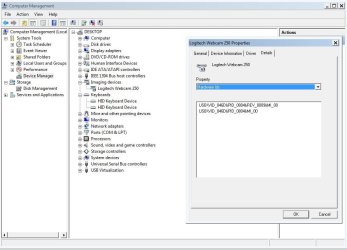
  • Open Device Manager and click on the device properties
  • Click on the Details Tab
  • Drop the 'Property' box until you find 'Hardware Id's"
  • You will find some number letter combianations, HID = Hardware ID, VID = Vendor ID, PID = Product ID.
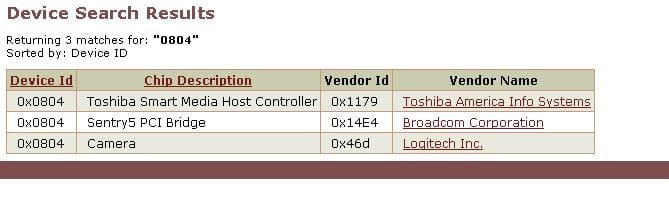
  • In my screen print I've looked up my Logitech Webcam. My PID=0804, My VID = 046D
  • Open the PCIDATABASE website
  • Type your PID where it says device Search and press SEACH, all Devices with that PID show. This is usually enough.
  • If you have multiple Devices, compare the Vendor ID column with your VID

You should now have enough info to search for the drivers for the device.

-Timo
 

Attachments

  • LOGITECH CAM id.JPG
    LOGITECH CAM id.JPG
    76.5 KB · Views: 243
  • 0804.JPG
    0804.JPG
    27.3 KB · Views: 97

My Computer

Computer Manufacturer/Model Number
Custom Hack job
OS
Windows 7 Ultimate 64 bit
CPU
Intel(R) Core(TM)2 Quad CPU Q8200 @ 2.33GHz
Motherboard
GigaByte EP45-UD3
Memory
8 GB Kingston
Graphics Card(s)
Nvidia GeForce 9600GT
Sound Card
Soundblaster Audigy
Monitor(s) Displays
AOC x2 22"
Hard Drives
2 x Samsung 500GB (RAID)
2 x Samsung 2TB
1 x WD Green 2TB
1 x Seagate 1TB
1 x Samsung 500GB
PSU
Thermaltake QFan 750W
Case
CM Scout Gaming
Cooling
Coolermaster V10
Keyboard
Microsoft Wireless Keyboard 1000
Mouse
Microsoft Wireless Optical 2000
Internet Speed
320
Other Info
Winfast PVR2000CP
LG DVD-RAM DVD/RW/DL Super Multi
Linksys WMP300Nx2 Wireless Adapter
Hardware IDs....

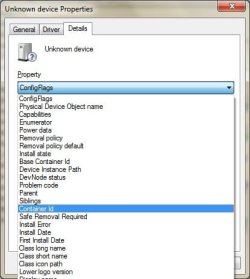
....doesn't appear. Container ID, Base Container ID but no Hardware ID
 

My Computer

OS
windows7
....doesn't appear. Container ID, Base Container ID but no Hardware ID

Please post a screen print, so I can see what you see.

EDIT - You can use the Snip Tool to easily get a picture then upload it with the attach button on sevenforums.
 

My Computer

Computer Manufacturer/Model Number
Custom Hack job
OS
Windows 7 Ultimate 64 bit
CPU
Intel(R) Core(TM)2 Quad CPU Q8200 @ 2.33GHz
Motherboard
GigaByte EP45-UD3
Memory
8 GB Kingston
Graphics Card(s)
Nvidia GeForce 9600GT
Sound Card
Soundblaster Audigy
Monitor(s) Displays
AOC x2 22"
Hard Drives
2 x Samsung 500GB (RAID)
2 x Samsung 2TB
1 x WD Green 2TB
1 x Seagate 1TB
1 x Samsung 500GB
PSU
Thermaltake QFan 750W
Case
CM Scout Gaming
Cooling
Coolermaster V10
Keyboard
Microsoft Wireless Keyboard 1000
Mouse
Microsoft Wireless Optical 2000
Internet Speed
320
Other Info
Winfast PVR2000CP
LG DVD-RAM DVD/RW/DL Super Multi
Linksys WMP300Nx2 Wireless Adapter
Hi Sikm,


You can find out exactly what the device is by looking up the Device ID.
You should now have enough info to search for the drivers for the device.

-Timo

Fantastic PCI database site!!! Wanted to REP but I must spread it around!
 

My Computer

Computer type
PC/Desktop
Computer Manufacturer/Model Number
Dell OP7010
OS
Windows 7 Enterprise (x64); Windows Server 2008 R2 (x64)
Memory
16GB
Monitor(s) Displays
4 Dell 24" LCD
Screen Resolution
1280x1024
Keyboard
Dell
Mouse
Dell Optical
Internet Speed
40meg
Hi Sikm,


You can find out exactly what the device is by looking up the Device ID.
You should now have enough info to search for the drivers for the device.

-Timo

Fantastic PCI database site!!! Wanted to REP but I must spread it around!

You're welcome. It's never led me wrong. Although Sikm might have found a device without a hardware ID, which means it may be a rouge driver and not a device, perhaps for a non-plug and play device..... if so I think I have a plan..... but baby steps first.
 

My Computer

Computer Manufacturer/Model Number
Custom Hack job
OS
Windows 7 Ultimate 64 bit
CPU
Intel(R) Core(TM)2 Quad CPU Q8200 @ 2.33GHz
Motherboard
GigaByte EP45-UD3
Memory
8 GB Kingston
Graphics Card(s)
Nvidia GeForce 9600GT
Sound Card
Soundblaster Audigy
Monitor(s) Displays
AOC x2 22"
Hard Drives
2 x Samsung 500GB (RAID)
2 x Samsung 2TB
1 x WD Green 2TB
1 x Seagate 1TB
1 x Samsung 500GB
PSU
Thermaltake QFan 750W
Case
CM Scout Gaming
Cooling
Coolermaster V10
Keyboard
Microsoft Wireless Keyboard 1000
Mouse
Microsoft Wireless Optical 2000
Internet Speed
320
Other Info
Winfast PVR2000CP
LG DVD-RAM DVD/RW/DL Super Multi
Linksys WMP300Nx2 Wireless Adapter
Hi Sikm,


You can find out exactly what the device is by looking up the Device ID.
You should now have enough info to search for the drivers for the device.

-Timo

Fantastic PCI database site!!! Wanted to REP but I must spread it around!

You're welcome. It's never led me wrong. Although Sikm might have found a device without a hardware ID, which means it is probably not a device, but an installed driver for a non-plug and play device..... if so I think I have a plan..... but baby steps first.

The part the OP has posted "ROOT\...." is a low level driver and there will not be an easy accessible ID. You will not even be able to remove it from the registry without taking permission of the keys first.
 

My Computer

Computer type
PC/Desktop
Computer Manufacturer/Model Number
Dell OP7010
OS
Windows 7 Enterprise (x64); Windows Server 2008 R2 (x64)
Memory
16GB
Monitor(s) Displays
4 Dell 24" LCD
Screen Resolution
1280x1024
Keyboard
Dell
Mouse
Dell Optical
Internet Speed
40meg
The part the OP has posted "ROOT\...." is a low level driver and there will not be an easy accessible ID.


@WS - Good Point, I'd kind of skimmed over that and didn't take it in. I like the way you're thinking! :) Although virus', and Non plug and Play's could be the same.
I'd be tempted to remove the registry entry and see if it repopulates.

@Sikm - It's unlikely its the family tree software. Do you want to remove it? We can always back up the changes before we make it and if it's a legit program that might emulate a legacy device (e.g. Virtual Floppy Drive, WinPcap etc) we can just reinstall.
- Still post he screen print, I want to see what other info it;s showing so that I can look that up.
 

My Computer

Computer Manufacturer/Model Number
Custom Hack job
OS
Windows 7 Ultimate 64 bit
CPU
Intel(R) Core(TM)2 Quad CPU Q8200 @ 2.33GHz
Motherboard
GigaByte EP45-UD3
Memory
8 GB Kingston
Graphics Card(s)
Nvidia GeForce 9600GT
Sound Card
Soundblaster Audigy
Monitor(s) Displays
AOC x2 22"
Hard Drives
2 x Samsung 500GB (RAID)
2 x Samsung 2TB
1 x WD Green 2TB
1 x Seagate 1TB
1 x Samsung 500GB
PSU
Thermaltake QFan 750W
Case
CM Scout Gaming
Cooling
Coolermaster V10
Keyboard
Microsoft Wireless Keyboard 1000
Mouse
Microsoft Wireless Optical 2000
Internet Speed
320
Other Info
Winfast PVR2000CP
LG DVD-RAM DVD/RW/DL Super Multi
Linksys WMP300Nx2 Wireless Adapter
Is this...

...the print you wanted? First time I've uploaded an attachment so.... print.jpg
 

My Computer

OS
windows7
...the print you wanted? First time I've uploaded an attachment so.... View attachment 84178

That's perfect, I'll take closer look at some of the settings and see if we can't sherlock a little more information together. I'll get back to you shortly. Meanwhile have a think about just removing it RE: my discussion with WindowsStar earlier.

Back to our device manager detective hunt. Please let me know what the following entries on the details tab contain.
DevNode status - This will tell us the current status of the device and differentiate between a driver existing and a driver loading
Device Instance path - Often contains Vendor and hardware information, if not than it may contain an ACPI linking it to a processor group.
Physical device object name - unique naming reference
Class Long Name - It's group name
Class Short Name - It's short (actual) name
Class icon path - The path to the dll that houses it's icons
siblings - Any related siblings
parent - any related parents
 
Last edited:

My Computer

Computer Manufacturer/Model Number
Custom Hack job
OS
Windows 7 Ultimate 64 bit
CPU
Intel(R) Core(TM)2 Quad CPU Q8200 @ 2.33GHz
Motherboard
GigaByte EP45-UD3
Memory
8 GB Kingston
Graphics Card(s)
Nvidia GeForce 9600GT
Sound Card
Soundblaster Audigy
Monitor(s) Displays
AOC x2 22"
Hard Drives
2 x Samsung 500GB (RAID)
2 x Samsung 2TB
1 x WD Green 2TB
1 x Seagate 1TB
1 x Samsung 500GB
PSU
Thermaltake QFan 750W
Case
CM Scout Gaming
Cooling
Coolermaster V10
Keyboard
Microsoft Wireless Keyboard 1000
Mouse
Microsoft Wireless Optical 2000
Internet Speed
320
Other Info
Winfast PVR2000CP
LG DVD-RAM DVD/RW/DL Super Multi
Linksys WMP300Nx2 Wireless Adapter
Hi Simon,

Could you please tell me if this key exists in your registry:
HKEY_LOCAL_MACHINE\SYSTEM\ControlSet001\Enum\Root\LEGACY_CPUZ132
Open REGEDIT from SEARCH or RUN and navigate to it. If it exists, please right click on it and export it. Then attached the export to your next post.

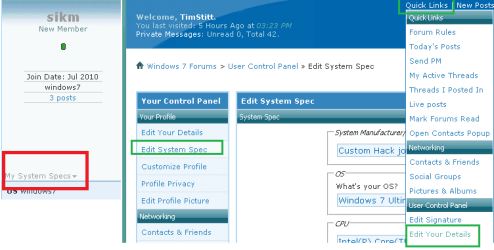
Also would you mind filling in your system specs page so I can see what CPU and other hardware you already have.

Thanks
 

Attachments

  • system specs.png
    system specs.png
    10.6 KB · Views: 94

My Computer

Computer Manufacturer/Model Number
Custom Hack job
OS
Windows 7 Ultimate 64 bit
CPU
Intel(R) Core(TM)2 Quad CPU Q8200 @ 2.33GHz
Motherboard
GigaByte EP45-UD3
Memory
8 GB Kingston
Graphics Card(s)
Nvidia GeForce 9600GT
Sound Card
Soundblaster Audigy
Monitor(s) Displays
AOC x2 22"
Hard Drives
2 x Samsung 500GB (RAID)
2 x Samsung 2TB
1 x WD Green 2TB
1 x Seagate 1TB
1 x Samsung 500GB
PSU
Thermaltake QFan 750W
Case
CM Scout Gaming
Cooling
Coolermaster V10
Keyboard
Microsoft Wireless Keyboard 1000
Mouse
Microsoft Wireless Optical 2000
Internet Speed
320
Other Info
Winfast PVR2000CP
LG DVD-RAM DVD/RW/DL Super Multi
Linksys WMP300Nx2 Wireless Adapter
Timo & Simon,

Might be under:

HKEY_LOCAL_MACHINE\SYSTEM\CurrentControlSet\Enum\Root\LEGACY_CPUZ132

or

HKEY_LOCAL_MACHINE\SYSTEM\ControlSet002\Enum\Root\LEGACY_CPUZ132

as well.
 

My Computer

Computer type
PC/Desktop
Computer Manufacturer/Model Number
Dell OP7010
OS
Windows 7 Enterprise (x64); Windows Server 2008 R2 (x64)
Memory
16GB
Monitor(s) Displays
4 Dell 24" LCD
Screen Resolution
1280x1024
Keyboard
Dell
Mouse
Dell Optical
Internet Speed
40meg
Timo & Simon,

Might be under:

HKEY_LOCAL_MACHINE\SYSTEM\CurrentControlSet\Enum\Root\LEGACY_CPUZ132

or

HKEY_LOCAL_MACHINE\SYSTEM\ControlSet002\Enum\Root\LEGACY_CPUZ132

as well.

Thanks mate, I'll add that to the tutorial that I wrote Yesterday for this.... and give you a plug.
 

My Computer

Computer Manufacturer/Model Number
Custom Hack job
OS
Windows 7 Ultimate 64 bit
CPU
Intel(R) Core(TM)2 Quad CPU Q8200 @ 2.33GHz
Motherboard
GigaByte EP45-UD3
Memory
8 GB Kingston
Graphics Card(s)
Nvidia GeForce 9600GT
Sound Card
Soundblaster Audigy
Monitor(s) Displays
AOC x2 22"
Hard Drives
2 x Samsung 500GB (RAID)
2 x Samsung 2TB
1 x WD Green 2TB
1 x Seagate 1TB
1 x Samsung 500GB
PSU
Thermaltake QFan 750W
Case
CM Scout Gaming
Cooling
Coolermaster V10
Keyboard
Microsoft Wireless Keyboard 1000
Mouse
Microsoft Wireless Optical 2000
Internet Speed
320
Other Info
Winfast PVR2000CP
LG DVD-RAM DVD/RW/DL Super Multi
Linksys WMP300Nx2 Wireless Adapter
Details

DevNode Status
value 01802401
DN_ROOT_ENUMERATED
DN_HAS_PROBLEM
DN_DISABLEABLE
DN_NT_ENUMERATOR
DN_NT_DRIVER

Device Instance Path
ROOT\LEGACY-CPUZ132\0000

Physical Device Object Name
\Device\0000000c

Class Long Name
other devices

Class Short Name
unknown

Class Icon Path

%SystemRoot%System32\setupapidll,-18

Siblings

Root\*ISATAP\0000
Root\*TEREDO\0000
Root\ACPI_HAL\0000
Root\blbdrive\0000
Root\COMPOSITEBUS\0000
Root\LEGACY_AFD\0000
Root\LEGACY_AVGLDX86\0000
Root\LEGACY_AVGTDIX\0000
Root\LEGACY_BEEP\0000
Root\LEGACY_CLFS\0000
Root\LEGACY_CNG\0000
Root\LEGACY_DISCACHE\0000
Root\LEGACY_DXGKRNL\0000
Root\LEGACY_ELBYCDIO\0000
Root\LEGACY_FVEVOL\0000
Root\LEGACY_HTTP\0000
Root\LEGACY_HWPOLICY\0000
Root\LEGACY_KSECDD\0000
Root\LEGACY_KSECPKG\0000
Root\LEGACY_LLTDIO\0000
Root\LEGACY_MOUNTMGR\0000
Root\LEGACY_MPSDRV\0000
Root\LEGACY_MSISADRV\0000
Root\LEGACY_NDIS\0000
Root\LEGACY_NDPROXY\0000
Root\LEGACY_NETBT\0000
Root\LEGACY_NSIPROXY\0000
Root\LEGACY_NULL\0000
Root\LEGACY_PARVDM\0000
Root\LEGACY_PCW\0000
Root\LEGACY_PEAUTH\0000
Root\LEGACY_PGFILTER\0000
Root\LEGACY_PSCHED\0000
Root\LEGACY_RDPCDD\0000
Root\LEGACY_RDPENCDD\0000
Root\LEGACY_RDPREFMP\0000
Root\LEGACY_RSPNDR\0000
Root\LEGACY_SECDRV\0000
Root\LEGACY_SPLDR\0000
Root\LEGACY_SPTD\0000
Root\LEGACY_TCPIP\0000
Root\LEGACY_TCPIPREG\0000
Root\LEGACY_TDX\0000
Root\LEGACY_VGASAVE\0000
Root\LEGACY_VOLMGRX\0000
Root\LEGACY_VOLSNAP\0000
Root\LEGACY_WANARPV6\0000
Root\LEGACY_WDF01000\0000
Root\LEGACY_WFPLWF\0000
Root\LEGACY_WUDFPF\0000
Root\mssmbios\0000
Root\MS_AGILEVPNMINIPORT\0000
Root\MS_L2TPMINIPORT\0000
Root\MS_NDISWANBH\0000
Root\MS_NDISWANIP\0000
Root\MS_NDISWANIPV6\0000
Root\MS_PPPOEMINIPORT\0000
Root\MS_PPTPMINIPORT\0000
Root\MS_SSTPMINIPORT\0000
Root\RDP_KBD\0000
Root\RDP_MOU\0000
Root\SCSIADAPTER\0000
Root\SYSTEM\0000
Root\UMBUS\0000
Root\vdrvroot\0000
Root\volmgr\0000

Parent
Htree\Root\0
 

My Computer

OS
windows7
Hi Sikm,

I've been out all day and just got back to look at your issue and one for another poster.

As a matter of urgency, can you please review this post and see if the other registry entries, *.dll's and files also match your scenario. I mentioned earlier that your issue may be a virus and although I am less than a quarter of the way through the new data that you sent me. I feel that this is important enough to let you know asap. I may yet prove this not to be so, but until I have please take a look as well.

Timo

EDIT
After reviewing the data, unfortunatley there is nothing substantial to find this device. However it's most likely to be one of three things.

1. A Virus
Many Virus' hide by faking themselves as real devices, so I take Virus warnings in device manager cautiously; but with an open mind. I want to rule out a real device first.
Comodo Report.
WinBlueSoft
This Blog where it is shown starting from inside a temp folder.
Also check this generic search.

You can ascertain if it is a virus by looking for the other tell tale signs as shown in the other blogs.

2. Windows Vista Installation or CPU ID
It's referenced a couple of times as a Windows Longhorn (the pre-release name for Vista) CPUID device. I first noticed this on a Chinese Alienware site; however I lost the link (and it's in Chinese anyway). But also here at GeekPolice it's on the driver safelist and here as well as system lookup. This does not mean that this is correct, I'm just mounting evidence. Did you upgrade from Vista?

Windows 7 may detect an unknown yet supported CPU as a Longhorn device. Please Post what CPU you have and I will find the correct driver link for it, to ensure that you have the correct drivers.
Therefore we'll rule this out. However a Vista, or Win7 device should have a Hardware ID.

3. A 3rd party program, although less likely there are a number of links to third party programs that share the same drivers and may also post that registry entry as a dummy device. The 3rd party programs are all Hardware monitoring tools? have you installed or removed any of these since you last installed windows?
Some examples of the 3rd party programs are below, there may be others:
PC Wizard 2009
SPECCY
CPUZ

A synopsis:
- We need you to rule out a virus by checking for the other things mentioned in the first link I posted (copied here)
- Please post your CPU make and model and we'll find the link to the drivers, for you to verify that you have the correct ones installed for all supported CPU functions (remember that some CPU's handle graphics functions and many other things)

-Timo

 
Last edited:

My Computer

Computer Manufacturer/Model Number
Custom Hack job
OS
Windows 7 Ultimate 64 bit
CPU
Intel(R) Core(TM)2 Quad CPU Q8200 @ 2.33GHz
Motherboard
GigaByte EP45-UD3
Memory
8 GB Kingston
Graphics Card(s)
Nvidia GeForce 9600GT
Sound Card
Soundblaster Audigy
Monitor(s) Displays
AOC x2 22"
Hard Drives
2 x Samsung 500GB (RAID)
2 x Samsung 2TB
1 x WD Green 2TB
1 x Seagate 1TB
1 x Samsung 500GB
PSU
Thermaltake QFan 750W
Case
CM Scout Gaming
Cooling
Coolermaster V10
Keyboard
Microsoft Wireless Keyboard 1000
Mouse
Microsoft Wireless Optical 2000
Internet Speed
320
Other Info
Winfast PVR2000CP
LG DVD-RAM DVD/RW/DL Super Multi
Linksys WMP300Nx2 Wireless Adapter
This whole exercise...

...is becoming a little tedious. So:

I disabled the device in Device Manager and, after re-booting my Win7 system (a clean installed, not an upgrade) there were no adverse effects.

So I then uninstalled the device and re -booted. Again, no adverse effects.

Then, mindful of the virus concerns, I ran MalwareByt'es anti Malware which found 4
infections: Spyware.onlinegames: Malware.Packer.Krunchy(2): and a Ubisoft game launcher ubiorbitapi_r2.dll. These were all quarantined and deleted successfully.

The final step I took was to 'Add A Device' but Windows didn't/couldn't find anything.

I know that this might not have solved the problem - it certainly hasn't explained the cause - and others might not be satisfied with my 'solution'. However I'm happy with the result and will check device manager on a regular basis to see if anything untoward re-appears.

Thank you all for your help, my first visit to this forum and I'm very impressed with the level of expertise/support.

Simon

P.S. I will get round to completing my system details!
 

My Computer

OS
windows7
...is becoming a little tedious. So:

I disabled the device in Device Manager and, after re-booting my Win7 system (a clean installed, not an upgrade) there were no adverse effects.

So I then uninstalled the device and re -booted. Again, no adverse effects.

Then, mindful of the virus concerns, I ran MalwareByt'es anti Malware which found 4
infections: Spyware.onlinegames: Malware.Packer.Krunchy(2): and a Ubisoft game launcher ubiorbitapi_r2.dll. These were all quarantined and deleted successfully.

The final step I took was to 'Add A Device' but Windows didn't/couldn't find anything.

I know that this might not have solved the problem - it certainly hasn't explained the cause - and others might not be satisfied with my 'solution'. However I'm happy with the result and will check device manager on a regular basis to see if anything untoward re-appears.

Thank you all for your help, my first visit to this forum and I'm very impressed with the level of expertise/support.

Simon

P.S. I will get round to completing my system details!

It's good to hear mate... it was getting a little tedious for me too. :)
Drop back in again sometime.
-Timo
 

My Computer

Computer Manufacturer/Model Number
Custom Hack job
OS
Windows 7 Ultimate 64 bit
CPU
Intel(R) Core(TM)2 Quad CPU Q8200 @ 2.33GHz
Motherboard
GigaByte EP45-UD3
Memory
8 GB Kingston
Graphics Card(s)
Nvidia GeForce 9600GT
Sound Card
Soundblaster Audigy
Monitor(s) Displays
AOC x2 22"
Hard Drives
2 x Samsung 500GB (RAID)
2 x Samsung 2TB
1 x WD Green 2TB
1 x Seagate 1TB
1 x Samsung 500GB
PSU
Thermaltake QFan 750W
Case
CM Scout Gaming
Cooling
Coolermaster V10
Keyboard
Microsoft Wireless Keyboard 1000
Mouse
Microsoft Wireless Optical 2000
Internet Speed
320
Other Info
Winfast PVR2000CP
LG DVD-RAM DVD/RW/DL Super Multi
Linksys WMP300Nx2 Wireless Adapter
Timo & Simon,

Might be under:

HKEY_LOCAL_MACHINE\SYSTEM\CurrentControlSet\Enum\Root\LEGACY_CPUZ132

or

HKEY_LOCAL_MACHINE\SYSTEM\ControlSet002\Enum\Root\LEGACY_CPUZ132

as well.

Thanks mate, I'll add that to the tutorial that I wrote Yesterday for this.... and give you a plug.

;) I can clarify relationships between ControlSet00X and CurrentControlSet

System read & use informations from only HKEY_LOCAL_MACHINE\SYSTEM\CurrentControlSet as name of key suggest,so if you want anything change in
system it's enough modify only this key.


In system there are usually 2-3 ControlSet00X (ControlSet001,ControlSet002,ControlSet003..) but somebody may have more of them. I know one guy which have almost 100 such kind of keys :roflmao:
These keys are created i.e when you use "Last Good Configuration" option

Only one of ControlSet00X is loaded under CurrentControlSet hive

To identify which one is loaded as CurrentControlSet you have to navigate to key

HKLM\System\Select and find Current string

if Current is equal 1

that means under CurrentControlSet is loaded key ControlSet001

if Current is equal 2

that means under CurrentControlSet is loaded key ControlSet002

and so on

of course when you edit anything in CurrentControlSet you edit his clone as well.Remains ControlSet00X keys are only kind of registry backups

BTW
There is a good tool which can identify registry keys,files for drivers
http://www.pro-it-education.de/software/deviceremover/
 

My Computer

Computer Manufacturer/Model Number
Custom made
OS
Windows 7 Professional x64 PL
CPU
AMD Athlon 4450e
Motherboard
Giga-Byte GA-MA69G-S3H
Memory
GoodRam DDR2 2x2048MB (FSB 800MHz)
Graphics Card(s)
nVidia GeForce 9600GT (G94-300) 1024 MB
Monitor(s) Displays
SAMSUNG SyncMaster HS2P301688
Hard Drives
Seagate ST3750330AS 750GB
PSU
Corsair 550W
Cooling
AeroCool ExtremeEngine 3T
Back
Top