
You are using an out of date browser. It may not display this or other websites correctly.
You should upgrade or use an alternative browser.
You should upgrade or use an alternative browser.
Unknown Devices
- Thread starter avery
- Start date


- Local time
- 6:34 PM
- Messages
- 2,698
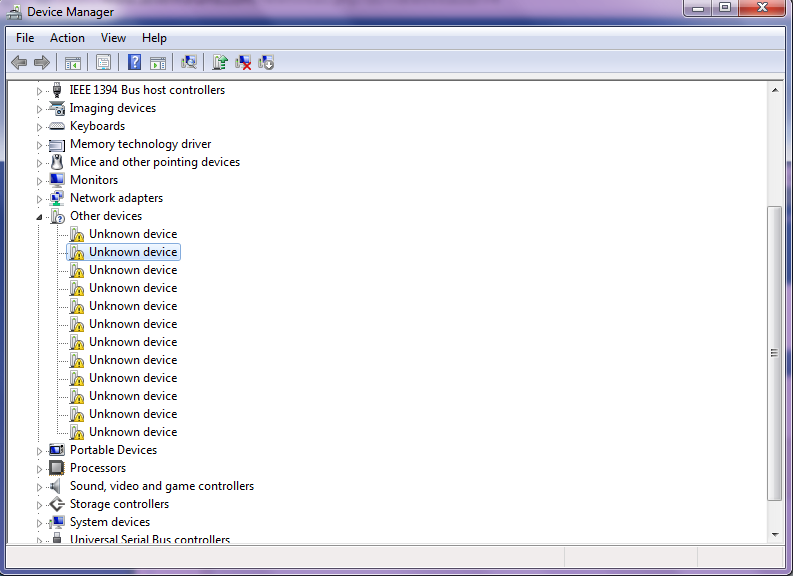
Right-click on one of those devices, in Propoerties, in Details tab, and then from drop down select Hardware ID. Pls screenshot this. We will then try and track down what the unknow device could be and if there is a driver available.
My Computer
- Computer Manufacturer/Model Number
- Lenovo ThinkPad T60
- OS
- Windows 7 Ultimate 64Bit
- CPU
- GenuineIntel Intel(R) Core(TM) DuoCore T2400 @ 1.83GHz
- Motherboard
- Intel(R) 82801G (ICH7 Family)
- Memory
- 2.00 GB
- Graphics Card(s)
- Mobile Intel(R) 945 Express Chipset
- Sound Card
- SoundMAX Integrated Digital HD Audio
- Monitor(s) Displays
- ThinkPad Display
- Screen Resolution
- 1400x1050
- Hard Drives
- 100Gb SATA
- Keyboard
- Standard Keyboard
- Mouse
- HID-compliant Mouse
- Internet Speed
- Cable Broadband - 54Mbps
- Other Info
- Intel(R) PRO/1000 PL Network Connection
11a/b/g Wireless LAN Mini PCI Express Adapter

my initial thought is integrated devices in a laptop, one is most likely a chipset, probably a web cam and microphone and a multi card reader but as mentioned above we won't know for sure what any of those are until we have system specs and a screenshot with all of the device trees open would also be helpful.
My Computer
- Computer Manufacturer/Model Number
- Custom
- OS
- Windows 7 Ultimate Signature Edition
- CPU
- Intel Core i7 Extreme 3.33GHz
- Motherboard
- EVGA X-58 SLI Classified
- Memory
- 12GB DDR3
- Graphics Card(s)
- 2x EVGA 285 2GB in SLI
- Sound Card
- Creative Labs X-Fi ExtremeGamer
- Monitor(s) Displays
- 30" Viewsonic
- Hard Drives
- 2x1TB Western Digital 7200RPM in RAID 0/1TB WD My Book External HDD
- PSU
- Thermaltake 1000w supporting quad SLI
- Case
- Thermaltake Armor Full Tower
- Cooling
- Thermaltake V1 CPU+DIY Liquid cooling
Right-click on one of those devices, in Propoerties, in Details tab, and then from drop down select Hardware ID. Pls screenshot this. We will then try and track down what the unknow device could be and if there is a driver available.
There is no Hardware ID option. There's container ID....?
My Computer
- OS
- Windows 7 Home Premium 64-bit
- Local time
- 6:34 PM
- Messages
- 2,698
What is the make and mode of your machine. Also do you remember if you have been using any USB devices, that you may have unplugged?
My Computer
- Computer Manufacturer/Model Number
- Lenovo ThinkPad T60
- OS
- Windows 7 Ultimate 64Bit
- CPU
- GenuineIntel Intel(R) Core(TM) DuoCore T2400 @ 1.83GHz
- Motherboard
- Intel(R) 82801G (ICH7 Family)
- Memory
- 2.00 GB
- Graphics Card(s)
- Mobile Intel(R) 945 Express Chipset
- Sound Card
- SoundMAX Integrated Digital HD Audio
- Monitor(s) Displays
- ThinkPad Display
- Screen Resolution
- 1400x1050
- Hard Drives
- 100Gb SATA
- Keyboard
- Standard Keyboard
- Mouse
- HID-compliant Mouse
- Internet Speed
- Cable Broadband - 54Mbps
- Other Info
- Intel(R) PRO/1000 PL Network Connection
11a/b/g Wireless LAN Mini PCI Express Adapter

Under the drop down menu the very first selection is hardware id are you saying it is missing when you follow the above directions? Right click on device>properties>details tab>drop down menu>hardware id>Copy and Paste ID string.(aem not rying ot step on your toes) Plus without any system specs your not going to be able to get help your looking for. At the top of the page it says User CP click on it. Then scroll down on the left to edit system specs, please input everything you know about your system. Otherwise how are we to know where to start looking for information on those devices? Thanks. Fabe
My Computer
- Computer Manufacturer/Model Number
- Self Built
- OS
- Windows 7 ultimate 64 bit / XP Home sp3
- CPU
- intel Core 2 Duo E8400 3.0ghz
- Motherboard
- Asus P5ND bios 1401
- Memory
- 8 gigs 1066 OCZ Fata1ty
- Graphics Card(s)
- EVGA GTX 580 Call of Duty Black Ops Edition
- Sound Card
- Creative Soundblaster Audigy 2zs
- Monitor(s) Displays
- Asus 24in LCD's 2MS X2
- Screen Resolution
- 1920x1080p @60Hz
- Hard Drives
- WD Caviar 500 Black/ WD Caviar 200 Blue
- PSU
- OCZ 700W GameXtreme
- Case
- NZXT Apollo
- Cooling
- Corsair H50 CPU/120mm x3 /60mm x2 /Corsair Dominator Ram
- Keyboard
- Logitech Bluetooth Wireless MX5000
- Mouse
- Logitech Bluetooth Wireless MX1000
- Internet Speed
- Download 19.83 Upload 0.97
- Other Info
- Logitech Z2300 Speakers/ Bose Noise Cancelling Headphones/Avermedia PCI-e Hybrid TV Bravo/Epson NX415 all in one/ 4 Port Powered USB Hub/ LG 10x Bluray Burner /TSST Corp DVDRW External
Under the drop down menu the very first selection is hardware id are you saying it is missing when you follow the above directions? Right click on device>properties>details tab>drop down menu>hardware id>Copy and Paste ID string.(aem not rying ot step on your toes) Plus without any system specs your not going to be able to get help your looking for. At the top of the page it says User CP click on it. Then scroll down on the left to edit system specs, please input everything you know about your system. Otherwise how are we to know where to start looking for information on those devices? Thanks. Fabe
Yes, there is no Hardware ID option.
My Computer
- OS
- Windows 7 Home Premium 64-bit
- Local time
- 6:34 PM
- Messages
- 2,698
It may be a USB device that is now no longer part of the machine. Have you connected any USB devices to your machine?
My Computer
- Computer Manufacturer/Model Number
- Lenovo ThinkPad T60
- OS
- Windows 7 Ultimate 64Bit
- CPU
- GenuineIntel Intel(R) Core(TM) DuoCore T2400 @ 1.83GHz
- Motherboard
- Intel(R) 82801G (ICH7 Family)
- Memory
- 2.00 GB
- Graphics Card(s)
- Mobile Intel(R) 945 Express Chipset
- Sound Card
- SoundMAX Integrated Digital HD Audio
- Monitor(s) Displays
- ThinkPad Display
- Screen Resolution
- 1400x1050
- Hard Drives
- 100Gb SATA
- Keyboard
- Standard Keyboard
- Mouse
- HID-compliant Mouse
- Internet Speed
- Cable Broadband - 54Mbps
- Other Info
- Intel(R) PRO/1000 PL Network Connection
11a/b/g Wireless LAN Mini PCI Express Adapter
Can you post your specs.
What hardware is not working?
1) remove all hardware device NOT NEED TO start PC.
2) Check Device Manager.(post back with screenshot, if unknown devices showing,also post your hardware specs)
3) Add hardware device one at a time,check Device Manager each time.
My Computer
- OS
- ME/XP/Vista/Win7