
unknown dot NET files...

cavair

New member
Local time
10:03 AM
Messages
8
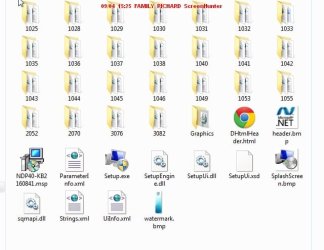
I have five folders on my backup HDD with a long string of letters and numbers as file name.
They are about 4.6mb in size and appear to be something to do with dot NET looking at a bmp file - 2 folders from 2010 and 4 from July 2012.
There are 25 folders in each main folder, of 4 figure file names, and a few other files including exe file, and a Windows Installer file - The small folders have foreign language end user license rtf file along with a xml & dll file - see my screenshots!

What are/were these folders/files for and can i just delete them? i dont know if i have set a back up somehow or if they are important, but id like to free up the space and clear unwanted and not needed junk.

Please can someone give a simple explanation of what they are and if i can safely remove them.?
Thanks!
 

Attachments
  • unknown NET  files screenshot.jpg
    unknown NET files screenshot.jpg
    36.7 KB · Views: 18
  • unknown NET  files 1 .jpg
    unknown NET files 1 .jpg
    7.7 KB · Views: 4

My Computer

Computer Manufacturer/Model Number
Novatech
OS
WINDOWS 7 Home Premium
CPU
AMD 64 X2 Dual core 4000+
Memory
4 GB
Graphics Card(s)
NVIDIA geforce 9500GT
Monitor(s) Displays
HYUNDAI
Hard Drives
Western Dig 160gb (C)
Maxtor 320gb (D)
First off I would do a scan with my anti virus software and Malwarebytes. That's just a precaution as I think but am not sure that these folders and files have been left over after a Windows update. The updates create temporory files during the update and then they are usually deleted. I think these are ones left behind but lets see what better brains than mine have to say. Do the scans anyway!
 

My Computer

Computer type
PC/Desktop
OS
Microsoft Windows 7 Home Premium 64-bit 7601 Multiprocessor Free Service Pack 1
CPU
Intel(R) Core(TM) i7-3770 CPU @ 3.40GHz
Motherboard
ASUSTeK COMPUTER INC. P8H77-M
Memory
8.00 GB
Graphics Card(s)
Intel(R) HD Graphics 4000
Sound Card
On Board
Monitor(s) Displays
Dell 24"
Screen Resolution
1920 x 1080
Hard Drives
(1) INTEL SSDSC2CT180A3 ATA Device (2) ST500DM002-1BD142 ATA Device (3) WDC WD3200AAKS-75L9A0 ATA Device (4) Generic- Compact Flash USB Device (5) Generic- MS/MS-Pro USB Device (6) Generic- SD/MMC USB Device (7) Generic- SM/xD-Picture USB
PSU
500w Corsair
Case
Cooler Master
Cooling
3 Fans
Keyboard
Logitech MK300
Mouse
Logitech WOM
Internet Speed
75Mb
Antivirus
Norton 360
Browser
Firefox, Opera, IE
My Windows 7 has about the same folders your XP system has. They seam to be part of Net Framework. Because of that I'm leaving mine alone.
 

My Computer

Computer type
PC/Desktop
Computer Manufacturer/Model Number
Home made Desktop
OS
Windows 10 Pro. 64/ version 1709 Windows 7 Pro/64
CPU
Intel i7-6800K @ 4.3
Motherboard
ASUS X-99 Deluxe II
Memory
Corsair Platinum 16 gig @2400
Graphics Card(s)
EVGA GTX 1070 OC
Monitor(s) Displays
Asus 27" LED LCD/VE278Q
Screen Resolution
1920-1080 or 1280-720 HDMI
Hard Drives
INTEL SSD 730-240 Gb Sata 3.0/
PSU
EVGA Platium 1200W
Case
Phanteks Luxe Tempered Glass 8 fans/ one radiator
Cooling
XSPC/ Water Cooled CPU
Keyboard
Das 4 Professional
Mouse
Logitech M705/MX Anywhere 2-S
Internet Speed
100 mbits
Antivirus
Microsoft Security Essentials/ Malwarebytes Premium 3.0/ SAS
Browser
I.E. 11 default/Firefox/ ISP Time Warner Cable/Spectrum
Other Info
LG BluRay Burner/
Sound system-KLipsch-THX/
Icy Dock ssd Hot Swap bays.
Cavair,
Forgive me for asking but if you have Windows XP installed as your systems specs indicates why are you asking questions on a Windows 7 Forum?
 

My Computer

Computer type
PC/Desktop
OS
Microsoft Windows 7 Home Premium 64-bit 7601 Multiprocessor Free Service Pack 1
CPU
Intel(R) Core(TM) i7-3770 CPU @ 3.40GHz
Motherboard
ASUSTeK COMPUTER INC. P8H77-M
Memory
8.00 GB
Graphics Card(s)
Intel(R) HD Graphics 4000
Sound Card
On Board
Monitor(s) Displays
Dell 24"
Screen Resolution
1920 x 1080
Hard Drives
(1) INTEL SSDSC2CT180A3 ATA Device (2) ST500DM002-1BD142 ATA Device (3) WDC WD3200AAKS-75L9A0 ATA Device (4) Generic- Compact Flash USB Device (5) Generic- MS/MS-Pro USB Device (6) Generic- SD/MMC USB Device (7) Generic- SM/xD-Picture USB
PSU
500w Corsair
Case
Cooler Master
Cooling
3 Fans
Keyboard
Logitech MK300
Mouse
Logitech WOM
Internet Speed
75Mb
Antivirus
Norton 360
Browser
Firefox, Opera, IE
Im on WIN 7 as well, so forgot to say that, so maybe theyre a left over from XP?
Having said that ive had 7 since 2010.
 

My Computer

Computer Manufacturer/Model Number
Novatech
OS
WINDOWS 7 Home Premium
CPU
AMD 64 X2 Dual core 4000+
Memory
4 GB
Graphics Card(s)
NVIDIA geforce 9500GT
Monitor(s) Displays
HYUNDAI
Hard Drives
Western Dig 160gb (C)
Maxtor 320gb (D)
Im on WIN 7 as well, so forgot to say that, so maybe theyre a left over from XP?
Having said that ive had 7 since 2010.
I doubt that as four of the folders are dated July 2012?
Could you update your system specs please to save future confusion!
BTW Did you run the scans?
 

My Computer

Computer type
PC/Desktop
OS
Microsoft Windows 7 Home Premium 64-bit 7601 Multiprocessor Free Service Pack 1
CPU
Intel(R) Core(TM) i7-3770 CPU @ 3.40GHz
Motherboard
ASUSTeK COMPUTER INC. P8H77-M
Memory
8.00 GB
Graphics Card(s)
Intel(R) HD Graphics 4000
Sound Card
On Board
Monitor(s) Displays
Dell 24"
Screen Resolution
1920 x 1080
Hard Drives
(1) INTEL SSDSC2CT180A3 ATA Device (2) ST500DM002-1BD142 ATA Device (3) WDC WD3200AAKS-75L9A0 ATA Device (4) Generic- Compact Flash USB Device (5) Generic- MS/MS-Pro USB Device (6) Generic- SD/MMC USB Device (7) Generic- SM/xD-Picture USB
PSU
500w Corsair
Case
Cooler Master
Cooling
3 Fans
Keyboard
Logitech MK300
Mouse
Logitech WOM
Internet Speed
75Mb
Antivirus
Norton 360
Browser
Firefox, Opera, IE
I have had those folders post-Windows Update. Removing them was difficult (time-wise) because of elevated rights of a few files in various folders. No harm encountered from their removal.
 

My Computer

OS
Windows 7 Home Premium x64
Havent had time to run the scans yet but will as soon as i can. i use Norton IS 2012 so pretty well protected.
Sorry had forgotten to change the spec.

Have had had win7 since april 2010 so cant see how the files are XP related.

The 2012 folders are dated 15/07 timed at 18.44, 2 @ 18.47 and then 18.49.

the 2010 ones are dated 02 Dec and 11 Dec. These are the only 5 folders.
Are they to do with dot NET?
 

My Computer

Computer Manufacturer/Model Number
Novatech
OS
WINDOWS 7 Home Premium
CPU
AMD 64 X2 Dual core 4000+
Memory
4 GB
Graphics Card(s)
NVIDIA geforce 9500GT
Monitor(s) Displays
HYUNDAI
Hard Drives
Western Dig 160gb (C)
Maxtor 320gb (D)
"The 2012 folders are dated 15/07 timed at 18.44, 2 @ 18.47 and then 18.49.

the 2010 ones are dated 02 Dec and 11 Dec. These are the only 5 folders.
Are they to do with dot NET?"

Look at your Windows Update history and/or Installed Updates and see if there are corresponding entries for those dates, as well as kb2160841 NDP-40 indicated by the snapshot.

My entries don't go that far back. The lowest kb is 23nnnnn.

Are your Updates non-automated? July 10th would be Patch Tuesday.
 

My Computer

OS
Windows 7 Home Premium x64
Back
Top
