Unknown Hard drive

xarden

New member
Heres a new one...
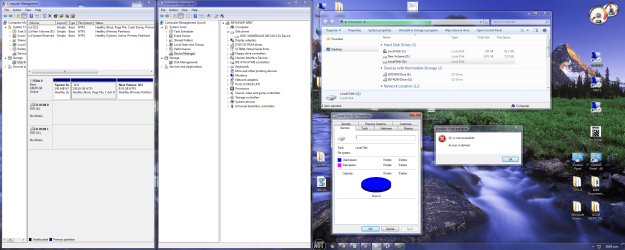
Mysteriously, a new harddrive is showing up in My Computer.
Q:
It wasnt there a few hours ago.
Without sounding like a 60's sci-fi flick... what is it, where did it come from, and why is it here?

Theres no network mapping to it. No local access. No properties. No physical drive. No partition. No removable media. No clue.

Am I missing something...?
Cheers
 

Attachments
  • q_Drive.png
    q_Drive.png
    1.9 MB · Views: 301

My Computer

OS
Windows 7 Enterprise
CPU
Intel Pentium Dual E2200 @2.2GHz
Motherboard
Gigabyte II-G31
Memory
4GB
Graphics Card(s)
Palit GForce 9500GT 1GB
Sound Card
onBoard
Hard Drives
WesternDigital: 250GB + 1TB + 1TB + 2TB
PSU
450W
Case
CoolerMaster CM690
Cooling
Corsair H50
Mouse
Logitech MX518
Sorry, its just a printscreen. I have dual monitors... clicking it should expand it.
Yes i have office 07
 

My Computer

OS
Windows 7 Enterprise
CPU
Intel Pentium Dual E2200 @2.2GHz
Motherboard
Gigabyte II-G31
Memory
4GB
Graphics Card(s)
Palit GForce 9500GT 1GB
Sound Card
onBoard
Hard Drives
WesternDigital: 250GB + 1TB + 1TB + 2TB
PSU
450W
Case
CoolerMaster CM690
Cooling
Corsair H50
Mouse
Logitech MX518

My Computer

Computer type
PC/Desktop
Computer Manufacturer/Model Number
Self built custom
OS
64-bit Windows 11 Pro for Workstations
CPU
Intel i7-8700K OC'd to 5 GHz
Motherboard
ASUS ROG Maximus XI Formula Z390
Memory
64 GB (4x16GB) G.SKILL TridentZ RGB DDR4 3600 MHz
Graphics Card(s)
ASUS ROG-STRIX-GTX1080TI-O11G-GAMING
Sound Card
Integrated
Monitor(s) Displays
2 x Samsung Odyssey G7 27"
Screen Resolution
2560x1440
Hard Drives
1TB Samsung 990 PRO M.2,
4TB Samsung 990 PRO PRO M.2,
TerraMaster F8 SSD Plus NAS
PSU
Seasonic Prime Titanium 850W
Case
Thermaltake Core P3
Cooling
Corsair Hydro H115i
Keyboard
Logitech wireless K800
Mouse
Logitech MX Master 4
Internet Speed
2 Gb/s Download and 100 Mb/s Upload
Antivirus
Malwarebyte Anti-Malware Premium
Browser
Google Chrome
Other Info
Logitech Z625 speaker system,
Logitech BRIO 4K Pro webcam,
HP Color LaserJet Pro MFP M477fdn,
APC SMART-UPS RT 1000 XL - SURT1000XLI,
Galaxy S23 Plus phone
Hi Shawn,
Thanks for your quick reply.
Followed option 2.
I also noted another key with the same binary data as /dosdevice/q: so I deleted that too.
Restarted machine and opened my computer again, and Q: is back there. So are both the regkeys.
Strange indeed.

Edit: Tried again without deleting the other key. No difference.
 

My Computer

OS
Windows 7 Enterprise
CPU
Intel Pentium Dual E2200 @2.2GHz
Motherboard
Gigabyte II-G31
Memory
4GB
Graphics Card(s)
Palit GForce 9500GT 1GB
Sound Card
onBoard
Hard Drives
WesternDigital: 250GB + 1TB + 1TB + 2TB
PSU
450W
Case
CoolerMaster CM690
Cooling
Corsair H50
Mouse
Logitech MX518
Go into the BIOS and see if the drive detection for the Phantom Drive is set to Auto Detect. If it is set it to Off, Save Changes and exit to boot, let us know if that drive is gone.

C: will be Primary Master if D: is your drive check to see where your CD/DVD etc are connected on the mobo, if the CD/DVD is the Slave and you have no other connected drives turn off both Primary and Slave Secondary Drives, if CD/DVD is master turn off both Slaves in BIOS.
 

My Computer

Computer Manufacturer/Model Number
DELL XPS Studio 435T
OS
Vista 64 Ultimate, Windows 7 64 Ultimate, Ubuntu 9.10
CPU
i7 975 3.3 GHz Extreme (Factory OC'd to 3.6 GHz)
Motherboard
DELL provided
Memory
18 Gb Tri-Channel 1066
Graphics Card(s)
ATI 5970 2048 Mb
Sound Card
X-Fi Extreme Gamer
Monitor(s) Displays
Vizio 37" HD-TV
Screen Resolution
1920 x 1080
Hard Drives
1.5 Tb HDD
1.5 Tb HDD
2.0 Tb Network Drive
512 Gb Crucial SSD
PSU
DELL Provided 475 watts
Case
DELL
Cooling
3 fans
Keyboard
Logitech Performance K350 Wireless
Mouse
Logitech Performance MX Wireless
Internet Speed
3 Mb up 750 Kb down
Other Info
Bamboo Fun Tablet, Belkin N+ Wireless router, Pioneer Dolby System Wireless Headphones, Bose 5.1 Dolby Surround Sound System, LifeCam VX 3000 Webcam, Blu-Ray/Hi Def DVD +RW combo and Blu-ray +RW,l 15 in 1 media card reader, Logitech Rumblepad 2, Hauppauge 2250 DTV Tuner with MS Media Center Remote

Laptop:Alienware M17x, Q9100 CPU, 8Gb RAM, 1920x1200 WUXGA LCD driven by 4870's in CrossFireX, Bl
Sounds like you have Office 2010 beta installed....
it uses the click-to-run technology which creates the Q: drive.
 

My Computer

Computer Manufacturer/Model Number
Gateway FX-510X
OS
Windows 7 Ultimate x64 RTM
CPU
Intel(R) Pentium(R) D CPU 3.00GHz
Motherboard
Intel OEMD975XW2G1
Memory
6 GB dual channel DDR2 333 MHz
Graphics Card(s)
NVIDIA GeForce 7800 GTX 256 MB
Sound Card
Creative X-Fi Fatal1ty Extreme Gamer
Monitor(s) Displays
15" Planar PL170 LCD, 17" Gateway FPD1965 LCD
Screen Resolution
1280 x 1024
Hard Drives
64 GB SSD Crucial
2000 GB internal WDC
500 GB internal WDC
@fishnbanjo, C: & D: are on Sata0, DVD (E:) drive is on Sata1. BD-rom (G:) drive is virtual.
Thanks for the suggestion though.

@dnorris, that would actually explain a lot. I did have office 2007 as thats what we're licensed for.
I was one of the guinea pigs for 2010, to see if we should upgrade. Im not sure where we got the .iso's from.
As it turns out, we wont be upgrading.
But, 2010 did have some uninstall issues. So I just reinstalled 2007 over the top.
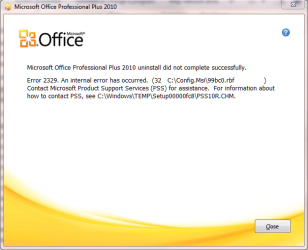
You seem knowledgeable with 2010, so perhaps you could help me with the uninstall error.
Capture.PNG
 

My Computer

OS
Windows 7 Enterprise
CPU
Intel Pentium Dual E2200 @2.2GHz
Motherboard
Gigabyte II-G31
Memory
4GB
Graphics Card(s)
Palit GForce 9500GT 1GB
Sound Card
onBoard
Hard Drives
WesternDigital: 250GB + 1TB + 1TB + 2TB
PSU
450W
Case
CoolerMaster CM690
Cooling
Corsair H50
Mouse
Logitech MX518

My Computer

Computer Manufacturer/Model Number
Gateway FX-510X
OS
Windows 7 Ultimate x64 RTM
CPU
Intel(R) Pentium(R) D CPU 3.00GHz
Motherboard
Intel OEMD975XW2G1
Memory
6 GB dual channel DDR2 333 MHz
Graphics Card(s)
NVIDIA GeForce 7800 GTX 256 MB
Sound Card
Creative X-Fi Fatal1ty Extreme Gamer
Monitor(s) Displays
15" Planar PL170 LCD, 17" Gateway FPD1965 LCD
Screen Resolution
1280 x 1024
Hard Drives
64 GB SSD Crucial
2000 GB internal WDC
500 GB internal WDC
Back
Top