"Unknown Publisher" Warning

rovf

New member
Local time
1:53 AM
Messages
30
Some of my installed programs always display the following warning when I run them:
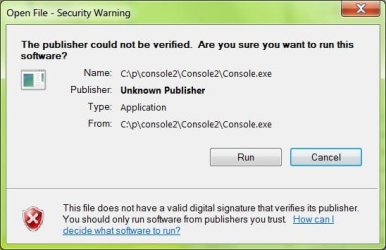
xnview_capture_08012011_112341.jpg

This is pretty annoying, because I always have to click on the "Run" button when starting them. It's OK if Windows asks me the first time, but then it should remember my choice...

Is there any way to suppress this warning?

Here is what I have already tried so far, but with no success:

- Reduce notification level in "User Account Control Settings"
- Check the "properties" of the exe file
 

My Computer

OS
Windows 7

My Computer

Computer type
PC/Desktop
Computer Manufacturer/Model Number
Custom Build
OS
Windows 10 Pro x64
CPU
Intel Core i5 4440 @Stock
Motherboard
Gigabyte Z97 D3H
Memory
4 x 4GB HyperX Fury DDR3
Graphics Card(s)
Gigabyte GTX 1050Ti O4G
Sound Card
Integrated
Monitor(s) Displays
Dell P2417H
Screen Resolution
1920 x 1080
Hard Drives
Samsung EVO 850 120GB / Toshiba DT01ACA050 1TB 7200prm 32MB
PSU
Riotoro Onyx 750W
Case
NZXT H500 Black-Red
Cooling
Stock CPU + NZXT 120mm + 2x120mm red fans
Keyboard
Modecom Volcano Lanparty
Mouse
Asus ROG Gladius / DeepCool E-Pad Plus
Internet Speed
DOCSIS 50/3 Mbit
Browser
Google Chrome
Other Info
Asus K55VJ(i5 3210M, GT635M / 2GB, 8GB DDR3, 500GB HDD)

Both solutions described there did not work:

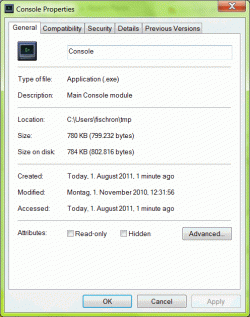
For the first solution, I copied the EXE to a directory below /Users/USERNAME and went to properties/General. However, there is no button for unblocking the file:
MWSnap001 2011-08-01, 14_49_13.gif

The second solution suggests to uncheck the checkbox "Always ask when running this file". However, as we can see from my screenshot in the original posting, there is no such checkbox to uncheck.

Any other idea?

Ronald
 

My Computer

OS
Windows 7
Sorry... But you want to open console.exe file ? Also I can see that the file is created today.(You're sure that it's not virus ? )
Also try with another .exe file, example download Firefox or Opera and try with that tutorial. There should be Unblock button.
 

My Computer

Computer type
PC/Desktop
Computer Manufacturer/Model Number
Custom Build
OS
Windows 10 Pro x64
CPU
Intel Core i5 4440 @Stock
Motherboard
Gigabyte Z97 D3H
Memory
4 x 4GB HyperX Fury DDR3
Graphics Card(s)
Gigabyte GTX 1050Ti O4G
Sound Card
Integrated
Monitor(s) Displays
Dell P2417H
Screen Resolution
1920 x 1080
Hard Drives
Samsung EVO 850 120GB / Toshiba DT01ACA050 1TB 7200prm 32MB
PSU
Riotoro Onyx 750W
Case
NZXT H500 Black-Red
Cooling
Stock CPU + NZXT 120mm + 2x120mm red fans
Keyboard
Modecom Volcano Lanparty
Mouse
Asus ROG Gladius / DeepCool E-Pad Plus
Internet Speed
DOCSIS 50/3 Mbit
Browser
Google Chrome
Other Info
Asus K55VJ(i5 3210M, GT635M / 2GB, 8GB DDR3, 500GB HDD)
Sorry... But you want to open console.exe file ? Also I can see that the file is created today.

According to the tutorial, the file needs to reside below \Users, and that's why I copied it to this directory (and that's why it has the current timestamp).

There are not that many files under \Users\USERNAME, and those which are there, don't have the "unblock" option in their properties.
 

My Computer

OS
Windows 7
Where did the program come from?

It needs a digital signature, even if it isn't Veritas approved.


It looks as though it's just an EXE that has been copied into place, which Win7 hates.

If it has been properly 'installed' via the 'trusted installer' then these messages tend to be suppressed.
 

My Computer

Computer Manufacturer/Model Number
Novatech (UK) iRush Pro
OS
MSDN Home Premium
CPU
Intel i5
Motherboard
Intel DP55WB
Memory
4Gb
Graphics Card(s)
ATI Radeon HD 5770
Sound Card
On Board
Monitor(s) Displays
Philips 170B
Hard Drives
1 x 1Tb
(7 Partitions)
PSU
750W
Case
Antec 300
Cooling
Tricool Fans
Keyboard
Microsoft 3000 Wireless
Mouse
Microsoft 5000 Wireless BlueTrack
Internet Speed
6.1 Mbps
Is this for IPython use?
 

My Computer

Computer type
PC/Desktop
Computer Manufacturer/Model Number
Bruce ... somewhere in his 40's
OS
Windows 7 Ultimate 32bit SP1
CPU
Intel(R) Core(TM)2 Quad CPU @ 2.40GHz, 2400 MHz
Motherboard
INTEL/D975XBX2
Memory
4 GB
Graphics Card(s)
ATI Radeon HD 2600 Pro
Monitor(s) Displays
Samsung SyncMaster 914v
Screen Resolution
1280 x 1024
Hard Drives
2/500GB each ... ST3500630AS ATA Device.
One is not connected
PSU
Rocketfish 700 W
Case
G.Skill Gigabyte Chassis
Keyboard
Standard PS/2 Keyboard
Mouse
Microsoft PS/2 Mouse
Internet Speed
DSL
Antivirus
Avira Internet Security
Browser
IE 11
Other Info
ATI HDMI Audio
Where did the program come from?
It needs a digital signature, even if it isn't Veritas approved.
It looks as though it's just an EXE that has been copied into place, which Win7 hates.
If it has been properly 'installed' via the 'trusted installer' then these messages tend to be suppressed.

Why do I need a signature for my programs?????

Yes, it is an executable copied from somewhere. Am I not allowed to put executables on my PC anymore????

In this case, the application is a sourceforge project (console2).

And today I observed something really weird:

I copied the program from my C: drive to some network drive and started it from there - and suddenly, no warning message anymore!!! Why does Windows warns me, when I start a program from my C: drive, but does not give any warning, when I start the identical program from my network drive???? This is absurd!
 

My Computer

OS
Windows 7
Back
Top