
Solved unknown RAM usage - need help determining the cause

Diddy7Kong

New member
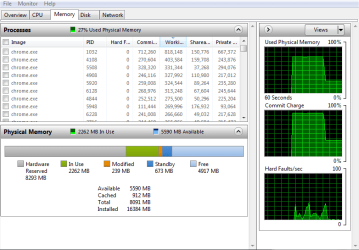
below is a screenshot of resmon, what I find rather odd and interesting, is that the last two boots had been giving me a low RAM warning, and upon checking whats using it all up, i am greeted to 8GBs of hardware reserved memory which has never happened on this build before. one theory i got was that maybe the MOBO went bad or is responsible, and flashing/updating the BIOS or replacing the whole MOBO would be a viable solution, however, I feel that's more of a last resort solution rather than a first resort solution, and troubleshooting this has me confused, any possible help on what this phenomenon is?
 

Attachments
  • 4f91255282924d89a73e28ec216f85a5.png
    4f91255282924d89a73e28ec216f85a5.png
    53.9 KB · Views: 0

My Computer

Computer type
Laptop
Computer Manufacturer/Model Number
HP
OS
Windows 7 Professional 64 bit
CPU
AMD APU
Motherboard
unknown
Memory
8GB
Graphics Card(s)
ATI radeon chipset
Hard Drives
500GB internal
2,048 GB external
Browser
Google Chrome
Well if you`re using the cpu for graphics, it could be normal.

Have you ever had a video card installed ?
 

My Computer

Computer type
PC/Desktop
Computer Manufacturer/Model Number
Skylake Special #666
OS
Windows 10 Pro x64
CPU
Intel Core i7 6700K
Motherboard
Asus Sabertooth Z170 Mark 1
Memory
GSkill TridentZ RGB 16GB 3600 16-16-16-36
Graphics Card(s)
EVGA GTX 980 Ti SC x2
Sound Card
Realtek High Definition
Monitor(s) Displays
AOC G2460PG
Screen Resolution
1920 x 1080 144Hz
Hard Drives
Samsung 860 Pro 256GB, Seagate Barracuda 4TB x2
PSU
EVGA 1000 P2, EVGA White Custom Braided Cables
Case
Corsair Vengeance C70 Gunmetal Black
Cooling
Corsair H100i v2, Corsair ML120 x2, Thermal Grizzly Kryonaut
Keyboard
Logitech G910 Orion Spectrum
Mouse
Logitech G700s
Internet Speed
Verizon Fios Quantum Gateway 75/75
Antivirus
Windows Defender, Malwarebytes Free 3.8.3
Browser
Chrome
Other Info
Corsair SP120 x4, LG Blu-ray Drive, Durabrand HT-395 100 Watt Dolby Digital Amp, Corsair H2100 Wireless 7.1 Headset
Well if you`re using the cpu for graphics, it could be normal.

Have you ever had a video card installed ?

i have one dedicated graphics card instaled, it has its own RAM on the card, there is no need for it to be reserving system ram (the hardware reserved coming from graphics is only for integrated graphics or GPUs that dont have their own memory (only integrated of which i have heard of)


anyways, i have just discovered that one of the two RAM sticks died as the POST passes, but the BIOS reported only 8 GB installed

when using the momOK button with one of the sticks only, the POST error came up, going to be RMAing the sticks
 

My Computer

Computer type
Laptop
Computer Manufacturer/Model Number
HP
OS
Windows 7 Professional 64 bit
CPU
AMD APU
Motherboard
unknown
Memory
8GB
Graphics Card(s)
ATI radeon chipset
Hard Drives
500GB internal
2,048 GB external
Browser
Google Chrome
From my previous experience I have found that when Hardware Reserve is high like yours is (8293mb) it is usually a ram problem of some kind.
Wrong ram, mismatched ram, ram installed incorrectly, bad ram or possibly a motherboard slot.
Hardware Reserve on my system at this time is 61mb.
 

My Computer

Computer type
PC/Desktop
Computer Manufacturer/Model Number
Home made Desktop
OS
Windows 10 Pro. 64/ version 1709 Windows 7 Pro/64
CPU
Intel i7-6800K @ 4.3
Motherboard
ASUS X-99 Deluxe II
Memory
Corsair Platinum 16 gig @2400
Graphics Card(s)
EVGA GTX 1070 OC
Monitor(s) Displays
Asus 27" LED LCD/VE278Q
Screen Resolution
1920-1080 or 1280-720 HDMI
Hard Drives
INTEL SSD 730-240 Gb Sata 3.0/
PSU
EVGA Platium 1200W
Case
Phanteks Luxe Tempered Glass 8 fans/ one radiator
Cooling
XSPC/ Water Cooled CPU
Keyboard
Das 4 Professional
Mouse
Logitech M705/MX Anywhere 2-S
Internet Speed
100 mbits
Antivirus
Microsoft Security Essentials/ Malwarebytes Premium 3.0/ SAS
Browser
I.E. 11 default/Firefox/ ISP Time Warner Cable/Spectrum
Other Info
LG BluRay Burner/
Sound system-KLipsch-THX/
Icy Dock ssd Hot Swap bays.
Back
Top