
Need help determining which driver to install

perkinw

New member
I have a two-week-old Windows 7 64-bit PC that is getting occasional blue screens. WhoCrashed consistently implicates the following driver:

iusb3xhc.sys (Intel(R) USB 3.0 eXtensible Host Controller Driver, Intel Corporation)

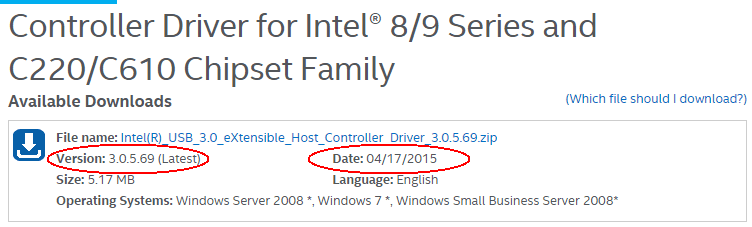
I found what I believe to be the latest driver for my PC on Intel's web site (see screenshot).

I am confused however, by the version number. The driver on the web site is version 3.0.5.69, but he driver on my computer (from Device Manager) is version 4.0.0.27. Unless I am mistaken, the "latest" version should have a higher version number. Can this driver really be newer than the one already installed? Should I install it?

FYI I am not experienced at installing drivers. This would be the first time I tried it.
 

Attachments
  • USB 3 0 Extensible Host Controller Driver.png
    USB 3 0 Extensible Host Controller Driver.png
    24.9 KB · Views: 2

My Computer

Computer type
PC/Desktop
Computer Manufacturer/Model Number
Dell Studio MT
OS
Microsoft Windows 7 Professional 64-bit 7601 Multiprocessor Free Service Pack 1
CPU
Intel(R) Core(TM) i7-4790 CPU @ 3.60GHz
Motherboard
Dell Inc. 0KWVT8
Memory
24.00 GB
Graphics Card(s)
AMD Radeon(TM) R9 270
Sound Card
(1) AMD High Definition Audio Device (2) Realtek High Defi
Monitor(s) Displays
Sun CRT
Screen Resolution
1920 x 1200 x 32 bits (4294967296 colors) @ 60 Hz
Hard Drives
(1) Crucial_ CT256MX100SSD1 SCSI Disk Device (2) Intel Raid 1 Volume SCSI Disk Device (3) SK hynix SC210 mSAT SCSI Disk Device (4) CF/MD Card (5) MS/Pro/Duo Card (6) SD/mini-MMC/RS Card (7) SM/xD Card
Hi perkinw,

You can try downloading the driver into the manufacturer's website of your machine, maybe they have the version that you are looking for.
 

My Computer

Computer type
PC/Desktop
Computer Manufacturer/Model Number
HP
OS
Windows 7 Pro 32bit
CPU
Dual Core
Antivirus
Trend Micro

My Computer

Computer type
PC/Desktop
Computer Manufacturer/Model Number
Custom Build
OS
W7 Pro x64 SP1 | W10 Pro IP x64 | W8.1 Pro x64 VM | Linux Mint VM
CPU
i7-4790k @ 4GHz (4.4GHz Boost)
Motherboard
ASUS Sabertooth Z87 (BIOS Rev 2004)
Memory
16GB DDR3 Kingston HyperX Fury @ 1600MHz CL 9-9-9-27
Graphics Card(s)
EVGA GTX 980 Classified
Sound Card
Realtek Onboard
Monitor(s) Displays
Samsung S27D390
Screen Resolution
1920 x 1080
Hard Drives
240GB Intel 520 Series SSD |
Samsung 850 EVO 120GB SSD |
2TB WD Caviar Black |
2TB WD Caviar Green
PSU
Corsair HX850-80 Gold Modular
Case
Cooler Master Silencio 650
Cooling
Corsair H80i w/2 x Corsair SP120 | 2 x 120mm Noctua NF-S12B
Keyboard
Microsoft Sidewinder X4
Mouse
Gigabyte M6900 optical
Internet Speed
152mb
Antivirus
F-Secure
Browser
Firefox 38.0
Other Info
Backup Rig: Win 7 Pro 64-bit | AMD A10-5800k | ASUS F2A85-V Pro | 8GB Samsung DDR3 @1600MHz | 120GB Toshiba SDD | 2TB Seagate HDD | Cooler Master Silencio 550
Thank you, Boozad. I have followed the instructions for BSOD posting and attached the zip file. Only the last two BSOD's are relevant. The problems causing the earlier BSOD's were fixed by my local computer shop. I'm hoping I can fix this one with your help, thanks!
 

Attachments

My Computer

Computer type
PC/Desktop
Computer Manufacturer/Model Number
Dell Studio MT
OS
Microsoft Windows 7 Professional 64-bit 7601 Multiprocessor Free Service Pack 1
CPU
Intel(R) Core(TM) i7-4790 CPU @ 3.60GHz
Motherboard
Dell Inc. 0KWVT8
Memory
24.00 GB
Graphics Card(s)
AMD Radeon(TM) R9 270
Sound Card
(1) AMD High Definition Audio Device (2) Realtek High Defi
Monitor(s) Displays
Sun CRT
Screen Resolution
1920 x 1200 x 32 bits (4294967296 colors) @ 60 Hz
Hard Drives
(1) Crucial_ CT256MX100SSD1 SCSI Disk Device (2) Intel Raid 1 Volume SCSI Disk Device (3) SK hynix SC210 mSAT SCSI Disk Device (4) CF/MD Card (5) MS/Pro/Duo Card (6) SD/mini-MMC/RS Card (7) SM/xD Card

My Computer

Computer type
PC/Desktop
Computer Manufacturer/Model Number
Custom Build
OS
W7 Pro x64 SP1 | W10 Pro IP x64 | W8.1 Pro x64 VM | Linux Mint VM
CPU
i7-4790k @ 4GHz (4.4GHz Boost)
Motherboard
ASUS Sabertooth Z87 (BIOS Rev 2004)
Memory
16GB DDR3 Kingston HyperX Fury @ 1600MHz CL 9-9-9-27
Graphics Card(s)
EVGA GTX 980 Classified
Sound Card
Realtek Onboard
Monitor(s) Displays
Samsung S27D390
Screen Resolution
1920 x 1080
Hard Drives
240GB Intel 520 Series SSD |
Samsung 850 EVO 120GB SSD |
2TB WD Caviar Black |
2TB WD Caviar Green
PSU
Corsair HX850-80 Gold Modular
Case
Cooler Master Silencio 650
Cooling
Corsair H80i w/2 x Corsair SP120 | 2 x 120mm Noctua NF-S12B
Keyboard
Microsoft Sidewinder X4
Mouse
Gigabyte M6900 optical
Internet Speed
152mb
Antivirus
F-Secure
Browser
Firefox 38.0
Other Info
Backup Rig: Win 7 Pro 64-bit | AMD A10-5800k | ASUS F2A85-V Pro | 8GB Samsung DDR3 @1600MHz | 120GB Toshiba SDD | 2TB Seagate HDD | Cooler Master Silencio 550
No, the model is Dell XPS 8700.
 

My Computer

Computer type
PC/Desktop
Computer Manufacturer/Model Number
Dell Studio MT
OS
Microsoft Windows 7 Professional 64-bit 7601 Multiprocessor Free Service Pack 1
CPU
Intel(R) Core(TM) i7-4790 CPU @ 3.60GHz
Motherboard
Dell Inc. 0KWVT8
Memory
24.00 GB
Graphics Card(s)
AMD Radeon(TM) R9 270
Sound Card
(1) AMD High Definition Audio Device (2) Realtek High Defi
Monitor(s) Displays
Sun CRT
Screen Resolution
1920 x 1200 x 32 bits (4294967296 colors) @ 60 Hz
Hard Drives
(1) Crucial_ CT256MX100SSD1 SCSI Disk Device (2) Intel Raid 1 Volume SCSI Disk Device (3) SK hynix SC210 mSAT SCSI Disk Device (4) CF/MD Card (5) MS/Pro/Duo Card (6) SD/mini-MMC/RS Card (7) SM/xD Card
Can you update your system specs please, I keep looking at them and am looking for the wrong thing.
 

My Computer

Computer type
PC/Desktop
Computer Manufacturer/Model Number
Custom Build
OS
W7 Pro x64 SP1 | W10 Pro IP x64 | W8.1 Pro x64 VM | Linux Mint VM
CPU
i7-4790k @ 4GHz (4.4GHz Boost)
Motherboard
ASUS Sabertooth Z87 (BIOS Rev 2004)
Memory
16GB DDR3 Kingston HyperX Fury @ 1600MHz CL 9-9-9-27
Graphics Card(s)
EVGA GTX 980 Classified
Sound Card
Realtek Onboard
Monitor(s) Displays
Samsung S27D390
Screen Resolution
1920 x 1080
Hard Drives
240GB Intel 520 Series SSD |
Samsung 850 EVO 120GB SSD |
2TB WD Caviar Black |
2TB WD Caviar Green
PSU
Corsair HX850-80 Gold Modular
Case
Cooler Master Silencio 650
Cooling
Corsair H80i w/2 x Corsair SP120 | 2 x 120mm Noctua NF-S12B
Keyboard
Microsoft Sidewinder X4
Mouse
Gigabyte M6900 optical
Internet Speed
152mb
Antivirus
F-Secure
Browser
Firefox 38.0
Other Info
Backup Rig: Win 7 Pro 64-bit | AMD A10-5800k | ASUS F2A85-V Pro | 8GB Samsung DDR3 @1600MHz | 120GB Toshiba SDD | 2TB Seagate HDD | Cooler Master Silencio 550

My Computer

Computer type
PC/Desktop
Computer Manufacturer/Model Number
Dell Studio MT
OS
Microsoft Windows 7 Professional 64-bit 7601 Multiprocessor Free Service Pack 1
CPU
Intel(R) Core(TM) i7-4790 CPU @ 3.60GHz
Motherboard
Dell Inc. 0KWVT8
Memory
24.00 GB
Graphics Card(s)
AMD Radeon(TM) R9 270
Sound Card
(1) AMD High Definition Audio Device (2) Realtek High Defi
Monitor(s) Displays
Sun CRT
Screen Resolution
1920 x 1200 x 32 bits (4294967296 colors) @ 60 Hz
Hard Drives
(1) Crucial_ CT256MX100SSD1 SCSI Disk Device (2) Intel Raid 1 Volume SCSI Disk Device (3) SK hynix SC210 mSAT SCSI Disk Device (4) CF/MD Card (5) MS/Pro/Duo Card (6) SD/mini-MMC/RS Card (7) SM/xD Card
Your specs say Dell Studio MT but you're saying Dell XPS 8700. These are two different PCs. Not knowing what you have makes it impossible to insure you get the correct drivers.
 

My Computer

Computer type
PC/Desktop
Computer Manufacturer/Model Number
Built 2/11/2011
OS
Windows 7 Pro-x64
CPU
i7-2600 3.4GHz - 3.8GHz Turbo
Motherboard
Intel DH67BL-B3
Memory
8Gb - 2x4GB, Muskin 991770 PC3-1333
Graphics Card(s)
Integrated Intel HD 2000
Sound Card
Integrated Intel 10.1 HD, RealTek ALC892
Monitor(s) Displays
Asus LCD VH222H, Haier HL24XSL2a
Screen Resolution
1920x1080, 1920x1080
Hard Drives
Crucial SSD C300-128Gb,
Western Digital WD5002AALX - 500Gb,
Western Digital WD7501AALS - 750Gb
PSU
Seasonic 650W 80+ Gold Modular
Case
Rosewill Defender
Cooling
Stock CPU, Four 120mm case fans, PCH fan added
Keyboard
Logitech EX100 Y-RBH94 Wireless
Mouse
Logitech EX100 M-RCE95 Wireless
Internet Speed
3.0/1.5 Mbs
Antivirus
Microsoft Security Essentials
Browser
Microsoft Internet Explorer 11
Other Info
Antec Veris Premier-Multimedia IR Station,
Cyber Accoustics-3602 Speakers,
AFT XM-5U Card Reader,
Hauppauge TV-HVR-2250,
Sony LX300 USB Turntable
I updated my specs. I didn't realize I needed to do that until Boozad explained how.
 

My Computer

Computer type
PC/Desktop
Computer Manufacturer/Model Number
Dell Studio MT
OS
Microsoft Windows 7 Professional 64-bit 7601 Multiprocessor Free Service Pack 1
CPU
Intel(R) Core(TM) i7-4790 CPU @ 3.60GHz
Motherboard
Dell Inc. 0KWVT8
Memory
24.00 GB
Graphics Card(s)
AMD Radeon(TM) R9 270
Sound Card
(1) AMD High Definition Audio Device (2) Realtek High Defi
Monitor(s) Displays
Sun CRT
Screen Resolution
1920 x 1200 x 32 bits (4294967296 colors) @ 60 Hz
Hard Drives
(1) Crucial_ CT256MX100SSD1 SCSI Disk Device (2) Intel Raid 1 Volume SCSI Disk Device (3) SK hynix SC210 mSAT SCSI Disk Device (4) CF/MD Card (5) MS/Pro/Duo Card (6) SD/mini-MMC/RS Card (7) SM/xD Card
Your specs still say Studio MT, if you could update that please it would be appreciated. We do rely heavily on those specs and it really does help us help you.

Onto the drivers. The faulting USB3.0 drivers have been flagged in the dumps, two of them to be exact. The first one blamed is the Intel eXtensible Host Controller, then the Intel USB3.0 Hub driver.
Code:
[COLOR=Red]*** WARNING: Unable to verify timestamp for iusb3xhc.sys
*** ERROR: Module load completed but symbols could not be loaded for iusb3xhc.sys[/COLOR]

Use !analyze -v to get detailed debugging information.

BugCheck 1000007E, {ffffffffc0000005, fffff8800504e3b4, fffff8801296d4d8, fffff8801296cd30}

Probably caused by : iusb3xhc.sys ( iusb3xhc+4e3b4 )

0: kd> lmvm iusb3xhc
start             end                 module name
fffff880`05000000 fffff880`050c8000   iusb3xhc T (no symbols)           
    Loaded symbol image file: iusb3xhc.sys
    Image path: \SystemRoot\system32\DRIVERS\iusb3xhc.sys
    Image name: iusb3xhc.sys
    Timestamp:        [COLOR=Red]Mon Mar 30 17:03:48 2015[/COLOR] (551973E4)
    CheckSum:         000C8429
    ImageSize:        000C8000
    Translations:     0000.04b0 0000.04e4 0409.04b0 0409.04e4
Code:
fffff880`1296cc08  fffff880`05828000Unable to load image \SystemRoot\system32\DRIVERS\iusb3hub.sys, Win32 error 0n2
[COLOR=Red]*** WARNING: Unable to verify timestamp for iusb3hub.sys
*** ERROR: Module load completed but symbols could not be loaded for iusb3hub.sys[/COLOR]
 iusb3hub

0: kd> lmvm iusb3hub
start             end                 module name
fffff880`05828000 fffff880`0588b000   iusb3hub T (no symbols)           
    Loaded symbol image file: iusb3hub.sys
    Image path: \SystemRoot\system32\DRIVERS\iusb3hub.sys
    Image name: iusb3hub.sys
    Timestamp:        [COLOR=Red]Thu Oct 30 10:05:14 2014[/COLOR] (54520D5A)
    CheckSum:         00066231
    ImageSize:        00063000
    Translations:     0000.04b0 0000.04e4 0409.04b0 0409.04e4
If you look at the dates the XHCI driver is newer than the Hub driver, whether that's causing the problem I don't know. I've checked the Dell website support page and I can't find anything newer than either of them for that model PC. I'll have to have a look around the Intel site and see if anything shows up.

One other driver of note is the ATI driver.
Code:
fffff880`1296ca88  fffff880`0f2f58bbUnable to load image \SystemRoot\system32\DRIVERS\atikmdag.sys, Win32 error 0n2
[COLOR=Red]*** WARNING: Unable to verify timestamp for atikmdag.sys
*** ERROR: Module load completed but symbols could not be loaded for atikmdag.sys[/COLOR]
 atikmdag+0x818bb

0: kd> lmvm atikmdag
start             end                 module name
fffff880`0f274000 fffff880`0febb000   atikmdag T (no symbols)           
    Loaded symbol image file: atikmdag.sys
    Image path: \SystemRoot\system32\DRIVERS\atikmdag.sys
    Image name: atikmdag.sys
    Timestamp:        [COLOR=Red]Sat Aug 31 01:02:50 2013[/COLOR] (522132AA)
    CheckSum:         00BF596C
    ImageSize:        00C47000
    Translations:     0000.04b0 0000.04e4 0409.04b0 0409.04e4
This one's pretty old and needs updating. Download the latest driver for your card from here and save it to your desktop. Download DDU and follow http://www.sevenforums.com/tutorials/367109-display-driver-uninstaller-how-use.html to remove all traces of your current driver. Reboot and install the downloaded driver.
 

My Computer

Computer type
PC/Desktop
Computer Manufacturer/Model Number
Custom Build
OS
W7 Pro x64 SP1 | W10 Pro IP x64 | W8.1 Pro x64 VM | Linux Mint VM
CPU
i7-4790k @ 4GHz (4.4GHz Boost)
Motherboard
ASUS Sabertooth Z87 (BIOS Rev 2004)
Memory
16GB DDR3 Kingston HyperX Fury @ 1600MHz CL 9-9-9-27
Graphics Card(s)
EVGA GTX 980 Classified
Sound Card
Realtek Onboard
Monitor(s) Displays
Samsung S27D390
Screen Resolution
1920 x 1080
Hard Drives
240GB Intel 520 Series SSD |
Samsung 850 EVO 120GB SSD |
2TB WD Caviar Black |
2TB WD Caviar Green
PSU
Corsair HX850-80 Gold Modular
Case
Cooler Master Silencio 650
Cooling
Corsair H80i w/2 x Corsair SP120 | 2 x 120mm Noctua NF-S12B
Keyboard
Microsoft Sidewinder X4
Mouse
Gigabyte M6900 optical
Internet Speed
152mb
Antivirus
F-Secure
Browser
Firefox 38.0
Other Info
Backup Rig: Win 7 Pro 64-bit | AMD A10-5800k | ASUS F2A85-V Pro | 8GB Samsung DDR3 @1600MHz | 120GB Toshiba SDD | 2TB Seagate HDD | Cooler Master Silencio 550
Back
Top