Unknown Sender - Windows Live Mail

winsupertweaker

Banned
VIP
Local time
3:15 PM
Messages
111
When I send an email and a copy of it goes to the "sent folder" or I delete the sent email, each time I visit either folder and click on the mail I sent, it says "unknown sender".

I have checked blocked and safe senders list. I am in the safe senders list and not in blocked senders list. I have myself as a contact at Hotmail and all synchronizing with email and calendar work just fine.

My security settings are the same as well. This just start happening about a week ago. I have uninstalled and resinstalled Windows Live Essentials (mail and messenger).

Something I am missing....grrr! :shock:
 

My Computer

Computer Manufacturer/Model Number
My own Custom Build: Asus, Corsair, Transcend, AMD, PNY, Ultra
OS
W7 64 Bit
CPU
AMD Phenom x4 4000Mhz
Memory
8 GB DDR-2
Graphics Card(s)
PNY-NVIDIA GeForce GTX 460 1GB GDDR5 PCI-e
Monitor(s) Displays
Dual: Flatron L1942T
Hard Drives
C: Drive (Agility 2 Solid State Drive 60 GB)
D: Drive (HDD Internal Western Digital 640 GB)
PSU
650 Watt
Cooling
Corsair Hydro H6 Liquid Cooler
Internet Speed
25 mbps down - 3 mbps up
If you send somthing to yourself does it show up in the inbox? Who is it from in that folder? When you first wrote it and before sending, what is in the "From" field.
 

My Computer

Computer type
PC/Desktop
Computer Manufacturer/Model Number
OQO 2+
OS
Windows 8 Pro w/MC 32-bit
CPU
Intel Atom 1.86 GHz
Motherboard
OQO 2+
Memory
2 GB
Graphics Card(s)
Intel GMA 500
Sound Card
IDT
Monitor(s) Displays
LCD
Screen Resolution
800 x 480 (portable) 1280 x 1024 (docked)
Hard Drives
64 GB SSD
PSU
9 Ah Battery (portable) or OQO Brick (docked)
Case
Shirt Pocket Sized
Cooling
Tiny Fan
Keyboard
Slide out (portable) DiNovo Edge (docked)
Mouse
Eraser head (portable) Logitech Bluetooth (docked)
Internet Speed
WWAN or 802.11G (portable) T1 (docked)
Browser
IE 10
Other Info
DVD-RW OQO Docking Station
hello ron,

yes. when I send something to myself it arrives in the inbox. Does not show "unkown sender" in the inbox folder. Just the sent/delete folders.

I am in the to and from lines: but these things are all basics that I have analyzed. Something to do with hotmail server or a windows update, perhaps.
 

My Computer

Computer Manufacturer/Model Number
My own Custom Build: Asus, Corsair, Transcend, AMD, PNY, Ultra
OS
W7 64 Bit
CPU
AMD Phenom x4 4000Mhz
Memory
8 GB DDR-2
Graphics Card(s)
PNY-NVIDIA GeForce GTX 460 1GB GDDR5 PCI-e
Monitor(s) Displays
Dual: Flatron L1942T
Hard Drives
C: Drive (Agility 2 Solid State Drive 60 GB)
D: Drive (HDD Internal Western Digital 640 GB)
PSU
650 Watt
Cooling
Corsair Hydro H6 Liquid Cooler
Internet Speed
25 mbps down - 3 mbps up
...Something to do with hotmail server or a windows update, perhaps...
I could not duplicate the problem with a pop3 account from my ISP which is not Hotmail. (I also have a pop3 Hotmail account but haven't set that up yet as an account in WLM.) Is your problem with a Hotmail account? Is it pop3 or html? Have you got any non-Hotmail accounts to try?
 

My Computer

Computer type
PC/Desktop
Computer Manufacturer/Model Number
OQO 2+
OS
Windows 8 Pro w/MC 32-bit
CPU
Intel Atom 1.86 GHz
Motherboard
OQO 2+
Memory
2 GB
Graphics Card(s)
Intel GMA 500
Sound Card
IDT
Monitor(s) Displays
LCD
Screen Resolution
800 x 480 (portable) 1280 x 1024 (docked)
Hard Drives
64 GB SSD
PSU
9 Ah Battery (portable) or OQO Brick (docked)
Case
Shirt Pocket Sized
Cooling
Tiny Fan
Keyboard
Slide out (portable) DiNovo Edge (docked)
Mouse
Eraser head (portable) Logitech Bluetooth (docked)
Internet Speed
WWAN or 802.11G (portable) T1 (docked)
Browser
IE 10
Other Info
DVD-RW OQO Docking Station
Seems to be a bug. Other people also have the problem.

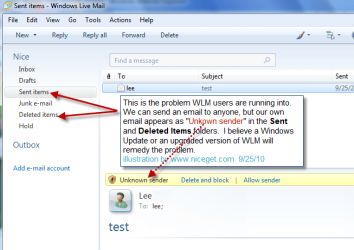
Windows Live Mail is listing me as an "Unknown Sender"
According to one poster it's a problem with the http Hotmail account on WLM, which is why I can't duplicate it:

" 1) Yes, there is a "From header" and it contains both my name as well as my Hotmail email address. Both my name and email address are correct.

2) All of the email messages in my Sent Items folder were created and sent via the WLM program.

3) My WLM account (for accessing Hotmail) is set up as a HTTP."
 

My Computer

Computer type
PC/Desktop
Computer Manufacturer/Model Number
OQO 2+
OS
Windows 8 Pro w/MC 32-bit
CPU
Intel Atom 1.86 GHz
Motherboard
OQO 2+
Memory
2 GB
Graphics Card(s)
Intel GMA 500
Sound Card
IDT
Monitor(s) Displays
LCD
Screen Resolution
800 x 480 (portable) 1280 x 1024 (docked)
Hard Drives
64 GB SSD
PSU
9 Ah Battery (portable) or OQO Brick (docked)
Case
Shirt Pocket Sized
Cooling
Tiny Fan
Keyboard
Slide out (portable) DiNovo Edge (docked)
Mouse
Eraser head (portable) Logitech Bluetooth (docked)
Internet Speed
WWAN or 802.11G (portable) T1 (docked)
Browser
IE 10
Other Info
DVD-RW OQO Docking Station
Last edited:

My Computer

Computer Manufacturer/Model Number
My own Custom Build: Asus, Corsair, Transcend, AMD, PNY, Ultra
OS
W7 64 Bit
CPU
AMD Phenom x4 4000Mhz
Memory
8 GB DDR-2
Graphics Card(s)
PNY-NVIDIA GeForce GTX 460 1GB GDDR5 PCI-e
Monitor(s) Displays
Dual: Flatron L1942T
Hard Drives
C: Drive (Agility 2 Solid State Drive 60 GB)
D: Drive (HDD Internal Western Digital 640 GB)
PSU
650 Watt
Cooling
Corsair Hydro H6 Liquid Cooler
Internet Speed
25 mbps down - 3 mbps up
Just so we all know what we are talking about, here is a screenshot I made to point out what is a "new annoyance" with Windows Live Mail using a hotmail account.
 

Attachments

  • wlm.png
    wlm.png
    30 KB · Views: 89

My Computer

Computer Manufacturer/Model Number
My own Custom Build: Asus, Corsair, Transcend, AMD, PNY, Ultra
OS
W7 64 Bit
CPU
AMD Phenom x4 4000Mhz
Memory
8 GB DDR-2
Graphics Card(s)
PNY-NVIDIA GeForce GTX 460 1GB GDDR5 PCI-e
Monitor(s) Displays
Dual: Flatron L1942T
Hard Drives
C: Drive (Agility 2 Solid State Drive 60 GB)
D: Drive (HDD Internal Western Digital 640 GB)
PSU
650 Watt
Cooling
Corsair Hydro H6 Liquid Cooler
Internet Speed
25 mbps down - 3 mbps up
I have done a lot of researching on this subject. Though no harm comes from the "unknown sender" appearing in folders in WLM that have "your email address as the sender", it's still annoying. I know many of us freak-out when something on our "real desktops" gets moved or someone leaves a finger print on your screens!!! lol :D Hopefully there will be a fix to this soon......I am really fastidious about my system! :sarc:
 

My Computer

Computer Manufacturer/Model Number
My own Custom Build: Asus, Corsair, Transcend, AMD, PNY, Ultra
OS
W7 64 Bit
CPU
AMD Phenom x4 4000Mhz
Memory
8 GB DDR-2
Graphics Card(s)
PNY-NVIDIA GeForce GTX 460 1GB GDDR5 PCI-e
Monitor(s) Displays
Dual: Flatron L1942T
Hard Drives
C: Drive (Agility 2 Solid State Drive 60 GB)
D: Drive (HDD Internal Western Digital 640 GB)
PSU
650 Watt
Cooling
Corsair Hydro H6 Liquid Cooler
Internet Speed
25 mbps down - 3 mbps up
Any chance this may have been fixed in the 2011 version, which recently came out of beta?
 

My Computer

Computer type
PC/Desktop
Computer Manufacturer/Model Number
OQO 2+
OS
Windows 8 Pro w/MC 32-bit
CPU
Intel Atom 1.86 GHz
Motherboard
OQO 2+
Memory
2 GB
Graphics Card(s)
Intel GMA 500
Sound Card
IDT
Monitor(s) Displays
LCD
Screen Resolution
800 x 480 (portable) 1280 x 1024 (docked)
Hard Drives
64 GB SSD
PSU
9 Ah Battery (portable) or OQO Brick (docked)
Case
Shirt Pocket Sized
Cooling
Tiny Fan
Keyboard
Slide out (portable) DiNovo Edge (docked)
Mouse
Eraser head (portable) Logitech Bluetooth (docked)
Internet Speed
WWAN or 802.11G (portable) T1 (docked)
Browser
IE 10
Other Info
DVD-RW OQO Docking Station
Dunno. You and I know as much about this as we're gonna know until someone has the fix posted....
 

My Computer

Computer Manufacturer/Model Number
My own Custom Build: Asus, Corsair, Transcend, AMD, PNY, Ultra
OS
W7 64 Bit
CPU
AMD Phenom x4 4000Mhz
Memory
8 GB DDR-2
Graphics Card(s)
PNY-NVIDIA GeForce GTX 460 1GB GDDR5 PCI-e
Monitor(s) Displays
Dual: Flatron L1942T
Hard Drives
C: Drive (Agility 2 Solid State Drive 60 GB)
D: Drive (HDD Internal Western Digital 640 GB)
PSU
650 Watt
Cooling
Corsair Hydro H6 Liquid Cooler
Internet Speed
25 mbps down - 3 mbps up
Its been over a year now since I noticed and reported this minor bug. Windows live essentials 2011 and all of its components (besides live mesh i believe) have been out of beta for a long time and have already had a few hotfixes, so I doubt this bug will get fixed before the relase of windows 8, as it would be very low on their list of priorities, just like the 'windows notepad never ever saves the maximised window placement setting' bug that has remained unfixed in every version of windows since windows 95.
 

My Computer

Computer Manufacturer/Model Number
Custom Built
OS
Windows 7 Ultimate x64
CPU
AMD Phenom II X6 1100T Black Edition
Motherboard
MSI 890GXM-G65
Memory
8GB G.Skill DDR3-2133
Graphics Card(s)
Gigabyte Nvidia GeForce GTS 450
Sound Card
Creative X-Fi Titanium PCI-E
Monitor(s) Displays
Asus VS248 24" LED
Hard Drives
4 X Western Digital Blue 500GB in RAID-0
Case
NZXT H2 Classic
Cooling
Corsair H60 + 3 x Thermaltake Ultrasilent 120mm case fans
How can I prevent my messages from being marked as from an “unknown sender” in the Windows Live Hotmail interface?


One way to ensure that your messages aren’t marked as being from an “unknown sender” is to join Return Path’s Sender Score Certified Email program, a third-party accreditation and reputation service that provides Windows Live Hotmail with a list of responsible senders. Alternatively, if a Hotmail user adds your domain or email address to their “contacts” or their “safe-senders list” they will no longer see this notification. In addition, senders who are on the Return Path Sender Score Certified list or on a user’s “safe sender’s” list typically experience links and images within their messages enabled by default.

I just added all my hot-mail email addresses to my contacts list and that fixed it ..
 

My Computer

Computer Manufacturer/Model Number
Me
OS
Windows 7 Professional 64bit
CPU
AMD 1090T
Motherboard
GA-890FXA-UD5 (rev. 2.0)
Memory
Corsair 4GB CMX4GX3M2A1600C9 X2= 8GB
Graphics Card(s)
GV-R587SO-1GD
Sound Card
ASUS Xonar Essence STX
Monitor(s) Displays
BenQ G2420HD
PSU
Corsair HX-850
Case
Antec Dark Fleet DF-85
Cooling
Noctua NH-C12P SE14
Thanks Mr Torture. I most likely won't really use that workaround on a long term basis, however I shall have a play around anyways. Your method is the only suggested workaround on the internet net to date that I or anybody else in any forums I have searched on is aware of. Im too tired to re-word that properly, but yeh.. :)

Cheers
 

My Computer

Computer Manufacturer/Model Number
Custom Built
OS
Windows 7 Ultimate x64
CPU
AMD Phenom II X6 1100T Black Edition
Motherboard
MSI 890GXM-G65
Memory
8GB G.Skill DDR3-2133
Graphics Card(s)
Gigabyte Nvidia GeForce GTS 450
Sound Card
Creative X-Fi Titanium PCI-E
Monitor(s) Displays
Asus VS248 24" LED
Hard Drives
4 X Western Digital Blue 500GB in RAID-0
Case
NZXT H2 Classic
Cooling
Corsair H60 + 3 x Thermaltake Ultrasilent 120mm case fans
Oh also the bug only* applies to windows live mail accounts and usually only appears in the sent items folder, but sometimes in your inbox if you send yourself an email from and to that same email account you are logged in with, as in the Windows live mail application doesn't trust your email, which is ironic, and marking yourself as a safe sender doesn't work as it ignores ONLY your own email from the safe senders list. I presume the same situation might occur by sending an email to yourself from one windows live account to another (if you have multiple windows live accounts) and I know the bug applies if you send an email to yourself from another computer/OS/email client/live web mail using the same account, not just doing it all from within the live mail app.
 

My Computer

Computer Manufacturer/Model Number
Custom Built
OS
Windows 7 Ultimate x64
CPU
AMD Phenom II X6 1100T Black Edition
Motherboard
MSI 890GXM-G65
Memory
8GB G.Skill DDR3-2133
Graphics Card(s)
Gigabyte Nvidia GeForce GTS 450
Sound Card
Creative X-Fi Titanium PCI-E
Monitor(s) Displays
Asus VS248 24" LED
Hard Drives
4 X Western Digital Blue 500GB in RAID-0
Case
NZXT H2 Classic
Cooling
Corsair H60 + 3 x Thermaltake Ultrasilent 120mm case fans
Just to clarify . Not my solution but info I found .

I have had this issue for ages now and did some looking on the net . I found the question being asked here ( W7 Forum ) and then found a solution and thought I may help some people so I have registered so others would know what I found .

Source . Troubleshooting
 

My Computer

Computer Manufacturer/Model Number
Me
OS
Windows 7 Professional 64bit
CPU
AMD 1090T
Motherboard
GA-890FXA-UD5 (rev. 2.0)
Memory
Corsair 4GB CMX4GX3M2A1600C9 X2= 8GB
Graphics Card(s)
GV-R587SO-1GD
Sound Card
ASUS Xonar Essence STX
Monitor(s) Displays
BenQ G2420HD
PSU
Corsair HX-850
Case
Antec Dark Fleet DF-85
Cooling
Noctua NH-C12P SE14
Yeh that just shows the modern shift of peoples tendencies to go directly to forums before checking FAQ's and stuff.
If I find the time i will try and link this thread to some of the other popular forums where this question remains unanswered. I have just re-read that Troubleshooting page and am now thinking that regardless of the bug being fixed or not, the Return Path Sender Score Certified Email service seems appealing to me for the long term.

Thanks again for your help.

Windows 7 forums added to my safe senders list now =D
 

My Computer

Computer Manufacturer/Model Number
Custom Built
OS
Windows 7 Ultimate x64
CPU
AMD Phenom II X6 1100T Black Edition
Motherboard
MSI 890GXM-G65
Memory
8GB G.Skill DDR3-2133
Graphics Card(s)
Gigabyte Nvidia GeForce GTS 450
Sound Card
Creative X-Fi Titanium PCI-E
Monitor(s) Displays
Asus VS248 24" LED
Hard Drives
4 X Western Digital Blue 500GB in RAID-0
Case
NZXT H2 Classic
Cooling
Corsair H60 + 3 x Thermaltake Ultrasilent 120mm case fans
Back
Top