Solved Unlabelled Volume On HDD

JPM27

New member
Local time
2:45 AM
Messages
3
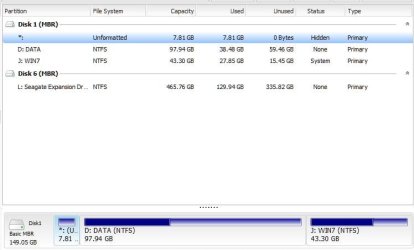
Looking at My HDD with Disk Manager and also Partition Master I see I have an unlabelled partition.
(see screenshots below)

Could this be left over from an earlier OS?
Did have XP then added Win7 (dual boot) then removed the XP partition.

Disk Mgr says 7.81 GB of 7.81GB Free, EPM says 7.81 GB of 7.81GB used.

Can anyone advise Me; would there be any risk in deleting it?

Thanks
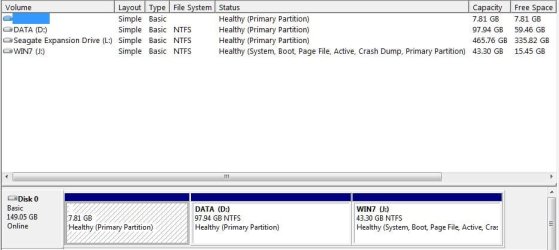
Disk Manager.jpg

EPM.jpg
 

My Computer My Computer

Computer type
PC/Desktop
Computer Manufacturer/Model Number
Pacard Bell
OS
Windows 7 Home Premium 32bit
CPU
AMD Athalon 3400+
Motherboard
Orion (?)
Memory
3.50 Gig
Graphics Card(s)
Nvidia GT9400
Hard Drives
Seagate 3M-ST3160023AS
Antivirus
Microsoft Security Essentials / Malwarebytes
Browser
IE11, Firefox, Crome
Welcome.

It may be a factory recovery partition from your old operating system. What operating system did the computer come with?
 

My Computer My Computer

Computer type
PC/Desktop
Computer Manufacturer/Model Number
Custom Built
OS
Windows 10 Pro x64, Windows 8.1 Pro x64, Windows 7 Ultimate x64 SP1,
CPU
INTEL i9-7920X LGA 2066
Motherboard
Gigabyte X299-WU8 F3
Memory
64 GB (4 X 16 GB) G-Skill V Series DDR4 3200 Quad Channel
Graphics Card(s)
EVGA GTX 1060 SC 3 GB
Sound Card
Realtek Onboard ALC1220
Monitor(s) Displays
2 x Samsung S27E310
Screen Resolution
1920x1080
Hard Drives
Samsung 2 x 970 EVO Plus 500 GB NVMe
1 x 6TB WD 6003FZBX SATA
1 x 6TB WD 60EFRX SATA
12 x 3TB WD 30EFRX SATA
PSU
Seasonic X-1050
Case
Thermaltake Armor+
Cooling
Corsair H80i V2 Liquid AOI Cooler
Keyboard
Logitech G510s
Mouse
Logitech MX Master 2S
Internet Speed
200 Mb/s
Antivirus
ESET NOD32 13.1
Browser
EDGE (Dev, Canary, Beta), Chrome
Other Info
ASUS RT-AC68U router
Malwarebytes 4.0.4
Windows XP and I get the feeling you're right!

Vaguely recall from back then something about burning a recovery disc (which I did) then having the option to delete something from the HDD.

I guess I could make a backup image of the whole HDD (just in case) then delete the mystery partition and see what happens?
 

My Computer My Computer

Computer type
PC/Desktop
Computer Manufacturer/Model Number
Pacard Bell
OS
Windows 7 Home Premium 32bit
CPU
AMD Athalon 3400+
Motherboard
Orion (?)
Memory
3.50 Gig
Graphics Card(s)
Nvidia GT9400
Hard Drives
Seagate 3M-ST3160023AS
Antivirus
Microsoft Security Essentials / Malwarebytes
Browser
IE11, Firefox, Crome
Sounds like a plan.
 

My Computer My Computer

Computer type
PC/Desktop
Computer Manufacturer/Model Number
Custom Built
OS
Windows 10 Pro x64, Windows 8.1 Pro x64, Windows 7 Ultimate x64 SP1,
CPU
INTEL i9-7920X LGA 2066
Motherboard
Gigabyte X299-WU8 F3
Memory
64 GB (4 X 16 GB) G-Skill V Series DDR4 3200 Quad Channel
Graphics Card(s)
EVGA GTX 1060 SC 3 GB
Sound Card
Realtek Onboard ALC1220
Monitor(s) Displays
2 x Samsung S27E310
Screen Resolution
1920x1080
Hard Drives
Samsung 2 x 970 EVO Plus 500 GB NVMe
1 x 6TB WD 6003FZBX SATA
1 x 6TB WD 60EFRX SATA
12 x 3TB WD 30EFRX SATA
PSU
Seasonic X-1050
Case
Thermaltake Armor+
Cooling
Corsair H80i V2 Liquid AOI Cooler
Keyboard
Logitech G510s
Mouse
Logitech MX Master 2S
Internet Speed
200 Mb/s
Antivirus
ESET NOD32 13.1
Browser
EDGE (Dev, Canary, Beta), Chrome
Other Info
ASUS RT-AC68U router
Malwarebytes 4.0.4
Imaged, partition deleted, re-booted and all seems well.

Disk Mgr even reported "this partition has not been made by Windows" when deleting.

I was just wanting to be sure, I guess.

Thanks pbcopter
 

My Computer My Computer

Computer type
PC/Desktop
Computer Manufacturer/Model Number
Pacard Bell
OS
Windows 7 Home Premium 32bit
CPU
AMD Athalon 3400+
Motherboard
Orion (?)
Memory
3.50 Gig
Graphics Card(s)
Nvidia GT9400
Hard Drives
Seagate 3M-ST3160023AS
Antivirus
Microsoft Security Essentials / Malwarebytes
Browser
IE11, Firefox, Crome
Back
Top