Unlocking Computer - prompt for User Selection

pasusu

New member
Local time
4:09 PM
Messages
5
Hi all,

I'm using W7x32 Enterprise in a domain and this only started happening recently so it must be a security update or a gpo pushed setting I suppose.

Incl. screenshots here's what happens.
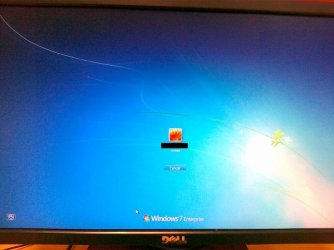
1. I lock my computer using "Windows + L" or "ctrl+alt+del + lock computer"
2. I see the screen in attachment 1 (01042010001.jpg)
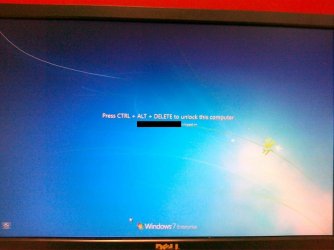
3. I press ctrl+alt+del to unlock the computer and instead of being prompted to enter my password, I have to select what user I want to use (and since only one option is listed this screen is absolutely senseless) - see attachment 2 (01042010002.jpg)
4. I hit enter or click on the user icon
5. I get to the "enter password" screen to unlock the computer - this is what I would expect to see after hitting "ctrl+alt+del" in the first place - see attachment 3 (01042010003.jpg).

Is there any way to remove this "user selection" screen in step 3/4? I know it's just an extra "enter" to hit but it's completely void in my opinion...

Any help is appreciated! Thanks!
 

Attachments
  • 01042010001.jpg
    01042010001.jpg
    61.7 KB · Views: 87
  • 01042010002.jpg
    01042010002.jpg
    62.9 KB · Views: 78
  • 01042010003.jpg
    01042010003.jpg
    60.9 KB · Views: 82

My Computer

Computer Manufacturer/Model Number
HP Elitebook 2530p
OS
7 x32
CPU
Centrino
Motherboard
n/a
Memory
4GB

My Computer

Computer type
PC/Desktop
Computer Manufacturer/Model Number
Dell XPS 420
OS
Windows 10, Home Clean Install
CPU
Intel Core2 processsor Q8200(2.33Ghz 1333FSB) Quad Core Tech
Motherboard
Dell
Memory
6 gb
Graphics Card(s)
ATI Radeon 256MB HD3650
Sound Card
Intergrated 7.1 Channel Audio
Monitor(s) Displays
Dell SP2009W 20"
Hard Drives
640 GB Serial ATA Hard drive
Cooling
Fan
Keyboard
Dell USB Keyboard
Mouse
Dell Premium Optical USB
Internet Speed
DSL 2.85
Well, somewhat unconventional situation, but try disabling fast user switching.

Open gp editor by typing gpedit.msc in "Run" box and hitting enter.

Navigate to the following:
Computer Configuration
-> Administrative Templates
-> System -> Logon
-> Hide Entry Points for Fast User Switching. Enable this setting.
 

My Computer

Computer Manufacturer/Model Number
Too many to describe...
OS
Windows 7 x64 pro/ Windows 7 x86 Pro/ XP SP3 x86
Thanks Bill - unfortunately that has already been enabled.

Richard - I have System Restores disabled so this won't do. I would have to rebuild which I would currently like to avoid.
 

My Computer

Computer Manufacturer/Model Number
HP Elitebook 2530p
OS
7 x32
CPU
Centrino
Motherboard
n/a
Memory
4GB
Thanks Bill - unfortunately that has already been enabled.

Richard - I have System Restores disabled so this won't do. I would have to rebuild which I would currently like to avoid.

I would do this. Try creating a new user account, and then login to Windows with that account. Then perform the same steps you have done here to see if you get this same prompting.

If still happening, I would perform a sfc /scannow in DOS and see what happens.
 

My Computer

Computer Manufacturer/Model Number
HP Pavilion dv7
OS
Windows 7
CPU
Core i7
Memory
8 GB
Graphics Card(s)
ATI FireGL
Monitor(s) Displays
Secondary is an HP L1940T
Screen Resolution
1680x1050
Hard Drives
160 GB SSD and 500 GB SATA
Keyboard
G11 Logitech
Mouse
G7 Logitech
Internet Speed
Fiber
Other Info
My rig smegging rules!
Hi all,

I'm using W7x32 Enterprise in a domain and this only started happening recently so it must be a security update or a gpo pushed setting I suppose.

Incl. screenshots here's what happens.
1. I lock my computer using "Windows + L" or "ctrl+alt+del + lock computer"

This may not be exactly what you want but....

Open REGEDIT... WinKey+R->REGEDIT->OK

Now path your way into...

HKEY_LOCAL_MACHINE\Software\Microsoft\Windows NT\CurrentVersion\Winlogon

Change --or create-- the dword setting "DisableCAD" to a 1.

This should disable the Ctrl-Alt-Del step leaving you to enter a password to unlock the desktop.
 

My Computer

Computer Manufacturer/Model Number
Homebrew
OS
XP Pro SP3 X86 / Win7 Pro X86
CPU
Amd 64 x2 4200 (2.4ghz)
Motherboard
Asus M2N-MX SE Plus
Memory
Kingston DDR2 800 2gb
Graphics Card(s)
Nvidia GF-8400
Sound Card
Realtek on Motherboard
Monitor(s) Displays
Acer x-193bw
Screen Resolution
1440 x 900
Hard Drives
Western Digital 500g
PSU
350watt In-Win
Case
In-Win
Cooling
Air
Keyboard
yes
Mouse
yes
Internet Speed
5mpbs
Other Info
Also ASRock ION 330 as HTPC (on XP).
Acer Aspire as GP netbook (on XP).
Actually the registry key removed the CAD prompt but I still had to pick the user afterwards.

Funny enough, I added one of my colleague's domain user accounts as a local admin on the system and had him log in: he didn't have the issue. Had him log out and logged back in myself and now it's gone.

Very weird one but by the looks of things it was profile related.

Thanks for all your help guys!
 

My Computer

Computer Manufacturer/Model Number
HP Elitebook 2530p
OS
7 x32
CPU
Centrino
Motherboard
n/a
Memory
4GB
Actually the registry key removed the CAD prompt but I still had to pick the user afterwards.

Funny enough, I added one of my colleague's domain user accounts as a local admin on the system and had him log in: he didn't have the issue. Had him log out and logged back in myself and now it's gone.

Very weird one but by the looks of things it was profile related.

Thanks for all your help guys!

Don't forget the rep button. :party: Glad things have been narrowed down.
 

My Computer

Computer Manufacturer/Model Number
HP Pavilion dv7
OS
Windows 7
CPU
Core i7
Memory
8 GB
Graphics Card(s)
ATI FireGL
Monitor(s) Displays
Secondary is an HP L1940T
Screen Resolution
1680x1050
Hard Drives
160 GB SSD and 500 GB SATA
Keyboard
G11 Logitech
Mouse
G7 Logitech
Internet Speed
Fiber
Other Info
My rig smegging rules!
already done :)
 

My Computer

Computer Manufacturer/Model Number
HP Elitebook 2530p
OS
7 x32
CPU
Centrino
Motherboard
n/a
Memory
4GB
Actually the registry key removed the CAD prompt but I still had to pick the user afterwards.

Funny enough, I added one of my colleague's domain user accounts as a local admin on the system and had him log in: he didn't have the issue. Had him log out and logged back in myself and now it's gone.

Very weird one but by the looks of things it was profile related.

Thanks for all your help guys!

Ahhh... my bad... I forgot to mention that you'd have to reboot to activate the change....

Glad you got it as you like!
 

My Computer

Computer Manufacturer/Model Number
Homebrew
OS
XP Pro SP3 X86 / Win7 Pro X86
CPU
Amd 64 x2 4200 (2.4ghz)
Motherboard
Asus M2N-MX SE Plus
Memory
Kingston DDR2 800 2gb
Graphics Card(s)
Nvidia GF-8400
Sound Card
Realtek on Motherboard
Monitor(s) Displays
Acer x-193bw
Screen Resolution
1440 x 900
Hard Drives
Western Digital 500g
PSU
350watt In-Win
Case
In-Win
Cooling
Air
Keyboard
yes
Mouse
yes
Internet Speed
5mpbs
Other Info
Also ASRock ION 330 as HTPC (on XP).
Acer Aspire as GP netbook (on XP).

My Computer

Computer Manufacturer/Model Number
HP Pavilion dv7
OS
Windows 7
CPU
Core i7
Memory
8 GB
Graphics Card(s)
ATI FireGL
Monitor(s) Displays
Secondary is an HP L1940T
Screen Resolution
1680x1050
Hard Drives
160 GB SSD and 500 GB SATA
Keyboard
G11 Logitech
Mouse
G7 Logitech
Internet Speed
Fiber
Other Info
My rig smegging rules!
Back
Top