unmoving My Documents

1andy

New member
Local time
4:07 AM
Messages
1
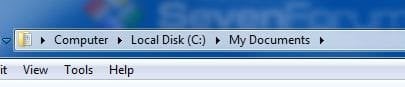
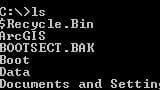
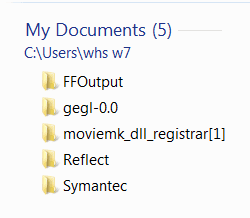
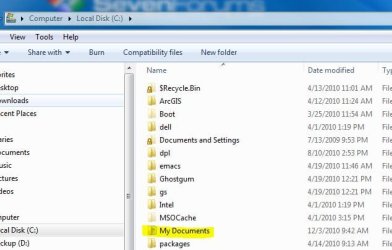
Some months back, I moved 'My Documents' to C:\Data. All was well. Now I have had to move it to D:\Data. All is well, my library goes to the right place, docs save there correctly etc. The issue is that Windows Explorer still thinks that there is a folder called 'My Documents' in C:\ but there isn't and never really has been - it was always just a link of some sort to C:\Data. Now I want to rename C:\Data but can't - from Explorer or from the cmd line (as me or as Admin) even though the cmd line sees the folder as 'Data'. Any suggestions on how to make the OS forget that C:\Data was ever associated with 'My Documents'?
 

Attachments
  • Capture1.JPG
    Capture1.JPG
    40.9 KB · Views: 2
  • Capture2.JPG
    Capture2.JPG
    13.4 KB · Views: 1
  • Capture3.JPG
    Capture3.JPG
    10.2 KB · Views: 61

My Computer

OS
Windows 7 Enterprise
You may want to keep the My Documents folder. Some programs are looking for that folder to store their own stuff. Examples: (note: I have also moved my user documents to another partition on another drive).
 

Attachments

  • 2010-12-06_1301.png
    2010-12-06_1301.png
    3 KB · Views: 59

My Computer

Computer Manufacturer/Model Number
HP, Dell, Gateway, Toshiba - 4 laptops and 2 desktops
OS
Vista, Windows7, Mint Mate, Zorin, Windows 8
CPU
from 1.6GHz Duo to i7
Monitor(s) Displays
2x HP w2207
Hard Drives
5x HDD, 7x SSD, 12x Externals
Keyboard
with trackball - no mices
Mouse
Trackball mice
Internet Speed
DSL 6000

My Computer

Computer type
PC/Desktop
Computer Manufacturer/Model Number
Self built custom
OS
64-bit Windows 11 Pro for Workstations
CPU
Intel i7-8700K OC'd to 5 GHz
Motherboard
ASUS ROG Maximus XI Formula Z390
Memory
64 GB (4x16GB) G.SKILL TridentZ RGB DDR4 3600 MHz
Graphics Card(s)
ASUS ROG-STRIX-GTX1080TI-O11G-GAMING
Sound Card
Integrated
Monitor(s) Displays
2 x Samsung Odyssey G7 27"
Screen Resolution
2560x1440
Hard Drives
1TB Samsung 990 PRO M.2,
4TB Samsung 990 PRO PRO M.2,
TerraMaster F8 SSD Plus NAS
PSU
Seasonic Prime Titanium 850W
Case
Thermaltake Core P3
Cooling
Corsair Hydro H115i
Keyboard
Logitech wireless K800
Mouse
Logitech MX Master 4
Internet Speed
2 Gb/s Download and 100 Mb/s Upload
Antivirus
Malwarebyte Anti-Malware Premium
Browser
Google Chrome
Other Info
Logitech Z625 speaker system,
Logitech BRIO 4K Pro webcam,
HP Color LaserJet Pro MFP M477fdn,
APC SMART-UPS RT 1000 XL - SURT1000XLI,
Galaxy S23 Plus phone
if you go to the my documents folder on C: (before you moved it) and change the location by right clicking and chosing properties and then the change location tab. You can tell windows where the new file is located.

I use this feature on small networks where AD and Roaming Profiles is not used. Keeps the My Docs data safe on server if pc fries.
 

My Computer

Computer Manufacturer/Model Number
Custom
OS
Windows 8 Professional
CPU
AMD Phenom II X6
Motherboard
ASUS
Memory
8 GB
Graphics Card(s)
XFX ATI Radeon 4890
Monitor(s) Displays
Dual 22" LCD
Screen Resolution
1680x1050
Hard Drives
PC Drives

HD0 = Crucial SSD 128gb Sata III
HD1 = 300gb (Seagate Barracuda)

NAS

HD0 = 1.5TB (Maxtor) Raid1
HD1 = 1.5TB (Maxtor) Raid1
HD2 = 1TB (Segate) Raid5
HD3 = 1TB (Segate) Raid5
HD4 = 1TB (Segate) Raid5
HD5 = 1TB (Segate) Raid5
PSU
750 watt
Mouse
Razr Mamba
Internet Speed
50 down 35 up FIOS
Back
Top