Unravelling CSRSS.exe and the new process architecture of Windows 7

joe7dust

New member
Member
VIP
Local time
1:15 AM
Messages
126
One of the things I first noticed in Windows 7 is how now there are many "hidden" processes not shown in the normal tab of Task Manager, and instead lumped into the "Services" tab yet still somehow connected or underneath the 'umbrella' of other processes. I used to know all the processes that run in Windows, and which I could kill and which I couldn't. After this Services tab I've kinda given up on that due to the sheer number.

I hope to help change that with this thread. Finally deciding to create a whitelist in my head of these Services like I used to have for all Windows processes. The first problem I'm noticing is that if a service is loaded under a critical process (like CSRSS.exe), then there is no obvious way to kill it. What is the way around this?

This seems like a huge security vulnerability, because what if a virus installs to being under the 'umbrella' of CSRSS.exe? There is an anti-cheat program called PunkBuster that is needed to play games like Battlefield 3. I noticed that PnkBstrA is part of the CSRSS.exe

I decided to reinstall this game tonight, as well as Punkbuster and Origin. (both software related to this game only for me) After uninstalling all 3 software, deleting all related folders from my HD, and deleting all leftover registry keys related to them and parent companies I noticed PnkBstrA was somehow STILL running! I hit Stop process, nothing. I hit Go To Process, and it took me to CSRSS.exe ... well darn. I know from experience you can't kill CSRSS.exe and expect Windows to keep running.

I'm amazed at this, I did not think it was possible for anything to survive in Windows after uninstall, file delete, registry key delete...

Anyways, I was already 15 minutes into downloading the game files when I noticed this so I'm going to have to just hope its a "clean" re-installation and overlook this. Mainly posting this out of curiosity and hoping to pick up a couple of pointers that might help me in the future manually remove advanced viruses that take advantage of this vulnerability.

TL;DR: How can you kill a non-windows 7 service that has itself injected into an essential windows 7 service? (other than via taskmgr since that doesn't always work correctly)
 
Last edited:

My Computer My Computer

At a glance

Windows 7 Ultimate 64-bit
Computer type
PC/Desktop
OS
Windows 7 Ultimate 64-bit
I would think that the uninstallation simply wasn't as thorough as it should've been. Did you reboot after uninstalling everything? Was that when you found Punkbuster still running?

I'd simply search the entire system drive for any occurrences of "PnkBstrA" and see what it comes up with. There might yet be something left to uninstall separately.
If not, you could try deleting whichever file you find; if it won't let you because the file is in use, try something like Unlocker to schedule deletion on the next restart.

Make sure to create a system restore point first, just in case this somehow breaks csrss.exe badly enough to prevent Windows from starting up again.

Another thought: is there any PunkBuster-related service listed under Administrative Tools -> Services?
 

My Computer My Computer

At a glance

Windows 7 Professional SP1 32-bitIntel Core 2 Duo E6600 2.4GHz4GB DDR2-667 (4x1GB in dual-channel config)nVidia GeForce 9800 GT
Computer type
PC/Desktop
Computer Manufacturer/Model Number
Custom-built
OS
Windows 7 Professional SP1 32-bit
CPU
Intel Core 2 Duo E6600 2.4GHz
Motherboard
Asus PL5D2
Memory
4GB DDR2-667 (4x1GB in dual-channel config)
Graphics Card(s)
nVidia GeForce 9800 GT
Sound Card
Creative X-Fi XtremeMusic
Monitor(s) Displays
Acer P236H
Screen Resolution
1920x1200 (DVI)
Hard Drives
OCZ SSD Vertex Plus 60GB SATA (Firmware 3.55), 64MB cache
Hitachi HD321KJ SATA, 320GB, 7200rpm, 16MB cache
PSU
Antec TruePower 2.0
Case
Cooler Master Centurion
Cooling
Too many fans
Keyboard
Standard
Mouse
Microsoft wireless optical mouse
Internet Speed
AT&T U-verse (18mbit/sec)
Antivirus
Microsoft Security Essentials
Browser
Firefox
Other Info
Other devices:
Compaq CQ-60 laptop
Google Nexus 7 (2012) tablet
Nvidia SHIELD tablet (US/LTE)
Hardkernel ODROID-XU single-board computer (Samsung Exynos 5420)
I'm downloading/installing the whole package again so I'm not messing with it. If this doesn't fix the issue I'll simply reinstall Windows. That might not even be it, and I could use a new motherboard. Just trying to stop random system crashes that only happen during 1 game. Not sure if heat, driver issue, other software issue, etc.

Mainly just posted this to learn about the Services tab in Task Manager, and learn more about how there are now processes within processes.

It's almost as if the Services are to Processes, as the old DLLs were to Processes.
 
Last edited:

My Computer My Computer

At a glance

Windows 7 Ultimate 64-bit
Computer type
PC/Desktop
OS
Windows 7 Ultimate 64-bit
This seems like a huge security vulnerability, because what if a virus installs to being under the 'umbrella' of CSRSS.exe? There is an anti-cheat program called PunkBuster that is needed to play games like Battlefield 3. I noticed that PnkBstrA is part of the CSRSS.exe

My PnkBstrA and/or PnkBstrB have been installed by Steam for certain games but never under the CSRSS.exe service. They always install independently and are displayed as such in Task Manager.

After the game(s) are installed, I remove the PnkBsrtA.exe & PnkBstrB.exe from the c:\windows\system32 directory were they live. I also remove the entries at the Windows Fireawall section.

Since I never ever play online nor multiplayer games, I don't need that crapware installed. If I need to use a cheat code, I do it! it's my game and I paid for it. So goodbye PunkBuster!! Never have had problems playing games after removing them.

By the way, enjoy BF3 !
 

My Computer My Computer

At a glance

Windows 7 Home Premium 64Bits SP1Intel i7-92012 Gb (6x2GB Corsair XMS TR3X3G1600C9 G) Tri ...ASUS GTX-970 Turbo
Computer type
PC/Desktop
Computer Manufacturer/Model Number
DIY Re-built.
OS
Windows 7 Home Premium 64Bits SP1
CPU
Intel i7-920
Motherboard
ASUS P6TD Deluxe
Memory
12 Gb (6x2GB Corsair XMS TR3X3G1600C9 G) Tri Channels
Graphics Card(s)
ASUS GTX-970 Turbo
Sound Card
ASUS On Board SoundMax
Monitor(s) Displays
Samsung UN46D6500 46" TV
Screen Resolution
1920x1080
Hard Drives
1 OCZ SSD Agility Sata III 120Gb
1 Samsung 1Tb
1 Samsung 750Gb
1 Western Digital 500Gb(Mounted in ext eSata case)
PSU
Enermax CUG-950W
Case
Full ATX (Generic)
Cooling
Fans (6) 80mm
Keyboard
Saitek Eclipse II
Mouse
Cyborg R.A.T-5
Internet Speed
Comcast 105.0 MBPS
Antivirus
AVG
Browser
Waterfox v40.02(x64)
Other Info
- Logitech X-530 5.1 Sound speakers.
- APC ES-1300.
- Arris TG862G/CT Modem/Router.
- Samsung BD-083A Blue Ray Player
- Lite On iHBS212 Blue Ray Burner
- Nippon Labs All-In-One Card Reader/Writer W/USB & eSata
When I reinstalled Punk Buster, I didn't have to give any special permissions for it to insert it self within CSRSS.exe

I fear this will become a common hiding place for malware if this isn't addressed soon...

Anyone have something to contribute to the OP on how the whole hidden services thing works, and how just any ole software and get in there? Looking pretty lean in here on information...
 

My Computer My Computer

At a glance

Windows 7 Ultimate 64-bit
Computer type
PC/Desktop
OS
Windows 7 Ultimate 64-bit
joe7dust, what you describe is nothing new. NOTHING. Services were always lumped under a process like svchost.exe. The only real difference is task manager has a service tab now so you can see them. Can we get a few screenshots of the issue you are talking about?
 

My Computer My Computer

At a glance

Windows 10 Pro (x64)Intel Core i7-3930K (3.2GHz - 4.5GHz)4x Samsung 4GB PC3-12800 DDR3 (16GB 1600MHz)Nvidia Geforce GTX 690
Computer type
PC/Desktop
Computer Manufacturer/Model Number
Alienware Aurora ALX R4
OS
Windows 10 Pro (x64)
CPU
Intel Core i7-3930K (3.2GHz - 4.5GHz)
Motherboard
Alienware Aurora-R4 x79
Memory
4x Samsung 4GB PC3-12800 DDR3 (16GB 1600MHz)
Graphics Card(s)
Nvidia Geforce GTX 690
Sound Card
SteelSeries Siberia Elite
Monitor(s) Displays
Dell UltraSharp U3011
Screen Resolution
2560x1600
Hard Drives
Samsung 850 Pro 256 GB, Seagate 1TB Desktop Hybrid HDD, 2x Western Digital 4TB Green HDD
PSU
875W Some Dell PSU <.<
Case
Alienware Aurora ALX
Cooling
Custom Liquid Cooling (EK CPU & GPU blocks) dual EK 480RAD
Keyboard
Logitech G710+ Mechanical
Mouse
Logitech G700s
Internet Speed
Verizon Fios (50 mbps average)
Other Info
Server: Intel NUC D54250WYK: i5-4250U, 16GB, 256 GB mSATA, Windows Server 2012 R2
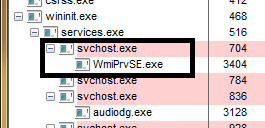
I remember seeing lots of DLLs loaded into each process back in the day using a special "task manager", but never services. I would assume it going something like this, Processes -> Services -> DLLs, is that right? I don't have screen shots, they would just be simple anyways like a picture of PnkBstrA.exe showing as loaded within CSRSS.exe as I described in the OP.

I see viruses on a regular basis, but surprised more of them don't just hide in CSRSS.exe's umbrella.
I guess what I really want is to listen in on a conversation between 2+ people more knowledgeable than I on the subject. I'm definitely not going to go grab a computer science textbook and read about it, but still curious..
 

My Computer My Computer

At a glance

Windows 7 Ultimate 64-bit
Computer type
PC/Desktop
OS
Windows 7 Ultimate 64-bit
Well, remember that you *did* have to provide administrative credentials (and if UAC is enabled, elevate the install) to allow this. It's a security risk, yes, but it's not possible unless the person running the code has administrative access. There's not a whole lot any system can do to prevent a system's administrators from blowing it up, if the user really is to have administrative access and decides to do something stupid.

Hence why running as administrator isn't a good idea on a day-to-day basis, paying attention to what one installs when they do elevate, etc.
 

My Computer My Computer

At a glance

Windows 10 Pro x64Intel Core i7 4790K @ 4.5GHz32GB DDR3Nvidia GeForce GTX970
Computer type
PC/Desktop
Computer Manufacturer/Model Number
Custom
OS
Windows 10 Pro x64
CPU
Intel Core i7 4790K @ 4.5GHz
Motherboard
Asus Maximus Hero VII
Memory
32GB DDR3
Graphics Card(s)
Nvidia GeForce GTX970
Sound Card
Realtek HD Audio
Screen Resolution
1920x1200
Hard Drives
1x Samsung 250GB SSD
4x WD RE 2TB (RAIDZ)
PSU
Corsair AX760i
Case
Fractal Design Define R4
Cooling
Noctua NH-D15
Is the below image what you are talking about of PnkBstrA.exe being loaded within CSRSS.exe? If so...its not being loaded within CSRSS.exe nor is it hidden. It just means CSRSS.exe loaded PnkBstrA.exe and is now a parent process. Otherwise I have no idea what you are going on about.
 

Attachments

  • Untitled.png
    Untitled.png
    2.8 KB · Views: 278

My Computer My Computer

At a glance

Windows 10 Pro (x64)Intel Core i7-3930K (3.2GHz - 4.5GHz)4x Samsung 4GB PC3-12800 DDR3 (16GB 1600MHz)Nvidia Geforce GTX 690
Computer type
PC/Desktop
Computer Manufacturer/Model Number
Alienware Aurora ALX R4
OS
Windows 10 Pro (x64)
CPU
Intel Core i7-3930K (3.2GHz - 4.5GHz)
Motherboard
Alienware Aurora-R4 x79
Memory
4x Samsung 4GB PC3-12800 DDR3 (16GB 1600MHz)
Graphics Card(s)
Nvidia Geforce GTX 690
Sound Card
SteelSeries Siberia Elite
Monitor(s) Displays
Dell UltraSharp U3011
Screen Resolution
2560x1600
Hard Drives
Samsung 850 Pro 256 GB, Seagate 1TB Desktop Hybrid HDD, 2x Western Digital 4TB Green HDD
PSU
875W Some Dell PSU <.<
Case
Alienware Aurora ALX
Cooling
Custom Liquid Cooling (EK CPU & GPU blocks) dual EK 480RAD
Keyboard
Logitech G710+ Mechanical
Mouse
Logitech G700s
Internet Speed
Verizon Fios (50 mbps average)
Other Info
Server: Intel NUC D54250WYK: i5-4250U, 16GB, 256 GB mSATA, Windows Server 2012 R2
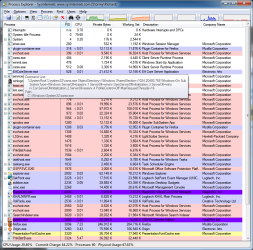
I'm trying to figure out how he is seeing PnkBstrA(or PnkBstrB) being attached to CSRSS. I have a couple of games that use Punkbuster and neither of its services are showing as being in or attached to CSRSS,

csrss.png
 

My Computer My Computer

At a glance

Win 7 Ultimate x64FX-8350 @ 4.6 GHz so farADATA XPG V1 Series Black 8GB DDR3 1600Sapphire R9 270x Dual-X
Computer type
PC/Desktop
Computer Manufacturer/Model Number
Me
OS
Win 7 Ultimate x64
CPU
FX-8350 @ 4.6 GHz so far
Motherboard
Asus M5A97 EVO
Memory
ADATA XPG V1 Series Black 8GB DDR3 1600
Graphics Card(s)
Sapphire R9 270x Dual-X
Sound Card
Xonar DGX w/ Corsair Vengence 1300
Monitor(s) Displays
Acer S232HL Abid
Screen Resolution
1920x1080
Hard Drives
120 GB OCZ Vertex 3
500 GB Seagate 7200.12
PSU
Antec Earthwatts 650W Green
Case
Antec Three Hundred
Cooling
Cooler Master 212 EVO
Keyboard
Logitech G510
Mouse
Logitech G500s
Internet Speed
35000/3000
Before when I would right click PnkBstrA.exe and hit Go To Process, it took me to CSRSS.exe and highlighted it. I probably misinterpreted what that means. Now since new OS and install it is no longer doing that. I really hate when things don't show in the Process tab however, it's such a drag to have to memorize every single service just to help identify potential malware, but I guess I need to start learning them.
 

My Computer My Computer

At a glance

Windows 7 Ultimate 64-bit
Computer type
PC/Desktop
OS
Windows 7 Ultimate 64-bit
Does that help clarify things, logicearth?
 

My Computer My Computer

At a glance

Windows 7 Ultimate 64-bit
Computer type
PC/Desktop
OS
Windows 7 Ultimate 64-bit
Back
Top