
Unrecognizable Windows Message

Wondermint

New member
Local time
12:14 AM
Messages
9
Location
SW Florida
At least once a week during startup I receive a message from (Windows I assume), with the following information:
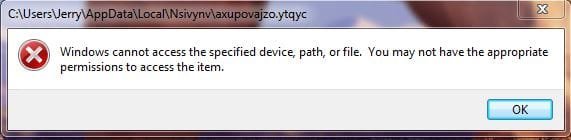
The message block header contains the Path "C;\Users\Jerry\AppData\Local\Nsivynv\axupovajzo.ytqyc"

Below that header is the following message:
Windows cannot access the specific device, path, or file. You may not have the appropriate
permissions to access the item. (This part of the message is preceded by a white X on a red circle.)

Can anyone tell me what this file is?

I have attached a snipping tool image of the message (I think) :sarc:

Jerry
 

Attachments
  • Win7 Issue.JPG
    Win7 Issue.JPG
    19.5 KB · Views: 60

My Computer

Computer type
Laptop
Computer Manufacturer/Model Number
Acer Aspire 5741
OS
Windows 7 Home Premium 64bit
CPU
Core I5 430M
Memory
4gb
Graphics Card(s)
Intel HD Graphics
Hard Drives
Hitachi HTS545050B9A300 500GB
Antivirus
PCMatic
Browser
Firefox
So, did you go to the location the message points to? Is there a file like this?

Because you've said once a week, check Task Scheduler for any task associated with this file.
 
Last edited:
Jerry,
Your flags say that you're in Florida....but where? You've never finished out your Control Panel info.

If you were close by, I'd be glad to help you with that problem. (no charge) Yes, I'm a Computer Tech.

Something is trying to call that file when you boot up your PC. That should not be all that hard to find.

Cheers Mate!

TechnoMage :cool:
 

My Computer

Computer type
PC/Desktop
Computer Manufacturer/Model Number
Various
OS
Win 7 Pro, SP1, x86, Win-11/Pro/64
CPU
AMD
Motherboard
Various
Memory
8GB Crucial
Graphics Card(s)
Various
Sound Card
OnBoard
Monitor(s) Displays
Acer 21.5"
Hard Drives
Crucial SSD, 500 GB
PSU
OEM
Case
SFF Slim Line Case
Cooling
OEM
Keyboard
eMachines
Mouse
Logitech Wireless
Internet Speed
varies
Antivirus
Windows Defender/Super Anti-Spyware
Browser
Firefox
Shut down and unplug all usb devices. Cell phones, hard drives, hub devices ect.
Keep your monitor, mouse and keyboard plugged in.

Boot your system and see if the problems is still there.

I tried to research Nsivynv\axupovajzo.ytqyc" in various ways. Malwarebytes pops up a warning. So I stopped the research. One search shows some sort of cell phone and another is some kind of sync music site. They all get spanked by Malwarebytes.


Jack
 
Last edited:

My Computer

Computer type
PC/Desktop
Computer Manufacturer/Model Number
Home made Desktop
OS
Windows 10 Pro. 64/ version 1709 Windows 7 Pro/64
CPU
Intel i7-6800K @ 4.3
Motherboard
ASUS X-99 Deluxe II
Memory
Corsair Platinum 16 gig @2400
Graphics Card(s)
EVGA GTX 1070 OC
Monitor(s) Displays
Asus 27" LED LCD/VE278Q
Screen Resolution
1920-1080 or 1280-720 HDMI
Hard Drives
INTEL SSD 730-240 Gb Sata 3.0/
PSU
EVGA Platium 1200W
Case
Phanteks Luxe Tempered Glass 8 fans/ one radiator
Cooling
XSPC/ Water Cooled CPU
Keyboard
Das 4 Professional
Mouse
Logitech M705/MX Anywhere 2-S
Internet Speed
100 mbits
Antivirus
Microsoft Security Essentials/ Malwarebytes Premium 3.0/ SAS
Browser
I.E. 11 default/Firefox/ ISP Time Warner Cable/Spectrum
Other Info
LG BluRay Burner/
Sound system-KLipsch-THX/
Icy Dock ssd Hot Swap bays.
MSClin, thanks for your reply. Yes, I did look at the location and the target file is there. I did a search on the internet for that file with no hits. To my limited knowledge it is not part of Windows or MacIOS. I am trying to find out what it is. I run PCMatic for my A/V and my scans return nothing. I have decided to delete the file and continue my research as time permits.

The Windows message does not happen on any schedule, I have had it happen as many as 3 startups in a row.

Layback Bear, You found more information on the file than I did. What search engine did you use?

TechnoMage2016, thanks for the offer. As I said above, I plan to delete the subject file and move on. I did however, update my profile to show I'm located in SW Florida.

Again, thanks to all for responding,
Jerry
 

My Computer

Computer type
Laptop
Computer Manufacturer/Model Number
Acer Aspire 5741
OS
Windows 7 Home Premium 64bit
CPU
Core I5 430M
Memory
4gb
Graphics Card(s)
Intel HD Graphics
Hard Drives
Hitachi HTS545050B9A300 500GB
Antivirus
PCMatic
Browser
Firefox
Hi Wondermint,

Did some looking too, nothing showed up

One of the better tools to identify suspicious entries is FRST, Farbar.
follow this link download/run/post the >>2<< logs, lets see if anything else pops-up
Farbar Recovery Scan Tool Download

Roy
 

My Computer

Computer type
PC/Desktop
Computer Manufacturer/Model Number
medionl/Aspire 6930G/acer x55a
OS
W7 home premium 32bit/W7HP 64bit/w10 tp insider ring
CPU
E5300 dual core
Motherboard
medion MS7366
Memory
3gb
Graphics Card(s)
Nvidia Geforce 7100 Nforce 630i
Monitor(s) Displays
avixc
Internet Speed
n (isp resticted to 72)
Antivirus
mse/pands
Browser
palemoon
Other Info
Belkin Fd7050 n USB using Railink RT2870 drivers, more upto date
Torchwood, thanks for the post. For reasons beyond my comprehension, when I clicked on your link my computer went into a restart. I think I'll unload my PCMatic A/V, load Malwarerbits and run a scan to see if I get any hits before I remove the offending file.

Jerry
 

My Computer

Computer type
Laptop
Computer Manufacturer/Model Number
Acer Aspire 5741
OS
Windows 7 Home Premium 64bit
CPU
Core I5 430M
Memory
4gb
Graphics Card(s)
Intel HD Graphics
Hard Drives
Hitachi HTS545050B9A300 500GB
Antivirus
PCMatic
Browser
Firefox
Hi Jerry
The link fires to

Bleepingcomputers website select downloads then search Farbar, its the second of 2 of theres.

Roy
 

My Computer

Computer type
PC/Desktop
Computer Manufacturer/Model Number
medionl/Aspire 6930G/acer x55a
OS
W7 home premium 32bit/W7HP 64bit/w10 tp insider ring
CPU
E5300 dual core
Motherboard
medion MS7366
Memory
3gb
Graphics Card(s)
Nvidia Geforce 7100 Nforce 630i
Monitor(s) Displays
avixc
Internet Speed
n (isp resticted to 72)
Antivirus
mse/pands
Browser
palemoon
Other Info
Belkin Fd7050 n USB using Railink RT2870 drivers, more upto date
Thanks Roy,

I'll look at it from that angle if I don't find anything from Malwarebits.

Jerry
 

My Computer

Computer type
Laptop
Computer Manufacturer/Model Number
Acer Aspire 5741
OS
Windows 7 Home Premium 64bit
CPU
Core I5 430M
Memory
4gb
Graphics Card(s)
Intel HD Graphics
Hard Drives
Hitachi HTS545050B9A300 500GB
Antivirus
PCMatic
Browser
Firefox
I tried to delete the Nsivynv folder, but it returns almost immediately, so I have finally thrown in the towel on this problem. I bought a Mac Book Pro rather than continue to fight Windows.......... I will wipe and install Ubuntu on this notebook and use it for a backup.

Thanks to everyone for your input on my problem.
Jerry
 

My Computer

Computer type
Laptop
Computer Manufacturer/Model Number
Acer Aspire 5741
OS
Windows 7 Home Premium 64bit
CPU
Core I5 430M
Memory
4gb
Graphics Card(s)
Intel HD Graphics
Hard Drives
Hitachi HTS545050B9A300 500GB
Antivirus
PCMatic
Browser
Firefox
Back
Top