
Solved Unspecified devices(?)

iMaStEr

I like Linux
Member
Local time
11:10 PM
Messages
38
Location
LTU
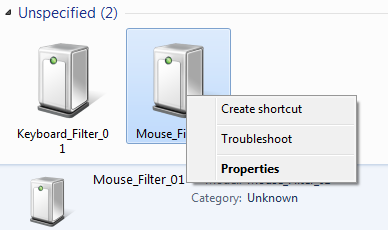
Well, today I opened "Devices and Printers" under Control panel, an there's such a weird thing. There are like two "unspecified" devices: Keyboard_Filter_01 and Mouse_Filter_01 (see below).
FukmK.png


Clicking Properties shows absolutely nothing about it - details are either "unknown" or "unavailable".
Googling a bit I've found that these might have to do something with HP notebooks and their drivers. However, I'm using a PC and it has nothing to do with HP, neither any of the other devices connected.

I wonder how these icons got there and how do I remove them?
 

My Computer

Computer Manufacturer/Model Number
PTG www.ptg.lt
OS
Win 7 Ultimate x64
CPU
AMD Phenom II X4 945 3000MHz
Motherboard
MSI 770-C45
Memory
Kingston 6GB DDR3
Graphics Card(s)
Sapphire Radeon HD4890 1GB GDDR5
Sound Card
Realtek
Monitor(s) Displays
Samsung 2243SN 21,5"
Screen Resolution
1920x1080
Hard Drives
WD Green 1TB 3GB/s
PSU
Gigabyte 550W Superb
Cooling
2x Nexus 80mm
Keyboard
Logitech Illuminated
Mouse
MS Wireless 2000
Internet Speed
100Mb/s DL & UL
What does your Device Manager look like? Are there any problem devices showing there?

Is you mouse and keyboard wireless?

Some ideas:

Easy: Perform a System Restore to a date before you noticed the devices and see if they go away.

And/Or:
In Device Manager, for the device(s) with the yellow "Bam!", (or in Devices and Printers) > right click on the device, then click "Properties". Go to the Details Tab, then click the drop down box under "Property" and select "Hardware ID's".

The result will be a string of codes, but you just want to write down the 4 digit codes next to VEN and DEV.

Then go here:
PCI Vendor and Device Lists
Enter the 4 digit VEN code in the box marked "Vendor Search", and click "Search", then
Enter the 4 digit DEV code in the box marked "Device Search" and click "Search".
Note you results.

You now know the brand and model of the problem devices. You could then try and reinstall install the drivers for them.
 

My Computer

Computer type
PC/Desktop
Computer Manufacturer/Model Number
Home Built - Jan 2013
OS
Windows 7 64 Bit Home Premium SP1
CPU
i7-3820
Motherboard
Asus P9X79-PRO - Bios 4608
Memory
GSkill F3-14900CL9Q - 16GB
Graphics Card(s)
EVGA GeForce GTX660 - Driver 352.86
Sound Card
On board Realtek ALC898
Monitor(s) Displays
Acer S271HL
Screen Resolution
1920 x 1080
Hard Drives
#1- Samsung 840 Pro Series
#2- Western Digital WD1002FAEX Sata3 Black
#3- Western Digital WD1002FAEX Sata3 Black
PSU
Corsair CMPSU-850TX-V2 - 850 watt (by Seasonic)
Case
Corsair Obsidian 550D
Cooling
Standard 3 120mm case fans, Cooler Master Hyper 212 EVO
Keyboard
MS KC-0405
Mouse
Intellimouse 5-button
Internet Speed
56 Mbits/Sec (on a good day)
Antivirus
Avast & Malwarebytes
Browser
Firefox
Other Info
Asus DVD - DRW-24B1ST 24X
Everything in Device Manager looks normal: http://i.imgur.com/ij4nb.png

My mouse and keyboard are wired.

I don't have Sys Restore enabled.

In Device Manager, nothing shows up with yellow and these devices (looking from Devices and Printers in Control Panel) don't have any properties, as I mentioned: http://i.imgur.com/eK9SR.png & http://i.imgur.com/KpXx2.png

I've tried running the troubleshooter (it is available to choose as you can see from my first post), it tries searching for drivers, but eventually says there's "no available drivers for this product" or smth like that.

Would it be possible to find if some entries are linked to these devices in the registry?

:/
 

My Computer

Computer Manufacturer/Model Number
PTG www.ptg.lt
OS
Win 7 Ultimate x64
CPU
AMD Phenom II X4 945 3000MHz
Motherboard
MSI 770-C45
Memory
Kingston 6GB DDR3
Graphics Card(s)
Sapphire Radeon HD4890 1GB GDDR5
Sound Card
Realtek
Monitor(s) Displays
Samsung 2243SN 21,5"
Screen Resolution
1920x1080
Hard Drives
WD Green 1TB 3GB/s
PSU
Gigabyte 550W Superb
Cooling
2x Nexus 80mm
Keyboard
Logitech Illuminated
Mouse
MS Wireless 2000
Internet Speed
100Mb/s DL & UL
Would it be possible to find if some entries are linked to these devices in the registry?

:/

Only if you knew what they were, had device names, or Hardware ID's!
Not advisable.

Try Removing or Uninstalling them. See if they come back.
 

My Computer

Computer type
PC/Desktop
Computer Manufacturer/Model Number
Home Built - Jan 2013
OS
Windows 7 64 Bit Home Premium SP1
CPU
i7-3820
Motherboard
Asus P9X79-PRO - Bios 4608
Memory
GSkill F3-14900CL9Q - 16GB
Graphics Card(s)
EVGA GeForce GTX660 - Driver 352.86
Sound Card
On board Realtek ALC898
Monitor(s) Displays
Acer S271HL
Screen Resolution
1920 x 1080
Hard Drives
#1- Samsung 840 Pro Series
#2- Western Digital WD1002FAEX Sata3 Black
#3- Western Digital WD1002FAEX Sata3 Black
PSU
Corsair CMPSU-850TX-V2 - 850 watt (by Seasonic)
Case
Corsair Obsidian 550D
Cooling
Standard 3 120mm case fans, Cooler Master Hyper 212 EVO
Keyboard
MS KC-0405
Mouse
Intellimouse 5-button
Internet Speed
56 Mbits/Sec (on a good day)
Antivirus
Avast & Malwarebytes
Browser
Firefox
Other Info
Asus DVD - DRW-24B1ST 24X
Removing or uninstalling what? There's no option to remove/uninstall them in the Control Panel, dunno where else to look :/
 

My Computer

Computer Manufacturer/Model Number
PTG www.ptg.lt
OS
Win 7 Ultimate x64
CPU
AMD Phenom II X4 945 3000MHz
Motherboard
MSI 770-C45
Memory
Kingston 6GB DDR3
Graphics Card(s)
Sapphire Radeon HD4890 1GB GDDR5
Sound Card
Realtek
Monitor(s) Displays
Samsung 2243SN 21,5"
Screen Resolution
1920x1080
Hard Drives
WD Green 1TB 3GB/s
PSU
Gigabyte 550W Superb
Cooling
2x Nexus 80mm
Keyboard
Logitech Illuminated
Mouse
MS Wireless 2000
Internet Speed
100Mb/s DL & UL
Keyboard and mouse filters are extremely useful "devices" (Really JUST a software driver, no hardware involved) for some specific legitimate uses. They are also exceptionally dangerous if used by the wrong people. Basically it's how keyloggers work, but is also used by programs for recording KB/Mouse at a very low level for other purposes. The drivers may come in as part of a package for your gaming KB and mouse if you installed those drivers. Or if you have a barcode reader embedded in your keyboard or any number of other possibilities.

SO, it could be 100% legitimate or it could be a sign of a virus infection. Might be hard to tell exactly, but I would do a full virus and malware scan just to try to rule that probability out first...

Also, did you notice exactly when they appeared? Have you installed any new hardware or software lately?
 

My Computer

Computer Manufacturer/Model Number
Scratch built
OS
Windows 7 x64 Ultimate
CPU
i7 960
Motherboard
Asus P6X58D
Memory
12 Gig Corsair Dominator
Graphics Card(s)
Nvidia 480
Sound Card
Maudio Delta 44 + breakout box
Monitor(s) Displays
Dell UltraSharp U2410 24in and Samsung 21 dual monitors
Screen Resolution
1920x1200 and 1280x1024
Hard Drives
Primary: Intel X-25M G2 160G SSD
Secondary: Segate baracuda 1.0 TB
HDs in AHCI mode.
PSU
Corasair TX850
Case
Cooler Master HAF
Cooling
Corsair H50
Keyboard
Logitech G15 + N52 game pad
Mouse
Logitech MX518
Internet Speed
15kbs down 4.5kbps up
Other Info
WEI 7.6
CPU & RAM 7.6
Graphics 7.9
Hard disk 7.7
Well I've noticed them when I wanted to share my printer on the network and opened Control Panel. That was a about a week ago. On the same time, there was some kind of virus infection that I think I dealt with.
Any software that I installed lately and that could have something to do with that could probably be Evolve (Games VPN/tracking software https://www.evolvehq.com/), but I couldn't find anything about the "filters" neither on their faq nor on the forums.
Well then I guess I'll do some scanning in safe mode and/or with Hiren's BootCD.
 

My Computer

Computer Manufacturer/Model Number
PTG www.ptg.lt
OS
Win 7 Ultimate x64
CPU
AMD Phenom II X4 945 3000MHz
Motherboard
MSI 770-C45
Memory
Kingston 6GB DDR3
Graphics Card(s)
Sapphire Radeon HD4890 1GB GDDR5
Sound Card
Realtek
Monitor(s) Displays
Samsung 2243SN 21,5"
Screen Resolution
1920x1080
Hard Drives
WD Green 1TB 3GB/s
PSU
Gigabyte 550W Superb
Cooling
2x Nexus 80mm
Keyboard
Logitech Illuminated
Mouse
MS Wireless 2000
Internet Speed
100Mb/s DL & UL
Well they could easily have been installed by the virus, if the virus has actually been cleaned out then they may not pose a danger any more (Something needs to use the filters to gather you keystrokes). But I'd be extra careful :/ Personally I'd consider a reinstall.
 

My Computer

Computer Manufacturer/Model Number
Scratch built
OS
Windows 7 x64 Ultimate
CPU
i7 960
Motherboard
Asus P6X58D
Memory
12 Gig Corsair Dominator
Graphics Card(s)
Nvidia 480
Sound Card
Maudio Delta 44 + breakout box
Monitor(s) Displays
Dell UltraSharp U2410 24in and Samsung 21 dual monitors
Screen Resolution
1920x1200 and 1280x1024
Hard Drives
Primary: Intel X-25M G2 160G SSD
Secondary: Segate baracuda 1.0 TB
HDs in AHCI mode.
PSU
Corasair TX850
Case
Cooler Master HAF
Cooling
Corsair H50
Keyboard
Logitech G15 + N52 game pad
Mouse
Logitech MX518
Internet Speed
15kbs down 4.5kbps up
Other Info
WEI 7.6
CPU & RAM 7.6
Graphics 7.9
Hard disk 7.7
I've managed to find these two in the Device Manger by clicking "Show hidden devices". I disabled and uninstalled them, but after reboot they came up again. Then went back to Device Manager, and done some digging in the Details tab, and I've found this: http://i.imgur.com/lD52x.png
The highlighted sentence contains EVOLVE (as I mentioned before, I have installed it lately, it's a game tracking software). I wrote them to confirm that, hope it's no kind of spyware...
 

My Computer

Computer Manufacturer/Model Number
PTG www.ptg.lt
OS
Win 7 Ultimate x64
CPU
AMD Phenom II X4 945 3000MHz
Motherboard
MSI 770-C45
Memory
Kingston 6GB DDR3
Graphics Card(s)
Sapphire Radeon HD4890 1GB GDDR5
Sound Card
Realtek
Monitor(s) Displays
Samsung 2243SN 21,5"
Screen Resolution
1920x1080
Hard Drives
WD Green 1TB 3GB/s
PSU
Gigabyte 550W Superb
Cooling
2x Nexus 80mm
Keyboard
Logitech Illuminated
Mouse
MS Wireless 2000
Internet Speed
100Mb/s DL & UL
Ok, well that makes sense then. In order for those kinds of programs to get keystrokes in order to control them during game play which is using Direct X, they HAVE to pre-filter the keyboard "stack" before even direct X gets the keystrokes and passes them directly to the game. The mouse filter is interesting though, unless you can also use the mouse to control the program as well.

That's an example of a "good" reason for KB filters to exist... Assuming they aren't also key logging your passwords! :)
 

My Computer

Computer Manufacturer/Model Number
Scratch built
OS
Windows 7 x64 Ultimate
CPU
i7 960
Motherboard
Asus P6X58D
Memory
12 Gig Corsair Dominator
Graphics Card(s)
Nvidia 480
Sound Card
Maudio Delta 44 + breakout box
Monitor(s) Displays
Dell UltraSharp U2410 24in and Samsung 21 dual monitors
Screen Resolution
1920x1200 and 1280x1024
Hard Drives
Primary: Intel X-25M G2 160G SSD
Secondary: Segate baracuda 1.0 TB
HDs in AHCI mode.
PSU
Corasair TX850
Case
Cooler Master HAF
Cooling
Corsair H50
Keyboard
Logitech G15 + N52 game pad
Mouse
Logitech MX518
Internet Speed
15kbs down 4.5kbps up
Other Info
WEI 7.6
CPU & RAM 7.6
Graphics 7.9
Hard disk 7.7
Well I got the answer from their staff quite fast:

Zxqd2.png


Problem solved. Thanks for your information fseal ;]
And for the passwords, I use LastPass addon for Firefox and I don't have to enter any passwords at all, they're stored in their servers and autofilled. It also generates random passwords if you are registering somewhere. Quality stuff ;D
 

My Computer

Computer Manufacturer/Model Number
PTG www.ptg.lt
OS
Win 7 Ultimate x64
CPU
AMD Phenom II X4 945 3000MHz
Motherboard
MSI 770-C45
Memory
Kingston 6GB DDR3
Graphics Card(s)
Sapphire Radeon HD4890 1GB GDDR5
Sound Card
Realtek
Monitor(s) Displays
Samsung 2243SN 21,5"
Screen Resolution
1920x1080
Hard Drives
WD Green 1TB 3GB/s
PSU
Gigabyte 550W Superb
Cooling
2x Nexus 80mm
Keyboard
Logitech Illuminated
Mouse
MS Wireless 2000
Internet Speed
100Mb/s DL & UL
Back
Top