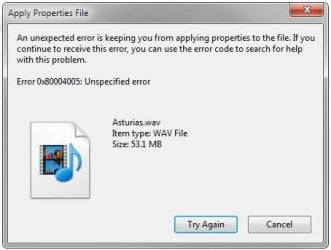
Unspecified Error code 0x80004005

mrfreezzzz

New member
Local time
3:08 PM
Messages
5
Hi,

I'm using Win 7 Home ed. 32 bit. And when trying to update and save tags for my .wav files, directly from the Explorer window, I get this error 0x80004005 each time. And won't let me save/update my tags, of course.


Any idea what's causing it?
 

Attachments

  • error_sc.jpg
    error_sc.jpg
    17.9 KB · Views: 28

My Computer

Computer type
PC/Desktop
OS
win home 7 32bit
Welcome to Seven Forums mrfreezzzz. Is this a problem that just started, and do you know when if so? If it just started, you can try a System Restore point from just before it began

http://www.sevenforums.com/tutorials/700-system-restore.html

If no help, try a clean start to see if there is a conflict

http://www.sevenforums.com/tutorial...ation-conflicts-performing-clean-startup.html

You might try and edit the tag information in WMP

Add or edit media information in Windows Media Player

If you can edit there, it likely isn't a file permission issue, but more an Explorer issue. You could try on another user and see if the problem occurs on that user as well. If it does not occur on another user, you could try and fix the corrupted user

Fix a corrupted user profile

If none of the above help, you should also run the System File Checker

http://www.sevenforums.com/tutorials/1538-sfc-scannow-command-system-file-checker.html

Did you make any changes just before the problem began? Installed any new programs? Ran any optimization programs, etc?

Would you be able to copy the file to another windows 7 PC and see if you can edit it there?

A Repair Install is also an option if the problem exists on all users, and nothing else helps.

http://www.sevenforums.com/tutorials/3413-repair-install.html

A Guy
 

My Computer

Computer type
PC/Desktop
OS
Windows 10 Home x64
CPU
INTEL Core i5-750 Quad-Core 3.37GHz
Motherboard
ASUS P7P55D
Memory
HyperX Fury Black Series 8GB (2 x 4GB) 1866Mhz
Graphics Card(s)
EVGA GeForce GTX 750 Superclocked 1GB 128-Bit GDDR5
Monitor(s) Displays
LG 32MA68HY 32" IPS
Screen Resolution
1920 x 1080
Hard Drives
Samsung 840 Evo 120GB, SEAGATE 500GB Barracuda® 7200.12, SATA 3 Gb/s, 7200 RPM, 16MB cache
PSU
ANTEC TruePower New TP-550, 80 PLUS, 550W
Case
ANTEC Three Hundred Illusion
Cooling
COOLER MASTER Hyper 212 Plus, 4 x 120mm 1 x 140mm Noctua's
Internet Speed
85 + Mbps
Antivirus
Avast
Browser
Vivaldi
Hi,

And thanks for all these inputs/leads. So

you can try a System Restore point from just before it began
Good idea, yes. Unfortunately I have encountered this issue for about 10 days, but there's no telling when it actually started. And on top of that, my last restore point showing in the list was setup... yesterday. Even though I create one on a weekly basis, and more if I uninstall applications.

You might try and edit the tag information in WMP
It does work, yes. But needless to say it's tedious, some fields do not show, even if the associated columns are selected, and edition can't be done on the fly, as one'd do directly from Explorer.

You could try on another user and see if the problem occurs on that user as well
I don't even have the possibility to edit id3 tags from Win Explorer, on another computer. Even though they're both running the same version of Windows.

As to your other solutions, I'll need more time to check them out. And will return here the results.


Thanks again,
Cheers,
J.


My Computer

Computer type
PC/Desktop
OS
win home 7 32bit

My Computer

Computer Manufacturer/Model Number
Generic
OS
Windows 7
CPU
Intel Core i7 920
Motherboard
Asus P6T
Memory
6 GB
Graphics Card(s)
Sapphire 4850 Vapor-x, 1GB Memory
Hard Drives
Western Digital 1 TB SATA
PSU
Enermax Modo 82+ 525w
Case
Ultra
Back
Top