
UNSTABLE wireless netwok (adapter) LoL

jingyin

New member
Member
Local time
9:31 AM
Messages
31
Hi

I have been experiencing some problem with my internet connection.
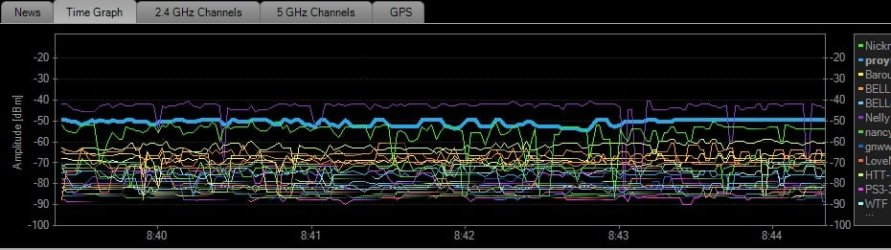
While i am playing League of Legend (online game) my WIRELESS internet's RSSI seems to be unstable. When i am not playing, it becomes stable again.

Here is a screenshot using inSSID (in the beigining im playing, and the end i am not):

EDIT: I also forgot to mention that i live in a busy neighbourhood.
There are a lot of wireless internet connections around
And ingame, i can reach over 3000 ping +
 

Attachments
  • Wireless.jpg
    Wireless.jpg
    50.1 KB · Views: 61

My Computer My Computer

OS
Windows 7 Home Premium 64bit
With all those wireless channels in the area there is bound to be some crossover which will decrease the available bandwidth.

Have you tried using wireless channels that are furthest away from the ones your neighbors are using?

You are going to have some channel overlap either way but you can increase the quality of the connection by using the best possible channels. Channel 1, 6 and 11 are the best ones if someone isn't using them already.
 

My Computer My Computer

Computer type
PC/Desktop
Computer Manufacturer/Model Number
Home built
OS
Windows 7 Ult, Windows 8.1 Pro,
CPU
Q9650-4.275GHz, E8600 4.5GHz, E6750-3.8GHz
Motherboard
Evga 780i FTW
Memory
G.Skill PC2 9600 1200Mhz 5 5 5 15 2T
Graphics Card(s)
GTX480
Sound Card
Asus Xonar D2
Monitor(s) Displays
HannsG
Screen Resolution
1680X1050
Hard Drives
GSkill Phoenix Pro 120GB SSD
PSU
ThermalTake Toughpower 1000Watt modular
Case
ThermalTake XaserV
Cooling
Xigmatek S1283
Keyboard
Logitech G15
Mouse
Logitech G9
Internet Speed
T1
The most used chanel in my neighbourhood is ch1, ch6 and ch11
so i set it to automatic and it changed to ch9
 

My Computer My Computer

OS
Windows 7 Home Premium 64bit
You can increase your signal strength by installing a wifeless access point closer to your machine, close as possible is best. I mention this because your signal strength isn't too good from what I'm seeing there in the chart.

If the connection still isn't good enough you could try using the 5Ghz band but that requires that your router has the option or you would need a new router that transmits on the 5Ghz band. You would probably need to upgrade your wireless adaptor to one that works with 5Ghz.

The problem with the 5Ghz band is that it doesn't go through walls as well as the 2.4Ghz band but it has the potential for much better bandwidth because it has a much larger channel spread "more channels" and hardly anyone is using it. Still you would need a straight line of site with no walls in the way to take advantage of the 5Ghz band

Of course you must realize that a wired connection is going to be much better for gaming.
 

My Computer My Computer

Computer type
PC/Desktop
Computer Manufacturer/Model Number
Home built
OS
Windows 7 Ult, Windows 8.1 Pro,
CPU
Q9650-4.275GHz, E8600 4.5GHz, E6750-3.8GHz
Motherboard
Evga 780i FTW
Memory
G.Skill PC2 9600 1200Mhz 5 5 5 15 2T
Graphics Card(s)
GTX480
Sound Card
Asus Xonar D2
Monitor(s) Displays
HannsG
Screen Resolution
1680X1050
Hard Drives
GSkill Phoenix Pro 120GB SSD
PSU
ThermalTake Toughpower 1000Watt modular
Case
ThermalTake XaserV
Cooling
Xigmatek S1283
Keyboard
Logitech G15
Mouse
Logitech G9
Internet Speed
T1
for my router setting
should i use 20Mhz or 40Mhz channel width to improve the connection?

And for my signal strengh, my computer has 5/5 rating
my wireless internet is the blue line
 

My Computer My Computer

OS
Windows 7 Home Premium 64bit
You should use the 20Mhz setting which is the single channel, no channel bonding. With that many channels being used in the area channel bonding off is probably best.

The channel crossover will be pretty strong with all those connections and your signal strength is not as good as it could be. The only way to make the connection better is to move closer to the access point or router and look around for the best possible channel or use the 5Ghz band or use a wired connection which is always best for gaming.
 

My Computer My Computer

Computer type
PC/Desktop
Computer Manufacturer/Model Number
Home built
OS
Windows 7 Ult, Windows 8.1 Pro,
CPU
Q9650-4.275GHz, E8600 4.5GHz, E6750-3.8GHz
Motherboard
Evga 780i FTW
Memory
G.Skill PC2 9600 1200Mhz 5 5 5 15 2T
Graphics Card(s)
GTX480
Sound Card
Asus Xonar D2
Monitor(s) Displays
HannsG
Screen Resolution
1680X1050
Hard Drives
GSkill Phoenix Pro 120GB SSD
PSU
ThermalTake Toughpower 1000Watt modular
Case
ThermalTake XaserV
Cooling
Xigmatek S1283
Keyboard
Logitech G15
Mouse
Logitech G9
Internet Speed
T1
Is there any possible way to get a wired internet?
cause my main computer is in another room, and the router too
 

My Computer My Computer

OS
Windows 7 Home Premium 64bit
You might try seeing how well a wireless extender helps. Set it up midway between your PC and the WAP you connect to.
 

My Computer My Computer

OS
Windows 7 Ultimate x64
Is there any possible way to get a wired internet?
cause my main computer is in another room, and the router too

You would need a switch for that but you would need to run an Ethernet cable to the switch in the next room. The gigabit switches are the way to go.
 

My Computer My Computer

Computer type
PC/Desktop
Computer Manufacturer/Model Number
Home built
OS
Windows 7 Ult, Windows 8.1 Pro,
CPU
Q9650-4.275GHz, E8600 4.5GHz, E6750-3.8GHz
Motherboard
Evga 780i FTW
Memory
G.Skill PC2 9600 1200Mhz 5 5 5 15 2T
Graphics Card(s)
GTX480
Sound Card
Asus Xonar D2
Monitor(s) Displays
HannsG
Screen Resolution
1680X1050
Hard Drives
GSkill Phoenix Pro 120GB SSD
PSU
ThermalTake Toughpower 1000Watt modular
Case
ThermalTake XaserV
Cooling
Xigmatek S1283
Keyboard
Logitech G15
Mouse
Logitech G9
Internet Speed
T1
it seems like that the walls are blocking the signal,
im just maybe 7~10m from the router, but there are 2 walls
 

My Computer My Computer

OS
Windows 7 Home Premium 64bit
it seems like that the walls are blocking the signal,
im just maybe 7~10m from the router, but there are 2 walls


Two walls and 30 feet from the router won't be a very good wireless connection for gaming.
 

My Computer My Computer

Computer type
PC/Desktop
Computer Manufacturer/Model Number
Home built
OS
Windows 7 Ult, Windows 8.1 Pro,
CPU
Q9650-4.275GHz, E8600 4.5GHz, E6750-3.8GHz
Motherboard
Evga 780i FTW
Memory
G.Skill PC2 9600 1200Mhz 5 5 5 15 2T
Graphics Card(s)
GTX480
Sound Card
Asus Xonar D2
Monitor(s) Displays
HannsG
Screen Resolution
1680X1050
Hard Drives
GSkill Phoenix Pro 120GB SSD
PSU
ThermalTake Toughpower 1000Watt modular
Case
ThermalTake XaserV
Cooling
Xigmatek S1283
Keyboard
Logitech G15
Mouse
Logitech G9
Internet Speed
T1
what would be the ideal position fro gaming?
would it be better if i changed the position of the router?
but it would have a lot of cables doesnt it?
 

My Computer My Computer

OS
Windows 7 Home Premium 64bit
Back
Top