Solved Untrusted connection paypal

pj29

New member
Local time
10:47 AM
Messages
20
Hello, I was about to pay an item on ebay, it redirected me on paypal but then firefox gave me this message : "This connection is untrusted" so I thought that I had a malware of some kind and I did a Hijkackthis log (that's the only software I know regarding malwares) I have the latest Kaspersky internet security updated, I have, as modules installed on firefox, AD Block plus and Noscript, and I think that all my softwares are up to date... I've put the Hijackthis log here : Hijackthis log PJ - Pastebin.com Thanks in advance for your help!
 

My Computer

Computer type
PC/Desktop
Computer Manufacturer/Model Number
Custom build
OS
Win 7 x64 Ultimate
CPU
Amd X4 955 Black Ed
Motherboard
Asus M4A88TD-V EVO/USB3
Memory
4 Gb 1600Mhz
Graphics Card(s)
HD5850
Hard Drives
WD Caviar Black 500gb
Antivirus
Kaspersky antivir 2014
pj29,

The problem may end up being a FireFox issue, however, let's do the following...

Please download ADWCleaner:
AdwCleaner Download (by Xplode)
Save to the Desktop.

Right-click on AdwCleaner.exe and select: Run as Administrator
At the main window, press the [Scan] button.

The Scan function does not delete anything. It just lists elements.
Once AdwCleaner completes its scan, it shows a list of entries.
You can uncheck any item(s) you do not want to remove from this list.

Next, click the [Clean] button.

A small window appears to inform that all programs will close. Press: OK
AdwCleaner proceeds to delete all checked elements.
If a reboot is needed, a small window appears notifying of such. Please click: OK

:ar: Please provide the AdwCleaner log in your reply.

ADWCleaner tutorial:
404 Not Found - ToolsLib


Next, please download Malwarebytes Anti-Malware
Download > https://www.malwarebytes.org/products/
Select the FREE version!
Save to the Desktop.

On the Desktop. double-click mbam-setup-2.X.X.XXXX.exe to install (X's = current version)
Allow the file to run.
Follow the setup wizard to Install.
Place a checkmark next to Launch Malwarebytes Anti-Malware, then click: Finish

Once MBAM opens, click the Settings tab at the top, and, in the left column, select Detections and Protections
If not already checked, select: Scan for rootkits
Click the Scan tab at the top of the program window, and select: Threat Scan
Next, click: Scan Now

If you receive a message that updates are available, click: Update Now
At this point, the update is downloaded, installed, and the scan starts.
The scan may take some time to finish, so please be patient.

If potential threats are detected, select Quarantine All as the Action for all the listed items.
Next, click: Apply Actions
While still on the Scan tab, click the link for View detailed log
In the window that opens, click the Export button, select Text file (*.txt), and save the log to the Desktop.

:ar: Please post the MBAM report in your reply.

Notes:
1. The log is automatically saved by MBAM and is also viewed by clicking:
History tab > Application Logs.
2, If MBAM encounters a file that is difficult to remove...
Click OK and allow MBAM to proceed with the disinfection process.
If asked to restart the computer, please do so immediately.

 

My Computer

Computer type
PC/Desktop
Computer Manufacturer/Model Number
An ol' eMachines
OS
Windows 7 Home Premium
Internet Speed
Fine for me...I'm retired!
Hello, thanks for the reply; I tried accessing Send Money, Pay Online or Set Up a Merchant Account - PayPal on IE and it worked, but it's still displaying this message on firefox...
I found nothing particular to delete with Adwcleaner and malawarebytes found nothing, find the logs attached;
I also tried to delete the cert8 file in mozilla but it did not change the message....
 

Attachments

My Computer

Computer type
PC/Desktop
Computer Manufacturer/Model Number
Custom build
OS
Win 7 x64 Ultimate
CPU
Amd X4 955 Black Ed
Motherboard
Asus M4A88TD-V EVO/USB3
Memory
4 Gb 1600Mhz
Graphics Card(s)
HD5850
Hard Drives
WD Caviar Black 500gb
Antivirus
Kaspersky antivir 2014
Check system clock?

Hello, thanks for the reply; I tried accessing Send Money, Pay Online or Set Up a Merchant Account - PayPal on IE and it worked, but it's still displaying this message on firefox...
I found nothing particular to delete with Adwcleaner and malawarebytes found nothing, find the logs attached;
I also tried to delete the cert8 file in mozilla but it did not change the message....

Does your system clock agree with the time shown here?

Accurate Time

If your system clock is wrong - adjust it.

Also the link you posted shows the non secure http:// rather than the secure https:// so try:

https://www.paypal.com
 

My Computer

Computer type
Laptop
Computer Manufacturer/Model Number
ASUS
OS
Microsoft Windows 7 Home Premium 64-bit 7601 Multiprocessor Free Service Pack 1
CPU
AMD C-60 APU with Radeon(tm) HD Graphics
Motherboard
ASUSTeK COMPUTER INC. X501U
Memory
4.00 GB
Graphics Card(s)
AMD Radeon HD 6290 Graphics
Sound Card
(1) AMD High Definition Audio Device (2) Realtek High Defi
Screen Resolution
1366 x 768 x 32 bits (4294967296 colors) @ 60 Hz
Hard Drives
Hitachi HTS545050A7E380 SATA Disk Device
Antivirus
Comodo CIS & FW, SecureAplus App Whitelisting, Threatfire
Browser
Cyberfox 64bit, Opera 64bit, Airfox
Other Info
Spy-The-Spy, HitmanPro.Alert, Norton Connect Safe, MJRegWatcher, BitDefender TrafficLight, Voodoo Shield, Zemana AntiMalware
I was 11 seconds ahead but I sync it and now it's accurate, even with the https the message appears... Do you think that I should reinstall firefox and/or delete one of my extensions? I went back to firefox especially for the no script extension, I used to have chrome and I had no problem with it; Maybe that I should mention this: i changed the dns servers from default to the google public dns, does it affects the connexion to paypal? I also noticed in the properties of the wireless card that I had the Kaspersky anti-virus NDIS 6 filter, I don't know if it's usefull information... Thanks for helping me
 

My Computer

Computer type
PC/Desktop
Computer Manufacturer/Model Number
Custom build
OS
Win 7 x64 Ultimate
CPU
Amd X4 955 Black Ed
Motherboard
Asus M4A88TD-V EVO/USB3
Memory
4 Gb 1600Mhz
Graphics Card(s)
HD5850
Hard Drives
WD Caviar Black 500gb
Antivirus
Kaspersky antivir 2014
SSL & Cipher Suites

Okay if I enable only strong cipher suites in Cyberfox (same as firefox) then it works okay.

If I enable weak cipher suites I get the untrusted connection issue.
 

My Computer

Computer type
Laptop
Computer Manufacturer/Model Number
ASUS
OS
Microsoft Windows 7 Home Premium 64-bit 7601 Multiprocessor Free Service Pack 1
CPU
AMD C-60 APU with Radeon(tm) HD Graphics
Motherboard
ASUSTeK COMPUTER INC. X501U
Memory
4.00 GB
Graphics Card(s)
AMD Radeon HD 6290 Graphics
Sound Card
(1) AMD High Definition Audio Device (2) Realtek High Defi
Screen Resolution
1366 x 768 x 32 bits (4294967296 colors) @ 60 Hz
Hard Drives
Hitachi HTS545050A7E380 SATA Disk Device
Antivirus
Comodo CIS & FW, SecureAplus App Whitelisting, Threatfire
Browser
Cyberfox 64bit, Opera 64bit, Airfox
Other Info
Spy-The-Spy, HitmanPro.Alert, Norton Connect Safe, MJRegWatcher, BitDefender TrafficLight, Voodoo Shield, Zemana AntiMalware
Kaspersky & No Script

I don't use either no script or kaspersky. I've heard of problems with secure sites when kaspersky SSL scanning is enabled.

Give me a minute - there's a couple of add ons to try that affect cipher suites and SSL. Just install both for now and I'll post back with settings that work for me. The wrong settings lead to problems.

https://addons.mozilla.org/en-US/firefox/addon/ssleuth/

https://addons.mozilla.org/en-US/firefox/user/calomelorg/?src=api

Your clock is okay - a few seconds doesn't matter.
 

My Computer

Computer type
Laptop
Computer Manufacturer/Model Number
ASUS
OS
Microsoft Windows 7 Home Premium 64-bit 7601 Multiprocessor Free Service Pack 1
CPU
AMD C-60 APU with Radeon(tm) HD Graphics
Motherboard
ASUSTeK COMPUTER INC. X501U
Memory
4.00 GB
Graphics Card(s)
AMD Radeon HD 6290 Graphics
Sound Card
(1) AMD High Definition Audio Device (2) Realtek High Defi
Screen Resolution
1366 x 768 x 32 bits (4294967296 colors) @ 60 Hz
Hard Drives
Hitachi HTS545050A7E380 SATA Disk Device
Antivirus
Comodo CIS & FW, SecureAplus App Whitelisting, Threatfire
Browser
Cyberfox 64bit, Opera 64bit, Airfox
Other Info
Spy-The-Spy, HitmanPro.Alert, Norton Connect Safe, MJRegWatcher, BitDefender TrafficLight, Voodoo Shield, Zemana AntiMalware
What's a cipher suite exactly ? I'll install the two addons then
 

My Computer

Computer type
PC/Desktop
Computer Manufacturer/Model Number
Custom build
OS
Win 7 x64 Ultimate
CPU
Amd X4 955 Black Ed
Motherboard
Asus M4A88TD-V EVO/USB3
Memory
4 Gb 1600Mhz
Graphics Card(s)
HD5850
Hard Drives
WD Caviar Black 500gb
Antivirus
Kaspersky antivir 2014
Add on settings

Okay try the following:

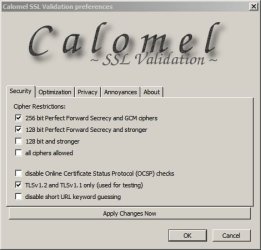
Tools > Add ons > Calomel > Options

Security Tab > Tick these:

Calomel SSL Validation preferences.jpg

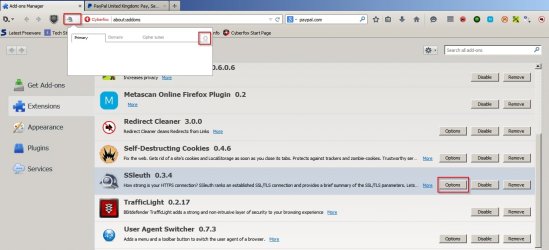
Then in SSL Sleuth either click the icon next to the address bar or choose options from add ons manager.

SSL Sleuth.jpg

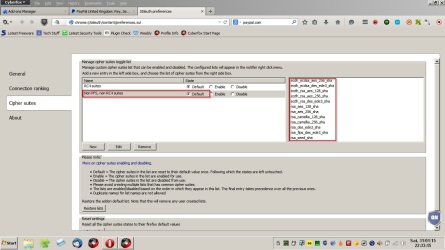
Then check you've got the same settings as these (and the same cipher suites)

RC4.jpg

Non RC4.jpg
 

My Computer

Computer type
Laptop
Computer Manufacturer/Model Number
ASUS
OS
Microsoft Windows 7 Home Premium 64-bit 7601 Multiprocessor Free Service Pack 1
CPU
AMD C-60 APU with Radeon(tm) HD Graphics
Motherboard
ASUSTeK COMPUTER INC. X501U
Memory
4.00 GB
Graphics Card(s)
AMD Radeon HD 6290 Graphics
Sound Card
(1) AMD High Definition Audio Device (2) Realtek High Defi
Screen Resolution
1366 x 768 x 32 bits (4294967296 colors) @ 60 Hz
Hard Drives
Hitachi HTS545050A7E380 SATA Disk Device
Antivirus
Comodo CIS & FW, SecureAplus App Whitelisting, Threatfire
Browser
Cyberfox 64bit, Opera 64bit, Airfox
Other Info
Spy-The-Spy, HitmanPro.Alert, Norton Connect Safe, MJRegWatcher, BitDefender TrafficLight, Voodoo Shield, Zemana AntiMalware
Cipher suites are what governs client handshake over a secure connection:

https://www.howsmyssl.com/

Your best bet is to configure Firefox to use strong cipher suites and disable the weak ones.
 

My Computer

Computer type
Laptop
Computer Manufacturer/Model Number
ASUS
OS
Microsoft Windows 7 Home Premium 64-bit 7601 Multiprocessor Free Service Pack 1
CPU
AMD C-60 APU with Radeon(tm) HD Graphics
Motherboard
ASUSTeK COMPUTER INC. X501U
Memory
4.00 GB
Graphics Card(s)
AMD Radeon HD 6290 Graphics
Sound Card
(1) AMD High Definition Audio Device (2) Realtek High Defi
Screen Resolution
1366 x 768 x 32 bits (4294967296 colors) @ 60 Hz
Hard Drives
Hitachi HTS545050A7E380 SATA Disk Device
Antivirus
Comodo CIS & FW, SecureAplus App Whitelisting, Threatfire
Browser
Cyberfox 64bit, Opera 64bit, Airfox
Other Info
Spy-The-Spy, HitmanPro.Alert, Norton Connect Safe, MJRegWatcher, BitDefender TrafficLight, Voodoo Shield, Zemana AntiMalware
Okay so it looks like the SSL Sleuth settings are the same as yours, but nothing was ticked in Calomel, so I did this; I went to your website hows my ssl and everything was marked as good; So I tried connecting to paypal but it's the same message (in the details it's said : (Error code : sec_error_unknown_issuer) ) Edit : I restarted firefox, tried to connect to paypal again, but this time another message appears (after the modifications) : Code d'erreur : ssl_error_no_cypher_overlap
 

My Computer

Computer type
PC/Desktop
Computer Manufacturer/Model Number
Custom build
OS
Win 7 x64 Ultimate
CPU
Amd X4 955 Black Ed
Motherboard
Asus M4A88TD-V EVO/USB3
Memory
4 Gb 1600Mhz
Graphics Card(s)
HD5850
Hard Drives
WD Caviar Black 500gb
Antivirus
Kaspersky antivir 2014
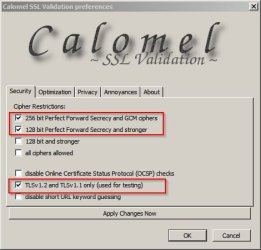
Calomel - nothing ticked?

That's not how it should be. These should be ticked. Also which FF version do you have?

And once applied close any paypal tab - clear cookies and open a new paypal tab.

Calomel SSL Validation preferences 2.jpg
 

My Computer

Computer type
Laptop
Computer Manufacturer/Model Number
ASUS
OS
Microsoft Windows 7 Home Premium 64-bit 7601 Multiprocessor Free Service Pack 1
CPU
AMD C-60 APU with Radeon(tm) HD Graphics
Motherboard
ASUSTeK COMPUTER INC. X501U
Memory
4.00 GB
Graphics Card(s)
AMD Radeon HD 6290 Graphics
Sound Card
(1) AMD High Definition Audio Device (2) Realtek High Defi
Screen Resolution
1366 x 768 x 32 bits (4294967296 colors) @ 60 Hz
Hard Drives
Hitachi HTS545050A7E380 SATA Disk Device
Antivirus
Comodo CIS & FW, SecureAplus App Whitelisting, Threatfire
Browser
Cyberfox 64bit, Opera 64bit, Airfox
Other Info
Spy-The-Spy, HitmanPro.Alert, Norton Connect Safe, MJRegWatcher, BitDefender TrafficLight, Voodoo Shield, Zemana AntiMalware
If have the 35.0.1 version of firefox;
I cleaned everything using CCleaner but I've noticed strange things:
In Calomel, everytime I would reboot firefox the 128 bit Perfect forward secrecy.... case would be unticked, so I had to tick it every time I would reboot firefox ;
Plus now when I try to log in in Facebook the page would not look correct (it's the screenshot attached), and I have this message on paypal : Code d'erreur : ssl_error_no_cypher_overlap
 

Attachments

  • Capture d'écran 2015-02-01 00.11.58.png
    Capture d'écran 2015-02-01 00.11.58.png
    83.7 KB · Views: 3

My Computer

Computer type
PC/Desktop
Computer Manufacturer/Model Number
Custom build
OS
Win 7 x64 Ultimate
CPU
Amd X4 955 Black Ed
Motherboard
Asus M4A88TD-V EVO/USB3
Memory
4 Gb 1600Mhz
Graphics Card(s)
HD5850
Hard Drives
WD Caviar Black 500gb
Antivirus
Kaspersky antivir 2014
Backup your profile

Okay so something is screwed up. Perhaps it's time to try a fresh install of Firefox. If you wan't to go ahead:

Remove those extensions for now and restart Firefox. Then close it again.

Navigate to C:\Users\<user name>\AppData\Roaming\Mozilla\Firefox\

Open the Firefox folder and copy the Profile Folder and profiles.ini file into a new folder on your desktop then you've got an exact copy of your old profile handy.

When you've done that - download, install and run this:

MozBackup - Backup tool for Firefox and Thunderbird

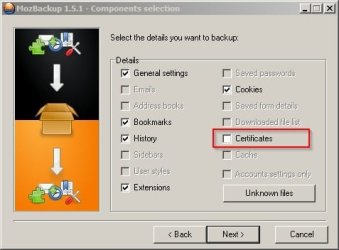
When you run it choose "Backup a profile" and select your Firefox profile in the bottom window and also choose a folder to save the backup file into. This way you can restore your bookmarks and extensions to a freah firefox installation.

When you get to the components selection screen choose the following and uncheck certificates.

MozBackup 1.5.1 - Components selection.jpg

On the next screen select "Unknown files" and check all of them.

Continue though the options. When finsished make sure that theres a file with the .pcv extension in your chosen backup location.

I'll carry on with Firefox removal and reinstall suggestions in another post.
 

My Computer

Computer type
Laptop
Computer Manufacturer/Model Number
ASUS
OS
Microsoft Windows 7 Home Premium 64-bit 7601 Multiprocessor Free Service Pack 1
CPU
AMD C-60 APU with Radeon(tm) HD Graphics
Motherboard
ASUSTeK COMPUTER INC. X501U
Memory
4.00 GB
Graphics Card(s)
AMD Radeon HD 6290 Graphics
Sound Card
(1) AMD High Definition Audio Device (2) Realtek High Defi
Screen Resolution
1366 x 768 x 32 bits (4294967296 colors) @ 60 Hz
Hard Drives
Hitachi HTS545050A7E380 SATA Disk Device
Antivirus
Comodo CIS & FW, SecureAplus App Whitelisting, Threatfire
Browser
Cyberfox 64bit, Opera 64bit, Airfox
Other Info
Spy-The-Spy, HitmanPro.Alert, Norton Connect Safe, MJRegWatcher, BitDefender TrafficLight, Voodoo Shield, Zemana AntiMalware
Your comment:

In Calomel, everytime I would reboot firefox the 128 bit Perfect forward secrecy.... case would be unticked, so I had to tick it every time I would reboot firefox.

I've just checked and that seems normal. Only the box above remains checked. 256bit Perfect Forward Secrecy. In any case everything works on my machine with those settings so if you reinstall there's nothing to lose.
 

My Computer

Computer type
Laptop
Computer Manufacturer/Model Number
ASUS
OS
Microsoft Windows 7 Home Premium 64-bit 7601 Multiprocessor Free Service Pack 1
CPU
AMD C-60 APU with Radeon(tm) HD Graphics
Motherboard
ASUSTeK COMPUTER INC. X501U
Memory
4.00 GB
Graphics Card(s)
AMD Radeon HD 6290 Graphics
Sound Card
(1) AMD High Definition Audio Device (2) Realtek High Defi
Screen Resolution
1366 x 768 x 32 bits (4294967296 colors) @ 60 Hz
Hard Drives
Hitachi HTS545050A7E380 SATA Disk Device
Antivirus
Comodo CIS & FW, SecureAplus App Whitelisting, Threatfire
Browser
Cyberfox 64bit, Opera 64bit, Airfox
Other Info
Spy-The-Spy, HitmanPro.Alert, Norton Connect Safe, MJRegWatcher, BitDefender TrafficLight, Voodoo Shield, Zemana AntiMalware
Remove Firefox completely and reinstall it

Okay so it's probably best to use:

GeekUninstaller | GeekUninstaller

It's portable and runs without installation. Run the executable and select Firefox in the list then uninstall it. Let GeekUninstaller scan for leftover files and registry entries and delete them.

Important: Reboot your machine. You can delete GeekUninstaller if you like.

Then navigate to:

C:\Program files\Mozilla Firefox

If the folder still exists - delete it.

Do the same for the following:

C:\Users\<username>\AppData\Local\Mozilla\

C:\Users\<username>\AppData\Local\VirtualStore\Program Files\Mozilla Firefox - if found.

C:\Users\<username>\AppData\Roaming\Mozilla

Run Ccleaner then reboot.

Download the latest version of Firefox and install it. Test to see if you still have the same problem.

Let us know how you get on. If the problem is solved you'll need to restore your bookmarks and extensions using MozBackup.
 

My Computer

Computer type
Laptop
Computer Manufacturer/Model Number
ASUS
OS
Microsoft Windows 7 Home Premium 64-bit 7601 Multiprocessor Free Service Pack 1
CPU
AMD C-60 APU with Radeon(tm) HD Graphics
Motherboard
ASUSTeK COMPUTER INC. X501U
Memory
4.00 GB
Graphics Card(s)
AMD Radeon HD 6290 Graphics
Sound Card
(1) AMD High Definition Audio Device (2) Realtek High Defi
Screen Resolution
1366 x 768 x 32 bits (4294967296 colors) @ 60 Hz
Hard Drives
Hitachi HTS545050A7E380 SATA Disk Device
Antivirus
Comodo CIS & FW, SecureAplus App Whitelisting, Threatfire
Browser
Cyberfox 64bit, Opera 64bit, Airfox
Other Info
Spy-The-Spy, HitmanPro.Alert, Norton Connect Safe, MJRegWatcher, BitDefender TrafficLight, Voodoo Shield, Zemana AntiMalware
Will check this thread again tomorrow to see how you got on.
 

My Computer

Computer type
Laptop
Computer Manufacturer/Model Number
ASUS
OS
Microsoft Windows 7 Home Premium 64-bit 7601 Multiprocessor Free Service Pack 1
CPU
AMD C-60 APU with Radeon(tm) HD Graphics
Motherboard
ASUSTeK COMPUTER INC. X501U
Memory
4.00 GB
Graphics Card(s)
AMD Radeon HD 6290 Graphics
Sound Card
(1) AMD High Definition Audio Device (2) Realtek High Defi
Screen Resolution
1366 x 768 x 32 bits (4294967296 colors) @ 60 Hz
Hard Drives
Hitachi HTS545050A7E380 SATA Disk Device
Antivirus
Comodo CIS & FW, SecureAplus App Whitelisting, Threatfire
Browser
Cyberfox 64bit, Opera 64bit, Airfox
Other Info
Spy-The-Spy, HitmanPro.Alert, Norton Connect Safe, MJRegWatcher, BitDefender TrafficLight, Voodoo Shield, Zemana AntiMalware
Callender, I was able to find some of your great stuff in the pics in this thread except two:
Redirect Cleaner and something ending in 0.6.0.6 -- would you mind telling me what & where for those two?
Thanks! I followed your advice above to the letter, got this from the howismyssl:
Your SSL client is Probably Okay.
 

My Computer

Computer type
PC/Desktop
Computer Manufacturer/Model Number
Antec desktop; Acer Aspire laptops
OS
Windows 7 Professional 64-bit
CPU
Desktop i5; Acers i5 & i7
Memory
desktop 16GB; 1 Acer 8GB & 1 Acer 16GB
Hard Drives
1TB split into 2 equal partitions [OS and data] usable by RJS
Internet Speed
AT&T DSL
Browser
FF, GChrome, msIE
Other Info
Windows 7 Firewall, Emsisoft AM/AV, MSE [scan-only], SpywareBlaster, Ruiware/BillP combine
Redirect Cleaner

Callender, I was able to find some of your great stuff in the pics in this thread except two:
Redirect Cleaner and something ending in 0.6.0.6 -- would you mind telling me what & where for those two?
Thanks! I followed your advice above to the letter, got this from the howismyssl:
Your SSL client is Probably Okay.

Well you can't get Redirect Cleaner anymore. If you really want to use it I could let you have the .xpi file and you can install it manually. (Install addon from file option) - Here's a reasonable alternative:

https://github.com/diegocr/CleanLinks - Mozilla add on link is down the page.

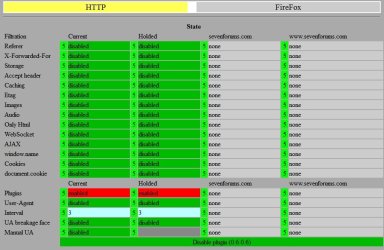
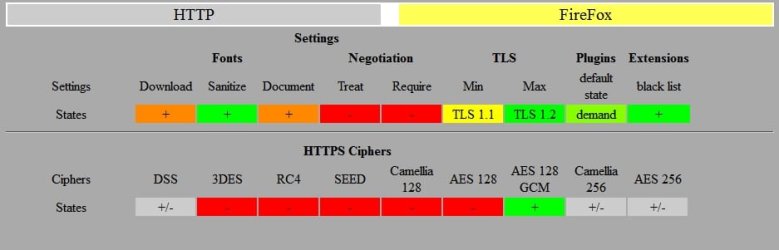
The one ending in 0.6.0.6 - you probably don't want that one really. It's pretty advanced. See these screenshots. If you still want it I'll post details.

Addon 1.jpg

Addon 2.jpg
 

My Computer

Computer type
Laptop
Computer Manufacturer/Model Number
ASUS
OS
Microsoft Windows 7 Home Premium 64-bit 7601 Multiprocessor Free Service Pack 1
CPU
AMD C-60 APU with Radeon(tm) HD Graphics
Motherboard
ASUSTeK COMPUTER INC. X501U
Memory
4.00 GB
Graphics Card(s)
AMD Radeon HD 6290 Graphics
Sound Card
(1) AMD High Definition Audio Device (2) Realtek High Defi
Screen Resolution
1366 x 768 x 32 bits (4294967296 colors) @ 60 Hz
Hard Drives
Hitachi HTS545050A7E380 SATA Disk Device
Antivirus
Comodo CIS & FW, SecureAplus App Whitelisting, Threatfire
Browser
Cyberfox 64bit, Opera 64bit, Airfox
Other Info
Spy-The-Spy, HitmanPro.Alert, Norton Connect Safe, MJRegWatcher, BitDefender TrafficLight, Voodoo Shield, Zemana AntiMalware
Ok so I did a fresh install following your instructions and paypal works, but I have not installed any addons yet and I've turned off kaspersky modules... Now I'm afraid to use Mozilla Sync to retrieve the bookmarks and addons...
But now that I've uninstalled the old firefox, MozBackup won't be usefull right?
What I could do is install one by one my extensions to see if one is 'corrupting' mozilla... Should I reinstall SSL Sleuth and Calomel for exemple?

Thanks for the help!
 

My Computer

Computer type
PC/Desktop
Computer Manufacturer/Model Number
Custom build
OS
Win 7 x64 Ultimate
CPU
Amd X4 955 Black Ed
Motherboard
Asus M4A88TD-V EVO/USB3
Memory
4 Gb 1600Mhz
Graphics Card(s)
HD5850
Hard Drives
WD Caviar Black 500gb
Antivirus
Kaspersky antivir 2014
Back
Top