Unusual Files in Temp Folder

Melissa

New member
Power User
Local time
12:06 PM
Messages
394
Dear Forum,

I have unfortunately been in ill health and not been in great spirits in the past two days.

Checked my email and a was informed that before I do a complete clean I should do some checks -

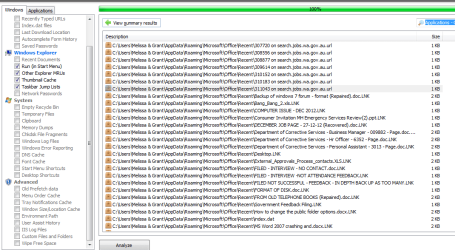
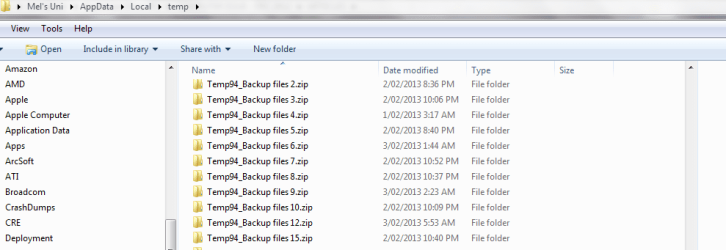
One being - %temp% folder - I found quite a bit in there - I was not too sure of the specifications - but being that I am running a clean install tomorrow - I thought it was interesting to show what may have been hampering my efforts.

I also was told by the Microsoft Community regarding my database enquiry - which is in an earlier thread - that it requires scanning for malware - it is a SQL Connector Server DB that appeared on my other computer.

On the up side. I still have a computer for use until tomorrow :shock:

I will be posting back on the other link regarding the clean boot. I did not realise I had so much data on my computer.

Thank you

Mel
 

Attachments
  • temp back up files.PNG
    temp back up files.PNG
    16.2 KB · Views: 34

My Computer

Computer type
Laptop
Computer Manufacturer/Model Number
Sony VAIO / E Series VPCEB46FG
OS
Windows 7 Home Premium 64bit
CPU
Windows 7 Service Pack 1 x86 NTFS
Motherboard
AMD E-350 Processor
Memory
4 GB
Hard Drives
500GB
Other Info
1.6GHz
Melissa, the temp folders are the scratch pad for almost every program on the computer. It can most times be cleaned out without any problems. sometimes a file will be open and you can't delete the temporary file from that program but just leave that file there and clean out the rest.

Rich
 

My Computer

Computer type
Laptop
Computer Manufacturer/Model Number
Toshiba Laptop Qosimo X870
OS
Windows 7 Pro x64 SP1
CPU
Intel Core I7
Motherboard
Toshiba Qosmio
Memory
16 Gigs
Graphics Card(s)
NVIDIA GeForce GTX 670M
Monitor(s) Displays
17.7" laptop
Screen Resolution
1600 x 900
Hard Drives
256 Gig SanDisk SSD for C
256 Gig Intel SSD for D
Internet Speed
50/25 FIOS
Antivirus
Vipre (all you can eat for 10 machines)
Browser
IE and FF
Other Info
I have dos 6.22, wfwg 3.11, win98, 2000 and xp VHD's available for testing. MS's Virtual PC works great.

My Computer

Computer Manufacturer/Model Number
HP, Dell, Gateway, Toshiba - 4 laptops and 2 desktops
OS
Vista, Windows7, Mint Mate, Zorin, Windows 8
CPU
from 1.6GHz Duo to i7
Monitor(s) Displays
2x HP w2207
Hard Drives
5x HDD, 7x SSD, 12x Externals
Keyboard
with trackball - no mices
Mouse
Trackball mice
Internet Speed
DSL 6000
Thanks Community,

It came up with the error that some of the files had names that were too long to go into the recycle bin and then I worry that I have deleted the incorrect files.

I already have been informed on here that I should clean out my recycle bin - Is that recommended?

Thanks for your advice - invaluable.
 

My Computer

Computer type
Laptop
Computer Manufacturer/Model Number
Sony VAIO / E Series VPCEB46FG
OS
Windows 7 Home Premium 64bit
CPU
Windows 7 Service Pack 1 x86 NTFS
Motherboard
AMD E-350 Processor
Memory
4 GB
Hard Drives
500GB
Other Info
1.6GHz
I ran the CC Cleaner - with the defaults - was a bit apprehensive that it would delete everything permanently. But I guess that is what the program is designed to do.

Thanks - I am only a novice.

Melissa:o
 

Attachments

  • cc cleaner 10-02-2013.PNG
    cc cleaner 10-02-2013.PNG
    32.1 KB · Views: 19

My Computer

Computer type
Laptop
Computer Manufacturer/Model Number
Sony VAIO / E Series VPCEB46FG
OS
Windows 7 Home Premium 64bit
CPU
Windows 7 Service Pack 1 x86 NTFS
Motherboard
AMD E-350 Processor
Memory
4 GB
Hard Drives
500GB
Other Info
1.6GHz
I also like the CC Cleaner - I disabled some startup programs in the the tools section.

You have enlightened me. I will not change that much.

If I require further assistance - you are the best.:)
 

My Computer

Computer type
Laptop
Computer Manufacturer/Model Number
Sony VAIO / E Series VPCEB46FG
OS
Windows 7 Home Premium 64bit
CPU
Windows 7 Service Pack 1 x86 NTFS
Motherboard
AMD E-350 Processor
Memory
4 GB
Hard Drives
500GB
Other Info
1.6GHz
CCleaner Documentation

I also like the CC Cleaner - I disabled some startup programs in the the tools section.

You have enlightened me. I will not change that much.

If I require further assistance - you are the best.:)

You can read the CCleaner documentation here (thanks to ICit2lol for the link):
Piriform - Docs
 

My Computer

Computer type
PC/Desktop
Computer Manufacturer/Model Number
n/a
OS
W7 Ultimate SP1, LM19.2 MATE, W10 Home 1703, W10 Pro 1703 VM, #All 64 bit
CPU
AMD Phenom II x6 1100T, 3.3 GHz
Motherboard
ASUS M4A88T-M/USB3 (AM3)
Memory
12GB DDR3 1333 G-Skill (4GB x 2), G-Skill (2GB x 2)
Graphics Card(s)
NVIDIA GeForce GTX 660
Sound Card
Realtek?
Monitor(s) Displays
Samsung S23B350
Screen Resolution
1920x1080
Hard Drives
WD Green 2TB (SATA), WD Green 3TB (SATA), WD Blue 4TB (SATA), WD Blue 6TB (SATA)
PSU
Cooler Master
Case
Antec GX300 Tower
Cooling
3x Antec TRICOOL 120mm Fans
Mouse
Wired Optical
Internet Speed
DSL
Antivirus
Avast
Browser
Pale Moon (64 bit)
Other Info
2018-12-27 Upgraded HDDs
2015-12-10 Upgraded case, graphics card, storage
2015-08-15 Upgraded motherboard & RAM
2015-07-15 Upgraded LM17.1 to LM17.2
I ran the CC Cleaner - with the defaults - was a bit apprehensive that it would delete everything permanently. But I guess that is what the program is designed to do.

Thanks - I am only a novice.

Melissa:o

Well, you might be a novice but you know how to do a screen capture. Very few novices can do that.

Here's wishing you good health.
 

My Computer

Computer type
PC/Desktop
Computer Manufacturer/Model Number
Home Built
OS
Windows `10 Professional 64bit
CPU
Intel i5 [email protected]
Motherboard
MSI P67A-GD55 (MS7681)
Memory
Corsair Vengeance DDR3 1600 16G
Graphics Card(s)
NVIDIA GeForce GT520 1GHz
Sound Card
Realtek High Definition Audio
Monitor(s) Displays
Haans G 241
Screen Resolution
1600X1024
Hard Drives
Crucial MX100 256GB SSD
PSU
OCZ ModXStream Modular High Performance 500 Watt
Case
Rosewill Challenger-U3
Cooling
Just Fans
Keyboard
Kensington K64338B
Mouse
Microsoft wheel mouse 1.1A
Internet Speed
240.0 Mbps
Antivirus
ESET Internet Security
Browser
Firefox
Other Info
SuperAntiSpyware-Pro
Malwarebytes (Premium)
Kerish Doctor
I only know how to do screen captures because of the fantastic link given to by a member on here.

I am hoping to dedicate the book to the patience of people that assist person's of my ability.

I am also trying to follow the surgeons orders. Pretty tough. Misdiagnosed. If you are having headaches etc - get yourself checked. I thought I just used a computer too much.....

I come from an accounting back ground. Car accident - bang - terminal brain tumour.

Thank you.

What is the difference between Partition Wizard and CC Cleaner?

I also am wondering if and when to run defrags?

Sorry for silly questions.
 

My Computer

Computer type
Laptop
Computer Manufacturer/Model Number
Sony VAIO / E Series VPCEB46FG
OS
Windows 7 Home Premium 64bit
CPU
Windows 7 Service Pack 1 x86 NTFS
Motherboard
AMD E-350 Processor
Memory
4 GB
Hard Drives
500GB
Other Info
1.6GHz
Partition Wizard is a tool to handle partitions - e.g. define partitions, delete partitions, activate or deactivate partitions, shrink partitions, etc. It is very handy - especially the bootable CD version - because it can do things that you cannot do with Disk Management.

CCcleaner is a tool to delete temporary files and cookies (if you want). It also has a registry cleaning function (no need to use that) and some other nifty facilities. Has nothing to do with PW - completely different set of functions.

I am really sorry about your bad health. Let's hope it will get better and the doctors are wrong.
 

My Computer

Computer Manufacturer/Model Number
HP, Dell, Gateway, Toshiba - 4 laptops and 2 desktops
OS
Vista, Windows7, Mint Mate, Zorin, Windows 8
CPU
from 1.6GHz Duo to i7
Monitor(s) Displays
2x HP w2207
Hard Drives
5x HDD, 7x SSD, 12x Externals
Keyboard
with trackball - no mices
Mouse
Trackball mice
Internet Speed
DSL 6000
Hi Melissa
I thought I saw in one of your posts yesterday or the day before that you were just going to do a clean install of Windows 7. This as we have said before will solve most of your file and folder problems! Are you still going to do a clean install?
 

My Computer

Computer type
PC/Desktop
OS
Microsoft Windows 7 Home Premium 64-bit 7601 Multiprocessor Free Service Pack 1
CPU
Intel(R) Core(TM) i7-3770 CPU @ 3.40GHz
Motherboard
ASUSTeK COMPUTER INC. P8H77-M
Memory
8.00 GB
Graphics Card(s)
Intel(R) HD Graphics 4000
Sound Card
On Board
Monitor(s) Displays
Dell 24"
Screen Resolution
1920 x 1080
Hard Drives
(1) INTEL SSDSC2CT180A3 ATA Device (2) ST500DM002-1BD142 ATA Device (3) WDC WD3200AAKS-75L9A0 ATA Device (4) Generic- Compact Flash USB Device (5) Generic- MS/MS-Pro USB Device (6) Generic- SD/MMC USB Device (7) Generic- SM/xD-Picture USB
PSU
500w Corsair
Case
Cooler Master
Cooling
3 Fans
Keyboard
Logitech MK300
Mouse
Logitech WOM
Internet Speed
75Mb
Antivirus
Norton 360
Browser
Firefox, Opera, IE
Back
Top