Solved Unusual Hard Disk Activity in Resource Monitor

kyle18

New member
Local time
4:52 AM
Messages
10
My computer has been stuttering and freezing for the last several months. I have performed a clean install of Windows twice to no avail. I especially notice this lagging when I type in Microsoft Word or even in this forum post. When my computer doesn't lag, it runs fine. My gut feeling tells me it is a hardware issue as my computer can lag even in BIOS. I also noticed lagging when I first had Windows 7 installed before any updates or any drivers were downloaded. The only issue so far that I have found was that my hard drive temperature was 53 degrees C, which is probably too high but I don't think the main cause of my performance issues. I am 100% convinced I have no malware issues.

Things I have tried:


  • Clean install of Windows 7 (I was extremely OCD about getting the right drivers and making sure there were no conflicts)
  • MemTest86+ (Pass 6 Errors 0)
  • Windows Memory Diagnostic (Pass)
  • Intel Processor Diagnostic Tool (All Pass)
  • Dell PC Checkup = PC Tools (All Pass)
  • Chkdsk (nothing wrong)
  • Defragging
  • turning off indexing service
  • removing all bloatware
At this point, I have been grasping at straws to try to find the problem.

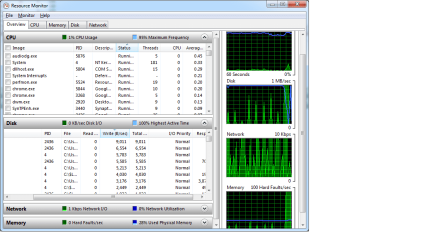
When I looked in resource monitor, the graph for Disk seemed unusual. When my computer lagged, the blue bar would level at 100%. Otherwise, it still spiked up and down constantly. This was when I had no programs open except for a new tab page in Chrome.

My browsing performance is also brutally slow. IE and FF are both incredibly slow and lag horribly, while Chrome lags less but has "Waiting for cache" problems. None of the normal fixes for browser issues have fixed the problem.
 

Attachments

  • diskgraph.png
    diskgraph.png
    44.7 KB · Views: 258
  • diskgraph2.png
    diskgraph2.png
    32 KB · Views: 300
Last edited:

My Computer My Computer

At a glance

Windows 7 Professional x64 SP1Intel Core i7-2720QM @ 2.20GHz8.00GBOptimus (Intel HD Graphics 3000 + nVidia GeFo...
Computer Manufacturer/Model Number
Dell XPS 15 (L502X)
OS
Windows 7 Professional x64 SP1
CPU
Intel Core i7-2720QM @ 2.20GHz
Memory
8.00GB
Graphics Card(s)
Optimus (Intel HD Graphics 3000 + nVidia GeForce GT 540M)
Sound Card
Realtek High Definition Audio
Monitor(s) Displays
Generic PnP Monitor
Hard Drives
TOSHIBA MK6461GSY
580 GB at 7200RPM
Internet Speed
20 Mbps
as per the snapshot above... it looks like DWM... desktop window manager is reading the disk at a high rate....

Try disabling it.... you will loose the whole jazz of your desktop.... but atleast you could get it to work!!

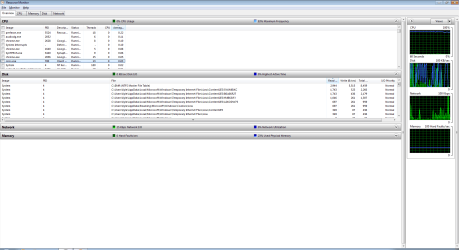
Post the event viewer logs and also do provide another snapshot... showing the cpu arranged by the highest usage and disk by highest read's
 

My Computer My Computer

At a glance

Windows 7 ultimate x64
Computer Manufacturer/Model Number
Nothing specific....what ever the clients provide for Repair
OS
Windows 7 ultimate x64
I disabled dwm.exe but the lag is still persisting.

I attached another screenshot.
 

Attachments

  • diskgraph3.png
    diskgraph3.png
    46.6 KB · Views: 171

My Computer My Computer

At a glance

Windows 7 Professional x64 SP1Intel Core i7-2720QM @ 2.20GHz8.00GBOptimus (Intel HD Graphics 3000 + nVidia GeFo...
Computer Manufacturer/Model Number
Dell XPS 15 (L502X)
OS
Windows 7 Professional x64 SP1
CPU
Intel Core i7-2720QM @ 2.20GHz
Memory
8.00GB
Graphics Card(s)
Optimus (Intel HD Graphics 3000 + nVidia GeForce GT 540M)
Sound Card
Realtek High Definition Audio
Monitor(s) Displays
Generic PnP Monitor
Hard Drives
TOSHIBA MK6461GSY
580 GB at 7200RPM
Internet Speed
20 Mbps
Again please post the files needed using this so we can have a look...
 

My Computer My Computer

At a glance

Windows 7 ultimate x64
Computer Manufacturer/Model Number
Nothing specific....what ever the clients provide for Repair
OS
Windows 7 ultimate x64
Sorry about that, I'm new here :)
 

Attachments

My Computer My Computer

At a glance

Windows 7 Professional x64 SP1Intel Core i7-2720QM @ 2.20GHz8.00GBOptimus (Intel HD Graphics 3000 + nVidia GeFo...
Computer Manufacturer/Model Number
Dell XPS 15 (L502X)
OS
Windows 7 Professional x64 SP1
CPU
Intel Core i7-2720QM @ 2.20GHz
Memory
8.00GB
Graphics Card(s)
Optimus (Intel HD Graphics 3000 + nVidia GeForce GT 540M)
Sound Card
Realtek High Definition Audio
Monitor(s) Displays
Generic PnP Monitor
Hard Drives
TOSHIBA MK6461GSY
580 GB at 7200RPM
Internet Speed
20 Mbps
Hi kyle

Could you possible disable the VSS ( Volume Shadow Copy) service for the time being and let me know if it still lags.....
 

My Computer My Computer

At a glance

Windows 7 ultimate x64
Computer Manufacturer/Model Number
Nothing specific....what ever the clients provide for Repair
OS
Windows 7 ultimate x64
I disabled it. I noticed that my browsing performance has improved. Google Chrome used to hang forever displaying "Waiting for cache" but it now seems to be speedy like it should be. Even IE was a lot faster. Moreover, the Windows search performance is a lot faster. However, I still have input lag especially in Microsoft Word.

Is it safe to permanently disable VSS?
 

My Computer My Computer

At a glance

Windows 7 Professional x64 SP1Intel Core i7-2720QM @ 2.20GHz8.00GBOptimus (Intel HD Graphics 3000 + nVidia GeFo...
Computer Manufacturer/Model Number
Dell XPS 15 (L502X)
OS
Windows 7 Professional x64 SP1
CPU
Intel Core i7-2720QM @ 2.20GHz
Memory
8.00GB
Graphics Card(s)
Optimus (Intel HD Graphics 3000 + nVidia GeForce GT 540M)
Sound Card
Realtek High Definition Audio
Monitor(s) Displays
Generic PnP Monitor
Hard Drives
TOSHIBA MK6461GSY
580 GB at 7200RPM
Internet Speed
20 Mbps
Usually VSS doesn't drag the OS but for some reason its timing out expanding the file as per your logs..

Yes its safe to disable it permanently... if you are not using Windows Backup ( you can use other third party software ) or System restore ( Just need to manually create a restore point once in while ) much...

Since you have an input lag..... check your harddrive's SMART values to see if they are ok...

Also please disable the below from startup and reboot and check. Most of this can be started from All programs in the start menu...

NUSB3MON REG_SZ "C:\Program Files (x86)\Renesas Electronics\USB 3.0 Host Controller Driver\Application\nusb3mon.exe"
IAStorIcon REG_SZ C:\Program Files (x86)\Intel\Intel(R) Rapid Storage Technology\IAStorIcon.exe
Adobe ARM REG_SZ "C:\Program Files (x86)\Common Files\Adobe\ARM\1.0\AdobeARM.exe"
VolPanel REG_SZ "C:\Program Files (x86)\Creative\SB X-Fi MB\Volume Panel\VolPanlu.exe" /r
UpdReg REG_SZ C:\Windows\UpdReg.EXE
 

My Computer My Computer

At a glance

Windows 7 ultimate x64
Computer Manufacturer/Model Number
Nothing specific....what ever the clients provide for Repair
OS
Windows 7 ultimate x64
Thank you for all of your help so far.

I ran CrystalDiskInfo and it gave me all blue except for "Reallocated Sectors Count."

The values for that are

Current: 100 Worst:100 Threshold: 50 Raw Values: 000000000082

.

I will go on to the next step of disabling those programs from startup after I finish installing updates for Microsoft Office.
 

My Computer My Computer

At a glance

Windows 7 Professional x64 SP1Intel Core i7-2720QM @ 2.20GHz8.00GBOptimus (Intel HD Graphics 3000 + nVidia GeFo...
Computer Manufacturer/Model Number
Dell XPS 15 (L502X)
OS
Windows 7 Professional x64 SP1
CPU
Intel Core i7-2720QM @ 2.20GHz
Memory
8.00GB
Graphics Card(s)
Optimus (Intel HD Graphics 3000 + nVidia GeForce GT 540M)
Sound Card
Realtek High Definition Audio
Monitor(s) Displays
Generic PnP Monitor
Hard Drives
TOSHIBA MK6461GSY
580 GB at 7200RPM
Internet Speed
20 Mbps
Well that explains the freeze and lag

For Reallocated sectors counts the raw value normally represents a count of the bad sectors that have been found and remapped.

If you system is aged... consider buying a new HDD... as you will reach a stage when the raw counts reach 100 and then you will start getting BSOD....

Well of course it doesn't mean you HDD will give up on you very soon .... but its just a sign of things to come...
 

My Computer My Computer

At a glance

Windows 7 ultimate x64
Computer Manufacturer/Model Number
Nothing specific....what ever the clients provide for Repair
OS
Windows 7 ultimate x64
Do you think it will last me another year? I know this is probably way too vague and hard to answer, but I'm curious how much life my hard drive has left.
 

My Computer My Computer

At a glance

Windows 7 Professional x64 SP1Intel Core i7-2720QM @ 2.20GHz8.00GBOptimus (Intel HD Graphics 3000 + nVidia GeFo...
Computer Manufacturer/Model Number
Dell XPS 15 (L502X)
OS
Windows 7 Professional x64 SP1
CPU
Intel Core i7-2720QM @ 2.20GHz
Memory
8.00GB
Graphics Card(s)
Optimus (Intel HD Graphics 3000 + nVidia GeForce GT 540M)
Sound Card
Realtek High Definition Audio
Monitor(s) Displays
Generic PnP Monitor
Hard Drives
TOSHIBA MK6461GSY
580 GB at 7200RPM
Internet Speed
20 Mbps
Well thats really subjective...

it might be years before it dies or maybe in a month or two... I cant predict

Your raw count is at 82... which is pretty close to 100..... you can keep an eye on this every once in a while... if it increases to higher level... its better to backup your stuff and get a new harddrive...
 

My Computer My Computer

At a glance

Windows 7 ultimate x64
Computer Manufacturer/Model Number
Nothing specific....what ever the clients provide for Repair
OS
Windows 7 ultimate x64
Besides maybe chkdsk, is there any way to prolong the life of the harddrive?

Thank you for your help today. Many applications used to ysbe so slow until I disabled that process. I removed the things you told me to and everything is better although windows is still laggy. Except for replacing the hard drive, is there anything else from my logs that is problematic?
 

My Computer My Computer

At a glance

Windows 7 Professional x64 SP1Intel Core i7-2720QM @ 2.20GHz8.00GBOptimus (Intel HD Graphics 3000 + nVidia GeFo...
Computer Manufacturer/Model Number
Dell XPS 15 (L502X)
OS
Windows 7 Professional x64 SP1
CPU
Intel Core i7-2720QM @ 2.20GHz
Memory
8.00GB
Graphics Card(s)
Optimus (Intel HD Graphics 3000 + nVidia GeForce GT 540M)
Sound Card
Realtek High Definition Audio
Monitor(s) Displays
Generic PnP Monitor
Hard Drives
TOSHIBA MK6461GSY
580 GB at 7200RPM
Internet Speed
20 Mbps
ran chkdsk (haven't ran it for a while) and restarted computer...it's now up to 84 :(

Maybe it's time for me to replace it...
 

My Computer My Computer

At a glance

Windows 7 Professional x64 SP1Intel Core i7-2720QM @ 2.20GHz8.00GBOptimus (Intel HD Graphics 3000 + nVidia GeFo...
Computer Manufacturer/Model Number
Dell XPS 15 (L502X)
OS
Windows 7 Professional x64 SP1
CPU
Intel Core i7-2720QM @ 2.20GHz
Memory
8.00GB
Graphics Card(s)
Optimus (Intel HD Graphics 3000 + nVidia GeForce GT 540M)
Sound Card
Realtek High Definition Audio
Monitor(s) Displays
Generic PnP Monitor
Hard Drives
TOSHIBA MK6461GSY
580 GB at 7200RPM
Internet Speed
20 Mbps
please backup your stuff !!
 

My Computer My Computer

At a glance

Windows 7 ultimate x64
Computer Manufacturer/Model Number
Nothing specific....what ever the clients provide for Repair
OS
Windows 7 ultimate x64
To double check if my hard drive was malfunctioning, I ran SeaTools Long Generic test. Sure enough, it failed. I am backing up all my files and then replacing it.

Thanks again centaur!
 

My Computer My Computer

At a glance

Windows 7 Professional x64 SP1Intel Core i7-2720QM @ 2.20GHz8.00GBOptimus (Intel HD Graphics 3000 + nVidia GeFo...
Computer Manufacturer/Model Number
Dell XPS 15 (L502X)
OS
Windows 7 Professional x64 SP1
CPU
Intel Core i7-2720QM @ 2.20GHz
Memory
8.00GB
Graphics Card(s)
Optimus (Intel HD Graphics 3000 + nVidia GeForce GT 540M)
Sound Card
Realtek High Definition Audio
Monitor(s) Displays
Generic PnP Monitor
Hard Drives
TOSHIBA MK6461GSY
580 GB at 7200RPM
Internet Speed
20 Mbps
You are welcome... glad to help
 

My Computer My Computer

At a glance

Windows 7 ultimate x64
Computer Manufacturer/Model Number
Nothing specific....what ever the clients provide for Repair
OS
Windows 7 ultimate x64
Back
Top