Unusual language display problem

Inferdramon

New member
Member
Local time
8:00 PM
Messages
25
A while back, I was trying to play a japanese game, but it wasn't working. It was recommended I use the japanese region setting on Windows 7 to display them. It wanted to reboot and I decided to try it another day, so I changed it back. Upon rebooting, the japanese characters were visible despite the region being set to English. At first, this wasn't a problem, though it didn't solve the issue with the game. There were unusual side effects, like the / sometimes replaced with a japanese symbol, but for the most part it was fine. But now a new problem has arisen. I downloaded a program called BlueGriffon, and I can't even use it because much of the english words are now japanese characters. And that's not the only area where this occurs.
http://i165.photobucket.com/albums/u72/Inferdramon/languageproblem.png
I've tried to change it back so that the english words are, well, english words again. I don't understand how this mixup occurred, why some english words are now in japanese. So far nothing I tried has worked. What should I do to get the proper language display back?
 

My Computer

OS
Windows 7

My Computer

Computer Manufacturer/Model Number
Dell XPS 15 L502x
OS
Windows 7 Home Premium 64bit (O.E.M)
CPU
Intel Core i7 2630QM @2.00GHz
Memory
6GB DDR3
Graphics Card(s)
Intel Intergrated Graphics 3000, nVidia GT525M (1GB)
Screen Resolution
1366x768
Hard Drives
750GB Seagate 7200rpm
Keyboard
Backlit Dell XPS 15 L502x Keyboard
Mouse
Microsoft Wireless Mobile Mouse 4000
Internet Speed
2.5 Mb/s down, 0.36 up
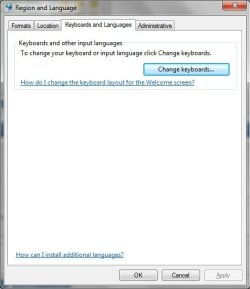
The option to change the display language is gone from the Keyboards And Languages tab. There's the option for the keyboard, but below that, it's completely blank, except for how to install new languages.
 

My Computer

OS
Windows 7
Hi again,

What version of Windows 7 are you using? (I.e. Home Premium, Ultimate etc.) The reason for this is you technically need Win 7 Ultimate or Entiprise to get the options given in the tutorial. If you don't, you just get the screen you descibed. The attatched image is what I get under the options in Win 7 Home Premium.

Stephen
 

Attachments

  • Language options.jpg
    Language options.jpg
    23.1 KB · Views: 2

My Computer

Computer Manufacturer/Model Number
Dell XPS 15 L502x
OS
Windows 7 Home Premium 64bit (O.E.M)
CPU
Intel Core i7 2630QM @2.00GHz
Memory
6GB DDR3
Graphics Card(s)
Intel Intergrated Graphics 3000, nVidia GT525M (1GB)
Screen Resolution
1366x768
Hard Drives
750GB Seagate 7200rpm
Keyboard
Backlit Dell XPS 15 L502x Keyboard
Mouse
Microsoft Wireless Mobile Mouse 4000
Internet Speed
2.5 Mb/s down, 0.36 up
Ok, make sure your keyboard is set to English as the default and remove any other languages that may be there.

Stephen
 

My Computer

Computer Manufacturer/Model Number
Dell XPS 15 L502x
OS
Windows 7 Home Premium 64bit (O.E.M)
CPU
Intel Core i7 2630QM @2.00GHz
Memory
6GB DDR3
Graphics Card(s)
Intel Intergrated Graphics 3000, nVidia GT525M (1GB)
Screen Resolution
1366x768
Hard Drives
750GB Seagate 7200rpm
Keyboard
Backlit Dell XPS 15 L502x Keyboard
Mouse
Microsoft Wireless Mobile Mouse 4000
Internet Speed
2.5 Mb/s down, 0.36 up
Back
Top