Solved Unusual startup/shutdown issues, program hangs, slow loads, etc...

FlawedHero

New member
Local time
2:07 AM
Messages
14
I built this PC from scratch a little over a year ago and aside from a driver issue here and there, have had no problems at all. (Detailed explanation first, summary after if you prefer to skip to it)

My Setup
  • Intel(R) Core(TM) i7 CPU 960@ 3.20GHz
  • ASUSTeK Computer INC. SABERTOOTH X58
  • 16GB RAM
  • NVIDIA GeForce GTX 560 Ti (Dual monitor setup)
  • Corsair Performance3 120GB SSD (OS Drive)
  • 2 1TB HDD (One for programs, one for media)

So, I booted up yesterday afternoon after class, Chrome on one screen, Diablo 3 on the other. Played for about 15min, basic browsing in Chrome, nothing out of the ordinary. I left the PC for a few hours (screen saver kicks on after 30min, requires login) and when I came back I tried to load up Diablo 3 again. Launcher took 4-5min to open and the next screen hung up, never loading past that point. I figured it was a software issue so closed it from the "program not responding" dialog box and tried to open Spotify and Chrome. Chrome opened fine and no issue loading pages, Spotify never loaded yet when I tried to open again, it said it was already running.

Checked the process list and it was indeed running, shut it down, tried again and same result. Tried to shut down the computer and after a slightly longer shutdown process it went to the blue "Shutting Down" screen and stayed there. It wasn't frozen, the circle indicator icon was still spinning, it just never actually shut down. I left it between 15-20min and when I came back I had to force shutdown with the power button.

I booted back up and aside from the normal/safemode prompt from the force shutdown, everything booted up like normal. I get to the password prompt on the login screen, enter it in and the screens goes black. After ~5min both desktops appear with a slight flicker as if they had been refreshed. I try to open Diablo and Spotify, same exact issues as before. Chrome opened immediately but when I tried to load a page, it took 2-3min to load (usually loads within seconds). I checked my connection in the Windows Network and Sharing center and it perpetually says "Identifying" yet when I check my Netgear Wireless adapter application, it shows a perfect connection and I'm able to load pages (albeit slowly).

Summary
  • Boot PC, works fine
  • Come back later, programs load slowly or not at all
  • Attempted shut down, hang up on blue "Shutting Down" screen
  • Force shutdown, restart, enter home screen password, black screen for a few minutes
  • Open programs, same issues as before
  • (No new installs recently)

I ran Norton full system scan and only pulled a couple tracking cookies. Rebooted into safe mode and ran again just for redundancy, nothing, clean. Ran Malwarebytes antivirus, nothing. (Made sure to shut down each completely before running the other so there were no conflicts) Ran a Windows repair from the disk, no changes. I attempted to uninstall a few programs I no longer used and they hang up just like Spotify. I try to uninstall one, nothing happens, try another and it tells me I can't uninstall while another program is uninstalling already. While in safe mode, Spotify opened just fine, the internet ran smoothly and Diablo opened like it should have.


So, that's where I am right now. I can provide any scan logs and I have a moderate knowledge of computers so I can get you near any information you request, try various fixes and processes. I've run DxDiag and checked EventViewer but I'm not entirely sure where to go from there/what to do with the results. I'm at a loss for what could be happening as nothing has changed in the past two months aside from updating OpenOffice. Any help would be greatly appreciated.
 
Last edited:

My Computer

Computer Manufacturer/Model Number
Self built custom
OS
Windows 7 Home Premium x64 SP1
CPU
Intel i7-960 3.2GHz
Motherboard
ASUSTeK SABERTOOTH X58
Memory
16 GB (4GBx4) DDR3
Graphics Card(s)
NVIDIA GeForce GTX 560 Ti
Sound Card
Creative X-Fi Audio Processor (WDM)
Monitor(s) Displays
2x LG Flatron lg E2041
Screen Resolution
1600x900
Hard Drives
120GB Corsair Performance3 SSD
2 x 1TB Seagate 7200RPM ST31000528AS
PSU
Corsair HX1000 modular
Case
Thermaltake Element T
Cooling
Corsair H60 liquid cooling
Keyboard
Logitech G510
Mouse
Razer DeathAdder
Internet Speed
12 Mb/s Download 1.5 Mb/s Upload

My Computer

Computer Manufacturer/Model Number
DELL SXPS 1640
OS
Windows 7 x64 Professional SP1
CPU
Intel C2D T9550 2.66 GHz @ 2.793 GHz (Thanks ThrottleStop!!)
Motherboard
Intel PM45
Memory
8 GB DDR3
Graphics Card(s)
ATI MOBILITY RADEON 4670
Sound Card
CREATIVE XFI AUDIO NOTEBOOK
Monitor(s) Displays
16.1 WLED
Screen Resolution
1920x1080
Hard Drives
Seagate ST9500420AS 500GB (465GiBi) 7200 RPM Drive

External Drives:-
2 TB WD Essentials x 3
1 TB WD Mybook Gen 1
1 TB WD Mybook Gen 2
1 TB Seagate
1 TB Seagate
320 GB WD Scorpio Black (enclosed)
PSU
90W Dell Power Brick
Case
Dell Chassis
Cooling
Coolermaster Cooling Pad
Keyboard
Built-in backlighted Keyboard
Mouse
Logitech Wireless Mini Mouse
Internet Speed
4/0.5
Absolutely, solarmystic, I'd be glad to. I'll go down the list and report all my findings (repeating steps I'd done on my own, just for the sake of completeness.)

  • Malwarebytes(updated) full scan - clean
  • MSE hangs on install, unable to install in Safe Mode
  • Established clean boot, no change, previous issues remain
  • Event Viewer log (today only, I can provide past 3 days if needed) -
  • Performance log (past three days) -
  • Problem Reports showed various issues over the year, mostly compatability issues with a few indie games. The only ones that stood out seem to have started on the 1st of the month. Those are ikeext.dll ipsecsvc.dll(PolicyAgent) ssdpsrv.dll. Those three have no entries until the issue started.
  • Stopping here for feedback since it appears the next few steps may take a significant amount of time to go over.
 
Last edited:

My Computer

Computer Manufacturer/Model Number
Self built custom
OS
Windows 7 Home Premium x64 SP1
CPU
Intel i7-960 3.2GHz
Motherboard
ASUSTeK SABERTOOTH X58
Memory
16 GB (4GBx4) DDR3
Graphics Card(s)
NVIDIA GeForce GTX 560 Ti
Sound Card
Creative X-Fi Audio Processor (WDM)
Monitor(s) Displays
2x LG Flatron lg E2041
Screen Resolution
1600x900
Hard Drives
120GB Corsair Performance3 SSD
2 x 1TB Seagate 7200RPM ST31000528AS
PSU
Corsair HX1000 modular
Case
Thermaltake Element T
Cooling
Corsair H60 liquid cooling
Keyboard
Logitech G510
Mouse
Razer DeathAdder
Internet Speed
12 Mb/s Download 1.5 Mb/s Upload
Alrighty then, take your time, we're not going anywhere :)
 

My Computer

Computer Manufacturer/Model Number
DELL SXPS 1640
OS
Windows 7 x64 Professional SP1
CPU
Intel C2D T9550 2.66 GHz @ 2.793 GHz (Thanks ThrottleStop!!)
Motherboard
Intel PM45
Memory
8 GB DDR3
Graphics Card(s)
ATI MOBILITY RADEON 4670
Sound Card
CREATIVE XFI AUDIO NOTEBOOK
Monitor(s) Displays
16.1 WLED
Screen Resolution
1920x1080
Hard Drives
Seagate ST9500420AS 500GB (465GiBi) 7200 RPM Drive

External Drives:-
2 TB WD Essentials x 3
1 TB WD Mybook Gen 1
1 TB WD Mybook Gen 2
1 TB Seagate
1 TB Seagate
320 GB WD Scorpio Black (enclosed)
PSU
90W Dell Power Brick
Case
Dell Chassis
Cooling
Coolermaster Cooling Pad
Keyboard
Built-in backlighted Keyboard
Mouse
Logitech Wireless Mini Mouse
Internet Speed
4/0.5
Updated previous post.
 

My Computer

Computer Manufacturer/Model Number
Self built custom
OS
Windows 7 Home Premium x64 SP1
CPU
Intel i7-960 3.2GHz
Motherboard
ASUSTeK SABERTOOTH X58
Memory
16 GB (4GBx4) DDR3
Graphics Card(s)
NVIDIA GeForce GTX 560 Ti
Sound Card
Creative X-Fi Audio Processor (WDM)
Monitor(s) Displays
2x LG Flatron lg E2041
Screen Resolution
1600x900
Hard Drives
120GB Corsair Performance3 SSD
2 x 1TB Seagate 7200RPM ST31000528AS
PSU
Corsair HX1000 modular
Case
Thermaltake Element T
Cooling
Corsair H60 liquid cooling
Keyboard
Logitech G510
Mouse
Razer DeathAdder
Internet Speed
12 Mb/s Download 1.5 Mb/s Upload
I've a suggestion to make, based on what you've provided me so far.

The logs from both your Event Viewer and Performance indicate some serious degradation issues with the Desktop Window Manager (i.e. the GPU subsystem dealing with Aero) and the the three related dlls all have to do network connectivity and security and they seem to have issues starting up.

To address these issues and as further troubleshooting steps to zone in can you:-

1) Temporarily end the dwm.exe process on your task manager and Services (start|type in services.msc in the search box|Head to Desktop windows manager entry|Right Click|Properties|Select Stop and Disable from the Drop Down Menu)

(This is to ascertain whether the Desktop Windows Manager is responsible or is just a red herring in this probleml. As a side effect of this process your desktop will look like Windows 95)

2) Open an administrator command prompt and run the System File Checker.

a.) Click Start Orb
b.) In search box, type cmd
c.) Right-click on cmd.exe, and choose 'Run as Administrator'
d.) At the command prompt type in 'sfc /scannow' (Without the ' ' marks)

(This is to check for violations in your Windows installation and would be present in that list of steps I linked to you earlier, we're skipping to it based on what you've presented me)

Thank you for being patient!
 

My Computer

Computer Manufacturer/Model Number
DELL SXPS 1640
OS
Windows 7 x64 Professional SP1
CPU
Intel C2D T9550 2.66 GHz @ 2.793 GHz (Thanks ThrottleStop!!)
Motherboard
Intel PM45
Memory
8 GB DDR3
Graphics Card(s)
ATI MOBILITY RADEON 4670
Sound Card
CREATIVE XFI AUDIO NOTEBOOK
Monitor(s) Displays
16.1 WLED
Screen Resolution
1920x1080
Hard Drives
Seagate ST9500420AS 500GB (465GiBi) 7200 RPM Drive

External Drives:-
2 TB WD Essentials x 3
1 TB WD Mybook Gen 1
1 TB WD Mybook Gen 2
1 TB Seagate
1 TB Seagate
320 GB WD Scorpio Black (enclosed)
PSU
90W Dell Power Brick
Case
Dell Chassis
Cooling
Coolermaster Cooling Pad
Keyboard
Built-in backlighted Keyboard
Mouse
Logitech Wireless Mini Mouse
Internet Speed
4/0.5
I've completed the steps as requested and after entering 'sfc /scannow' (without the marks), it drops down to a blank with a flashing underscore as if it's trying to complete the request and nothing else happens. I can Ctrl+C out of it to the command prompt but the scan never actually runs.
 

My Computer

Computer Manufacturer/Model Number
Self built custom
OS
Windows 7 Home Premium x64 SP1
CPU
Intel i7-960 3.2GHz
Motherboard
ASUSTeK SABERTOOTH X58
Memory
16 GB (4GBx4) DDR3
Graphics Card(s)
NVIDIA GeForce GTX 560 Ti
Sound Card
Creative X-Fi Audio Processor (WDM)
Monitor(s) Displays
2x LG Flatron lg E2041
Screen Resolution
1600x900
Hard Drives
120GB Corsair Performance3 SSD
2 x 1TB Seagate 7200RPM ST31000528AS
PSU
Corsair HX1000 modular
Case
Thermaltake Element T
Cooling
Corsair H60 liquid cooling
Keyboard
Logitech G510
Mouse
Razer DeathAdder
Internet Speed
12 Mb/s Download 1.5 Mb/s Upload
I've completed the steps as requested and after entering 'sfc /scannow' (without the marks), it drops down to a blank with a flashing underscore as if it's trying to complete the request and nothing else happens. I can Ctrl+C out of it to the command prompt but the scan never actually runs.

This is what you should see when running the command

Capture.PNG

How long did you wait before trying to close the box?

Also, as another step, could please download and run Process Explorer (by Mark Russinovich, windows fellow at Microsoft) and put up a screenshot showing showing the current processes on your system sorted by CPU usage if you don't mind?

View attachment Process Explorer.zip

http://www.sevenforums.com/tutorials/9733-screenshots-files-upload-post-seven-forums.html

One last thing, can you also open up Resouce Monitor and post screenshots from your Disk and Network tabs too?

I'm beginning to suspect something familiar here....
 

My Computer

Computer Manufacturer/Model Number
DELL SXPS 1640
OS
Windows 7 x64 Professional SP1
CPU
Intel C2D T9550 2.66 GHz @ 2.793 GHz (Thanks ThrottleStop!!)
Motherboard
Intel PM45
Memory
8 GB DDR3
Graphics Card(s)
ATI MOBILITY RADEON 4670
Sound Card
CREATIVE XFI AUDIO NOTEBOOK
Monitor(s) Displays
16.1 WLED
Screen Resolution
1920x1080
Hard Drives
Seagate ST9500420AS 500GB (465GiBi) 7200 RPM Drive

External Drives:-
2 TB WD Essentials x 3
1 TB WD Mybook Gen 1
1 TB WD Mybook Gen 2
1 TB Seagate
1 TB Seagate
320 GB WD Scorpio Black (enclosed)
PSU
90W Dell Power Brick
Case
Dell Chassis
Cooling
Coolermaster Cooling Pad
Keyboard
Built-in backlighted Keyboard
Mouse
Logitech Wireless Mini Mouse
Internet Speed
4/0.5
I had previously let it run for ~5min before stopping to try once more, assuming it was hanging like the rest. I guess what they say about assuming is true. ~6min in, I got the following result:
 
Last edited:

My Computer

Computer Manufacturer/Model Number
Self built custom
OS
Windows 7 Home Premium x64 SP1
CPU
Intel i7-960 3.2GHz
Motherboard
ASUSTeK SABERTOOTH X58
Memory
16 GB (4GBx4) DDR3
Graphics Card(s)
NVIDIA GeForce GTX 560 Ti
Sound Card
Creative X-Fi Audio Processor (WDM)
Monitor(s) Displays
2x LG Flatron lg E2041
Screen Resolution
1600x900
Hard Drives
120GB Corsair Performance3 SSD
2 x 1TB Seagate 7200RPM ST31000528AS
PSU
Corsair HX1000 modular
Case
Thermaltake Element T
Cooling
Corsair H60 liquid cooling
Keyboard
Logitech G510
Mouse
Razer DeathAdder
Internet Speed
12 Mb/s Download 1.5 Mb/s Upload
Hmm.. now i'm more inclined to think that something may be seriously wrong with Windows itself....

If sfc fails to even start the repair service it is an indication of a serious corruption of Windows internals itself...

If you have your Windows 7 install disc/repair disc, could you try this before we think about the nuclear option?

http://www.sevenforums.com/tutorials/2083-system-repair-disc-create.html

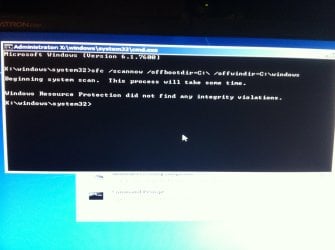
Boot to your Repair/Install disc, choose the "Repair your computer" option, choose your installation drive, open up a command prompt, and then type in this command:

sfc /scannow /offbootdir=x:\ /offwindir=x:\windows

Where x: is the drive letter of your Windows installation

This will bypass your troubled Windows installation and allow the command to run from DVD itself..
 

My Computer

Computer Manufacturer/Model Number
DELL SXPS 1640
OS
Windows 7 x64 Professional SP1
CPU
Intel C2D T9550 2.66 GHz @ 2.793 GHz (Thanks ThrottleStop!!)
Motherboard
Intel PM45
Memory
8 GB DDR3
Graphics Card(s)
ATI MOBILITY RADEON 4670
Sound Card
CREATIVE XFI AUDIO NOTEBOOK
Monitor(s) Displays
16.1 WLED
Screen Resolution
1920x1080
Hard Drives
Seagate ST9500420AS 500GB (465GiBi) 7200 RPM Drive

External Drives:-
2 TB WD Essentials x 3
1 TB WD Mybook Gen 1
1 TB WD Mybook Gen 2
1 TB Seagate
1 TB Seagate
320 GB WD Scorpio Black (enclosed)
PSU
90W Dell Power Brick
Case
Dell Chassis
Cooling
Coolermaster Cooling Pad
Keyboard
Built-in backlighted Keyboard
Mouse
Logitech Wireless Mini Mouse
Internet Speed
4/0.5
Disk created; back in a bit with the results.
 

My Computer

Computer Manufacturer/Model Number
Self built custom
OS
Windows 7 Home Premium x64 SP1
CPU
Intel i7-960 3.2GHz
Motherboard
ASUSTeK SABERTOOTH X58
Memory
16 GB (4GBx4) DDR3
Graphics Card(s)
NVIDIA GeForce GTX 560 Ti
Sound Card
Creative X-Fi Audio Processor (WDM)
Monitor(s) Displays
2x LG Flatron lg E2041
Screen Resolution
1600x900
Hard Drives
120GB Corsair Performance3 SSD
2 x 1TB Seagate 7200RPM ST31000528AS
PSU
Corsair HX1000 modular
Case
Thermaltake Element T
Cooling
Corsair H60 liquid cooling
Keyboard
Logitech G510
Mouse
Razer DeathAdder
Internet Speed
12 Mb/s Download 1.5 Mb/s Upload
Complete, here's the results.
IMG_3334.jpg

Also, in an interesting turn of events, I had to manually choose which network to connect to and instead of getting stuck at "Identifying" while still allowing me access, it joined the network right away. Curious, I tried to open Spotify and it opened in roughly the same time as it did before all of this happened.

So now I'm even more confused but hopefully it's a good sign. I followed the instructions to a T so as far as I'm aware, nothing really changed but it's magically working. Hrm.
 

My Computer

Computer Manufacturer/Model Number
Self built custom
OS
Windows 7 Home Premium x64 SP1
CPU
Intel i7-960 3.2GHz
Motherboard
ASUSTeK SABERTOOTH X58
Memory
16 GB (4GBx4) DDR3
Graphics Card(s)
NVIDIA GeForce GTX 560 Ti
Sound Card
Creative X-Fi Audio Processor (WDM)
Monitor(s) Displays
2x LG Flatron lg E2041
Screen Resolution
1600x900
Hard Drives
120GB Corsair Performance3 SSD
2 x 1TB Seagate 7200RPM ST31000528AS
PSU
Corsair HX1000 modular
Case
Thermaltake Element T
Cooling
Corsair H60 liquid cooling
Keyboard
Logitech G510
Mouse
Razer DeathAdder
Internet Speed
12 Mb/s Download 1.5 Mb/s Upload
Just a though. Was Norton completely removed before installing MSE?
 

My Computer

Computer type
PC/Desktop
Computer Manufacturer/Model Number
Home made Desktop
OS
Windows 10 Pro. 64/ version 1709 Windows 7 Pro/64
CPU
Intel i7-6800K @ 4.3
Motherboard
ASUS X-99 Deluxe II
Memory
Corsair Platinum 16 gig @2400
Graphics Card(s)
EVGA GTX 1070 OC
Monitor(s) Displays
Asus 27" LED LCD/VE278Q
Screen Resolution
1920-1080 or 1280-720 HDMI
Hard Drives
INTEL SSD 730-240 Gb Sata 3.0/
PSU
EVGA Platium 1200W
Case
Phanteks Luxe Tempered Glass 8 fans/ one radiator
Cooling
XSPC/ Water Cooled CPU
Keyboard
Das 4 Professional
Mouse
Logitech M705/MX Anywhere 2-S
Internet Speed
100 mbits
Antivirus
Microsoft Security Essentials/ Malwarebytes Premium 3.0/ SAS
Browser
I.E. 11 default/Firefox/ ISP Time Warner Cable/Spectrum
Other Info
LG BluRay Burner/
Sound system-KLipsch-THX/
Icy Dock ssd Hot Swap bays.
I was unable to uninstall anything and was also unable to install MSE.

Attempting uninstall would result in the uninstall dialog from disappearing and reporting that I must wait for an uninstall to finish before attempting another. Left up for over an hour, no change.

In trying to install MSE, it would hang about halfway through the process, no change for ~30min.
 

My Computer

Computer Manufacturer/Model Number
Self built custom
OS
Windows 7 Home Premium x64 SP1
CPU
Intel i7-960 3.2GHz
Motherboard
ASUSTeK SABERTOOTH X58
Memory
16 GB (4GBx4) DDR3
Graphics Card(s)
NVIDIA GeForce GTX 560 Ti
Sound Card
Creative X-Fi Audio Processor (WDM)
Monitor(s) Displays
2x LG Flatron lg E2041
Screen Resolution
1600x900
Hard Drives
120GB Corsair Performance3 SSD
2 x 1TB Seagate 7200RPM ST31000528AS
PSU
Corsair HX1000 modular
Case
Thermaltake Element T
Cooling
Corsair H60 liquid cooling
Keyboard
Logitech G510
Mouse
Razer DeathAdder
Internet Speed
12 Mb/s Download 1.5 Mb/s Upload
Hmm.. we've nearly reached the end of our rope here...

I'm inclined to ask you to perform the semi-nuclear/nuclear option (clean install/repair install) as listed as the final 2 steps in the Troubleshooting Guide i linked to your earlier on, but I'll hand it over to Guru Layback Bear to offer a fresh perspective on your problem...

http://www.sevenforums.com/tutorials/3413-repair-install.html?ltr=R

http://www.sevenforums.com/tutorials/219487-clean-reinstall-factory-oem-windows-7-a.html#post1839164

Thanks for being very patient and sticking with me so far and I apologize for not being able to definitively solve your issue...
 

My Computer

Computer Manufacturer/Model Number
DELL SXPS 1640
OS
Windows 7 x64 Professional SP1
CPU
Intel C2D T9550 2.66 GHz @ 2.793 GHz (Thanks ThrottleStop!!)
Motherboard
Intel PM45
Memory
8 GB DDR3
Graphics Card(s)
ATI MOBILITY RADEON 4670
Sound Card
CREATIVE XFI AUDIO NOTEBOOK
Monitor(s) Displays
16.1 WLED
Screen Resolution
1920x1080
Hard Drives
Seagate ST9500420AS 500GB (465GiBi) 7200 RPM Drive

External Drives:-
2 TB WD Essentials x 3
1 TB WD Mybook Gen 1
1 TB WD Mybook Gen 2
1 TB Seagate
1 TB Seagate
320 GB WD Scorpio Black (enclosed)
PSU
90W Dell Power Brick
Case
Dell Chassis
Cooling
Coolermaster Cooling Pad
Keyboard
Built-in backlighted Keyboard
Mouse
Logitech Wireless Mini Mouse
Internet Speed
4/0.5
No need to apologize at all, you've been incredibly helpful :)
 

My Computer

Computer Manufacturer/Model Number
Self built custom
OS
Windows 7 Home Premium x64 SP1
CPU
Intel i7-960 3.2GHz
Motherboard
ASUSTeK SABERTOOTH X58
Memory
16 GB (4GBx4) DDR3
Graphics Card(s)
NVIDIA GeForce GTX 560 Ti
Sound Card
Creative X-Fi Audio Processor (WDM)
Monitor(s) Displays
2x LG Flatron lg E2041
Screen Resolution
1600x900
Hard Drives
120GB Corsair Performance3 SSD
2 x 1TB Seagate 7200RPM ST31000528AS
PSU
Corsair HX1000 modular
Case
Thermaltake Element T
Cooling
Corsair H60 liquid cooling
Keyboard
Logitech G510
Mouse
Razer DeathAdder
Internet Speed
12 Mb/s Download 1.5 Mb/s Upload
First things first. You must uninstall Nortons before you can properly install MSE.
https://www-secure.symantec.com/nor...t=home&pvid=f-home&version=1&lg=english&ct=us
I haven't used Norton in years but I still remember the hell I went through getting all of it gone.
IMHO Norton can be causing many of your problems.
When trying to repair Microsoft's operating system using Microsoft's anti virus make thing easier. They like each other.
Get back with your results and we all can go from their.
 

My Computer

Computer type
PC/Desktop
Computer Manufacturer/Model Number
Home made Desktop
OS
Windows 10 Pro. 64/ version 1709 Windows 7 Pro/64
CPU
Intel i7-6800K @ 4.3
Motherboard
ASUS X-99 Deluxe II
Memory
Corsair Platinum 16 gig @2400
Graphics Card(s)
EVGA GTX 1070 OC
Monitor(s) Displays
Asus 27" LED LCD/VE278Q
Screen Resolution
1920-1080 or 1280-720 HDMI
Hard Drives
INTEL SSD 730-240 Gb Sata 3.0/
PSU
EVGA Platium 1200W
Case
Phanteks Luxe Tempered Glass 8 fans/ one radiator
Cooling
XSPC/ Water Cooled CPU
Keyboard
Das 4 Professional
Mouse
Logitech M705/MX Anywhere 2-S
Internet Speed
100 mbits
Antivirus
Microsoft Security Essentials/ Malwarebytes Premium 3.0/ SAS
Browser
I.E. 11 default/Firefox/ ISP Time Warner Cable/Spectrum
Other Info
LG BluRay Burner/
Sound system-KLipsch-THX/
Icy Dock ssd Hot Swap bays.
Sounds good, I'll do that now. Back in a moment.
 

My Computer

Computer Manufacturer/Model Number
Self built custom
OS
Windows 7 Home Premium x64 SP1
CPU
Intel i7-960 3.2GHz
Motherboard
ASUSTeK SABERTOOTH X58
Memory
16 GB (4GBx4) DDR3
Graphics Card(s)
NVIDIA GeForce GTX 560 Ti
Sound Card
Creative X-Fi Audio Processor (WDM)
Monitor(s) Displays
2x LG Flatron lg E2041
Screen Resolution
1600x900
Hard Drives
120GB Corsair Performance3 SSD
2 x 1TB Seagate 7200RPM ST31000528AS
PSU
Corsair HX1000 modular
Case
Thermaltake Element T
Cooling
Corsair H60 liquid cooling
Keyboard
Logitech G510
Mouse
Razer DeathAdder
Internet Speed
12 Mb/s Download 1.5 Mb/s Upload

My Computer

Computer Manufacturer/Model Number
Toshiba Satellite S875D-S7239 laptop
OS
MS Windows 7 Ultimate SP1 64-bit
CPU
AMD A10-4600M
Motherboard
AMD Pumori (Socket FT1)
Memory
6.00 GB Dual-Channel DDR3 @ 798MHz (11-11-12-28)
Graphics Card(s)
AMD Radeon HD 7660G
Sound Card
High Definition Audio Device
Monitor(s) Displays
Generic PnP Monitor (1600x900@60Hz)
Screen Resolution
1600x900@60Hz
Hard Drives
SSD 119GB Corsair CSSD-V128GB2 ATA Device
Keyboard
Standard PS/2 Keyboard
Mouse
HP Wireless Optical Mobile Mouse Model FHA-3410
Internet Speed
What the local pub, local coffee shop offers.
Other Info
Optical Drive:MATSHITA BD-CMB UJ160B ATA Device


Also have an Asus ha1002xp netbook with Win 7 Ultimate installed.
Thanks Karl for the links.
Also unplug everything from your computer not needed. No phone, printers, card readers, hard drives or any other little goodie not needed.
I and others do things step at a time, please do them in that fashion and we will get you going on your way to happy computing.
 

My Computer

Computer type
PC/Desktop
Computer Manufacturer/Model Number
Home made Desktop
OS
Windows 10 Pro. 64/ version 1709 Windows 7 Pro/64
CPU
Intel i7-6800K @ 4.3
Motherboard
ASUS X-99 Deluxe II
Memory
Corsair Platinum 16 gig @2400
Graphics Card(s)
EVGA GTX 1070 OC
Monitor(s) Displays
Asus 27" LED LCD/VE278Q
Screen Resolution
1920-1080 or 1280-720 HDMI
Hard Drives
INTEL SSD 730-240 Gb Sata 3.0/
PSU
EVGA Platium 1200W
Case
Phanteks Luxe Tempered Glass 8 fans/ one radiator
Cooling
XSPC/ Water Cooled CPU
Keyboard
Das 4 Professional
Mouse
Logitech M705/MX Anywhere 2-S
Internet Speed
100 mbits
Antivirus
Microsoft Security Essentials/ Malwarebytes Premium 3.0/ SAS
Browser
I.E. 11 default/Firefox/ ISP Time Warner Cable/Spectrum
Other Info
LG BluRay Burner/
Sound system-KLipsch-THX/
Icy Dock ssd Hot Swap bays.
Back
Top