
Unverified publisher, for an app I have used for over 9 years

bawldiggle

GrayGhost2 ret.
Pro User
VIP
Local time
12:10 AM
Messages
895
Location
Australia
When rebooting my PC after installing a portable (AHK) app, Windows showed this alert ...
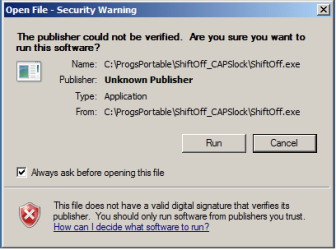
1_shiftoff unverified publisher.png

I have been using "ShiftOff" for >9 years on several XP desktops and now my third Win-7 machines.
ShiftOff is started by Startup and I have it whitelisted (folder and executable) in Bitdefender IS 2016.
The alert looks like Windows Essentials (?) , which I think I had disabled in my 2008 Toshiba, without any dramas for the past 9 years.
(The Toshiba has expired in the last 4 weeks or so)

Obviously Windows offers an option never ask me again if I want to run ShiftOff.exe at boot, by disabling ...
[ ] Always ask before opening this file
Q:1 Where does Windows store the settings when I chose to never ask me again ?
- and how do I access that list, the Registry ?
Q:2 Would elevating the EXE to run as admin, in
<file.exe> Properties -> Compatibility -> Privilege Level -> [x] Run this programs as administrator ...
... be a solution for any other programs run at startup. ?
I have some of my scripts (.VBS) that run at startup too.
I am in the process of setting up this Lenovo (2 years after I purchased it) and a lot more "stuff" to install.

Any informative input ... would be appreciated :)
Thank you

---------------
Windows 7 PRO x64
ShiftOff.exe home page
 
Last edited:

My Computer My Computer

At a glance

XP Pro (x86) | 7 HP (x86) & (x64) | 7 Pro (x64)
Computer type
PC/Desktop
Computer Manufacturer/Model Number
Toshiba, Lenovo (laptops) + 4 rigs
OS
XP Pro (x86) | 7 HP (x86) & (x64) | 7 Pro (x64)
Hello Bawldiggle,

Q:1 Where does Windows store the settings when I chose to never ask me again ?
- and how do I access that list, the Registry ?
The “Open File - Security Warning” prompts are caused by something known as an alternate data stream (ADS) which is a resource forking feature of NTFS.

When you access a file in Explorer you’re getting the content of the primary data stream for that file. Each data stream on a file has a name and the name for the primary data stream is “:$DATA”.

Files blocked with a “Open File - Security Warning” will have a stream named “Zone.Identifier”. When you unblock a file, the “Zone.Identifier” ADS for that file is deleted.

Here’s an experiment for you, Bawldiggle. Open a command prompt and enter the following line, substituting the file name with a file that you know produces the “Open File - Security Warning” prompt. This will open the content of the “Zone.Identifier” stream in Notepad for you to read.
Code:
notepad "[COLOR="Red"]C:\Users\Pyprohly\Downloads\file.exe[/COLOR]:Zone.Identifier"

Q:2 Would elevating the EXE to run as admin, in
<file.exe> Properties -> Compatibility -> Privilege Level -> [x] Run this programs as administrator ...
... be a solution for any other programs run at startup. ?
Without testing, from memory I don’t believe this works, but if you create the shortcut using the laborious method outlined in the tutorial below you should be in luck.

Elevated Program Shortcut without UAC Prompt - Create
 

My Computer My Computer

At a glance

Windows 10, Windows 8.1 Pro, Windows 7 Profes...
Computer type
PC/Desktop
OS
Windows 10, Windows 8.1 Pro, Windows 7 Professional, OS X El Capitan

My Computer My Computer

At a glance

Microsoft Windows 7 Home Premium 64-bit 7601 ...AMD C-60 APU with Radeon(tm) HD Graphics4.00 GBAMD Radeon HD 6290 Graphics
Computer type
Laptop
Computer Manufacturer/Model Number
ASUS
OS
Microsoft Windows 7 Home Premium 64-bit 7601 Multiprocessor Free Service Pack 1
CPU
AMD C-60 APU with Radeon(tm) HD Graphics
Motherboard
ASUSTeK COMPUTER INC. X501U
Memory
4.00 GB
Graphics Card(s)
AMD Radeon HD 6290 Graphics
Sound Card
(1) AMD High Definition Audio Device (2) Realtek High Defi
Screen Resolution
1366 x 768 x 32 bits (4294967296 colors) @ 60 Hz
Hard Drives
Hitachi HTS545050A7E380 SATA Disk Device
Antivirus
Comodo CIS & FW, SecureAplus App Whitelisting, Threatfire
Browser
Cyberfox 64bit, Opera 64bit, Airfox
Other Info
Spy-The-Spy, HitmanPro.Alert, Norton Connect Safe, MJRegWatcher, BitDefender TrafficLight, Voodoo Shield, Zemana AntiMalware
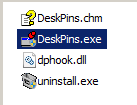
Deskpins.exe is an installed app and not portable
Deskpins files.PNG

Hi Pyprohly (and "Callendar"), applogies for my belated response :)
my Lenovo crashed last Wed 24-May and BSOD? (I had a mouse pointer and could open "Task Manager" but no desktop). All I had done was to unistall Adobe Reader with Revo-PRO, and I didn't (still don't) know how to restore a "Restore Point", so Lenovo has been with repair shop until yesterday Sunday 4pm. I suspect RPs are not possible with BSOD or whatever state my PC was in
Frustrating


I have tried your ...

Code:
notepad "C:\Users\Pyprohly\Downloads\file.exe:Zone.Identifier"
... as ...
Code:
notepad "C:\Programs2\DeskPins (x86)\DeskPins.exe:Zone.Identifier"
[COLOR=Red]... and ...[/COLOR]
notepad "C:\Programs2\DeskPins (x86)\DeskPins.exe":Zone.Identifier
First expression returned an error.
Second expression populated Notepad with ... see attachment 1750 lines of gibberish.
I don't know what I am looking for ?
The Notepad result file name was "Desk Pins.exe" and could not be saved so I copied it to my Editor and saved it as TXT.

'--------------------------

Hi "Callendar" thank you for your response :)

I will look into your suggestions later today
Option One - Step 5 might meet your needs but those warnings exist for good reason. To prompt you when launching potentially untrusted files.
.... I don't want to be foolish and sabotage my security. The executable in point is very trusted and I agree with you I don't want a wholesale risk

I willl get back to you
 

Attachments

My Computer My Computer

At a glance

XP Pro (x86) | 7 HP (x86) & (x64) | 7 Pro (x64)
Computer type
PC/Desktop
Computer Manufacturer/Model Number
Toshiba, Lenovo (laptops) + 4 rigs
OS
XP Pro (x86) | 7 HP (x86) & (x64) | 7 Pro (x64)
my Lenovo crashed last Wed 24-May and BSOD? (I had a mouse pointer and could open "Task Manager" but no desktop). All I had done was to unistall Adobe Reader with Revo-PRO, and I didn't (still don't) know how to restore a "Restore Point", so Lenovo has been with repair shop until yesterday Sunday 4pm. I suspect RPs are not possible with BSOD or whatever state my PC was in
Frustrating
The thrills of PC.

First expression returned an error.
What kind of error, “Cannot find file.exe:Zone.Identifier file”? It doesn’t have a Zone.Identifier stream then.

Second expression populated Notepad with ... see attachment 1750 lines of gibberish.
The 1750 lines of gibberish is what you get when you open a binary file as a text file. Due to the way Notepad splits it’s arguments, the following lines are equivalent.
Code:
notepad "C:\Programs2\DeskPins (x86)\DeskPins.exe:Zone.Identifier":Zone.Identifier
notepad "C:\Programs2\DeskPins (x86)\DeskPins.exe:Zone.Identifier" :Zone.Identifier
notepad "C:\Programs2\DeskPins (x86)\DeskPins.exe:Zone.Identifier"
You’ve just uploaded DeskPins.exe as a text file.

This is what a Zone.Identifier stream’s content typically looks like. Increase the number and you’ll find Windows refusing to run the program.
Code:
[ZoneTransfer]
ZoneId=3
 

My Computer My Computer

At a glance

Windows 10, Windows 8.1 Pro, Windows 7 Profes...
Computer type
PC/Desktop
OS
Windows 10, Windows 8.1 Pro, Windows 7 Professional, OS X El Capitan
Scanned DeskPins folder with "ADSScanner" ... no 'Zone.Identifier" streams (files) found.

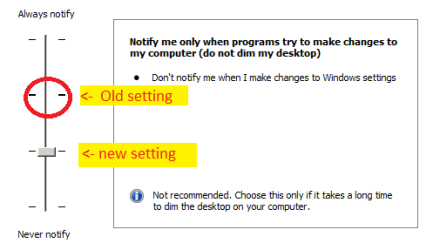
Modified "User Account Control Settings" ... to ...

UAC settings changed.PNG

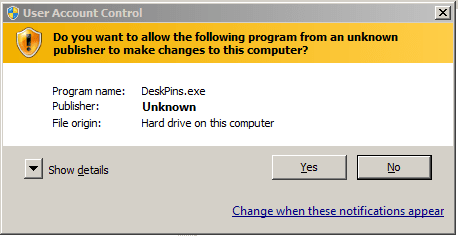
Now Deskpins.exe ...

UAC for DeskPins.PNG

Now what can I do to run "DeskPins.exe" at Startup without UAC challenge and not compromise my PCs security ?
 

My Computer My Computer

At a glance

XP Pro (x86) | 7 HP (x86) & (x64) | 7 Pro (x64)
Computer type
PC/Desktop
Computer Manufacturer/Model Number
Toshiba, Lenovo (laptops) + 4 rigs
OS
XP Pro (x86) | 7 HP (x86) & (x64) | 7 Pro (x64)
My Computer My Computer

At a glance

Microsoft Windows 7 Home Premium 64-bit 7601 ...AMD C-60 APU with Radeon(tm) HD Graphics4.00 GBAMD Radeon HD 6290 Graphics
Computer type
Laptop
Computer Manufacturer/Model Number
ASUS
OS
Microsoft Windows 7 Home Premium 64-bit 7601 Multiprocessor Free Service Pack 1
CPU
AMD C-60 APU with Radeon(tm) HD Graphics
Motherboard
ASUSTeK COMPUTER INC. X501U
Memory
4.00 GB
Graphics Card(s)
AMD Radeon HD 6290 Graphics
Sound Card
(1) AMD High Definition Audio Device (2) Realtek High Defi
Screen Resolution
1366 x 768 x 32 bits (4294967296 colors) @ 60 Hz
Hard Drives
Hitachi HTS545050A7E380 SATA Disk Device
Antivirus
Comodo CIS & FW, SecureAplus App Whitelisting, Threatfire
Browser
Cyberfox 64bit, Opera 64bit, Airfox
Other Info
Spy-The-Spy, HitmanPro.Alert, Norton Connect Safe, MJRegWatcher, BitDefender TrafficLight, Voodoo Shield, Zemana AntiMalware
Hi Callendar :)

All I get is ...

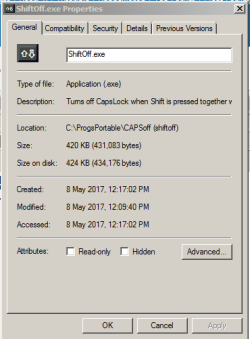
Properties dlg, no unblock.PNG

and when is run manually

UAC alert for ShiftOff_p.PNG

I want to run ShiftOff.exe on startup.
 

My Computer My Computer

At a glance

XP Pro (x86) | 7 HP (x86) & (x64) | 7 Pro (x64)
Computer type
PC/Desktop
Computer Manufacturer/Model Number
Toshiba, Lenovo (laptops) + 4 rigs
OS
XP Pro (x86) | 7 HP (x86) & (x64) | 7 Pro (x64)
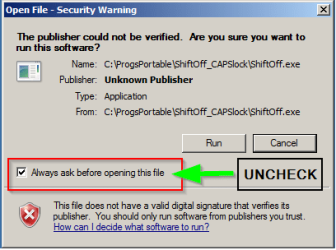
From the screenshot in your Post #1 - unblock the file:

1_shiftoff unverified publisher.png

Then follow the steps in the Elevated Shortcut - Create tutorial to create an elevated shortcut in your startup folder here:

C:\Users\Username\AppData\Roaming\Microsoft\Windows\Start Menu\Programs\Startup

(Replace Username in the path shown above with your username)
 

My Computer My Computer

At a glance

Microsoft Windows 7 Home Premium 64-bit 7601 ...AMD C-60 APU with Radeon(tm) HD Graphics4.00 GBAMD Radeon HD 6290 Graphics
Computer type
Laptop
Computer Manufacturer/Model Number
ASUS
OS
Microsoft Windows 7 Home Premium 64-bit 7601 Multiprocessor Free Service Pack 1
CPU
AMD C-60 APU with Radeon(tm) HD Graphics
Motherboard
ASUSTeK COMPUTER INC. X501U
Memory
4.00 GB
Graphics Card(s)
AMD Radeon HD 6290 Graphics
Sound Card
(1) AMD High Definition Audio Device (2) Realtek High Defi
Screen Resolution
1366 x 768 x 32 bits (4294967296 colors) @ 60 Hz
Hard Drives
Hitachi HTS545050A7E380 SATA Disk Device
Antivirus
Comodo CIS & FW, SecureAplus App Whitelisting, Threatfire
Browser
Cyberfox 64bit, Opera 64bit, Airfox
Other Info
Spy-The-Spy, HitmanPro.Alert, Norton Connect Safe, MJRegWatcher, BitDefender TrafficLight, Voodoo Shield, Zemana AntiMalware
Back
Top