Solved unwanted folders in UsersFilesFolder

brad9126

New member
Local time
5:46 PM
Messages
4
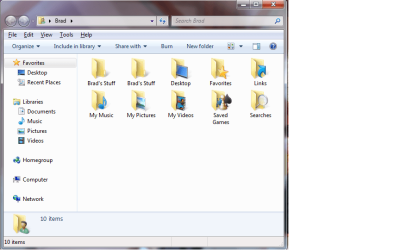
While learning how to relocate my userfilesfolders (My Music, My Videos, etc) I ended up with some folders that I do not want in my usersfilesfolder. Does anyone know how to remove folders from here.


Here's what I've tried:
  • I moved all files out of the folder in question (we'll call it Folder A) and into another, new folder.
  • I then deleted folder A from the usersfilesfolder.
  • I then deleted folder A from it's actual location.
  • I then recreated folder A with the original name in the original location
  • When I went back into UsersFilesFolder there it was again just like I had never deleted it
An interesting point: there are two folder A's in the UsersFilesFolder. There was two before I tried the above mentioned and there are two again.

Another interesting point about another login on the same machine: In the UsersFilesFolder there is an icon/folder (whatever the things in that folder are) that represents the root drive of one of my hard drives. It is simply called C:/. I would also like this to be removed from the UsersFilesFolder.

Anyone got any advice???

Thanks.
 

My Computer

Computer Manufacturer/Model Number
HP
OS
Windows 7 ultimate
CPU
Intel Core 2
Motherboard
?
Memory
1 gb
Graphics Card(s)
?
Sound Card
?
Monitor(s) Displays
Samsung
Hard Drives
1 TB & 320 GB
Welcome to Windows Seven Forums.

Windows Vista and Windows Seven use virtual folders known as Junction points and symbolic links to ensure compatibility with applications that were written for Windows XP.

These virtual folders point to other real folders e.g. if a program points to the virtual folder Windows 7 will show it the real folder. In other words, if older programs try to read from \Documents and Settings, Windows 7 will point them to the contents of the \Users folder.

These links should never be deleted and real folders shouldn't be moved or deleted in the way you've tried.

My advice would be to create a new User Account with a fresh User Profile, copy any stuff you need from the old User Account, and then delete it. Next, check this link for comprehensive information on Windows 7's Libraries:

Windows 7 Libraries: Walkthrough
 

My Computer

Computer Manufacturer/Model Number
HP Pavilion Elite 495UK
OS
Windows 7 Ultimate SP1 64-Bit
CPU
Intel Core i7 870 @ 2.93GHz
Motherboard
MSI 2A9C (CPU1)
Memory
8Gb Dual-Channel DDR3 @ 664MHz
Graphics Card(s)
nVidia GeForce GTX 460 1024MB dedicated RAM
Sound Card
Realtek HD Audio
Monitor(s) Displays
HP2310i
Screen Resolution
1920 x 1080
Hard Drives
1x1954GB Hitachi HDS22020ALA 330 (RAID), 1x1954GB Hitachi External for backup and storage
PSU
460W
Case
HP Elite
Cooling
Air cooled
Keyboard
Logitech K750 solar-powered keyboard
Mouse
Logitech Wireless M180 mouse
Internet Speed
2Mb
Other Info
Pure Avanti Flow Internet Radio with iPod Dock, 64Gb iPod, HP USB Speakers, Sony MDR-V500 Headphones, Sony Vaio F-Series Laptop
Thank you Seavixen for the good info and terminology to help me get my Windows 7 legs. Let me clarify: Folder A was not an existing folder (My Music, My Videos, etc) it was a folder of my creation that was on another hard drive in a previous machine running XP. Somehow this folder ended up in the UsersFilesFolder (is there a more consice term for this folder???). This is also true for the "Junction Point" C:/ that is another unwanted item in a different login on the same machine.

After clarifying these things I have another question for you:
  • Does/will Win7 put junction points in the UsersFilesFolder on it's own? In other words is it common as time goes by and I install new software on the computer that there will be things showing up in there that I did not put there?
Thanks in advance,
Brad
 

My Computer

Computer Manufacturer/Model Number
HP
OS
Windows 7 ultimate
CPU
Intel Core 2
Motherboard
?
Memory
1 gb
Graphics Card(s)
?
Sound Card
?
Monitor(s) Displays
Samsung
Hard Drives
1 TB & 320 GB
If you install a legacy program that is written for say, Windows XP, Windows 7 will indeed create an appropriate junction point so that it knows where the real folder is.

Any Windows 7 software won't be a problem, but as I understand it any badly-written software or legacy software will produce more virtual folders so in a sense things will happen that you are unaware of. This is because you don't need to know about as these junction points and links as they are hidden by default.

One important point: In Windows 7, you can't store your own files in Program Files\Windows\ or the root of Drive C, although you could, for example, create a folder C:\Personal Data\ and store stuff in there.

The link I gave you gives some very good advice on Windows 7's Libraries and how to use them, and going by some of the comments on these forums, Libraries are a sea-change from what we had before and can be a powerful data-storage tool when used correctly.

If you check out WSF's Tutorials I'm sure there'll be good information among them on how to point your Library folders to another location if that is what you're trying to achieve.
 

My Computer

Computer Manufacturer/Model Number
HP Pavilion Elite 495UK
OS
Windows 7 Ultimate SP1 64-Bit
CPU
Intel Core i7 870 @ 2.93GHz
Motherboard
MSI 2A9C (CPU1)
Memory
8Gb Dual-Channel DDR3 @ 664MHz
Graphics Card(s)
nVidia GeForce GTX 460 1024MB dedicated RAM
Sound Card
Realtek HD Audio
Monitor(s) Displays
HP2310i
Screen Resolution
1920 x 1080
Hard Drives
1x1954GB Hitachi HDS22020ALA 330 (RAID), 1x1954GB Hitachi External for backup and storage
PSU
460W
Case
HP Elite
Cooling
Air cooled
Keyboard
Logitech K750 solar-powered keyboard
Mouse
Logitech Wireless M180 mouse
Internet Speed
2Mb
Other Info
Pure Avanti Flow Internet Radio with iPod Dock, 64Gb iPod, HP USB Speakers, Sony MDR-V500 Headphones, Sony Vaio F-Series Laptop
Seavixen,
I get that Windows (of all versions) does things in various places on the computer that you don't want to manipulate manually because you risk messing up the way windows works. What I would like to know specifically is:

  • Will Win7 be adding files/folders to the UsersFilesFolder without my choice?
My goal is to have this location contain the original stock folders (My Music, My Videos, etc) and ONLY these folders. Currently there are other things in this location that ended up there on accident while I was learning how to redirect the stock folders to another hard drive. I have succeeded at redirecting the location of these stock folders with the help of tutorials on this forum (very helpfull) and I've also learned a great deal about Libraries on the tutorials, but have found nothing on how to get rid of unwanted folders/objects in the UsersFilesFolder.

Please see the two screen shots that I've included so you fully understand what I am trying to accomplish. In one shot I want to remove the two "Brads Stuff" folders. In the other shot I want to remove the C:/ folder/object

Thanks,
Brad
 

Attachments

  • Duplicate folders in System Folder.png
    Duplicate folders in System Folder.png
    34.6 KB · Views: 19
  • Unwanted C object in System Folder.png
    Unwanted C object in System Folder.png
    34.9 KB · Views: 12

My Computer

Computer Manufacturer/Model Number
HP
OS
Windows 7 ultimate
CPU
Intel Core 2
Motherboard
?
Memory
1 gb
Graphics Card(s)
?
Sound Card
?
Monitor(s) Displays
Samsung
Hard Drives
1 TB & 320 GB
These SF tuts should sort it out. Employ the first one first to restore your default locations, then run the 2nd to correctly relocate them. Follow the instructions carefully to avoid creating more duplicates:

http://www.sevenforums.com/tutorials/18583-user-folders-restore-default-location.html

http://www.sevenforums.com/tutorials/18629-user-folders-change-default-location.html

A warning: Do not use take ownership or change the permissions for user folders, as mayhem will result. :shock:

James
 

My Computer

OS
Win7U 64 RTM
CPU
Q9550
Motherboard
GA-EP45-UD3R
Memory
8GB Gskill
Graphics Card(s)
ASUS|EAH4850/HTDI/1GD3/A
Sound Card
xfi Plat
Monitor(s) Displays
Dell 2405fpw
Screen Resolution
1920x1200
Hard Drives
Seagate & WD sata Drives
PSU
Antec
Case
Antec
Keyboard
MS Natural Ergonomic 4000
Mouse
Logitech MX610 USB Cordless
Seavixen & James,
I did something wrong and as you put it "mayhem" was the result. Control Panel, IE and other things wouldn't open. I eneded up re-installing Windows and starting from scratch. I then found/followed the tut on relocating the user profile. I'm all good now. Thank you both for contributed to solving my problem.
You'll probably hear back from me again.

Brad
 

My Computer

Computer Manufacturer/Model Number
HP
OS
Windows 7 ultimate
CPU
Intel Core 2
Motherboard
?
Memory
1 gb
Graphics Card(s)
?
Sound Card
?
Monitor(s) Displays
Samsung
Hard Drives
1 TB & 320 GB
You're very welcome Brad.

We've all learned from our mistakes and I do understand the urge to investigate and create a user profile that you're happy with.

I've only been contributing to this forum for a short time, but the good people on here have helped me increase my knowledge of Windows 7 quite dramatically.

If you need more help, don't hesitate to ask.
 

My Computer

Computer Manufacturer/Model Number
HP Pavilion Elite 495UK
OS
Windows 7 Ultimate SP1 64-Bit
CPU
Intel Core i7 870 @ 2.93GHz
Motherboard
MSI 2A9C (CPU1)
Memory
8Gb Dual-Channel DDR3 @ 664MHz
Graphics Card(s)
nVidia GeForce GTX 460 1024MB dedicated RAM
Sound Card
Realtek HD Audio
Monitor(s) Displays
HP2310i
Screen Resolution
1920 x 1080
Hard Drives
1x1954GB Hitachi HDS22020ALA 330 (RAID), 1x1954GB Hitachi External for backup and storage
PSU
460W
Case
HP Elite
Cooling
Air cooled
Keyboard
Logitech K750 solar-powered keyboard
Mouse
Logitech Wireless M180 mouse
Internet Speed
2Mb
Other Info
Pure Avanti Flow Internet Radio with iPod Dock, 64Gb iPod, HP USB Speakers, Sony MDR-V500 Headphones, Sony Vaio F-Series Laptop
Back
Top