Solved unwanted sounds

meamjw

New member
Local time
7:30 AM
Messages
24
I'm running Win7 Pro 64 bit and I have all system sounds turned off, however, I'm still getting two sounds that are very annoying to me: I use Photoshop a lot and for a long time I only noticed a loud pop when I opened it and a warbling spring sound when I closed it, so I thought it was coming from Photoshop, but couldn't find any info about that. This morning I copied and pasted a tracking number into the USPS web page and when I closed the browser I got the warbling spring sound. Now I'm thinking it may have something to do with clipboard, but with every single system sound listed turned off I don't understand how it is happening nor, more importantly, how to stop it.
 

My Computer

OS
Win 7
A critical piece of information is missing, which version of PhotoShop?

Do you get the sound when the Volume has been muted or speakers unplugged? If so it's a hardware issue with the computer.
 

My Computer

Computer type
PC/Desktop
Computer Manufacturer/Model Number
Customs, Dell, Gateway, HP, Toshiba, Acer, ASUS
OS
Windows 7 Ultimate 64-bit, Windows 8.1 64-bit, Mac OS X 10.10, Linux Mint 17, Windows 10 Pro TP
Keyboard
Microsoft
Mouse
Microsoft
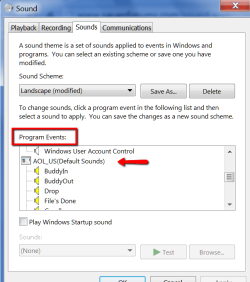
You have to go into Program Events. Some applications have their own sound scheme.
 

My Computer

Computer Manufacturer/Model Number
HP, Dell, Gateway, Toshiba - 4 laptops and 2 desktops
OS
Vista, Windows7, Mint Mate, Zorin, Windows 8
CPU
from 1.6GHz Duo to i7
Monitor(s) Displays
2x HP w2207
Hard Drives
5x HDD, 7x SSD, 12x Externals
Keyboard
with trackball - no mices
Mouse
Trackball mice
Internet Speed
DSL 6000
WHS,
I didn't even know there is such a thing as program events. Can you give me details of how to access it and how to interpret what I find?
 

My Computer

OS
Win 7
Right click on the speaker icon in the taskbar, go to Sound and you will see what's on my picture. Some programs can have their own settings in there - in my example it is AOL.
 

Attachments

  • 2015-03-03_1228.png
    2015-03-03_1228.png
    22.5 KB · Views: 6

My Computer

Computer Manufacturer/Model Number
HP, Dell, Gateway, Toshiba - 4 laptops and 2 desktops
OS
Vista, Windows7, Mint Mate, Zorin, Windows 8
CPU
from 1.6GHz Duo to i7
Monitor(s) Displays
2x HP w2207
Hard Drives
5x HDD, 7x SSD, 12x Externals
Keyboard
with trackball - no mices
Mouse
Trackball mice
Internet Speed
DSL 6000
WHS,
Glad to have that information WHS, but it apparently is not the answer to my annoyance. Everything listed there is from Microsoft. At the bottom of the page was a checkbox to play Windows startup sounds. It was checked, but isn't now.
Yesterday I tried to edit this post with an addendum stating that I was premature with my assumption that your info did not fix my problem. Unchecking the box in front of "Play Windows Startup Sounds"
did stop the noises that were plaguing me. I also tried to mark the thread as solved. It seems that none of that was saved for some reason. Maybe I forgot to click save?
 
Last edited:

My Computer

OS
Win 7
Back
Top