update 12 Jan

reconjohn

New member
Local time
1:32 PM
Messages
2
attempted to install auto updates which put the computer into infinite boot loop with blue screen of death. had to restore to 10 Jan anybody else having these issues?
 

My Computer

Computer Manufacturer/Model Number
Dell vostro 220
OS
7 home premium x32bit
CPU
dual core
Graphics Card(s)
intel on board
attempted to install auto updates which put the computer into infinite boot loop with blue screen of death. had to restore to 10 Jan anybody else having these issues?

There is one 64 bit update that has caused some grief. It is KB976902. You might want to hide that one.


Ken J
 

My Computer

Computer Manufacturer/Model Number
HP Pavillion dv-7 1005 Tx
OS
Win 8 Release candidate 8400
CPU
[email protected]
Memory
4 gigs
Graphics Card(s)
Nvidia 9600M
Sound Card
HD built-in
Monitor(s) Displays
17" Wxga
Screen Resolution
1440x900
Cooling
none
Internet Speed
45Mb down 5Mb up
Welcome to SevenForums,

Though he's working on a x32bits (Saw your specs at 332bits!!:shock:) based system, guess it is the same. you still can hide this one...but installed it on mine with no probs.
 

My Computer

Computer type
PC/Desktop
Computer Manufacturer/Model Number
Custom Build
OS
Windows 7 Professional SP1 - x64 [Non-UEFI Boot]
CPU
Ivy Bridge Core i5 3570K (Delidded)
Motherboard
Asus P8Z77-V LE PLUS
Memory
G.Skill "Ares" DDR3 PC3-12800 - 1600MHz (16Gb)
Graphics Card(s)
Asus Dual-RX480-O4G
Sound Card
Creative Sound Blaster Z w/5.1 sound system
Monitor(s) Displays
Asus IPS 23"
Screen Resolution
16/9
Hard Drives
Internal:
500Go Sata 6Gb/s (x2)
500Go Sata 3Gb/s (x2)
SSD 60Go Sata 6Gb/s
PSU
In Win C 900W Series 80+ Platinum
Case
Thermaltake Chaser A71
Cooling
Custom Water Cooling Loop
Keyboard
Cooler Master QuickFire XTi
Mouse
Razer Imperator 2012 (4G)
Antivirus
MSE
Browser
IE 11.0.xxx Rtm
Other Info
"Raid0" with Intel Smart Response Technology (HDD/SSD)
I had that update Ken and it installed without problems although it had to be done on it's own, but that's on a 32 bit system.
 

My Computer

Computer type
PC/Desktop
Computer Manufacturer/Model Number
Acer Aspire XC-704 x64 bit/ Asus K55A Notebook PC/HP Envy x360 Convertible 15-bq0xx
OS
Windows 10 64bit/Windows 10 64bit/Windows 10 64bit
CPU
Intel Pentium J3710 @ 60GHz/Intel B820,1.7GHz/AMD A9 Radeon
Motherboard
Acer Aspire XC-704 (SOCKET 0)/Asus/HP 8312 (Socket FP4)
Memory
8.00GB DDR3 @ 1599MHz/8GB 2 x 4GB DDR3/8.00GB Dual-Channel
Graphics Card(s)
Intel HD Graphics/Intel/512MB ATI AMD Radeon R5 Graphics (HP
Sound Card
Realtek High Definition Audio/Onboard/AMD High Definition Au
Monitor(s) Displays
Acer LCD K222HQL /Asus 15.6/Generic PnP Monitor (1920x1080@6
Screen Resolution
1920x1080@59Hz/1366 x 768/1920x1080@60Hz
Hard Drives
1863GBWesternn Digital WDC/Asus/119GB SanDisk SD8SN8U-128G-1006 (SSD)
931GB Hitachi HGST HTS721010A9E630 (SATA)
Keyboard
Microsoft Natural Ergonomic Keyboard 4000 (UK)/Inbuilt/Inbui
Mouse
Microsoft Optical Wheel Mouse/Same plus Touchpad/Same + Pad
Internet Speed
Infinity 2 up to 76 Mbps
Antivirus
MSE/MSE/MSE and all 3 have MalwareBytes Premium
Browser
Edge, Firefox/Edge, Firefox/Edge, Firefox, Chrome
Other Info
Seagate Expansion 500GB External Desktop Drive
Seagate Expansion Portable Drives 500GB and 1TB
Epson XP-332 Wireless Printer
I had that update Ken and it installed without problems although it had to be done on it's own, but that's on a 32 bit system.

I had the same problem. It failed when installed with the rest but installed cleanly on its own on a 64 bit system.
 

My Computer

Computer type
Laptop
Computer Manufacturer/Model Number
Hewlett-Packard/G62-107SA Notebook
OS
Microsoft Windows 7 Home Premium 64-bit Service Pack 1
CPU
Intel(R) Core(TM) i3 CPU M 330 @ 2.13GHz
Motherboard
Hewlett-Packard 1425
Memory
8 GB DDR3
Graphics Card(s)
Intel(R) HD Graphics
Sound Card
Realtek High Definition Audio
Monitor(s) Displays
Builtin
Screen Resolution
1366 x 768 x 32 bits (4294967296 colors) @ 60 Hz
Hard Drives
250 GB SATA Hard Disk Drive 7200 rpm
2TB Seagate GoFlex USB 2 Drive
1TB Iomega Prestige USB 2 Drive
1.5TB Iomega Prestige USB 2 Drive (Samsung)
2TB WD MyBook Live NAS.
Mouse
Logitech Anywhere MX
Internet Speed
152 Mbs download 10 Mbs upload
Antivirus
Norton 360
Browser
Chrome
I did them one at a time. Download and install restart if needed.
 

My Computer

Computer Manufacturer/Model Number
Hopalong/ Godzilla
OS
Windows7 Pro 64bit SP-1; Windows XP Pro 32bit
CPU
Intel Core i7-870 Lynnfield 2.93GHz LGA 1156 95W Quad-Core
Motherboard
ASUS P7P55D-E PRO
Memory
8GB@1400MHz Crucial Ballistix DDR3-1600 4x2GB
Graphics Card(s)
ASUS ENGTX460 DirectCU/2DI/1GD5 1GB 256-bit GDDR5
Sound Card
VIA Onboard
Monitor(s) Displays
Asus VS248H-P 24"; Samsung SyncMaster 941BW 19"ws
Screen Resolution
1920x1080; 1440x900
Hard Drives
Samsung 830 120GB SSD
Intel 320 120GB SSD
Western Digital Caviar Black WD7501AALS 750GB 7200 RPM SATA 3.0Gb/s
Western Digital Caviar Black WD6401AALS 640GB 7200 RPM SATA 3.0Gb/s
PSU
COOLER MASTER Silent Pro RS850-AMBAJ3-US 850W Modular
Case
COOLER MASTER HAF 932 RC-932-KKN5-GP Black
Cooling
Scythe "Mugen-2 Rev.B" (2 ScytheKaze-Jyuni PWM fans)
Keyboard
Logitech K-320
Mouse
Kensington
Antivirus
Avast Inernet Suite
Browser
IE 9 ; Chrome
Windows 7 Update Jan 11th Crashes PC's.

attempted to install auto updates which put the computer into infinite boot loop with blue screen of death. had to restore to 10 Jan anybody else having these issues?


Hey John, I am an IT Admin here in Dallas and I manage about 30 computers/servers , so far about 10 of our new HP Users PC's with Windows 7 Professional 32bit that have installed the update have done the same thing. I have spent all day trying to figure out which update it is that is causing it.
Its happening on both our desktops and our laptops. They all have to be restored back to yesterday and then I have to turn off Windows auto update and unchecked the 3 updates so they don't install again..arghh...

I am not sure if its limited to HP hardware or firmware as we only have HP machines that are having this issue.(We don't have other hardware to test on).

If you are running different hardware please post up as that will help troubleshoot the issues.
Thanks!

More info: Narrowed it down to Update for Windows 7 (KB2454826) - BEWARE of this update! I wouldn't install it if you are running Windows 7 Professional 32bit.
 
Last edited:

My Computer

OS
Windows 7 Professional 32bit
It appears a different update can give different systems problems today and it's best to install each separately. I installed four updates and three, including KB976902, installed without a hitch; however KB2419640 was the one that failed on my system. Installed afterward by its self with no problem.
 

My Computer

Computer type
PC/Desktop
Computer Manufacturer/Model Number
Wordsworth 5000
OS
Windows 10 Pro 64 bit
CPU
Core i7 6700K Skylake 4.0GHz
Motherboard
Asus Z170 Pro
Memory
Corsair Vengeance LPX DDR4 32GB 3000MHz
Graphics Card(s)
Asus Radeon RX480 Strix 8GB
Sound Card
Asus Xonar DSX
Monitor(s) Displays
HP 2709m
Screen Resolution
1920x1080
Hard Drives
Intel 600p M.2 PCIe NVMe SSD 512GB; Intel 335 SSD 240GB ;Western Digital Caviar Black 1TB
PSU
Thermaltake Toughpower Grand Platinum 850W
Case
Lian Li PC-B70
Cooling
CPU-Noctua NH D15, GPU-Stock, Case-Noctua 2x140, 2x120
Keyboard
Microsoft Natural Ergo 4000
Mouse
Microsoft Wireless Optical 1000
Internet Speed
Cable
Other Info
HP bd 340,
HP bd 240,
Klipsch Promedia 5.1 THX
attempted to install auto updates which put the computer into infinite boot loop with blue screen of death. had to restore to 10 Jan anybody else having these issues?

There is one 64 bit update that has caused some grief. It is KB976902. You might want to hide that one.


Ken J
That particular update appeared, but was not checked on my updates list. That one I will be wary of.
 

My Computer

Computer type
PC/Desktop
Computer Manufacturer/Model Number
Frankenstein PC
OS
Windows 7 Home Premium 64-bit SP1
CPU
Intel core i7 920 @ 2.67Ghz; Bloomfield 45nm Technology
Motherboard
Intel Corporation DX58SO (J1PR)
Memory
16GB Dual-Channel DDR3 @ 540MHz (7-7-7-19)
Graphics Card(s)
4095MB NVIDIA GeForce GTX 960 (EVGA)
Sound Card
N/A Integrated Audio
Monitor(s) Displays
Acer S231HLbid LED Monitor 23"
Screen Resolution
1920x1080 1080p 60Hz
Hard Drives
BOOT: 59GB ADATA SP900 (SSD)
STORAGE 1: 977GB Hitachi HDS721010CLA (SATA) @7200RPM;
STORAGE 2: 465GB Western Digital WDC WD5000AAKS-65YGA0 (SATA) @ 7200RPM;
PSU
EVGA SuperNOVA 750 G1 80+ Gold (120-G1-0750-XR)
Case
Cooler Master Elite Gaming Case Black 430
Cooling
Cooler Master Hyper 212 Heatsink. Front and rear 120mm fan
Keyboard
Rosewill RIKB-11003
Mouse
James Donkey 112S
Internet Speed
200/40
Antivirus
Avast! Antivirus Free
Browser
Cyberfox x64 / FireFox / PaleMoon x64; kept up-to-date
Other Info
Windows Installed on March 21, 2014
I had the same problem. It failed when installed with the rest but installed cleanly on its own on a 64 bit system.

Exactly. I just now installed them. Just install all the updates, let that one fail, restart the computer and install it. Piece of cake :thumbsup:

Windows Ultimate x64
 

My Computer

Computer type
PC/Desktop
Computer Manufacturer/Model Number
Custom built by me.
OS
Windows 10 Pro
CPU
Intel Core i7-4770K (3.5Ghz)
Motherboard
Gigabyte G1 Sniper 5 (F10 Bios)
Memory
32 gig Corsair Dominator Platinum (4x8Gig)
Graphics Card(s)
Sapphire Tri-X R9 Fury
Sound Card
Soundblaster ZXR
Monitor(s) Displays
NEC PA242W 24" LCD Monitor
Screen Resolution
1920 x 1200
Hard Drives
Primary - Samsung 850 Pro (512gig), Samsung 840 Pro (256gig), 2TB WD Caviar Black.
PSU
EVGA Supernova 1000 G2
Case
Cooler Master HAF X
Cooling
Corsair H100i with Corsair Air Series SP120 Quiet Fans
Keyboard
Logitech Wireless Wave
Mouse
Logitech Performance MX
Internet Speed
High Speed Cable
Antivirus
Norton Security
Browser
IE11
Other Info
Memory Timings - 1866MHz @ 9-9-9-27-1T @ 1.5 volts
for Cruzer076 my system is a Dell Vostro 220 not an HP. I would say it is not a specific manufacturer issue.
 

My Computer

Computer Manufacturer/Model Number
Dell vostro 220
OS
7 home premium x32bit
CPU
dual core
Graphics Card(s)
intel on board
After further testing I narrowed it down to:
Update for Windows 7 (KB2454826) my title for this update: "Reliability update makes Windows 7 unreliable"
A performance and functionality update for Windows 7 and for Windows Server 2008 R2 is available

I installed all the other windows updates on the same pc and it works fine but this specific update causes the crash on our PC's.

I am going to try to install it after I have installed all the other updates to see if maybe its a timing thing but I would not use this update if you are on Windows 7 Professional 32bit on a HP.
just my .02.
Good Luck!
 

My Computer

OS
Windows 7 Professional 32bit
reconjohn - Do you have any anti-virus on your computer like: Comodo, MalwareAntibytes, Norton?

I am doing more trouble shooting and I am thinking that maybe it is one of these that is causing it to crash. I am thinking it may be Comodo but once I hear back from you I may be able to narrow it down more.

Thanks.
 

My Computer

OS
Windows 7 Professional 32bit
having reboot problems with a friends 32bit dell vostro 1520 laptop, with a version of norton internet security.

currently trying to system restore....
 

My Computer

Computer Manufacturer/Model Number
mickey megabyte 1234
OS
ultimate 64 sp1
CPU
i5 2500K [email protected]
Motherboard
MSI P67A-GD53
Memory
8 gigs GSkill Ripjaws 1600
Graphics Card(s)
amd hd6950
Sound Card
creative x-fi gamer
Monitor(s) Displays
samsung 24"
Screen Resolution
1920x1080
Hard Drives
ocz vertex 2e 60 gig, samsung f3 1tb, buffalo 2tb ext
PSU
antec 550
Case
antec three hundred
Cooling
i'm a cooling fan
Keyboard
saitek eclipse ii
Mouse
logitech g3
Internet Speed
about 4 Mbps
Other Info
i love win7
ok, i think i can confirm that it was problems with the reliability (:p) update KB2454826 in my case - reboot bsod's with 32bit dell vostro lappy.

apparently, it only affects certain machines (but especially dells), and there's some speculation as to it being linked to norton internet security or symantec av - although some mse users have been affected.

i'm not sure why microsoft haven't pulled this one yet.

my solution was to do a system restore, and hide the update.

other people have booted into safemode, and uninstalled the troublesome KB2454826 update.

*edit* looks like microsoft have taken it down now, i can't see it here on two other 32bit machines.
 

My Computer

Computer Manufacturer/Model Number
mickey megabyte 1234
OS
ultimate 64 sp1
CPU
i5 2500K [email protected]
Motherboard
MSI P67A-GD53
Memory
8 gigs GSkill Ripjaws 1600
Graphics Card(s)
amd hd6950
Sound Card
creative x-fi gamer
Monitor(s) Displays
samsung 24"
Screen Resolution
1920x1080
Hard Drives
ocz vertex 2e 60 gig, samsung f3 1tb, buffalo 2tb ext
PSU
antec 550
Case
antec three hundred
Cooling
i'm a cooling fan
Keyboard
saitek eclipse ii
Mouse
logitech g3
Internet Speed
about 4 Mbps
Other Info
i love win7
attempted to install auto updates which put the computer into infinite boot loop with blue screen of death. Had to restore to 10 jan anybody else having these issues?


hey john, i am an it admin here in dallas and i manage about 30 computers/servers , so far about 10 of our new hp users pc's with windows 7 professional 32bit that have installed the update have done the same thing. I have spent all day trying to figure out which update it is that is causing it.
Its happening on both our desktops and our laptops. They all have to be restored back to yesterday and then i have to turn off windows auto update and unchecked the 3 updates so they don't install again..arghh...

I am not sure if its limited to hp hardware or firmware as we only have hp machines that are having this issue.(we don't have other hardware to test on).

If you are running different hardware please post up as that will help troubleshoot the issues.
Thanks!

more info: narrowed it down to update for windows 7 (kb2454826) - beware of this update! I wouldn't install it if you are running windows 7 professional 32bit.

Run with Avast V.5 Pro & Malwarebyte Pro.V.
Update all of them in 1 shot .
1-13-2011 2-00-42 PM.jpg
 

My Computer

Computer type
Laptop
Computer Manufacturer/Model Number
Sony Vaio VPC-SE23FXS
OS
WDS 7 Home Pre.x64
CPU
Intel Core i5 2450M @ 2.50GHz
Memory
8GB Kingston[2x4] Dual-Channel DDR3 @ 1333MHz
Graphics Card(s)
AMD Radeon(TM) HD 6470M + Intel(R) HD Graph 3000
Hard Drives
TOSHIBA MK6459GSXP 600GB x 5400RPM (SATA)
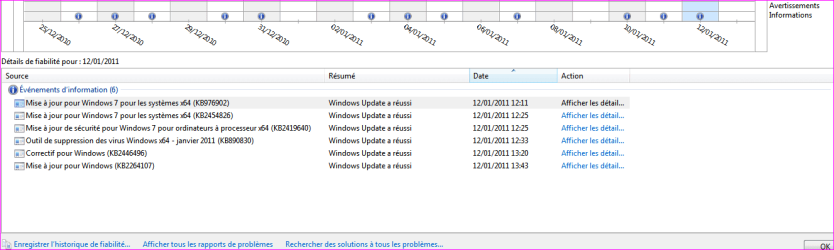
As you can see on screenshot, i did took my time to update my machine between 12h11 to 13h43...I first installed as i stated earlier the kb976902, then all the other ones, rebooted each time the computer after the updates choosen.

I'm not running MSE, NIS...as i saw on another thread might be some probs due to some AV, but i'm running McAfee.

So far i'm not on IDE but AHCI (again saw that on another thread)...everything went here very smooth.

Wish all could have update that cool!
 

Attachments

  • Capture.PNG
    Capture.PNG
    14.6 KB · Views: 13

My Computer

Computer type
PC/Desktop
Computer Manufacturer/Model Number
Custom Build
OS
Windows 7 Professional SP1 - x64 [Non-UEFI Boot]
CPU
Ivy Bridge Core i5 3570K (Delidded)
Motherboard
Asus P8Z77-V LE PLUS
Memory
G.Skill "Ares" DDR3 PC3-12800 - 1600MHz (16Gb)
Graphics Card(s)
Asus Dual-RX480-O4G
Sound Card
Creative Sound Blaster Z w/5.1 sound system
Monitor(s) Displays
Asus IPS 23"
Screen Resolution
16/9
Hard Drives
Internal:
500Go Sata 6Gb/s (x2)
500Go Sata 3Gb/s (x2)
SSD 60Go Sata 6Gb/s
PSU
In Win C 900W Series 80+ Platinum
Case
Thermaltake Chaser A71
Cooling
Custom Water Cooling Loop
Keyboard
Cooler Master QuickFire XTi
Mouse
Razer Imperator 2012 (4G)
Antivirus
MSE
Browser
IE 11.0.xxx Rtm
Other Info
"Raid0" with Intel Smart Response Technology (HDD/SSD)
Update kb976902 (AKA Blackhole) is an SP1 prerequisite. It won't install as a pack with other updates but will install standalone.

A few users have complained that the update won't install even after a reboot and standalone attempt.

As usual, MS is starting to try out release prerequisite for SP1 and some machines are not responding to the update. This has happened with other updates for Service Packs (Vista service packs) in the past which had caused issues with some users.

I tested the SP1 and had to add reg tree for the SP to install.

I can't say without a doubt that this is what we are seeing but the scenario is the same as some past SPs and I would not go ballistics with this issue.

MS will probably release this update again as we can see that it won't install on every machine.

:sleepy:
 

My Computer

Computer Manufacturer/Model Number
Asus
OS
Windows 7 x64 Ultimate SP1
CPU
I5 875K Unlocked
Motherboard
P7P55D-E-PRO
Memory
Kingston HyperX Genesis DDR3-1600MHz 9-9-9-27 @ 1.65V XMP
Graphics Card(s)
EVGA GeForce GTX 570 HD 732 MHz GPU 1280 MB, 152 GB Mem
Sound Card
Onboard Via 1828S
Monitor(s) Displays
Samsung T240 HD
Screen Resolution
Dual 1920X1200 1027X768
Hard Drives
OCZ Vertex II Extended Sandforce SSD 60 Gig 2X WD Black Caviar 1 terabyte 6GBS Transer Sata 3 Marvell Chip
PSU
Corsair Gold fully Modular 80 Plus 850
Case
Coolermaster Half X Full Tower
Cooling
Noctua NH-U12P
Keyboard
MS
Mouse
MS
Internet Speed
Fast enough
Other Info
My fridge has a water tap
Hey Guys, I found several threads on this particular issues and several solutions:
This one stands out:
Windows 7 - KB2454826 fails and doesn't recover after reboot

After further investigation and research I have found the following:
1. Proposed Problem: Obsolete Driver
Proposed Solution: Remove SPTD.SYS (removal utility from DuplexSecure - Downloads)
then try re-installing the windows update.

2. Proposed Problem: Anti-virus Software
Proposed Solution: Disable or Uninstall Anti-virus Software - Reinstall updates, then reinstall AV software

3. Proposed Problem: Video Card Driver needs updating before applying Windows update
Proposed Solution: Using Windows update or manufactures website to update video card drivers before installing Windows update.

4. Proposed Problem: Windows Update KB2454826 is the problem!
Proposed Solution: Before system installs the update, right click on it, in the windows update section and select "HIDE" this should prevent Windows from installing it in the next reboot. Wait for Microsoft to release an update.

Hope this helps.
 

My Computer

OS
Windows 7 Professional 32bit
well in my case,

1 - this particular laptop never had daemon-tools, alcohol or similar

2 - it's a bit much to have to completely uninstall/reinstall a/v to run an update

3 - video driver was already up to date

4 - this was my solution - a system restore to pre-update, then hide KB2454826

===================================================

this thread seems to have split into a discussion of both KB2454826 and KB976902
 

My Computer

Computer Manufacturer/Model Number
mickey megabyte 1234
OS
ultimate 64 sp1
CPU
i5 2500K [email protected]
Motherboard
MSI P67A-GD53
Memory
8 gigs GSkill Ripjaws 1600
Graphics Card(s)
amd hd6950
Sound Card
creative x-fi gamer
Monitor(s) Displays
samsung 24"
Screen Resolution
1920x1080
Hard Drives
ocz vertex 2e 60 gig, samsung f3 1tb, buffalo 2tb ext
PSU
antec 550
Case
antec three hundred
Cooling
i'm a cooling fan
Keyboard
saitek eclipse ii
Mouse
logitech g3
Internet Speed
about 4 Mbps
Other Info
i love win7
Back
Top