
I bought a new laptop, Toshiba Satellite C55-B with Windows 7 Professional 64Bit installed.
After installing Office 2010 Home and Student edition I find that with Windows update I can not get Windows update to set Office for the update program. Every thing I have been able to determine is that I need to start Windows Update and then click on "Find out more" after the "Get updates for other Microsoft products". When I do this I am directed to a web page, Microsoft Windows Update
One suggestion was to uninstall and reinstall Office which I did and of course I got the same results.
How can I get the the updates for Office. I don't have this problem with the desktop running Windows 7.
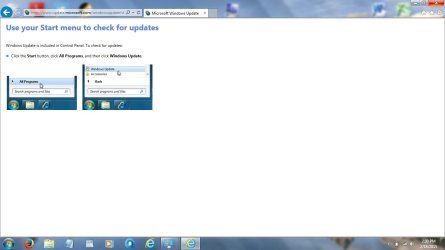
And this is what I get, no way to select anything See the screen shot.
Anybody have any ideas?
Thanks!
Keith
After installing Office 2010 Home and Student edition I find that with Windows update I can not get Windows update to set Office for the update program. Every thing I have been able to determine is that I need to start Windows Update and then click on "Find out more" after the "Get updates for other Microsoft products". When I do this I am directed to a web page, Microsoft Windows Update
One suggestion was to uninstall and reinstall Office which I did and of course I got the same results.
How can I get the the updates for Office. I don't have this problem with the desktop running Windows 7.
And this is what I get, no way to select anything See the screen shot.
Anybody have any ideas?
Thanks!
Keith
Attachments
My Computer
- Computer type
- Laptop
- Computer Manufacturer/Model Number
- Toshiba Satelite C55-B
- OS
- windows 7 professional 64 bit
- CPU
- Intel Core(TM0 i3-4005U 2 cores 1.70GHz
- Memory
- 6GB
- Graphics Card(s)
- Intel HD Graphics Family
- Hard Drives
- Toshiba MQ01ABD075
- Antivirus
- AdAware
- Browser
- Firefox
