
Update ATI driver - help needed

GRoston

New member
Power User
VIP
Local time
11:12 PM
Messages
374
All,

ATI just released V10.4 of the Catalyst driver. According to an article on TomsHardware, this is an important release as it fixes a major issue/bug with 2D performance. As such, I really want to install it.

Based on my reading, one should first uninstall previous versions of ATI Catalyst before installing the new. The last time I tried this, I had major problems which resulted in the need to rebuild the entire system. I do not want to go through that again, so I am being quite cautious.

To uninstall, I opened Control Panel->Programs and Features, selected ATI Catalyst Install Manager, then clicked Change. From there, I selected Next, then 'Express Uninstall ALL ATI software'. When I clicked next, I received the following:
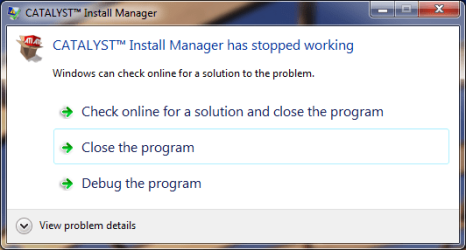
Error.png

When I clicked 'Close the program', the uninstaller seemed to 'revive' itself as the following was presented:
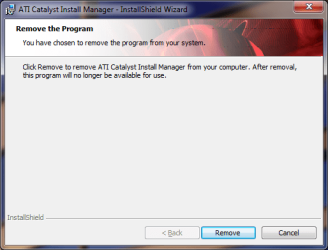
Remove.png

At this point, I clicked Cancel because I am afraid that something might go terribly wrong. Any suggestions? (If it matters, I am running Win7 Pro x64)
 

My Computer

Computer type
PC/Desktop
OS
Windows 7 x64 Pro
CPU
Core i7 860 @ 3.8 GHz
Motherboard
MSI P55-GD80
Memory
16 GB F3-12800CL7D (DDR3 1600 7-7-7-24)
Graphics Card(s)
Sapphire Vapor-X 100283VXL Radeon HD 5770
Monitor(s) Displays
NEC LCD3090WQXi-BK
Honestly, I didn't know you could uninstall by way of the Control Panel.

If you let CCC uninstall go the express route, I believe it may uninstall other components as well -- don't know for sure.

Anyway, my uninstallation routine goes: C:\ATI\Support\<Current Driver folder>\Setup

Double click Setup > Click Yes on prompt > Click Next at CCC Welcome screen > Click Uninstall > Check Custom and then Next > then I check: Catalyst Control Center and ATI Display Driver then click Next.

Also, I have Driver Sweeper -- so when Catalyst prompts me to reboot the computer, I select yes, then restart in Safe Mode, run Driver Sweeper of ATI files, then reboot again.

After that, installation of the new ATI driver and CCC. When installing the new driver, I let it go the Express route.
 

My Computer

Computer Manufacturer/Model Number
Rig 1
OS
Windows 7 Ultimate x64
CPU
AMD Phenom II X4 940 Black Edition @ 3.4GHz (AM2+)
Motherboard
Gigabyte GA-MA790X-UD4P (AM2+)
Memory
Corsair CM2X4096-8500C5 (4 X 2GB)
Graphics Card(s)
XFX Radeon HD 5770 / Diamond Radeon HD 5770 CrossFireX
Sound Card
Asus Xonar DS (PCI)
Monitor(s) Displays
Samsung SyncMaster 932bw+ (3)
Screen Resolution
4320x900
Hard Drives
OCZ Vertex 2 80 GB - Windows 7 System --
WD Caviar Black 1TB - Music, Movies, Vids, Pics --
WD Caviar Black 640GB - User Profiles & Games --
WD My Book 320GB external
PSU
Corsair CMPSU-750TX
Case
Cooler Master HAF 932
Cooling
Corsair Hydro Series H50
Keyboard
Logitech Desktop Wave
Mouse
Logitech LX8 Laser
Internet Speed
20 down / 2 up
Other Info
LG GGC-H20L Blu-Ray / HDDVD combo --
Hauppauge HVR-1250 --
Silverstone MFP-51 --
Logitech Webcam C600
mpcrsc562 - any idea where else the setup file might be located? C:\ati is created during the installation process and I always delete it once the installation has been completed.
 

My Computer

Computer type
PC/Desktop
OS
Windows 7 x64 Pro
CPU
Core i7 860 @ 3.8 GHz
Motherboard
MSI P55-GD80
Memory
16 GB F3-12800CL7D (DDR3 1600 7-7-7-24)
Graphics Card(s)
Sapphire Vapor-X 100283VXL Radeon HD 5770
Monitor(s) Displays
NEC LCD3090WQXi-BK
mpcrsc562 - any idea where else the setup file might be located? C:\ati is created during the installation process and I always delete it once the installation has been completed.

Try: C:\Program Files\ATI\CIM\Bin64
 

My Computer

Computer Manufacturer/Model Number
Rig 1
OS
Windows 7 Ultimate x64
CPU
AMD Phenom II X4 940 Black Edition @ 3.4GHz (AM2+)
Motherboard
Gigabyte GA-MA790X-UD4P (AM2+)
Memory
Corsair CM2X4096-8500C5 (4 X 2GB)
Graphics Card(s)
XFX Radeon HD 5770 / Diamond Radeon HD 5770 CrossFireX
Sound Card
Asus Xonar DS (PCI)
Monitor(s) Displays
Samsung SyncMaster 932bw+ (3)
Screen Resolution
4320x900
Hard Drives
OCZ Vertex 2 80 GB - Windows 7 System --
WD Caviar Black 1TB - Music, Movies, Vids, Pics --
WD Caviar Black 640GB - User Profiles & Games --
WD My Book 320GB external
PSU
Corsair CMPSU-750TX
Case
Cooler Master HAF 932
Cooling
Corsair Hydro Series H50
Keyboard
Logitech Desktop Wave
Mouse
Logitech LX8 Laser
Internet Speed
20 down / 2 up
Other Info
LG GGC-H20L Blu-Ray / HDDVD combo --
Hauppauge HVR-1250 --
Silverstone MFP-51 --
Logitech Webcam C600
mpcrsc562- tried running setup.exe from C:\Program Files\ATI\CIM\Bin64. When I clicked Uninstall, the 'CATALYST Install manager has stopped working" message appeared - twice. Most frustrating - I really do want to upgrade the driver.
 

My Computer

Computer type
PC/Desktop
OS
Windows 7 x64 Pro
CPU
Core i7 860 @ 3.8 GHz
Motherboard
MSI P55-GD80
Memory
16 GB F3-12800CL7D (DDR3 1600 7-7-7-24)
Graphics Card(s)
Sapphire Vapor-X 100283VXL Radeon HD 5770
Monitor(s) Displays
NEC LCD3090WQXi-BK
OK - problem resolved. And, believe it or not, MS was actually helpful! I clicked the 'Check online for a solution and close the program'. This led me to a hotfix - Article ID: 961894: FIX: An application that uses the Mfc80.dll module or the Mfc80u.dll module crashes after you install a product that updates the module version.

After installing the hotfix, the uninstall and install went smoothly. Thanks everyone for your help!
 

My Computer

Computer type
PC/Desktop
OS
Windows 7 x64 Pro
CPU
Core i7 860 @ 3.8 GHz
Motherboard
MSI P55-GD80
Memory
16 GB F3-12800CL7D (DDR3 1600 7-7-7-24)
Graphics Card(s)
Sapphire Vapor-X 100283VXL Radeon HD 5770
Monitor(s) Displays
NEC LCD3090WQXi-BK
Back
Top