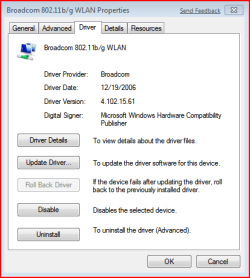
Updated gave me a recommended update for Broadcom Wireless 802.11g driver. It caused my laptop to hang intermittently requiring a hard reboot. Rolled back to previous vista driver I was using and everything is fine. Just a heads up to folks getting this update.
Updated gave me a recommended update for Broadcom Wireless 802.11g driver. It caused my laptop to hang intermittently requiring a hard reboot. Rolled back to previous vista driver I was using and everything is fine. Just a heads up to folks getting this update.
I had problems with Broadcom drivers, in all areas, and I settled on driver version 4.170.77.3 dated 3/21/08. The problem I was having was having the connection disconnect and getting instruction to reset the router. This driver works for me.
Does that wireless card have a Ralink chipset? There seems to be intermittent hangs/freezes with every Ralink chipset-containing-device on 64bit OSs. Though this wouldn't explain the seemingly smooth running on Vista. My Ralink-based card hangs in both Vista and W7 64bit OSs when sharing is enabled. With sharing switched off it is fine.
hello architeck and welcome
these are broadcom chipsets
and i can further confirm this (on a Broadcom n mini pci-e)...
for me though both the vista broadcom (the one made by my OEM) and the 7 ones cause a disconnection on standby but the driver wont release or even realize there was a disconnection...
while i have concocted a workaround that will be done once and from then on will do the work for you it will done shortly....
My Computer
Computer Manufacturer/Model Number
Tx2500z Tablet Pc/Homemade Server
OS
Windows 7 Ult x64(x2), HomePrem x32(x4), Server 08 (+VM), 08 R2 (VM) , SuSe 11.2 (VM), XP 32 (VM)
CPU
Turion X2 ultra (oh well came with laptop)/P4 @3.2 (yes P4)
Motherboard
IDK HP Motherboard / Intel DG965SS
Memory
OCZ Dual Channel 4GB kit/ 1gb Dual Channel
Graphics Card(s)
HD 3200 graphics /GMA x3100 (yay for intergrated!!)
Sound Card
Realtek HD Audio(mic working, well sort of)/Siig IC-70012
Updated gave me a recommended update for Broadcom Wireless 802.11g driver. It caused my laptop to hang intermittently requiring a hard reboot. Rolled back to previous vista driver I was using and everything is fine. Just a heads up to folks getting this update.
I know this thread is a bit old by now but I just installed Win 7 RC and I too have problems with Broadcom drivers. thdpt, you wrote that version 4.102.15.61 is working on your system, but when I use that version I get disconnected when I download at higher speeds (at least that seems to be causing the disconnection). Do you have or had similar problems with that version?
Agreed - I have no idea why Windows Update is pushing out-of-date drivers.
The version 4 Broadcom drivers have appalling performance on my WiFi 802.11g card compared with the version 5 drivers. The signal is always 100% and 54Mbps when I use the v5 drivers, but the v4 drivers only give me 75% signal and 32-48Mbps.
The WinQuall process must be a good year behind the driver release cycle for this to be happening. I'm going to ignore driver updates via Windows Update now, but think of all the people who don't know any better....
My Computer
OS
Windows 7 Home Premium x64
CPU
Pentium D 945
Motherboard
Dell DXP051
Memory
4GB 667MHz DDR2
Graphics Card(s)
NVidia 8800GT
Sound Card
Soundblaster Audigy 2 ZS
Monitor(s) Displays
1680 x 1050
Screen Resolution
1680 x 1050
Hard Drives
1 x Intel MX-25 G2 SSD, 1 x 7200RPM Western Digital
In my opinion you should always go to the manufacturers site for your drivers when ever possible rather than using windows update as it is not always up to date. Fabe
Logitech Z2300 Speakers/ Bose Noise Cancelling Headphones/Avermedia PCI-e Hybrid TV Bravo/Epson NX415 all in one/ 4 Port Powered USB Hub/ LG 10x Bluray Burner /TSST Corp DVDRW External