Solved Update Drives or NOT please HELP!

squirtmph

New member
Member
VIP
Local time
1:50 PM
Messages
235
Location
PDX
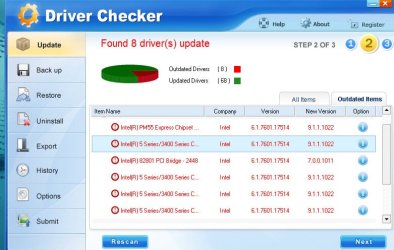
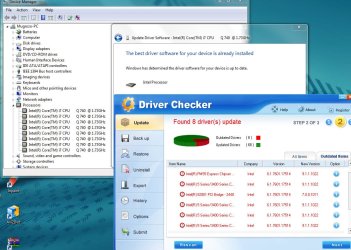
I am so confuse from this point, I have use full pay software to scan Hardware and I have found allot updates, I have done check manually in Windows 7 64Bite say no Drives updates drives found.
any suggestion will be appreciate!
 

Attachments
  • Driver Checker Full Report4-9-2013 6-48-03 PM.jpg
    Driver Checker Full Report4-9-2013 6-48-03 PM.jpg
    129 KB · Views: 15
  • Driver Checker Update4-9-2013 6-32-40 PM.jpg
    Driver Checker Update4-9-2013 6-32-40 PM.jpg
    60 KB · Views: 11

My Computer

Computer type
Laptop
Computer Manufacturer/Model Number
Azure Blade 15.6
OS
Windows 10 Pro Version 22H2 64-bit Edition
CPU
Intel(R) Core(TM) i7-10875H CPU @ 2.30GHz 2.30 GHz
Memory
2.0 GB (31.8 GB usable)
Monitor(s) Displays
4K UHD OLED TOUCH
Screen Resolution
3840 x 2160
Hard Drives
1 TB
Mouse
Logitech MX Master 3S
Antivirus
Windows Security
Browser
Google Chrome
Other Info
______________________________________________


______________________________________________
You should not have to update your Motherboard chipset drivers. Do not do so if there is nothing wrong with your computer. If there is something wrong, don't blindly update these drivers but try and get some help on these forums.

Follow the maxim - if it ain't broke, don't fix it.
 

My Computer

Computer type
PC/Desktop
Computer Manufacturer/Model Number
Home built (GeneO industries)/Model 4
OS
Windows 10 Pro. EFI boot partition, full EFI boot
CPU
i7 4770k 4.4GHz (44-44-43-43 turbo) @ 1.248V
Motherboard
ASUS Maximus VI Hero
Memory
16GB (8GBx2) @2200 MHz G.skill Sniper 10-11-10-30-1, 1.6V
Graphics Card(s)
MSI GTX 970 Gaming 4G
Sound Card
Onboard SupremeFX Audio
Monitor(s) Displays
NEC Spectraview 2490WUXi-SV
Screen Resolution
1920 x 1200
Hard Drives
Samsung 850 Pro 256GB (OS), Samsung 2x 128GB 840 Pro SSD in RAID0, 3x WD Blue 6Gb/s 1TB RAID0, WD 2TB Black external USB 3.0, 2TB WD20EARS Green external USB 3.0, 2x 500GB Seagate and 1 750 GB external USB, 1x 350GB external USB3
PSU
Seasonic X-850 (2012 KM3 model)
Case
Fractal Design Define R4
Cooling
NH-D14, NF-F12, NF-A15; NF-P14, NF-P12,NF-A14, S12A PWM
Keyboard
Cooler Master Storm Quickfire Rapid - Brown
Mouse
Logitech G602
Internet Speed
126.4 Mb/s down, 24.3 Mb/s up
Other Info
USB 3.0 x8 , SATA III x8, eSATA, USB 2.0 x6. Samsung DVD R/W drive.

WEI: CPU 7.8, Memory 7.9, Graphics 7.9, Disk 7.9
thank you for you response

Yes It is running fine on My Opinion.

Thank you very Much! (:
I am not trying to fix it, what I like to do as Maintenance updates
 

My Computer

Computer type
Laptop
Computer Manufacturer/Model Number
Azure Blade 15.6
OS
Windows 10 Pro Version 22H2 64-bit Edition
CPU
Intel(R) Core(TM) i7-10875H CPU @ 2.30GHz 2.30 GHz
Memory
2.0 GB (31.8 GB usable)
Monitor(s) Displays
4K UHD OLED TOUCH
Screen Resolution
3840 x 2160
Hard Drives
1 TB
Mouse
Logitech MX Master 3S
Antivirus
Windows Security
Browser
Google Chrome
Other Info
______________________________________________


______________________________________________
These driver checkers flag you every time some language package of e.g. Hungarian has been updated or some other nit was changed. If you speak Hungarian, that may be interesting but else it is of no use.

As Gene said, if it works, don't change it. I would go only with the official MS updates
 

My Computer

Computer Manufacturer/Model Number
HP, Dell, Gateway, Toshiba - 4 laptops and 2 desktops
OS
Vista, Windows7, Mint Mate, Zorin, Windows 8
CPU
from 1.6GHz Duo to i7
Monitor(s) Displays
2x HP w2207
Hard Drives
5x HDD, 7x SSD, 12x Externals
Keyboard
with trackball - no mices
Mouse
Trackball mice
Internet Speed
DSL 6000
If you speak Hungarian, that may be interesting but else it is of no use.
How could you be available to find out these detail, do you own especial software read?
If you do, what name and version is, please!
As Gene said, if it works, don't change it. I would go only with the official MS updates
Thank you for your Advice, I will do that.
Where could you do MS Updates?
Would Windows would do this task?
Do I have to GO for that Factory Website?
In another word's all updates are Base IN Language Updates?

Thank you for advice, I'm gratefully.

squirtmph
Note I have found different Updates would you like to view them, since you are full of hard drives knowledge, please? (:
 
Last edited:

My Computer

Computer type
Laptop
Computer Manufacturer/Model Number
Azure Blade 15.6
OS
Windows 10 Pro Version 22H2 64-bit Edition
CPU
Intel(R) Core(TM) i7-10875H CPU @ 2.30GHz 2.30 GHz
Memory
2.0 GB (31.8 GB usable)
Monitor(s) Displays
4K UHD OLED TOUCH
Screen Resolution
3840 x 2160
Hard Drives
1 TB
Mouse
Logitech MX Master 3S
Antivirus
Windows Security
Browser
Google Chrome
Other Info
______________________________________________


______________________________________________
Where could you do MS Updates?
Would Windows would do this task?
The Windows updates come automatically or look into Control Panel\System and Security\Windows Update
 

My Computer

Computer Manufacturer/Model Number
HP, Dell, Gateway, Toshiba - 4 laptops and 2 desktops
OS
Vista, Windows7, Mint Mate, Zorin, Windows 8
CPU
from 1.6GHz Duo to i7
Monitor(s) Displays
2x HP w2207
Hard Drives
5x HDD, 7x SSD, 12x Externals
Keyboard
with trackball - no mices
Mouse
Trackball mice
Internet Speed
DSL 6000
Those Driver update program can also recommend drivers for non-existent hardware too.
 

My Computer

Computer type
PC/Desktop
Computer Manufacturer/Model Number
Home Built Desktop By DataTech
OS
Windows 7 Ultimate X64 SP1
CPU
Intel i5-2550K, Differing ~4.4-4.8GHz No built in GPU
Motherboard
ASUS P8Z68-V PRO/GEN3
Memory
16GB G.Skill Sniper 1866MHz @ 2133MHz 2x8GB
Graphics Card(s)
ASUS GTX650TIB-DC2OC-2GD5, (650TI Boost)
Sound Card
Onboard Realtek 5-1
Monitor(s) Displays
Samsung P2570HD
Screen Resolution
1920x1080
Hard Drives
Samsung 840 Pro 256GB SSD for OS, 500GB Seagate Constellation (Enterprise drive) for Data
PSU
Corsair HX650W
Case
Inwin Dragon Rider
Cooling
Hyper 212 EVO w/two Noctua fans, push-pull, @1300 RPM
Keyboard
E-Z Eyes, bright yellow keys with large characters
Mouse
steelseries SENSEI Laser Pro Gaming
Internet Speed
48-51Mbs Mbs down, 11 Mbs up Xfinity Cable
Antivirus
Norton Internet Security 2013
Browser
IE 10, Opera, Pale Moon if needed
Other Info
4 case fans, LG BluRay-RE, ASUS DVD-RW, Mr. Fusion power supply, 1.21 gigawatts.
I personally do not prefer using 3rd party driver checking utilities. They are just kind of useless sometimes suggesting unneeded driver updates, installing which might even break your system.
 

My Computer

Computer type
PC/Desktop
OS
Windows 7 Home Premium x64
The only updates you need are:

1. Microsoft updates(as already posted) enable automatic updates and it will update your system for you and prompt to restart after update as neccessary.

2. Hardware driver updates from the computer manufacturer' s website for your hardware.

3. Motherboard manufacturer's website for custom or self built computers.

4. Hardware manufacturer's website for any hardware you may have installed since owning the computer.

Driver checker and similar programs are not reliable for reason mentioned above and because in many cases identify incorrect drivers for installation which can cause system instability.

Same as original advice if it aint broke don't fix it there is no need if evrything is working as it should.

You should only update drivers if there is a an issue you are having with a particular piece of heardware.
 

My Computer

Computer Manufacturer/Model Number
HP Compaq 6715B
OS
Windows 7 Ultimate x64
CPU
AMD turion 64x2 TL-64 2.2Ghz
Motherboard
HC030
Memory
Sodimm DDR2 4GB
Graphics Card(s)
ATI Radeon 1250 128MB IGP
Hard Drives
Fujitsu Siemens 500GB sata 3.0 Gb/s
roboticarm &
TheCyberMan

Thank you both of you for you Input in my concern. It seem I just bought useless software, But I dint pay that much. So Isn't big deal to me, now.
I Got it, for this purposes but I am glad I have ask before Installed those Drives.
Thank you very much again for you help.
 

My Computer

Computer type
Laptop
Computer Manufacturer/Model Number
Azure Blade 15.6
OS
Windows 10 Pro Version 22H2 64-bit Edition
CPU
Intel(R) Core(TM) i7-10875H CPU @ 2.30GHz 2.30 GHz
Memory
2.0 GB (31.8 GB usable)
Monitor(s) Displays
4K UHD OLED TOUCH
Screen Resolution
3840 x 2160
Hard Drives
1 TB
Mouse
Logitech MX Master 3S
Antivirus
Windows Security
Browser
Google Chrome
Other Info
______________________________________________


______________________________________________
you can Go to Control Panel\All Control Panel Items\Windows Update in the left pane click Check for updates also.
 

My Computer

Computer type
PC/Desktop
Computer Manufacturer/Model Number
Home Built Desktop By DataTech
OS
Windows 7 Ultimate X64 SP1
CPU
Intel i5-2550K, Differing ~4.4-4.8GHz No built in GPU
Motherboard
ASUS P8Z68-V PRO/GEN3
Memory
16GB G.Skill Sniper 1866MHz @ 2133MHz 2x8GB
Graphics Card(s)
ASUS GTX650TIB-DC2OC-2GD5, (650TI Boost)
Sound Card
Onboard Realtek 5-1
Monitor(s) Displays
Samsung P2570HD
Screen Resolution
1920x1080
Hard Drives
Samsung 840 Pro 256GB SSD for OS, 500GB Seagate Constellation (Enterprise drive) for Data
PSU
Corsair HX650W
Case
Inwin Dragon Rider
Cooling
Hyper 212 EVO w/two Noctua fans, push-pull, @1300 RPM
Keyboard
E-Z Eyes, bright yellow keys with large characters
Mouse
steelseries SENSEI Laser Pro Gaming
Internet Speed
48-51Mbs Mbs down, 11 Mbs up Xfinity Cable
Antivirus
Norton Internet Security 2013
Browser
IE 10, Opera, Pale Moon if needed
Other Info
4 case fans, LG BluRay-RE, ASUS DVD-RW, Mr. Fusion power supply, 1.21 gigawatts.
Thank you I just did yesterday about 9 Important updates, And I also did One driver from:
Synaptics_v16_3_15_1_C_XP32_Vista32_Win7-32_XP64_Vista64_Win7-64_Signed_Acme_Inc
Thank you for keeping in touch! (:
 

My Computer

Computer type
Laptop
Computer Manufacturer/Model Number
Azure Blade 15.6
OS
Windows 10 Pro Version 22H2 64-bit Edition
CPU
Intel(R) Core(TM) i7-10875H CPU @ 2.30GHz 2.30 GHz
Memory
2.0 GB (31.8 GB usable)
Monitor(s) Displays
4K UHD OLED TOUCH
Screen Resolution
3840 x 2160
Hard Drives
1 TB
Mouse
Logitech MX Master 3S
Antivirus
Windows Security
Browser
Google Chrome
Other Info
______________________________________________


______________________________________________
roboticarm &
TheCyberMan

Thank you both of you for you Input in my concern. It seem I just bought useless software, But I dint pay that much. So Isn't big deal to me, now.
I Got it, for this purposes but I am glad I have ask before Installed those Drives.
Thank you very much again for you help.

You are welcome.
 

My Computer

Computer Manufacturer/Model Number
HP Compaq 6715B
OS
Windows 7 Ultimate x64
CPU
AMD turion 64x2 TL-64 2.2Ghz
Motherboard
HC030
Memory
Sodimm DDR2 4GB
Graphics Card(s)
ATI Radeon 1250 128MB IGP
Hard Drives
Fujitsu Siemens 500GB sata 3.0 Gb/s
roboticarm &
TheCyberMan

Thank you both of you for you Input in my concern. It seem I just bought useless software, But I dint pay that much. So Isn't big deal to me, now.
I Got it, for this purposes but I am glad I have ask before Installed those Drives.
Thank you very much again for you help.

You are most welcome. :)
 

My Computer

Computer type
PC/Desktop
OS
Windows 7 Home Premium x64
Back
Top