
Update Error 80070643

dockster

New member
Member
Local time
6:40 PM
Messages
63
Windows Update Error Code 80070643

I am trying to update 4 identical PC's. They are Win 7 x64 Home Premium.

I am getting the following error on ALL the pc's -- they haven't been updated since February, 2010. Code 80070643. The second error in the pic is new, but the 0643 error occurs on them all.

Looking up the error, i found an MS support article saying its related to .net framework. I tried the few solutions on there and it didn't fix it.

I tried the Windows Update reset solutions on this forum as well as the MS Fix it tool. Neither fixed the issue.

Any further advice?
 

Attachments
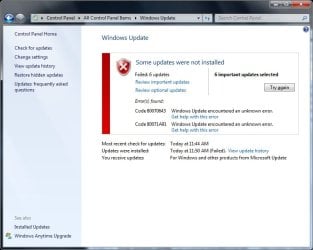
  • windows update errors.jpg
    windows update errors.jpg
    46.8 KB · Views: 795
Last edited:

My Computer

Computer Manufacturer/Model Number
Hewlett Packard dv4-1222nr
OS
Windows 7
CPU
AMD Turion X2 RM-72 2.10 GHz Dual-Core Mobile Processor
Memory
4GB
Graphics Card(s)
ATI Radeon HD 3200 Graphics RS780M
Monitor(s) Displays
14.1" LCD
Hard Drives
250GB (5400RPM)
Internet Speed
3.0 MBPS (down) / 1.0MBPS (up)

My Computer

Computer Manufacturer/Model Number
Custom made
OS
Windows 7 Professional x64 PL
CPU
AMD Athlon 4450e
Motherboard
Giga-Byte GA-MA69G-S3H
Memory
GoodRam DDR2 2x2048MB (FSB 800MHz)
Graphics Card(s)
nVidia GeForce 9600GT (G94-300) 1024 MB
Monitor(s) Displays
SAMSUNG SyncMaster HS2P301688
Hard Drives
Seagate ST3750330AS 750GB
PSU
Corsair 550W
Cooling
AeroCool ExtremeEngine 3T
What is 3p antivirus? The only security software installed is Microsoft Security Essentials.

Other programs installed:

Returnil (deactivated for windows update) - antivirus part not enabled
OpenOffice
Firefox
Adobe Acrobat 10.1

That's it -- really. These are basic quick use computers in the business center of our condo building.
 

My Computer

Computer Manufacturer/Model Number
Hewlett Packard dv4-1222nr
OS
Windows 7
CPU
AMD Turion X2 RM-72 2.10 GHz Dual-Core Mobile Processor
Memory
4GB
Graphics Card(s)
ATI Radeon HD 3200 Graphics RS780M
Monitor(s) Displays
14.1" LCD
Hard Drives
250GB (5400RPM)
Internet Speed
3.0 MBPS (down) / 1.0MBPS (up)
I strong recommend unistall completely both MSE and Returnil -if any security soft cause problem disabling it may not be enough to solve problem -even if you disable program it is still able to run some own processes.I know it is strange but it is.

Besides Returnil already include antivirus and MSE too -it is not good idea.You have practicaly installed two antiviruses.Even if you will solve your problem,leave only Returnil,MSE uninstall pernamently
 

My Computer

Computer Manufacturer/Model Number
Custom made
OS
Windows 7 Professional x64 PL
CPU
AMD Athlon 4450e
Motherboard
Giga-Byte GA-MA69G-S3H
Memory
GoodRam DDR2 2x2048MB (FSB 800MHz)
Graphics Card(s)
nVidia GeForce 9600GT (G94-300) 1024 MB
Monitor(s) Displays
SAMSUNG SyncMaster HS2P301688
Hard Drives
Seagate ST3750330AS 750GB
PSU
Corsair 550W
Cooling
AeroCool ExtremeEngine 3T
Finally got this fixed, in case others search for this. I did not have to uninstall MSE or Returnil. Not sure which of the following steps actually takes care of the issue, but I did all of them on each PC and it allows WIndows Update to work:

1) Turn Windows Features On/Off --> Uncheck .Net Framework 3.5
2) Run Windows Update Reset Tool (Fix it) [Check "Aggressive Mode"] Article
3) Run .Net Cleanup Tool Article
4) In an elevated command prompt, execute (Article):
1. Bring up an elevated (Administrator) command prompt
2. Execute the following commands sequentially:
a. fsutil resource setautoreset true c:\
b. cd %windir%\system32\config\txr
c. attrib -r -s -h *
d. del *

3.Type: Cd c:\windows\System32\SMI\Store\Machine
Type: Attrib –a –h –s *.TM*
Type: Del *.TM*

*** You may get access denied errors -- its ok for now ***

5) Restart in Safe Mode with Command Prompt. Redo the steps above in BOLD. Some files still will not delete. That's fine.
6) Restart in Normal Mode - run windows update with success.
 

My Computer

Computer Manufacturer/Model Number
Hewlett Packard dv4-1222nr
OS
Windows 7
CPU
AMD Turion X2 RM-72 2.10 GHz Dual-Core Mobile Processor
Memory
4GB
Graphics Card(s)
ATI Radeon HD 3200 Graphics RS780M
Monitor(s) Displays
14.1" LCD
Hard Drives
250GB (5400RPM)
Internet Speed
3.0 MBPS (down) / 1.0MBPS (up)
Hi Flavius,
Apologies for resurrecting an older thread, but I wanted to make sure you were aware of the following:

Uninstalling Returnil Virtual System 2010 or the new Returnil System Safe 2011 is not required as we have designed the Virus Guard component to be compatible with most 1st and 2nd tier Antivirus/antispyware solutions to support existing customer deployments where an AV may already exist on the client. As a general rule of thumb when installing MS/Windows updates however, turning off the Real-time virus protection feature in RVS/RSS temporarily (until the update is complete) may be useful.

It is the System Level virtualization and Anti-Execute features that are more important in update situations. The AE requires the virtualization (System Safe in RVS 2010, Virtual Mode in RSS 2011) to be active so simply turning off the virtualization (as noted by dokster) should be sufficient.

If anyone encounters an issue with RVS/RSS please let us know at our forums or via support e-mail to support (dash) tech (at) returnil (dot) com.

Thanks
Mike
Returnil Support
 

My Computer

Computer Manufacturer/Model Number
HP TouchSmart 600-1005t
OS
Windows 7 Pro 64-bit
CPU
Intel Core 2 DUO P7450
Memory
4 GB
Graphics Card(s)
NVIDIA GeForce GT 230
Sound Card
Realtek HD Audio
Monitor(s) Displays
23" HP touchscreen (integrated)
Just now I registered in this forum to say you a big thank you, dockster. :)

With your above posting #5 you solved my difficult problem with the installation and also uninstallation of Windows updates. Both of them failed since more than a month now, always with the same errorcodes as in your picture in the first posting: in most of the cases code 80070643 and in connection with some of the latest updates also 80071A91.

For all this time I was looking desperately for a solution of the problem. But all methods failed - until I found last night your posting by searching with Google.

You describe 4 different methods and you write:

Not sure which of the following steps actually takes care of the issue, but I did all of them on each PC and it allows WIndows Update to work:

Well, from my experience I can say that methodes 1 - 3 did not work (on my computer). I had alreday tried them in vain before finding your posting.

But the solution of all troubles came with this:
4) In an elevated command prompt, execute (Article):
1. Bring up an elevated (Administrator) command prompt
2. Execute the following commands sequentially:
a. fsutil resource setautoreset true c:\
b. cd %windir%\system32\config\txr
c. attrib -r -s -h *
d. del *

3.Type: Cd c:\windows\System32\SMI\Store\Machine
Type: Attrib –a –h –s *.TM*
Type: Del *.TM*

*** You may get access denied errors -- its ok for now ***

5) Restart in Safe Mode with Command Prompt. Redo the steps above in BOLD. Some files still will not delete. That's fine.
6) Restart in Normal Mode - run windows update with success.

I tried it - and it worked. :D

I had already lost the hope to find a solution, but your posting was the rescue.

Thanks again, dockster. :)
 
Last edited:

My Computer

OS
Windows 7 Home Premium 32bit
Thanks Dockster. You are a great. This error drove me mad and I searched high and low for a solution without much help until I saw your post. Got few errors following the instructions but it worked.
Once again, thanks a lot.
 

My Computer

OS
W7 x64 Ultimate
Thanks Dockster for putting this solution here.

Just like Peter123, I have registered simply to say thank you because of your post #5.

After trying all the MS fixes for .net Framework in vain, I executed steps 1 to 5 and it worked for me.

Windows Update is now working normally again.

Thanks again.
 

My Computer

OS
Windows 7 x64
One of todays updates will probably not install.
Silverlight Security update.> KB2668562 - Microsoft Silverlight Failed to update. - Microsoft Answers

Thanks to responses on this listserver, we've looked into the Silverlight update, have identified a metadata (logic) error and will be releasing a revision to correct this very soon.

Consider holding off on this update until a revision is published and visible in your WSUS/SCCM consoles - or simply allow auto-approval to permit the revision to replace the original version. We have similarly 'down throttled' unmanaged (consumer) machines until the revision is released (throttled at 0% = no consumer machines will get this installed automatically - but users who open WUApp and choose it, will still be able to run it - even though it will fail).

doug neal
Microsoft Update (MU)

New update to be released in the future.
 

My Computer

Computer Manufacturer/Model Number
Hopalong/ Godzilla
OS
Windows7 Pro 64bit SP-1; Windows XP Pro 32bit
CPU
Intel Core i7-870 Lynnfield 2.93GHz LGA 1156 95W Quad-Core
Motherboard
ASUS P7P55D-E PRO
Memory
8GB@1400MHz Crucial Ballistix DDR3-1600 4x2GB
Graphics Card(s)
ASUS ENGTX460 DirectCU/2DI/1GD5 1GB 256-bit GDDR5
Sound Card
VIA Onboard
Monitor(s) Displays
Asus VS248H-P 24"; Samsung SyncMaster 941BW 19"ws
Screen Resolution
1920x1080; 1440x900
Hard Drives
Samsung 830 120GB SSD
Intel 320 120GB SSD
Western Digital Caviar Black WD7501AALS 750GB 7200 RPM SATA 3.0Gb/s
Western Digital Caviar Black WD6401AALS 640GB 7200 RPM SATA 3.0Gb/s
PSU
COOLER MASTER Silent Pro RS850-AMBAJ3-US 850W Modular
Case
COOLER MASTER HAF 932 RC-932-KKN5-GP Black
Cooling
Scythe "Mugen-2 Rev.B" (2 ScytheKaze-Jyuni PWM fans)
Keyboard
Logitech K-320
Mouse
Kensington
Antivirus
Avast Inernet Suite
Browser
IE 9 ; Chrome
80070643 update bug

Thank Dockster. Like others. I sincerely thank you for your posting. None of the .net recommendations from MS worked for me. Following your 5 steps (part of was deleting the transaction logs specifically for win7) really worked. I tested it immediately without even have to repeat the 5 steps in SAFE MODE.

I am very very happy for your post.
 

My Computer

OS
win7 32 ultimate
5 Steps not working for me

As soon as I enter the command line in "c", I get that "attrib" is not a valid internal or external command.
Can you please tell me what I'm doing wrong. Please be clear as to where spacing goes. I've tried what I think is every combination.
Thank you
 

My Computer

Computer Manufacturer/Model Number
Custom build
OS
Windows 7 Professional 64-bit
CPU
Intel I7-920
Motherboard
Gigabyte
Memory
6 GB
Graphics Card(s)
Radeon 5850
Monitor(s) Displays
Samsung PX 2370
Hard Drives
Internal: WD Caviar Black 1 TB
External: Seagate Free Agent 2 TB
PSU
Corsair TX850
Case
Coolermaster HAF-922
Cooling
Corsair H50
I also get error # 80070643. It looks as though all my failed updates relate to Office 2010 and/or Outlook. I've tried running standard FixIt, FixIt 50202, repairing .NET Framework, repairing Office using installation CD, completely uninstalling/re-installing Office. I currently have 16 failed updates. Windows will alert me to new updates, and when I run Windows Update, often it will successfully install the new updates but the original 16 continue to fail. It used to be 13 failed, now 16. At my wit's end with this, and just want to successfully update and move on. Any help would be appreciated. Running Win7 Professional 64-bit with MS Office Professional 2010.
 

My Computer

Computer Manufacturer/Model Number
Custom build
OS
Windows 7 Professional 64-bit
CPU
Intel I7-920
Motherboard
Gigabyte
Memory
6 GB
Graphics Card(s)
Radeon 5850
Monitor(s) Displays
Samsung PX 2370
Hard Drives
Internal: WD Caviar Black 1 TB
External: Seagate Free Agent 2 TB
PSU
Corsair TX850
Case
Coolermaster HAF-922
Cooling
Corsair H50
Also get error # 80070643

It looks as though all my failed updates relate to Office 2010 and/or Outlook. I've tried running standard FixIt, FixIt 50202, repairing .NET Framework, repairing Office using installation CD, completely uninstalling/re-installing Office. I currently have 16 failed updates. Windows will alert me to new updates, and when I run Windows Update, often it will successfully install the new updates but the original 16 continue to fail. It used to be 13 failed, now 16. At my wit's end with this, and just want to successfully update and move on. Any help would be appreciated. Running Win7 Professional 64-bit with MS Office Professional 2010.
 

My Computer

Computer Manufacturer/Model Number
Custom build
OS
Windows 7 Professional 64-bit
CPU
Intel I7-920
Motherboard
Gigabyte
Memory
6 GB
Graphics Card(s)
Radeon 5850
Monitor(s) Displays
Samsung PX 2370
Hard Drives
Internal: WD Caviar Black 1 TB
External: Seagate Free Agent 2 TB
PSU
Corsair TX850
Case
Coolermaster HAF-922
Cooling
Corsair H50
Help d;

AHH dude, im so confused... i tried it.. but im a freaking nood when it comes to computers... i need big time help... like step by step help :c
 

My Computer

OS
windows 7 64 bit
I will try to help

@ klingcam + ghostmilk

It is a little bit difficult for me to explain in English but I will describe in detail what you have to do when applying the method described by dockster in posting # 5.

As preliminary measure:
Hide (= temporarily disable) the Windows updates whose installation fails. (After the following procedure you have to restore them again.)


I. Bring up an elevated (Administrator) command prompt.
This works in the following way (Windows 7):

- Click on "Start"
- Type cmd.exe
- Right-click the "cmd.exe"-entry
- Choose the option "Run as administrator"

II. A black window will open.
There you have to type exactly the following commands.

You have to take care that there are correct spaces (where necessary) and no spaces (where necessary). (Make copy and paste of the commands into a word document if you cannot see clearly where spaces are and where not.)
For example:
attrib -r -s -h * has spaces before -r, before -s, before -h and before *
or

cd %windir%\system32\config\txr has one space: after cd
or
del *
has one space: after del
etc.

After every command you will have to push "Enter" on your keyboard.

Type the bold and blue letters (without the 1., 2. , 3. etc. at the beginning):

1. fsutil resource setautoreset true c:\

2. cd %windir%\system32\config\txr

3. attrib -r -s -h *

4. del *

5. Now you will have to verify the deletion of files. I think in the english version you have to push the key "Y" (for "yes").

It will appear a list of files and the remark that access is denied. This is o.k. and can be ignored. Continue with 6.

6. Cd c:\windows\System32\SMI\Store\Machine

7. Attrib -a -h -s *.TM*

8. Del *.TM*

Close the black window and shut down your computer.

_____________

Here a screenshot how the black window looks like after entering the first four of the above commands:

Bild: auffgbcbjd.jpg - abload.de

_____________

III. Restart your computer in Safe Mode. (It depends on you computer how it works: Often it works by pushing - if necessary several times - the key F8 immediately after turning on the computer.)

Choose the option: "Safe Mode with Command Prompt"

The black window will appear again.

In this window repeat the above steps (described in II. 1. to 8.). ---> Type the same commands as before.

After this procedure close the black window and shut down your computer.

IV. Restart your computer (in Normal Mode).

Restore the hidden Windows updates again (the ones you had disabled before starting the procedure) and let them install. It should work now without any problems. :) :)
 
Last edited:

My Computer

OS
Windows 7 Home Premium 32bit
Unable to apply dockster's fix for error 80070643

Following the fix outlined by dockster and Peter 123, I have run into an error which I don't know how to fix. The 8 steps specified by Peter123 (above) work fine in regular mode but in SAFE MODE after entering step 7, I get the message "*.TM* not found". Then when I enter step 8, I get the message "could not find c:\windows\System32\SM1\Store\Machine\*.TM*". Can anyone help me with this problem:cry::cry:?
 

My Computer

Computer Manufacturer/Model Number
Dell XPS 8300
OS
Windows 7 Ultimate x64
CPU
Intel Core i7-2600 (8MB Cache, 3.4 GHz
Memory
12GB DDR3 SDRAM at 1333MHz
Graphics Card(s)
Nvidia GeForce GT 545 1GB GDDR5
Monitor(s) Displays
Dell ST2420L
Hard Drives
2TB Serial ATA 2 Hard Drive 7200 RPM

My Computer

Computer type
Laptop
Computer Manufacturer/Model Number
Asus K52F or Lenovo B51-80
OS
Win 7 x64 Home Premium (and x86 VirtualBox VM)/Win10
CPU
i3 370M/i7 6500U
Motherboard
Asus/Lenovo
Memory
8GB - finally :)/8GB
Graphics Card(s)
it's an i3, dude!/dual Intel&nVidia
Sound Card
onboard
Monitor(s) Displays
15.6" built-in
Screen Resolution
1366x768/1920x1080
Hard Drives
750GB Seagate internal
Sundry external drives attached to other computers on the local network
1TB SSD on the Lenovo
PSU
n/a
Internet Speed
as much as I can get - usually on a dongle/phone, so <1MB/s
Antivirus
MSE/Defender
Browser
IE11/12/Edge/Chrome/FF(if I must)
wbluebird, sorry for replying such a long time after your posting, but I did not see it earlier.
NoelDP, sorry for continuing in this thread but perhaps wbluebird's problem can be solved very quickly. ;)

[...] but in SAFE MODE after entering step 7, I get the message "*.TM* not found". Then when I enter step 8, I get the message "could not find c:\windows\System32\SM1\Store\Machine\*.TM*".

wbluebird, please be very careful in what you are typing when making this procedure:

You write (concerning the command of step 6):
c:\windows\System32\SM1\Store\Machine\*.TM*

Maybe you typed exactly the same, when being in safe mode?
Well, then this would have been an error:
In step 6 it is not SM1 ("SMOne") but SMI (three letters in capitals: SMI).

So simply try again with the correct commands.

I just now had again the problems with the latest Windows-Updates. And after making the above described procedure, their installation worked (as usually) without difficulties. :)
 

My Computer

OS
Windows 7 Home Premium 32bit
Back
Top