Update Errors and Unavailable repair files

elkevo20

New member
Local time
7:12 AM
Messages
21
The windows update error codes are Code 80073712 and 64C Also Looking at the CheckSUR Log I have many unavailable repair files.
 

Attachments

My Computer My Computer

Computer type
PC/Desktop
Computer Manufacturer/Model Number
Custom
OS
Windows 7 Professional 64 bit
CPU
Intel i5 2500
Motherboard
Asrock p67 Pro 3.0
Memory
8gb G Skill
Graphics Card(s)
MSI Gtx 660 ti
Hard Drives
Samsung 840 128 GB OS
Samsung 850 EVO 250 GB Games
WD 1TB Backup
Browser
FireFox
Hello and welcome to the sevens forum.

1. First I would do is a complete scan using your security.

2. Go to accessories right click the command promt, type sfc /scannow and let it run without using your system to see if it will repair any files.
 

My Computer My Computer

Computer type
PC/Desktop
Computer Manufacturer/Model Number
Lenovo
OS
Windows 7 Home Premium 64-Bit SP1
CPU
Intel Core i7 2600
Motherboard
Lenovo
Memory
8.00 GB Dual-Channel DDR3
Graphics Card(s)
1024MB GeForce GT 420
Sound Card
Intergrated Realtex ALC888S
Monitor(s) Displays
LG W40 series Widescreen
Screen Resolution
1920 by 1080 widescreen
Hard Drives
932GB Hitachi HDS TB
External drive 640 GB also
PSU
300W
Case
Tower
Cooling
yes came installed
Keyboard
Lenovo
Mouse
Laser wirless 5000
Antivirus
MBAM / Superantispyware pro paid for.
Browser
Google /
Other Info
PLDS DVD-RW DH16ABSH
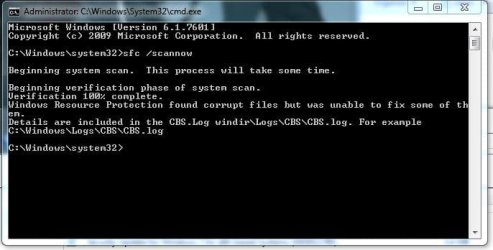
Scanned nothing came up, and the sfc scan didn't find any problems.
 

My Computer My Computer

Computer type
PC/Desktop
Computer Manufacturer/Model Number
Custom
OS
Windows 7 Professional 64 bit
CPU
Intel i5 2500
Motherboard
Asrock p67 Pro 3.0
Memory
8gb G Skill
Graphics Card(s)
MSI Gtx 660 ti
Hard Drives
Samsung 840 128 GB OS
Samsung 850 EVO 250 GB Games
WD 1TB Backup
Browser
FireFox
Here's the error-list from the CheckSUR log...
Code:
Unavailable repair files:
 winsxs\manifests\amd64_microsoft-windows-m..ditevtlog.resources_31bf3856ad364e35_6.1.7601.18637_en-us_b818f58670898bbd.manifest
 winsxs\manifests\amd64_microsoft-windows-security-schannel_31bf3856ad364e35_6.1.7601.22843_none_80a46a3e85194f37.manifest
 winsxs\manifests\amd64_microsoft-windows-msauditevtlog_31bf3856ad364e35_6.1.7601.22843_none_25d0997ea843ed32.manifest
 winsxs\manifests\x86_microsoft-windows-msauditevtlog_31bf3856ad364e35_6.1.7601.18637_none_c937305dd6bd2876.manifest
 winsxs\manifests\amd64_microsoft-windows-t..teconnectionmanager_31bf3856ad364e35_6.1.7601.18637_none_ecb2935b6af13c52.manifest
 winsxs\manifests\wow64_microsoft-windows-t..teconnectionmanager_31bf3856ad364e35_6.1.7601.18637_none_f7073dad9f51fe4d.manifest
 winsxs\manifests\x86_microsoft-windows-c..ityclient.resources_31bf3856ad364e35_6.1.7601.22843_en-us_672eda97174dc073.manifest
 winsxs\manifests\amd64_microsoft-windows-lsa.resources_31bf3856ad364e35_6.1.7601.22843_en-us_e535f381c671cf9d.manifest
 winsxs\manifests\amd64_microsoft-windows-c..ityclient.resources_31bf3856ad364e35_6.1.7601.22843_en-us_c34d761acfab31a9.manifest
 winsxs\manifests\wow64_microsoft-windows-lsa_31bf3856ad364e35_6.1.7601.18637_none_0eb286a7a7d91f21.manifest
 winsxs\manifests\wow64_microsoft-windows-security-kerberos_31bf3856ad364e35_6.1.7601.22843_none_4fb9a6ae1504ca69.manifest
 winsxs\manifests\x86_microsoft-windows-security-credssp_31bf3856ad364e35_6.1.7601.22843_none_c627b51c19090c11.manifest
 winsxs\manifests\amd64_microsoft-windows-ncrypt-dll_31bf3856ad364e35_6.1.7601.22843_none_bc6c74c221728719.manifest
 winsxs\manifests\amd64_microsoft-windows-security-ntlm_31bf3856ad364e35_6.1.7601.22843_none_db410c0392613b8e.manifest
 winsxs\manifests\amd64_microsoft-windows-security-digest_31bf3856ad364e35_6.1.7601.22843_none_995b6a47ac8b8c3f.manifest
 winsxs\manifests\wow64_microsoft-windows-lsa_31bf3856ad364e35_6.1.7601.22843_none_0f2d5444c10272a7.manifest
 winsxs\manifests\amd64_microsoft-windows-security-credssp_31bf3856ad364e35_6.1.7601.22843_none_2246509fd1667d47.manifest
 winsxs\manifests\amd64_microsoft-windows-security-kerberos_31bf3856ad364e35_6.1.7601.22843_none_4564fc5be0a4086e.manifest
 winsxs\manifests\amd64_microsoft-windows-c..tionauthorityclient_31bf3856ad364e35_6.1.7601.22843_none_360bd4ac6c7e009c.manifest
 winsxs\manifests\amd64_microsoft-windows-lsa_31bf3856ad364e35_6.1.7601.22843_none_04d8a9f28ca1b0ac.manifest
 winsxs\manifests\x86_microsoft-windows-ncrypt-dll_31bf3856ad364e35_6.1.7601.22843_none_604dd93e691515e3.manifest
 winsxs\manifests\wow64_microsoft-windows-security-schannel_31bf3856ad364e35_6.1.7601.22843_none_8af91490b97a1132.manifest
 winsxs\manifests\wow64_microsoft-windows-security-ntlm_31bf3856ad364e35_6.1.7601.22843_none_e595b655c6c1fd89.manifest
 winsxs\manifests\wow64_microsoft-windows-security-digest_31bf3856ad364e35_6.1.7601.22843_none_a3b01499e0ec4e3a.manifest
 winsxs\manifests\x86_microsoft-windows-m..ditevtlog.resources_31bf3856ad364e35_6.1.7601.22843_en-us_5c75279fd1556e0d.manifest
 winsxs\manifests\amd64_microsoft-windows-msauditevtlog_31bf3856ad364e35_6.1.7601.18637_none_2555cbe18f1a99ac.manifest
 winsxs\manifests\x86_microsoft-windows-c..tionauthorityclient_31bf3856ad364e35_6.1.7601.22843_none_d9ed3928b4208f66.manifest
 winsxs\manifests\x86_microsoft-windows-m..ditevtlog.resources_31bf3856ad364e35_6.1.7601.18637_en-us_5bfa5a02b82c1a87.manifest
 winsxs\manifests\amd64_microsoft-windows-t..teconnectionmanager_31bf3856ad364e35_6.1.7601.22843_none_ed2d60f8841a8fd8.manifest
 winsxs\manifests\wow64_microsoft-windows-t..teconnectionmanager_31bf3856ad364e35_6.1.7601.22843_none_f7820b4ab87b51d3.manifest
 winsxs\manifests\amd64_microsoft-windows-m..ditevtlog.resources_31bf3856ad364e35_6.1.7601.22843_en-us_b893c32389b2df43.manifest
 winsxs\manifests\amd64_microsoft-windows-lsa_31bf3856ad364e35_6.1.7601.18637_none_045ddc5573785d26.manifest
 winsxs\manifests\x86_microsoft-windows-msauditevtlog_31bf3856ad364e35_6.1.7601.22843_none_c9b1fdfaefe67bfc.manifest
 servicing\packages\Package_105_for_KB3003743~31bf3856ad364e35~amd64~~6.1.1.1.mum
 servicing\packages\Package_105_for_KB3003743~31bf3856ad364e35~amd64~~6.1.1.1.mum
 servicing\packages\Package_106_for_KB3003743~31bf3856ad364e35~amd64~~6.1.1.1.mum
 servicing\packages\Package_106_for_KB3003743~31bf3856ad364e35~amd64~~6.1.1.1.mum
 servicing\packages\Package_107_for_KB3003743~31bf3856ad364e35~amd64~~6.1.1.1.mum
 servicing\packages\Package_107_for_KB3003743~31bf3856ad364e35~amd64~~6.1.1.1.mum
 servicing\packages\Package_108_for_KB3003743~31bf3856ad364e35~amd64~~6.1.1.1.mum
 servicing\packages\Package_108_for_KB3003743~31bf3856ad364e35~amd64~~6.1.1.1.mum
 servicing\packages\Package_109_for_KB3003743~31bf3856ad364e35~amd64~~6.1.1.1.mum
 servicing\packages\Package_109_for_KB3003743~31bf3856ad364e35~amd64~~6.1.1.1.mum
 servicing\packages\Package_111_for_KB3003743~31bf3856ad364e35~amd64~~6.1.1.1.mum
 servicing\packages\Package_111_for_KB3003743~31bf3856ad364e35~amd64~~6.1.1.1.mum
 servicing\packages\Package_112_for_KB3003743~31bf3856ad364e35~amd64~~6.1.1.1.mum
 servicing\packages\Package_112_for_KB3003743~31bf3856ad364e35~amd64~~6.1.1.1.mum
 servicing\packages\Package_113_for_KB3003743~31bf3856ad364e35~amd64~~6.1.1.1.mum
 servicing\packages\Package_113_for_KB3003743~31bf3856ad364e35~amd64~~6.1.1.1.mum
 servicing\packages\Package_114_for_KB3003743~31bf3856ad364e35~amd64~~6.1.1.1.mum
 servicing\packages\Package_114_for_KB3003743~31bf3856ad364e35~amd64~~6.1.1.1.mum
 servicing\packages\Package_115_for_KB3003743~31bf3856ad364e35~amd64~~6.1.1.1.mum
 servicing\packages\Package_115_for_KB3003743~31bf3856ad364e35~amd64~~6.1.1.1.mum
 servicing\packages\Package_2_for_KB3003057~31bf3856ad364e35~amd64~~11.2.1.0.mum
 servicing\packages\Package_3_for_KB3003057~31bf3856ad364e35~amd64~~11.2.1.0.mum
 servicing\packages\Package_49_for_KB3003743~31bf3856ad364e35~amd64~~6.1.1.1.mum
 servicing\packages\Package_49_for_KB3003743~31bf3856ad364e35~amd64~~6.1.1.1.mum
 servicing\packages\Package_4_for_KB3003057~31bf3856ad364e35~amd64~~11.2.1.0.mum
 servicing\packages\Package_50_for_KB3003743~31bf3856ad364e35~amd64~~6.1.1.1.mum
 servicing\packages\Package_50_for_KB3003743~31bf3856ad364e35~amd64~~6.1.1.1.mum
 servicing\packages\Package_51_for_KB3003743~31bf3856ad364e35~amd64~~6.1.1.1.mum
 servicing\packages\Package_51_for_KB3003743~31bf3856ad364e35~amd64~~6.1.1.1.mum
 servicing\packages\Package_53_for_KB3003743~31bf3856ad364e35~amd64~~6.1.1.1.mum
 servicing\packages\Package_53_for_KB3003743~31bf3856ad364e35~amd64~~6.1.1.1.mum
 servicing\packages\Package_54_for_KB3003743~31bf3856ad364e35~amd64~~6.1.1.1.mum
 servicing\packages\Package_54_for_KB3003743~31bf3856ad364e35~amd64~~6.1.1.1.mum
 servicing\packages\Package_5_for_KB3003057~31bf3856ad364e35~amd64~~11.2.1.0.mum
 servicing\packages\Package_80_for_KB3003743~31bf3856ad364e35~amd64~~6.1.1.1.mum
 servicing\packages\Package_80_for_KB3003743~31bf3856ad364e35~amd64~~6.1.1.1.mum
 servicing\packages\Package_for_KB3003057_RTM~31bf3856ad364e35~amd64~~11.2.1.0.mum
 servicing\packages\Package_for_KB3003057~31bf3856ad364e35~amd64~~11.2.1.0.mum
 servicing\packages\Package_for_KB3003743_SP1~31bf3856ad364e35~amd64~~6.1.1.1.mum
 servicing\packages\Package_for_KB3003743_SP1~31bf3856ad364e35~amd64~~6.1.1.1.mum
 servicing\packages\Package_for_KB3003743~31bf3856ad364e35~amd64~~6.1.1.1.mum
 servicing\packages\Package_for_KB3003743~31bf3856ad364e35~amd64~~6.1.1.1.mum
I'll post a fix protocol later.
 

My Computer My Computer

Computer type
Laptop
Computer Manufacturer/Model Number
Asus K52F or Lenovo B51-80
OS
Win 7 x64 Home Premium (and x86 VirtualBox VM)/Win10
CPU
i3 370M/i7 6500U
Motherboard
Asus/Lenovo
Memory
8GB - finally :)/8GB
Graphics Card(s)
it's an i3, dude!/dual Intel&nVidia
Sound Card
onboard
Monitor(s) Displays
15.6" built-in
Screen Resolution
1366x768/1920x1080
Hard Drives
750GB Seagate internal
Sundry external drives attached to other computers on the local network
1TB SSD on the Lenovo
PSU
n/a
Internet Speed
as much as I can get - usually on a dongle/phone, so <1MB/s
Antivirus
MSE/Defender
Browser
IE11/12/Edge/Chrome/FF(if I must)
So any idea?
 

My Computer My Computer

Computer type
PC/Desktop
Computer Manufacturer/Model Number
Custom
OS
Windows 7 Professional 64 bit
CPU
Intel i5 2500
Motherboard
Asrock p67 Pro 3.0
Memory
8gb G Skill
Graphics Card(s)
MSI Gtx 660 ti
Hard Drives
Samsung 840 128 GB OS
Samsung 850 EVO 250 GB Games
WD 1TB Backup
Browser
FireFox
I've uploaded a file - accaa.zip - to my OneDrive at Noel's OneDrive
Please download and save it.
Right-click on the downloaded file, and select Extract all…
Extract to the default location - which will create a new folder accaa in the same place.
Open this folder - there should be two folders inside it (Manifests, and Packages)

Copy the content of the Packages folder to the folder
C:\Windows\Temp\CheckSur\Servicing\Packages

And the content of the manifests folder (.manifest files) into this folder:

C:\Windows\Temp\CheckSur\Winsxs\Manifests

Now run the CheckSUR tool again (it may take a while)

Post the new CheckSUR.log file, and the CheckSUR.persist.log file.
 

My Computer My Computer

Computer type
Laptop
Computer Manufacturer/Model Number
Asus K52F or Lenovo B51-80
OS
Win 7 x64 Home Premium (and x86 VirtualBox VM)/Win10
CPU
i3 370M/i7 6500U
Motherboard
Asus/Lenovo
Memory
8GB - finally :)/8GB
Graphics Card(s)
it's an i3, dude!/dual Intel&nVidia
Sound Card
onboard
Monitor(s) Displays
15.6" built-in
Screen Resolution
1366x768/1920x1080
Hard Drives
750GB Seagate internal
Sundry external drives attached to other computers on the local network
1TB SSD on the Lenovo
PSU
n/a
Internet Speed
as much as I can get - usually on a dongle/phone, so <1MB/s
Antivirus
MSE/Defender
Browser
IE11/12/Edge/Chrome/FF(if I must)
Ok it seems to look a lot better only says 1 thing is unavailable now.
 

Attachments

My Computer My Computer

Computer type
PC/Desktop
Computer Manufacturer/Model Number
Custom
OS
Windows 7 Professional 64 bit
CPU
Intel i5 2500
Motherboard
Asrock p67 Pro 3.0
Memory
8gb G Skill
Graphics Card(s)
MSI Gtx 660 ti
Hard Drives
Samsung 840 128 GB OS
Samsung 850 EVO 250 GB Games
WD 1TB Backup
Browser
FireFox

Attachments

  • sfc error.JPG
    sfc error.JPG
    37.4 KB · Views: 38

My Computer My Computer

Computer type
PC/Desktop
Computer Manufacturer/Model Number
Custom
OS
Windows 7 Professional 64 bit
CPU
Intel i5 2500
Motherboard
Asrock p67 Pro 3.0
Memory
8gb G Skill
Graphics Card(s)
MSI Gtx 660 ti
Hard Drives
Samsung 840 128 GB OS
Samsung 850 EVO 250 GB Games
WD 1TB Backup
Browser
FireFox
Here's the CheckSUR error...
Code:
Unavailable repair files:
 winsxs\manifests\x86_microsoft-windows-m..ditevtlog.resources_31bf3856ad364e35_6.1.7601.22843_en-us_5c75279fd1556e0d.manifest
... back in a jiffy!
 

My Computer My Computer

Computer type
Laptop
Computer Manufacturer/Model Number
Asus K52F or Lenovo B51-80
OS
Win 7 x64 Home Premium (and x86 VirtualBox VM)/Win10
CPU
i3 370M/i7 6500U
Motherboard
Asus/Lenovo
Memory
8GB - finally :)/8GB
Graphics Card(s)
it's an i3, dude!/dual Intel&nVidia
Sound Card
onboard
Monitor(s) Displays
15.6" built-in
Screen Resolution
1366x768/1920x1080
Hard Drives
750GB Seagate internal
Sundry external drives attached to other computers on the local network
1TB SSD on the Lenovo
PSU
n/a
Internet Speed
as much as I can get - usually on a dongle/phone, so <1MB/s
Antivirus
MSE/Defender
Browser
IE11/12/Edge/Chrome/FF(if I must)
I've uploaded a file - e20aa.zip - to my OneDrive at Noel's OneDrive
Please download and save it.
Right-click on the downloaded file, and select Extract all…
Extract to the default location - which will create a new folder e20aa in the same place.
Open this folder - there should be one folder inside it (Manifests, )

Copy the content of the manifests folder (.manifest files) into this folder:

C:\Windows\Temp\CheckSur\Winsxs\Manifests

Now run the CheckSUR tool again (it may take a while)

Post the new CheckSUR.log file, and the CheckSUR.persist.log file.
 

My Computer My Computer

Computer type
Laptop
Computer Manufacturer/Model Number
Asus K52F or Lenovo B51-80
OS
Win 7 x64 Home Premium (and x86 VirtualBox VM)/Win10
CPU
i3 370M/i7 6500U
Motherboard
Asus/Lenovo
Memory
8GB - finally :)/8GB
Graphics Card(s)
it's an i3, dude!/dual Intel&nVidia
Sound Card
onboard
Monitor(s) Displays
15.6" built-in
Screen Resolution
1366x768/1920x1080
Hard Drives
750GB Seagate internal
Sundry external drives attached to other computers on the local network
1TB SSD on the Lenovo
PSU
n/a
Internet Speed
as much as I can get - usually on a dongle/phone, so <1MB/s
Antivirus
MSE/Defender
Browser
IE11/12/Edge/Chrome/FF(if I must)
..and here's the SFC result...
Code:
 Line 1206494: 2015-05-14 14:00:06, Info                  CSI    00000516 [SR] Repairing 1 components
 Line 1206495: 2015-05-14 14:00:06, Info                  CSI    00000517 [SR] Beginning Verify and Repair transaction
 Line 1206498: 2015-05-14 14:00:06, Info                  CSI    00000519 [SR] Cannot repair member file [l:24{12}]"utc.app.json" of Microsoft-Windows-Unified-Telemetry-Client, Version = 6.1.7601.18839, pA = PROCESSOR_ARCHITECTURE_AMD64 (9), Culture neutral, VersionScope = 1 nonSxS, PublicKeyToken = {l:8 b:31bf3856ad364e35}, Type neutral, TypeName neutral, PublicKey neutral in the store, hash mismatch

 Line 1206501: 2015-05-14 14:00:06, Info                  CSI    0000051b [SR] Cannot repair member file [l:66{33}]"telemetry.ASM-WindowsDefault.json" of Microsoft-Windows-Unified-Telemetry-Client, Version = 6.1.7601.18839, pA = PROCESSOR_ARCHITECTURE_AMD64 (9), Culture neutral, VersionScope = 1 nonSxS, PublicKeyToken = {l:8 b:31bf3856ad364e35}, Type neutral, TypeName neutral, PublicKey neutral in the store, hash mismatch

Easiest way to fix this is to uninstall KB3022345, then go back to Windows Update, do a Check for Updates, and reinstall the new version you'll be offered.
 

My Computer My Computer

Computer type
Laptop
Computer Manufacturer/Model Number
Asus K52F or Lenovo B51-80
OS
Win 7 x64 Home Premium (and x86 VirtualBox VM)/Win10
CPU
i3 370M/i7 6500U
Motherboard
Asus/Lenovo
Memory
8GB - finally :)/8GB
Graphics Card(s)
it's an i3, dude!/dual Intel&nVidia
Sound Card
onboard
Monitor(s) Displays
15.6" built-in
Screen Resolution
1366x768/1920x1080
Hard Drives
750GB Seagate internal
Sundry external drives attached to other computers on the local network
1TB SSD on the Lenovo
PSU
n/a
Internet Speed
as much as I can get - usually on a dongle/phone, so <1MB/s
Antivirus
MSE/Defender
Browser
IE11/12/Edge/Chrome/FF(if I must)
OK so for the Manifest it looks good.
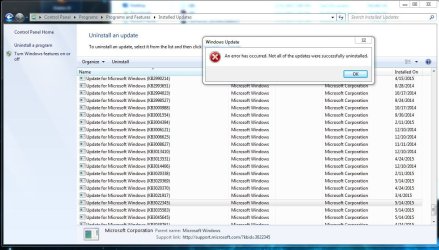
But for uninstalling that update that's a no go.
 

Attachments

My Computer My Computer

Computer type
PC/Desktop
Computer Manufacturer/Model Number
Custom
OS
Windows 7 Professional 64 bit
CPU
Intel i5 2500
Motherboard
Asrock p67 Pro 3.0
Memory
8gb G Skill
Graphics Card(s)
MSI Gtx 660 ti
Hard Drives
Samsung 840 128 GB OS
Samsung 850 EVO 250 GB Games
WD 1TB Backup
Browser
FireFox
CheckSUR found and fixed just the one error -
Code:
Checking Component Store
(f) CSI Manifest All Zeros 0x00000000 winsxs\Manifests\x86_microsoft-windows-m..ditevtlog.resources_31bf3856ad364e35_6.1.7601.22843_en-us_5c75279fd1556e0d.manifest x86_microsoft-windows-m..ditevtlog.resources_31bf3856ad364e35_6.1.7601.22843_en-us_5c75279fd1556e0d 
(fix) CSI Manifest All Zeros CSI File Replaced File: x86_microsoft-windows-m..ditevtlog.resources_31bf3856ad364e35_6.1.7601.22843_en-us_5c75279fd1556e0d.manifest From: C:\Windows\CheckSur\v1.0\windows6.1-7601-x64-clientcab4.cab

Please run another SFC /SCANNOW and we'll see if anything has changed there
 

My Computer My Computer

Computer type
Laptop
Computer Manufacturer/Model Number
Asus K52F or Lenovo B51-80
OS
Win 7 x64 Home Premium (and x86 VirtualBox VM)/Win10
CPU
i3 370M/i7 6500U
Motherboard
Asus/Lenovo
Memory
8GB - finally :)/8GB
Graphics Card(s)
it's an i3, dude!/dual Intel&nVidia
Sound Card
onboard
Monitor(s) Displays
15.6" built-in
Screen Resolution
1366x768/1920x1080
Hard Drives
750GB Seagate internal
Sundry external drives attached to other computers on the local network
1TB SSD on the Lenovo
PSU
n/a
Internet Speed
as much as I can get - usually on a dongle/phone, so <1MB/s
Antivirus
MSE/Defender
Browser
IE11/12/Edge/Chrome/FF(if I must)
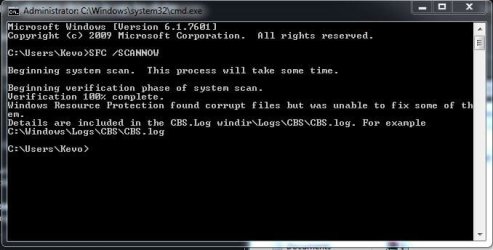
Still an error
 

Attachments

  • sfc scan error.JPG
    sfc scan error.JPG
    37.2 KB · Views: 16

My Computer My Computer

Computer type
PC/Desktop
Computer Manufacturer/Model Number
Custom
OS
Windows 7 Professional 64 bit
CPU
Intel i5 2500
Motherboard
Asrock p67 Pro 3.0
Memory
8gb G Skill
Graphics Card(s)
MSI Gtx 660 ti
Hard Drives
Samsung 840 128 GB OS
Samsung 850 EVO 250 GB Games
WD 1TB Backup
Browser
FireFox
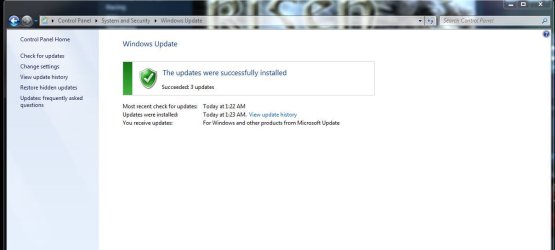
But there is a plus side.
 

Attachments

  • succeeded.JPG
    succeeded.JPG
    44.4 KB · Views: 0

My Computer My Computer

Computer type
PC/Desktop
Computer Manufacturer/Model Number
Custom
OS
Windows 7 Professional 64 bit
CPU
Intel i5 2500
Motherboard
Asrock p67 Pro 3.0
Memory
8gb G Skill
Graphics Card(s)
MSI Gtx 660 ti
Hard Drives
Samsung 840 128 GB OS
Samsung 850 EVO 250 GB Games
WD 1TB Backup
Browser
FireFox
OK - please post the CBS folder again and I'll take another look.
 

My Computer My Computer

Computer type
Laptop
Computer Manufacturer/Model Number
Asus K52F or Lenovo B51-80
OS
Win 7 x64 Home Premium (and x86 VirtualBox VM)/Win10
CPU
i3 370M/i7 6500U
Motherboard
Asus/Lenovo
Memory
8GB - finally :)/8GB
Graphics Card(s)
it's an i3, dude!/dual Intel&nVidia
Sound Card
onboard
Monitor(s) Displays
15.6" built-in
Screen Resolution
1366x768/1920x1080
Hard Drives
750GB Seagate internal
Sundry external drives attached to other computers on the local network
1TB SSD on the Lenovo
PSU
n/a
Internet Speed
as much as I can get - usually on a dongle/phone, so <1MB/s
Antivirus
MSE/Defender
Browser
IE11/12/Edge/Chrome/FF(if I must)
Seems a lot smaller....
 

My Computer My Computer

Computer type
PC/Desktop
Computer Manufacturer/Model Number
Custom
OS
Windows 7 Professional 64 bit
CPU
Intel i5 2500
Motherboard
Asrock p67 Pro 3.0
Memory
8gb G Skill
Graphics Card(s)
MSI Gtx 660 ti
Hard Drives
Samsung 840 128 GB OS
Samsung 850 EVO 250 GB Games
WD 1TB Backup
Browser
FireFox
Here's the error from that file...
Code:
2015-05-19 08:00:23, Info                  CBS    Disabling manifest caching, because the image is not writeable.
2015-05-19 08:00:25, Error                 CSI    0000000b (F) STATUS_MEDIA_WRITE_PROTECTED #1163540# from Windows::Rtl::SystemImplementation::DirectFileSystemProvider::SysSetInformationFile(flags = (AllowNotSameDevice), h = 105c8 ("\Device\HarddiskVolumeShadowCopy2\Windows\winsxs\ManifestCache\702349c5b78f9a04_blobs.bin"), iosb = @0x17fd770, buff = @0x17b2e0, bufflen = 242 (0x000000f2), ic = 10 (0x0000000a), disp = Invalid)
[gle=0xd00000a2]
2015-05-19 08:00:25, Error                 CSI    [EMAIL="0000000c@2015/5/19:13:00:25.111"]0000000c@2015/5/19:13:00:25.111[/EMAIL] (F) d:\win7sp1_gdr\base\wcp\sil\merged\ntu\ntsystem.cpp(2530): Error STATUS_MEDIA_WRITE_PROTECTED originated in function Windows::Rtl::SystemImplementation::DirectFileSystemProvider::SysSetInformationFile expression: (null)
[gle=0x80004005]
2015-05-19 08:00:25, Error                 CSI    0000000d (F) STATUS_MEDIA_WRITE_PROTECTED #1163538# from Windows::Rtl::SystemImplementation::CSystemIsolationLayer_IRtlSystemIsolationLayerTearoff::TransferFile(flags = (ReplaceIfExists|OpenForBackupIntent|MissingFileIsOk), op = [4]"Move", odir = NULL, oname = [l:206{103}]"\??\GLOBALROOT\Device\HarddiskVolumeShadowCopy2\Windows\WinSxS\ManifestCache\702349c5b78f9a04_blobs.bin", ndir = NULL, nname = [l:218{109}]"\??\GLOBALROOT\Device\HarddiskVolumeShadowCopy2\Windows\WinSxS\ManifestCache\35d5abc53392d00102000000ec055c07", disp = (null))
[gle=0xd00000a2]
2015-05-19 08:00:25, Error                 CSI    0000000e (F) STATUS_MEDIA_WRITE_PROTECTED #1163529# from ComponentStore::CRawStoreLayout::RenameAwayManifestCacheBlobfileAttempting to RenameAwayManifestCacheBlobfile. Current blobfile name: [l:52{26}]"702349c5b78f9a04_blobs.bin"
[gle=0xd00000a2]
2015-05-19 08:00:25, Error                 CBS    Failed to get offline CSI store. [HRESULT = 0x80070013 - ERROR_WRITE_PROTECT]

This looks as if someone has write-protected one of the registry hives in some fashion - or it's corrupted to the point where it can't be properly accessed.

I'll do some research and get back to you - but it may be a couple of days.
 

My Computer My Computer

Computer type
Laptop
Computer Manufacturer/Model Number
Asus K52F or Lenovo B51-80
OS
Win 7 x64 Home Premium (and x86 VirtualBox VM)/Win10
CPU
i3 370M/i7 6500U
Motherboard
Asus/Lenovo
Memory
8GB - finally :)/8GB
Graphics Card(s)
it's an i3, dude!/dual Intel&nVidia
Sound Card
onboard
Monitor(s) Displays
15.6" built-in
Screen Resolution
1366x768/1920x1080
Hard Drives
750GB Seagate internal
Sundry external drives attached to other computers on the local network
1TB SSD on the Lenovo
PSU
n/a
Internet Speed
as much as I can get - usually on a dongle/phone, so <1MB/s
Antivirus
MSE/Defender
Browser
IE11/12/Edge/Chrome/FF(if I must)
Let's have a look at the permissions on the file mentioned in the report...


Open an Elevated Command Prompt, and run the following commands...

ICACLS C:\Windows\winsxs\ManifestCache /T
ATTRIB C:\Windows\winsxs\ManifestCache
ATTRIB C:\Windows\winsxs\ManifestCache\*.*

post the results.

Here are some instructions to make life easier :)
1) To open an Elevated Command Prompt Window (the ECP window), click on Start, All Programs, Accessories – then right-click on Command Prompt, and select Run as Administrator. Accept the UAC prompt.
2) To run the commands easier, highlight the block of commands, and right-click on the highlight – select Copy. In the CP Window, click on the black/white icon at top left – select Paste. The commands will run but may not complete the last command, so hit the Enter Key once.
3) To copy the results... click on the Black/White icon in the top left, and select Edit... 'Select All', and hit the Enter key - then use Ctrl+V or r-click+Paste to paste it into your response.
 

My Computer My Computer

Computer type
Laptop
Computer Manufacturer/Model Number
Asus K52F or Lenovo B51-80
OS
Win 7 x64 Home Premium (and x86 VirtualBox VM)/Win10
CPU
i3 370M/i7 6500U
Motherboard
Asus/Lenovo
Memory
8GB - finally :)/8GB
Graphics Card(s)
it's an i3, dude!/dual Intel&nVidia
Sound Card
onboard
Monitor(s) Displays
15.6" built-in
Screen Resolution
1366x768/1920x1080
Hard Drives
750GB Seagate internal
Sundry external drives attached to other computers on the local network
1TB SSD on the Lenovo
PSU
n/a
Internet Speed
as much as I can get - usually on a dongle/phone, so <1MB/s
Antivirus
MSE/Defender
Browser
IE11/12/Edge/Chrome/FF(if I must)
Microsoft Windows [Version 6.1.7601]
Copyright (c) 2009 Microsoft Corporation. All rights reserved.

C:\Windows\system32>ICACLS C:\Windows\winsxs\ManifestCache /T
C:\Windows\winsxs\ManifestCache NT SERVICE\TrustedInstaller:(OI)(CI)(F)
BUILTIN\Administrators:(OI)(CI)(RX)
NT AUTHORITY\SYSTEM:(OI)(CI)(RX)
BUILTIN\Users:(OI)(CI)(RX)

C:\Windows\winsxs\ManifestCache\702349c5b78f9a04_blobs.bin NT SERVICE\TrustedIns
taller:(I)(F)
BUILTIN\Administrator
s:(I)(RX)
NT AUTHORITY\SYSTEM:(
I)(RX)
BUILTIN\Users:(I)(RX)


C:\Windows\winsxs\ManifestCache\7ea401d14a8fd001013f00006404cc0f NT SERVICE\Trus
tedInstaller:(I)(F)
BUILTIN\Adminis
trators:(I)(RX)
NT AUTHORITY\SY
STEM:(I)(RX)
BUILTIN\Users:(
I)(RX)

C:\Windows\winsxs\ManifestCache\a786a517e28d5687_blobs.bin NT SERVICE\TrustedIns
taller:(I)(F)
BUILTIN\Administrator
s:(I)(RX)
NT AUTHORITY\SYSTEM:(
I)(RX)
BUILTIN\Users:(I)(RX)


C:\Windows\winsxs\ManifestCache\e12b8b39758ed00101000000a404f004 NT SERVICE\Trus
tedInstaller:(I)(F)
BUILTIN\Adminis
trators:(I)(RX)
NT AUTHORITY\SY
STEM:(I)(RX)
BUILTIN\Users:(
I)(RX)

Successfully processed 5 files; Failed processing 0 files

C:\Windows\system32>ATTRIB C:\Windows\winsxs\ManifestCache
C:\Windows\winsxs\ManifestCache

C:\Windows\system32>ATTRIB C:\Windows\winsxs\ManifestCache\*.*
A C:\Windows\winsxs\ManifestCache\702349c5b78f9a04_blobs.bin
A C:\Windows\winsxs\ManifestCache\7ea401d14a8fd001013f00006404cc0f
A C:\Windows\winsxs\ManifestCache\a786a517e28d5687_blobs.bin
A C:\Windows\winsxs\ManifestCache\e12b8b39758ed00101000000a404f004

C:\Windows\system32>
 

My Computer My Computer

Computer type
PC/Desktop
Computer Manufacturer/Model Number
Custom
OS
Windows 7 Professional 64 bit
CPU
Intel i5 2500
Motherboard
Asrock p67 Pro 3.0
Memory
8gb G Skill
Graphics Card(s)
MSI Gtx 660 ti
Hard Drives
Samsung 840 128 GB OS
Samsung 850 EVO 250 GB Games
WD 1TB Backup
Browser
FireFox
Back
Top