
Solved Update errors Code 64C, 8004FF84 & 66A.

gabby02

New member
Local time
10:10 AM
Messages
53
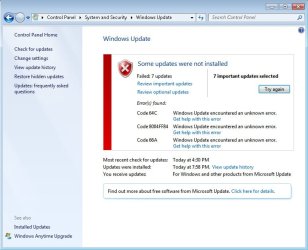
It says I need to 7 important updates to install and it fails every time. When I shut the computed down and it updates, it still fails. I've tried installing the updates one by one but it didn't help. My internet connection is working fine.

I've included a screenshot.

Windows 7 Home Premium 64bit.
 

Attachments
  • update.jpg
    update.jpg
    55.3 KB · Views: 110

My Computer

Computer Manufacturer/Model Number
Lenovo IdeaPad z470
OS
Windows 7 Home Premium 64 bit
CPU
Intel Core i5-2430M @ 2.40GHz
Memory
4.00 GB
Graphics Card(s)
NVIDIA GeForce GT540 M
Screen Resolution
1366x768
bump.

anyone?
 

My Computer

Computer Manufacturer/Model Number
Lenovo IdeaPad z470
OS
Windows 7 Home Premium 64 bit
CPU
Intel Core i5-2430M @ 2.40GHz
Memory
4.00 GB
Graphics Card(s)
NVIDIA GeForce GT540 M
Screen Resolution
1366x768

My Computer

Computer type
PC/Desktop
Computer Manufacturer/Model Number
Self assembled
OS
Windows 10 Home 64Bit
CPU
Intel Core i5 10400 @ 2.90GHz
Motherboard
Intel Corporation DG41WV (PROCESSOR)
Memory
8.00GB Single-Channel Unknown @ 1329MHz (16-20-20-38)
Sound Card
Realtek High Definition Audio
Monitor(s) Displays
DELL E170S
Screen Resolution
1280x1024 pixels
Hard Drives
931GB TOSHIBA DT01ACA100 (SATA)
238GB TEAM TM8PS7256G (SATA SSD)
Case
Nothing Fancy
Cooling
Fans
Keyboard
A4 Tech Co LTD
Mouse
A4 Tech Co Ltd/Logitech
Internet Speed
25 Mbps

My Computer

Computer Manufacturer/Model Number
Lenovo IdeaPad z470
OS
Windows 7 Home Premium 64 bit
CPU
Intel Core i5-2430M @ 2.40GHz
Memory
4.00 GB
Graphics Card(s)
NVIDIA GeForce GT540 M
Screen Resolution
1366x768

My Computer

Computer type
PC/Desktop
Computer Manufacturer/Model Number
Self assembled
OS
Windows 10 Home 64Bit
CPU
Intel Core i5 10400 @ 2.90GHz
Motherboard
Intel Corporation DG41WV (PROCESSOR)
Memory
8.00GB Single-Channel Unknown @ 1329MHz (16-20-20-38)
Sound Card
Realtek High Definition Audio
Monitor(s) Displays
DELL E170S
Screen Resolution
1280x1024 pixels
Hard Drives
931GB TOSHIBA DT01ACA100 (SATA)
238GB TEAM TM8PS7256G (SATA SSD)
Case
Nothing Fancy
Cooling
Fans
Keyboard
A4 Tech Co LTD
Mouse
A4 Tech Co Ltd/Logitech
Internet Speed
25 Mbps
Scanned and rebooted. Still unable to update. :/

I'm using BitDefender, MSE & Malwarebytes. No registry cleaning programs installed.
 

My Computer

Computer Manufacturer/Model Number
Lenovo IdeaPad z470
OS
Windows 7 Home Premium 64 bit
CPU
Intel Core i5-2430M @ 2.40GHz
Memory
4.00 GB
Graphics Card(s)
NVIDIA GeForce GT540 M
Screen Resolution
1366x768
Uninstall BitDefender and try updating.

Please be patient :( I have called for more help.
 

My Computer

Computer type
PC/Desktop
Computer Manufacturer/Model Number
Self assembled
OS
Windows 10 Home 64Bit
CPU
Intel Core i5 10400 @ 2.90GHz
Motherboard
Intel Corporation DG41WV (PROCESSOR)
Memory
8.00GB Single-Channel Unknown @ 1329MHz (16-20-20-38)
Sound Card
Realtek High Definition Audio
Monitor(s) Displays
DELL E170S
Screen Resolution
1280x1024 pixels
Hard Drives
931GB TOSHIBA DT01ACA100 (SATA)
238GB TEAM TM8PS7256G (SATA SSD)
Case
Nothing Fancy
Cooling
Fans
Keyboard
A4 Tech Co LTD
Mouse
A4 Tech Co Ltd/Logitech
Internet Speed
25 Mbps
Sorry if I took too long to reply. We've had some network connection problems so I haven't been able to go online.

Anyways, I'm still getting the errors. System Update Readiness Tool didn't work. :\

The System Update Readiness Tool (or more commonly abbreviated to SURT) is only effective to a certain extent, luckily it writes any files that it can't fix to a log which can then be used to identify remaining issues. If you could provide me with this log, I'll be able to help you sort through the rest of the issues :) Please copy and paste the contents of this file into your next post:
C:\Windows\Logs\CBS\CheckSUR.persist.log

Tom
 

My Computer

Computer type
PC/Desktop
Computer Manufacturer/Model Number
Build #1
OS
Windows 8.1 Pro x64
CPU
Intel i7 3770K @4.5GHz
Motherboard
ASUS P8Z77-V PRO
Memory
Corsair Vengeance 2x4GB DDR3 1600MHz Low Profile (White)
Graphics Card(s)
Gigabyte Radeon HD 7850 (2GB GDDR5)
Sound Card
Integrated on motherboard
Monitor(s) Displays
23" LG LCD/LED IPS
Screen Resolution
1920*1080
Hard Drives
Samsung EVO 128GB SSD
Seagate Barracuda 2GB 7200rpm
2x Seagate FreeAgent [500gb]
PSU
Corsair TX650W V2 (80+ Bronze)
Case
NZXT Phantom 410 White
Cooling
Corsair H100 Water Cooler
Keyboard
Microsoft Desktop 2000 Wireless Keyboard
Mouse
Microsoft Desktop 2000 Wireless Mouse
Internet Speed
95 Mb/s Download 70 Mb/s Upload
Antivirus
MSE + MBAM Pro
Browser
Firefox
Uninstall BitDefender and try updating.

Please be patient :( I have called for more help.

Uninstalled.

Hey, no worries. :) And thank you.


The System Update Readiness Tool (or more commonly abbreviated to SURT) is only effective to a certain extent, luckily it writes any files that it can't fix to a log which can then be used to identify remaining issues. If you could provide me with this log, I'll be able to help you sort through the rest of the issues :) Please copy and paste the contents of this file into your next post:

C:\Windows\Logs\CBS\CheckSUR.persist.log

Tom

Here you go.


=================================
Checking System Update Readiness.
Binary Version 6.1.7601.21645
Package Version 15.0
2012-06-09 11:55

Checking Windows Servicing Packages

Checking Package Manifests and Catalogs

Checking Package Watchlist

Checking Component Watchlist

Checking Packages

Checking Component Store

Summary:
Seconds executed: 1169
No errors detected
(w) Unable to open Event Log 0x000006B5 Application OpenEventLog failed: 0x000006B5 - The interface is unknown.
.
(w) Unable to open Event Log 0x000006B5 System OpenEventLog failed: 0x000006B5 - The interface is unknown.
.


=================================
Checking System Update Readiness.
Binary Version 6.1.7601.21645
Package Version 15.0
2012-06-09 12:19

Checking Windows Servicing Packages

Checking Package Manifests and Catalogs

Checking Package Watchlist

Checking Component Watchlist

Checking Packages

Checking Component Store

Summary:
Seconds executed: 541
No errors detected
(w) Unable to open Event Log 0x000006B5 Application OpenEventLog failed: 0x000006B5 - The interface is unknown.
.
(w) Unable to open Event Log 0x000006B5 System OpenEventLog failed: 0x000006B5 - The interface is unknown.
.


=================================
Checking System Update Readiness.
Binary Version 6.1.7601.21645
Package Version 15.0
2012-08-10 18:55

Checking Windows Servicing Packages

Checking Package Manifests and Catalogs

Checking Package Watchlist

Checking Component Watchlist

Checking Packages

Checking Component Store

Summary:
Seconds executed: 1196
No errors detected
 

My Computer

Computer Manufacturer/Model Number
Lenovo IdeaPad z470
OS
Windows 7 Home Premium 64 bit
CPU
Intel Core i5-2430M @ 2.40GHz
Memory
4.00 GB
Graphics Card(s)
NVIDIA GeForce GT540 M
Screen Resolution
1366x768
Hi Gabby,

That SURT log is fine :) The only errors that are present are for the event log, and these are perfectly normal.

What are the numbers of the updates that you are trying to install? Those error codes have given me a few clues :)

Tom
 

My Computer

Computer type
PC/Desktop
Computer Manufacturer/Model Number
Build #1
OS
Windows 8.1 Pro x64
CPU
Intel i7 3770K @4.5GHz
Motherboard
ASUS P8Z77-V PRO
Memory
Corsair Vengeance 2x4GB DDR3 1600MHz Low Profile (White)
Graphics Card(s)
Gigabyte Radeon HD 7850 (2GB GDDR5)
Sound Card
Integrated on motherboard
Monitor(s) Displays
23" LG LCD/LED IPS
Screen Resolution
1920*1080
Hard Drives
Samsung EVO 128GB SSD
Seagate Barracuda 2GB 7200rpm
2x Seagate FreeAgent [500gb]
PSU
Corsair TX650W V2 (80+ Bronze)
Case
NZXT Phantom 410 White
Cooling
Corsair H100 Water Cooler
Keyboard
Microsoft Desktop 2000 Wireless Keyboard
Mouse
Microsoft Desktop 2000 Wireless Mouse
Internet Speed
95 Mb/s Download 70 Mb/s Upload
Antivirus
MSE + MBAM Pro
Browser
Firefox
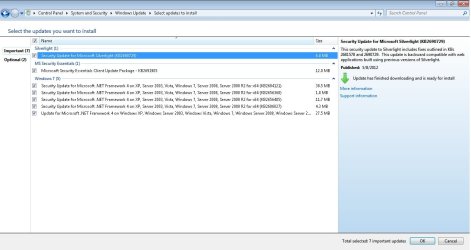
Here you go. :)
 

Attachments

  • Update1.jpg
    Update1.jpg
    84.5 KB · Views: 88

My Computer

Computer Manufacturer/Model Number
Lenovo IdeaPad z470
OS
Windows 7 Home Premium 64 bit
CPU
Intel Core i5-2430M @ 2.40GHz
Memory
4.00 GB
Graphics Card(s)
NVIDIA GeForce GT540 M
Screen Resolution
1366x768
Perfect, thank you :) One more thing before we try some fixes. Could you copy and paste the contents of your Windows Update log for me please?

C:\Windows\WindowsUpdate.log

Tom
 

My Computer

Computer type
PC/Desktop
Computer Manufacturer/Model Number
Build #1
OS
Windows 8.1 Pro x64
CPU
Intel i7 3770K @4.5GHz
Motherboard
ASUS P8Z77-V PRO
Memory
Corsair Vengeance 2x4GB DDR3 1600MHz Low Profile (White)
Graphics Card(s)
Gigabyte Radeon HD 7850 (2GB GDDR5)
Sound Card
Integrated on motherboard
Monitor(s) Displays
23" LG LCD/LED IPS
Screen Resolution
1920*1080
Hard Drives
Samsung EVO 128GB SSD
Seagate Barracuda 2GB 7200rpm
2x Seagate FreeAgent [500gb]
PSU
Corsair TX650W V2 (80+ Bronze)
Case
NZXT Phantom 410 White
Cooling
Corsair H100 Water Cooler
Keyboard
Microsoft Desktop 2000 Wireless Keyboard
Mouse
Microsoft Desktop 2000 Wireless Mouse
Internet Speed
95 Mb/s Download 70 Mb/s Upload
Antivirus
MSE + MBAM Pro
Browser
Firefox
Um, I'm having trouble pasting the document here so I just attached the file.
Hope it's okay.
 

My Computer

Computer Manufacturer/Model Number
Lenovo IdeaPad z470
OS
Windows 7 Home Premium 64 bit
CPU
Intel Core i5-2430M @ 2.40GHz
Memory
4.00 GB
Graphics Card(s)
NVIDIA GeForce GT540 M
Screen Resolution
1366x768
Hey, man. You there?
 

My Computer

Computer Manufacturer/Model Number
Lenovo IdeaPad z470
OS
Windows 7 Home Premium 64 bit
CPU
Intel Core i5-2430M @ 2.40GHz
Memory
4.00 GB
Graphics Card(s)
NVIDIA GeForce GT540 M
Screen Resolution
1366x768
Sorry for the delay, I've had to do a little research on this one. Could you do the following for me please:

Export CBS.log


  1. Click the Start button
    StartButton_16x16.gif
    then click Computer
  2. Double click on the C: drive, under the Hard Disk Drives category, and then scroll down to, and double click on the Windows folder
  3. Find and double click on the Logs folder, and then inside that folder, the CBS folder
  4. Right-click on the CBS.log file, and select Copy. It may show as just CBS (without the .log extension). Do not be concerned, and proceed to copy the file.
  5. Go back to your Desktop, right-click on it, and select Paste. You should now see a file on your Desktop called CBS(.log)
  6. Right-click on this file again, and navigate through Send to, and select Compressed (zipped) folder
  7. Another new file, also called CBS, but this time with a different icon, will be created. Please upload this new file to the forum, here
 

My Computer

Computer type
PC/Desktop
Computer Manufacturer/Model Number
Build #1
OS
Windows 8.1 Pro x64
CPU
Intel i7 3770K @4.5GHz
Motherboard
ASUS P8Z77-V PRO
Memory
Corsair Vengeance 2x4GB DDR3 1600MHz Low Profile (White)
Graphics Card(s)
Gigabyte Radeon HD 7850 (2GB GDDR5)
Sound Card
Integrated on motherboard
Monitor(s) Displays
23" LG LCD/LED IPS
Screen Resolution
1920*1080
Hard Drives
Samsung EVO 128GB SSD
Seagate Barracuda 2GB 7200rpm
2x Seagate FreeAgent [500gb]
PSU
Corsair TX650W V2 (80+ Bronze)
Case
NZXT Phantom 410 White
Cooling
Corsair H100 Water Cooler
Keyboard
Microsoft Desktop 2000 Wireless Keyboard
Mouse
Microsoft Desktop 2000 Wireless Mouse
Internet Speed
95 Mb/s Download 70 Mb/s Upload
Antivirus
MSE + MBAM Pro
Browser
Firefox
Oh, that's fine. No problem. :)
Here you go.
 

My Computer

Computer Manufacturer/Model Number
Lenovo IdeaPad z470
OS
Windows 7 Home Premium 64 bit
CPU
Intel Core i5-2430M @ 2.40GHz
Memory
4.00 GB
Graphics Card(s)
NVIDIA GeForce GT540 M
Screen Resolution
1366x768

My Computer

Computer type
PC/Desktop
Computer Manufacturer/Model Number
Build #1
OS
Windows 8.1 Pro x64
CPU
Intel i7 3770K @4.5GHz
Motherboard
ASUS P8Z77-V PRO
Memory
Corsair Vengeance 2x4GB DDR3 1600MHz Low Profile (White)
Graphics Card(s)
Gigabyte Radeon HD 7850 (2GB GDDR5)
Sound Card
Integrated on motherboard
Monitor(s) Displays
23" LG LCD/LED IPS
Screen Resolution
1920*1080
Hard Drives
Samsung EVO 128GB SSD
Seagate Barracuda 2GB 7200rpm
2x Seagate FreeAgent [500gb]
PSU
Corsair TX650W V2 (80+ Bronze)
Case
NZXT Phantom 410 White
Cooling
Corsair H100 Water Cooler
Keyboard
Microsoft Desktop 2000 Wireless Keyboard
Mouse
Microsoft Desktop 2000 Wireless Mouse
Internet Speed
95 Mb/s Download 70 Mb/s Upload
Antivirus
MSE + MBAM Pro
Browser
Firefox
Tried installing. This came up:

KB2604121 does not apply, or is blocked by another condition on your computer.
KB2656405 does not apply, or is blocked by another condition on your computer.
KB2686827 does not apply, or is blocked by another condition on your computer.
 

My Computer

Computer Manufacturer/Model Number
Lenovo IdeaPad z470
OS
Windows 7 Home Premium 64 bit
CPU
Intel Core i5-2430M @ 2.40GHz
Memory
4.00 GB
Graphics Card(s)
NVIDIA GeForce GT540 M
Screen Resolution
1366x768

My Computer

Computer type
PC/Desktop
Computer Manufacturer/Model Number
Build #1
OS
Windows 8.1 Pro x64
CPU
Intel i7 3770K @4.5GHz
Motherboard
ASUS P8Z77-V PRO
Memory
Corsair Vengeance 2x4GB DDR3 1600MHz Low Profile (White)
Graphics Card(s)
Gigabyte Radeon HD 7850 (2GB GDDR5)
Sound Card
Integrated on motherboard
Monitor(s) Displays
23" LG LCD/LED IPS
Screen Resolution
1920*1080
Hard Drives
Samsung EVO 128GB SSD
Seagate Barracuda 2GB 7200rpm
2x Seagate FreeAgent [500gb]
PSU
Corsair TX650W V2 (80+ Bronze)
Case
NZXT Phantom 410 White
Cooling
Corsair H100 Water Cooler
Keyboard
Microsoft Desktop 2000 Wireless Keyboard
Mouse
Microsoft Desktop 2000 Wireless Mouse
Internet Speed
95 Mb/s Download 70 Mb/s Upload
Antivirus
MSE + MBAM Pro
Browser
Firefox
I got the same error.

KB2604121 does not apply, or is blocked by another condition on your computer.
 

My Computer

Computer Manufacturer/Model Number
Lenovo IdeaPad z470
OS
Windows 7 Home Premium 64 bit
CPU
Intel Core i5-2430M @ 2.40GHz
Memory
4.00 GB
Graphics Card(s)
NVIDIA GeForce GT540 M
Screen Resolution
1366x768
Back
Top