Update Icons in Taskbar preview windows

Maxwax

New member
Local time
12:45 PM
Messages
6
Dear Sirs,
all my attempts have proved futile and you are my last hope.

Situation:
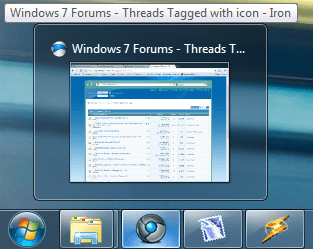
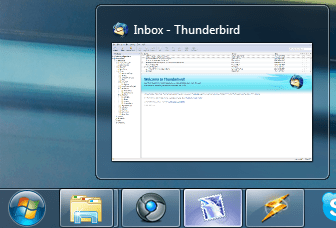
I have replaced the icons for 3 of my programs, browser, mail client & mp3 player with custom icons from the web (16x16 ico, 32x32 ico, 48x48 ico, 256x256 png). They show up correctly in the taskbar itself (small and large) BUT the preview windows title bar icon remains the original (See attachments).

Attempted solutions:
Clearing Icon Cache, Prefetch, MUICache, tried all icon color depths, removing Icon completely, re-installing programs :cry:

The aesthetic discrepancy is driving me :mad:
I believe that windows has somewhere stored a type of "favicon" upon 1st launch of the programs and I can't find it.

If anyone can help me thank you very much, I hope I simply overlooked something really straightforward :rolleyes:

Greets,
Maxwax
 

Attachments

  • Icon_browser.png
    Icon_browser.png
    27.4 KB · Views: 706
  • Icon_thunderbird.png
    Icon_thunderbird.png
    25 KB · Views: 26
  • Icon_winamp.png
    Icon_winamp.png
    25.6 KB · Views: 38
  • Icons_small.png
    Icons_small.png
    15.6 KB · Views: 678
  • Icon_yapyap.png
    Icon_yapyap.png
    15.5 KB · Views: 637
Last edited:

My Computer

OS
Win7 Home Prem x64
Maybe I;m missing something but only the Winamp icon looks different.
 

My Computer

Computer Manufacturer/Model Number
Cheap $399.00 E-Machine
OS
Windows 7 Pro & Vista Home Premium
CPU
Athlon 64 3800+ (Orleans) 2.40GHz
Motherboard
Winfast
Memory
2GB DDR2 RAM DIMM
Graphics Card(s)
NVIDIA GeForce 8500 GT 512 MB memory HDMI out
Sound Card
creative X-Fi Exteme 7..1 channel
Monitor(s) Displays
Acer V223W 22" widescreen DVI
Screen Resolution
1680x1050
Hard Drives
WDC WD5 500GB
WDC WD25 250GB
PSU
OCZ 550 watt
Case
Gateway
Cooling
2 fans
Keyboard
Dell
Mouse
Sony Vaio
Internet Speed
18MB/s down - .72MB /s up
Added the small taskbar attachment, those are the icons I was expecting to see in the preview window :)
 

My Computer

OS
Win7 Home Prem x64
Why are you using a .png file for the icon?
 

My Computer

Computer Manufacturer/Model Number
Cheap $399.00 E-Machine
OS
Windows 7 Pro & Vista Home Premium
CPU
Athlon 64 3800+ (Orleans) 2.40GHz
Motherboard
Winfast
Memory
2GB DDR2 RAM DIMM
Graphics Card(s)
NVIDIA GeForce 8500 GT 512 MB memory HDMI out
Sound Card
creative X-Fi Exteme 7..1 channel
Monitor(s) Displays
Acer V223W 22" widescreen DVI
Screen Resolution
1680x1050
Hard Drives
WDC WD5 500GB
WDC WD25 250GB
PSU
OCZ 550 watt
Case
Gateway
Cooling
2 fans
Keyboard
Dell
Mouse
Sony Vaio
Internet Speed
18MB/s down - .72MB /s up
From wikipedia:
PNG format
The PNG format introduced with Windows Vista encodes the image transparency data directly as a PNG image; it contains neither the XOR nor the AND bitmap data of the older icon image format.

In other words it's smaller in file size :)
 

My Computer

OS
Win7 Home Prem x64
Yes,. but when you look inside executable using resource editor,. like Resource Hacker,. you'll find an icon section.

The are all ,.ico rather rather .png
 

My Computer

Computer Manufacturer/Model Number
Cheap $399.00 E-Machine
OS
Windows 7 Pro & Vista Home Premium
CPU
Athlon 64 3800+ (Orleans) 2.40GHz
Motherboard
Winfast
Memory
2GB DDR2 RAM DIMM
Graphics Card(s)
NVIDIA GeForce 8500 GT 512 MB memory HDMI out
Sound Card
creative X-Fi Exteme 7..1 channel
Monitor(s) Displays
Acer V223W 22" widescreen DVI
Screen Resolution
1680x1050
Hard Drives
WDC WD5 500GB
WDC WD25 250GB
PSU
OCZ 550 watt
Case
Gateway
Cooling
2 fans
Keyboard
Dell
Mouse
Sony Vaio
Internet Speed
18MB/s down - .72MB /s up
Added the Winamp Eurekrap attachment, managed to get the default application Icon, by deleting all icon resources, adding my own, changing application name and location. Why won't it use the only icon resource in the application :confused:?

reghakr that is because Resource Hacker is older than Vista, the error message "Out of system resources" holds no meaning other than Reshack not supporting PNG icon previews, that aside it will save the data nonetheless. Please stay on topic or make a new thread I will gladly join the discussion to the best of my capabilities :)

*OffTopicEdit* The user tweaker pointed out there is a new ResHack version available since 19th of Nov, that supports PNG/x64 :D Awesome!
 
Last edited:

My Computer

OS
Win7 Home Prem x64
Back
Top