Solved Update installation or monthly rollup fail: Code 80070308

Vincent Warte

New member
Local time
9:17 AM
Messages
5
Hello dear friends,

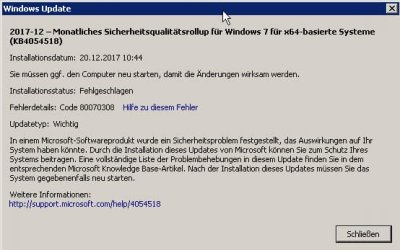
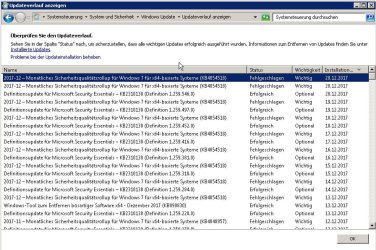
for several months now I have a problem with my WUS. Every monthly security rollup for the last few months fails to install, bringing up the error code 80070308

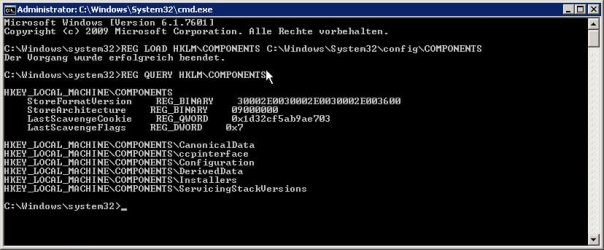
I already tried everything that countless google links related to the error above could bring up, but nothing seems to help. I deleted the pendingrequired key in the registry, ran several update fixing tools from Microsoft, uninstalled several kb packages, used update complete packs hoping to missing updates would fix the problem, but nothing seems to help.

The thing is, I need this Windows 7 installation to work. Reinstalling Windows on this machine is not an option yet. And I don't feel comfortable running a productive Windows machine without the proper updates, so this forums are more or less my last hope.

I attached my CBS.log if that may be of a help.

I hope someone who have experience with this kind of error could give me some clues, I would really appreciate that. Thanks in advance.

Best regards,
Vincent
 

Attachments
  • SCREEN_20.12.2017_11.10.59_000.jpg
    SCREEN_20.12.2017_11.10.59_000.jpg
    126.9 KB · Views: 1
  • SCREEN_20.12.2017_11.11.15_000.jpg
    SCREEN_20.12.2017_11.11.15_000.jpg
    30.4 KB · Views: 36

My Computer My Computer

Computer type
PC/Desktop
OS
Windows 7 Professional x64

My Computer My Computer

Computer type
PC/Desktop
Computer Manufacturer/Model Number
medionl/Aspire 6930G/acer x55a
OS
W7 home premium 32bit/W7HP 64bit/w10 tp insider ring
CPU
E5300 dual core
Motherboard
medion MS7366
Memory
3gb
Graphics Card(s)
Nvidia Geforce 7100 Nforce 630i
Monitor(s) Displays
avixc
Internet Speed
n (isp resticted to 72)
Antivirus
mse/pands
Browser
palemoon
Other Info
Belkin Fd7050 n USB using Railink RT2870 drivers, more upto date
Hello Roy,

thanks for the link, but unfortunately I don't have the pendingrequired key in my registry, as mentioned above. It looks like the probleme lies somewhere else.
 

Attachments

  • SCREEN_20.12.2017_13.36.47_000.jpg
    SCREEN_20.12.2017_13.36.47_000.jpg
    44.5 KB · Views: 1

My Computer My Computer

Computer type
PC/Desktop
OS
Windows 7 Professional x64
Hi Vincent,

That'll teach me to not to fully review the log.
Allthough that fix usually works, yours is slightly different, its not creating a pending file:o

It appears that the update process is trying to remove a TLC twice, causing an inconsistant state.
-- Over-removing a TLC, s/b internal error a4c66b93bb605ede299d2eed2d814ed7 --
(Dont ask me what that specifically relates to - i've searched no joy)
The suspect update packages
Package_500_for_KB4054518
Package_359_for_KB4015549

Can you confirm that NEITHER of these are installed, and the latest installed roll-ups are for March.

Please run KB947821, and provide the Checksur log
It could take a while, and it might not actually provide any info.

Have you tried turning updates OFF and tried to run the latest roll-up directly.


Roy
 
Last edited:

My Computer My Computer

Computer type
PC/Desktop
Computer Manufacturer/Model Number
medionl/Aspire 6930G/acer x55a
OS
W7 home premium 32bit/W7HP 64bit/w10 tp insider ring
CPU
E5300 dual core
Motherboard
medion MS7366
Memory
3gb
Graphics Card(s)
Nvidia Geforce 7100 Nforce 630i
Monitor(s) Displays
avixc
Internet Speed
n (isp resticted to 72)
Antivirus
mse/pands
Browser
palemoon
Other Info
Belkin Fd7050 n USB using Railink RT2870 drivers, more upto date
Hi Roy,

thank very much for your effort and for your time.

This may bring us a little bit further. As you suggested, I checked if KB4054518 and KB4015549 are installed. While the first one is not, the KB4015549 was indeed installed

Code:
C:\>wmic qfe | find "4015549"
http://support.microsoft.com/?kbid=4015549   SRVR01  Security Update     KB4015549      NT-AUTORITÄT\   SYSTEM      4/13/2017

I followed the link, and that's what I found:
Known Issues in this update

If the PC uses an AMD Carrizo DDR4 processor, installing this update will block downloading and installing future Windows updates.

There is an AMD A4-4000 inside this PC, so it probably is a CPU with a Carrizo chip indeed.

As a resolution / workaround, Microsoft recommends to install the KB4022719, linking to the update:
https://support.microsoft.com/en-us/help/4022719/windows-7-update-kb4022719

On the bottom of that page there is an additional information on how to install that rollup on the affected systems, which looks like this:

  1. Download KB4022719 from Microsoft update catalog.
  2. Extract the CAB file from the downloaded .msu file from step 1. Note the path where you stored the CAB file for use in step 3.
  3. Run the DISM /Online /Add-Package command to install the update: DISM.exe /Online /Add-Package /PackagePath: CAB file path from step 2.

So I tried that. I extracted the .cab file and ran the suggested command. Unfortunately, I got an error again:

Code:
C:\>DISM.exe /Online /Add-Package /PackagePath:D:\upd\extracted\Windows6.1-KB4022719-x64.cab

Tool zur Abbildverwaltung für die Bereitstellung
Version: 6.1.7600.16385

Abbildversion: 6.1.7601.18489

1 von 1 werden verarbeitet - Paket "Package_for_RollupFix~31bf3856ad364e35~amd64~~7601.23833.1.6" wird hinzugefügt
[==========================100.0%========================= ]
Fehler - Package_for_RollupFix: 0x80070308

Fehler: 776

Der Client einer Komponente hat einen Vorgang angefordert, der in Bezug auf den Status der Komponenteninstanz nicht gültig ist.

Die DISM-Protokolldatei befindet sich unter "C:\Windows\Logs\DISM\dism.log".

It's a german installation, so I'll try to translate it as following:
Proceeding 1 of 1 - adding package "Package_for_RollupFix~31bf3856ad364e35~amd64~~7601.23833.1.6"

Error - Package_for_RollupFix: 0x80070308

Error: 776

The client of a component requested an operation which is not valid given the state of the component instance.

The DISM-protocoll can be found under "C:\Windows\Logs\DISM\dism.log"

I attached the dism.log file. I'm quite sure, that kb4015549 was indeed the last rollup that was installed before the issued with the Windows Update began.

I hope this information is of any use. I googled the error above, but couldn't find anything helpful.

Thank you again so far!
 

Attachments

My Computer My Computer

Computer type
PC/Desktop
OS
Windows 7 Professional x64
Hi Vincent,

According to the DISM log, its reporting missing drivers, "oemX\inf"

Can you check in device manager for
small down arrows, "!" or unknown

If there are please update them, hopefully that will allow the fix KB to work.


Been searching the web for your exact error, no luck
Looks like were in undiscovered country,
Did you run KB947821, would like to see the log
If it comes back clear,
next option would be to UNinstall KB4015549 but lets see what happens


Roy
 

My Computer My Computer

Computer type
PC/Desktop
Computer Manufacturer/Model Number
medionl/Aspire 6930G/acer x55a
OS
W7 home premium 32bit/W7HP 64bit/w10 tp insider ring
CPU
E5300 dual core
Motherboard
medion MS7366
Memory
3gb
Graphics Card(s)
Nvidia Geforce 7100 Nforce 630i
Monitor(s) Displays
avixc
Internet Speed
n (isp resticted to 72)
Antivirus
mse/pands
Browser
palemoon
Other Info
Belkin Fd7050 n USB using Railink RT2870 drivers, more upto date
Hey Roy,

there was indeed a driver missing for the AMD audio device. I reinstalled the driver so the device was up and running. Unfortunately, this didn't solve the problem, I still get the same errors as before.

I got KB947821 and launched it, but it gives me an "This update is not suited for your computer" warning, and then the setup quits. I attached the CBS.log, but I don't think there is anything interesting inside.

If I try to uninstall kb4015549, I get the same error as mentioned earlier:
The client of a component requested an operation which is not valid given the state of the component instance.

Never experienced something like this before. I can install all the other Windows updates besides the rollups.

CBS.log (too big to attach): http://m00h.org/CBS_2.zip

Best regards,
Vince
 

My Computer My Computer

Computer type
PC/Desktop
OS
Windows 7 Professional x64
Hi Vince,

Unusuall for KB947821 to not work, did you run the correct bit version.
(it was called in your first CBS report, is there a checksur log in the cbs folder)

we can try an alternative
http://www.sysnative.com/niemiro/apps/SFCFix.exe

note
i was also expecting driver failures for
usb
usbport
blth

wouldnt hurt to run
sfc /scannow
see if it picks anything up

Roy

not sure if the AMD failure is part of the problem, the error terminology in the only other log i've seen it mentioned in is quite specific CPU NOT SUPPORTED, and its not in yours
 

My Computer My Computer

Computer type
PC/Desktop
Computer Manufacturer/Model Number
medionl/Aspire 6930G/acer x55a
OS
W7 home premium 32bit/W7HP 64bit/w10 tp insider ring
CPU
E5300 dual core
Motherboard
medion MS7366
Memory
3gb
Graphics Card(s)
Nvidia Geforce 7100 Nforce 630i
Monitor(s) Displays
avixc
Internet Speed
n (isp resticted to 72)
Antivirus
mse/pands
Browser
palemoon
Other Info
Belkin Fd7050 n USB using Railink RT2870 drivers, more upto date
Hey Roy,

you are my hero! :D

Actually, it was my oscitancy with the KB947821. While I was on the english page with the x64 version, I then went to the german one, and somehow overlooked that I downloaded the x86 version.
Now, after I ran the proper one, the CheckSUR log gave me this:

=================================
Checking System Update Readiness.
Binary Version 6.1.7601.22471
Package Version 26.0
2017-12-21 16:24

Checking Windows Servicing Packages

Checking Package Manifests and Catalogs

Checking Package Watchlist

Checking Component Watchlist

Checking Packages

Checking Component Store
(f) CSI Missing C Mark 0x00000000 c!a4c66b93bb6..eed2d814ed7_31bf3856ad364e35_6.1.7601.23715_8e5be6aae0f183e6 amd64_a4c66b93bb605ede299d2eed2d814ed7_31bf3856ad364e35_6.1.7601.23715_none_8e5be6aae0f183e6 Missing c!
(fix) CSI Missing C Mark CSI Registry Item Repaired c!a4c66b93bb6..eed2d814ed7_31bf3856ad364e35_6.1.7601.23715_8e5be6aae0f183e6 successfully added to amd64_a4c66b93bb605ede299d2eed2d814ed7_31bf3856ad364e35_6.1.7601.23715_none_8e5be6aae0f183e6

Summary:
Seconds executed: 1595
Found 1 errors
Fixed 1 errors
CSI Missing C Mark Total count: 1
Fixed: CSI Missing C Mark. Total count: 1

And guess what? I'm actually on the newest rollup right now!

After all this trouble, I can't thank you enough for the time and effort you put into helping me!
This was very important for me to get this certain machine back on track updatewise, otherwise it would mean many many days or even weeks of work reinstalling and setting everything up again as it is now, since there is very customized stuff running on it.

So thank you very much again, and happy and safe holidays to you and your beloved ones!

Best regards,
Vince
 

My Computer My Computer

Computer type
PC/Desktop
OS
Windows 7 Professional x64
Hi Vince,

good stuff,
the missing entry i mentioned, the duplicated removal was the one surt fixed
4c66b93bb6..........

Now we're wiser and know what the formerly unknown error means

Happy surfing and Xmas


NOW DONT FORGET
INSTALL MACRIUM FREE, and make a back-up image
Roy
 

My Computer My Computer

Computer type
PC/Desktop
Computer Manufacturer/Model Number
medionl/Aspire 6930G/acer x55a
OS
W7 home premium 32bit/W7HP 64bit/w10 tp insider ring
CPU
E5300 dual core
Motherboard
medion MS7366
Memory
3gb
Graphics Card(s)
Nvidia Geforce 7100 Nforce 630i
Monitor(s) Displays
avixc
Internet Speed
n (isp resticted to 72)
Antivirus
mse/pands
Browser
palemoon
Other Info
Belkin Fd7050 n USB using Railink RT2870 drivers, more upto date
Back
Top